การแนะนำ
This manual provides detailed instructions for the installation, operation, and maintenance of your xmartO WB2024-W 2K 3MP WiFi Home Security Camera. This camera is designed as an add-on unit for existing xmartO expandable camera systems or xmartO NVRs. It is important to note that this camera does not function as a standalone device and requires a 5MP xmartO NVR to operate correctly. If your NVR operates at 960p or 1080p resolution, these 3MP cameras may have too high a resolution for compatibility.
The WB2024-W camera features 2K (2304*1296) HD resolution, a built-in microphone for audio capture, IR night vision, and an IP66 weatherproof rating for versatile indoor and outdoor use.
มีอะไรอยู่ในกล่อง
- WB2024-W IP camera (2 units)
- 10ft 12V 1A DC power plug (2 units)
คุณสมบัติหลัก
- 2K 3MP HD Resolution: Delivers clear 2304*1296 resolution video.
- ไมโครโฟนในตัว: Captures audio without the need for external microphones.
- พอร์ตอีเธอร์เน็ต RJ45: Allows for wired connection to the NVR or router for stable connectivity.
- การทำงานแบบออฟไลน์: When connected to an xmartO NVR, the system can record and playback videos without internet access.
- IR ไนท์วิชั่น: Equipped with 3 professional IR LEDs for clear vision in complete darkness, up to 25 meters.
- กันฝนระดับ IP66: โลหะทนทาน casing suitable for both indoor and outdoor installation.
- Long WiFi Range: Offers extended wireless range when used with xmartO NVRs, up to 1300ft (400m) in open areas.
- Monitor/TV Display: View camera feeds on a monitor or TV via HDMI when connected to an xmartO NVR.
การตั้งค่า
1. การจ่ายไฟให้กับกล้อง
Connect the provided 10ft 12V 1A DC power plug to the camera and then to a power outlet. Ensure a constant power supply for continuous operation.
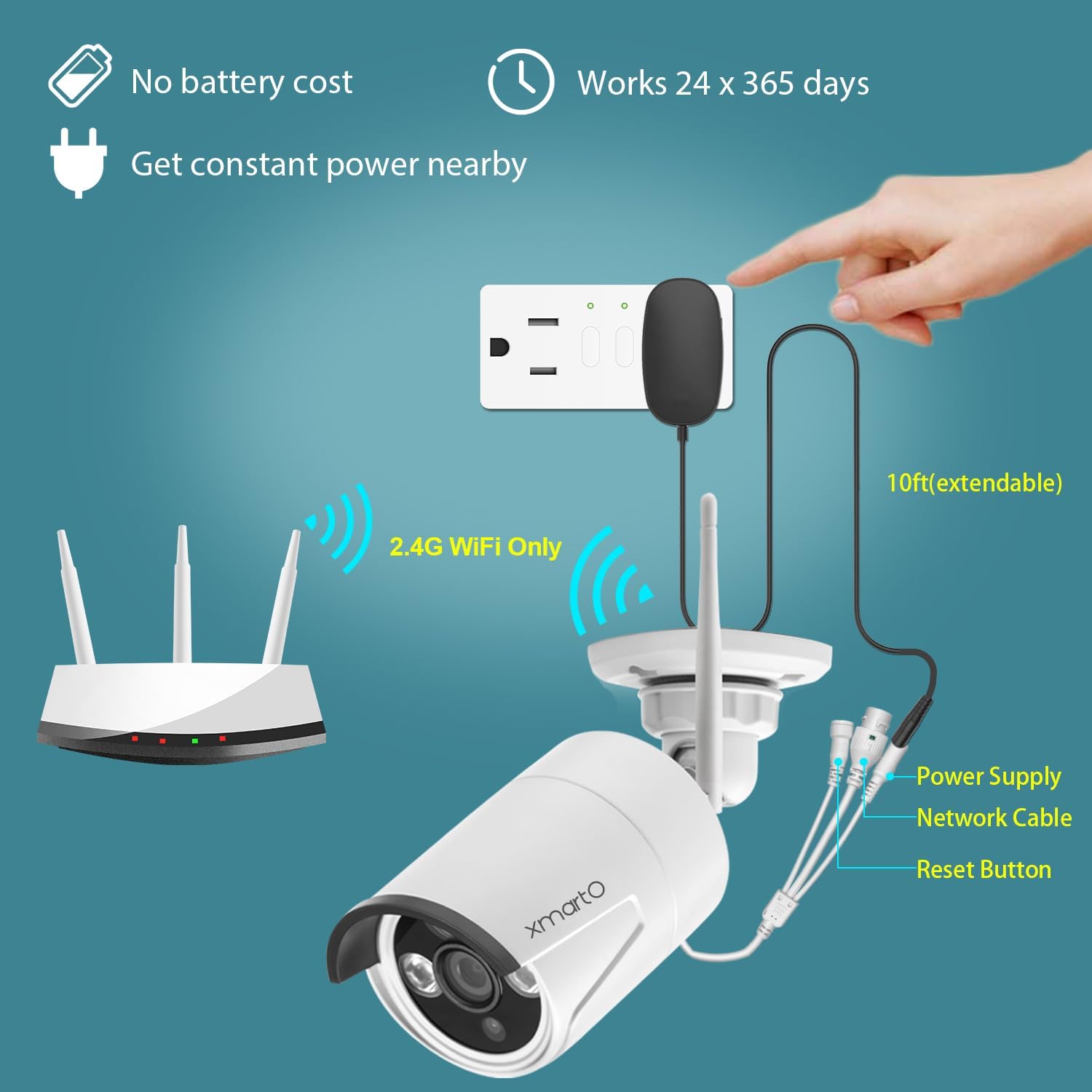
2. Pairing with xmartO NVR
The WB2024-W is an add-on camera designed to work with xmartO NVRs (Network Video Recorders). It requires a 5MP xmartO NVR for proper functionality.
- การจับคู่แบบไร้สาย: The camera will automatically attempt to connect to a compatible xmartO NVR within range.
- Wired Pairing (RJ45 Port): If the WiFi signal is weak or for a more stable connection, use a CAT5 Ethernet cable to connect the camera directly to your router. Then, use the 'Add One' tool in the NVR's Camera Management interface to add the camera. Refer to the xmartO website or contact support for detailed instructions on wired pairing.
3. การติดตั้งกล้อง
The camera's IP66 weatherproof rating allows for flexible installation both indoors and outdoors. Choose a location that provides the desired viewing angle and is within range of your NVR's WiFi signal or accessible for a wired connection.


การใช้งานกล้อง
1. สด View และการเล่น
Once connected to your xmartO NVR, you can view การถ่ายทอดสดและการเล่นซ้ำ footage directly on a monitor or TV connected to the NVR via HDMI. For remote access, download the xmartO app on your smartphone or tablet, or use the client software on your PC or laptop.

2. การตรวจสอบเสียง
The built-in microphone allows you to hear audio from the camera's vicinity. This feature is accessible through the NVR interface or the remote viewแอปพลิเคชัน

3. การมองเห็นในเวลากลางคืน
The camera automatically switches to IR night vision in low-light conditions, providing clear black and white footage. The night vision range is up to 25 meters.

4. การตรวจจับการเคลื่อนไหว
The camera supports motion detection, which can trigger recording and send alerts to your connected devices. Configure motion detection settings via your NVR or the xmartO application.

การซ่อมบำรุง
การบำรุงรักษาตามปกติจะช่วยให้กล้องรักษาความปลอดภัยของคุณมีประสิทธิภาพสูงสุดและมีอายุการใช้งานยาวนาน
- การทำความสะอาด: ทำความสะอาดเลนส์และตัวเรือนกล้องเป็นระยะด้วยผ้านุ่มๆamp ผ้า หลีกเลี่ยงน้ำยาทำความสะอาดที่มีฤทธิ์กัดกร่อนซึ่งอาจทำให้เลนส์เป็นรอยได้
- ตรวจสอบการเชื่อมต่อ: ตรวจสอบให้แน่ใจว่าสายไฟและสายเครือข่ายทั้งหมดเชื่อมต่อแน่นหนาและไม่มีความเสียหาย
- อัพเดตเฟิร์มแวร์: Check the xmartO official website for any available firmware updates for your NVR and cameras. Keeping firmware updated can improve performance and add new features.
- การตรวจสอบสิ่งแวดล้อม: For outdoor installations, periodically check the mounting for stability and ensure no obstructions are blocking the camera's view.
การแก้ไขปัญหา
Camera Not Connecting to NVR
- ความเข้ากันได้กับ NVR: Confirm your NVR is a 5MP xmartO NVR. This camera is not compatible with 960p or 1080p NVRs.
- แหล่งจ่ายไฟ: Ensure the camera is properly powered on and receiving stable power.
- สัญญาณ WiFi: Check the distance between the camera and the NVR. Obstacles can reduce WiFi range. Consider relocating the camera or using the RJ45 port for a wired connection.
- รีเซ็ตกล้อง: Use the reset button on the camera (refer to the power and connectivity diagram) to reset it and attempt pairing again.
No Video Feed / Poor Image Quality
- ความสะอาดของเลนส์: ทำความสะอาดเลนส์กล้องเพื่อขจัดสิ่งสกปรกหรือรอยเปื้อนต่างๆ
- สภาพแสง: Ensure adequate lighting for optimal daytime performance. For night vision, confirm IR LEDs are functioning.
- ความเสถียรของเครือข่าย: A weak WiFi signal or network interference can affect video quality. Consider a wired connection via the RJ45 port if issues persist.
ไม่มีเสียง / คุณภาพเสียงไม่ดี
- การอุดตันของไมโครโฟน: Ensure the built-in microphone is not obstructed.
- การตั้งค่าระดับเสียง: Check audio settings on your NVR or viewแอปพลิเคชัน
- เสียงรบกวนจากสิ่งแวดล้อม: Excessive background noise can affect audio clarity.
For further assistance, please visit the xmartO webไซต์หรือติดต่อทีมสนับสนุนของพวกเขา
ข้อมูลจำเพาะ
| คุณสมบัติ | ข้อมูลจำเพาะ |
|---|---|
| แบบอย่าง | WB2024-W |
| ความละเอียดในการจับภาพวิดีโอ | 2K (2304*1296) 3MP |
| อุปกรณ์ที่รองรับ | Smartphone, xmartO 5MP NVR |
| แหล่งพลังงาน | Corded Electric (12V DC, 1A) |
| โปรโตคอลการเชื่อมต่อ | Wi-Fi (2.4G), Wired (RJ45 Ethernet) |
| ประเภทการติดตั้ง | ติดตั้งบนเพดาน, ติดตั้งบนผนัง |
| ส่วนประกอบที่รวมอยู่ | WB2024-W IP camera, 10ft 12V 1A DC power plug |
| ช่วงการมองเห็นตอนกลางคืน | 25 เมตร |
| วัสดุ | โลหะ |
| การให้คะแนนการคุ้มครองระหว่างประเทศ | IP66 |
| ขนาดรายการ (ยาว x กว้าง x สูง) | 10 x 10 x 5 นิ้ว |
| น้ำหนักสินค้า | 2.66 ปอนด์ |
| การใช้ที่แนะนำ | ระบบรักษาความปลอดภัยภายในบ้าน, กล้องมองกลางคืน |
| การใช้งานภายใน/ภายนอกอาคาร | ในร่ม, กลางแจ้ง |
การรับประกันและการสนับสนุน
xmartO is committed to providing reliable products and customer satisfaction.
- รับประกันคืนเงินภายใน 30 วัน: หากคุณไม่พอใจกับการซื้อของคุณ คุณสามารถส่งคืนได้ภายใน 30 วันเพื่อรับเงินคืนเต็มจำนวน
- การรับประกันจำกัด 1 ปี: ผลิตภัณฑ์นี้มีการรับประกันแบบจำกัดระยะเวลา 1 ปี สำหรับข้อบกพร่องจากการผลิต
- การสนับสนุนออนไลน์ 24/7: For any technical assistance or inquiries, xmartO offers 24/7 online support. Please visit the ร้าน xmartO บน Amazon หรืออย่างเป็นทางการของพวกเขา webเว็บไซต์สำหรับข้อมูลการติดต่อ


