1. บทนำ
คู่มือนี้ให้คำแนะนำโดยละเอียดเกี่ยวกับการติดตั้ง การใช้งาน และการบำรุงรักษาของกล้องวงจรปิดไร้สาย xmartO DT3034 2K โปรดอ่านคู่มือนี้อย่างละเอียดก่อนใช้งานผลิตภัณฑ์เพื่อให้มั่นใจถึงการทำงานที่ถูกต้องและความปลอดภัย xmartO DT3034 เป็นกล้องวงจรปิด WiFi สำหรับใช้งานภายนอกอาคาร มีความละเอียด 2K Super HD, การติดตามอัตโนมัติ, การควบคุมการหมุน การเอียง และการซูม, ระบบเสียงสองทางที่ได้รับการปรับปรุง, ไฟส่องสว่างอัตโนมัติ และคุณสมบัติกันน้ำกันฝุ่นระดับ IP66 สามารถใช้งานได้โดยลำพังผ่านแอป xmartO WallPixel หรือทำงานร่วมกับระบบ xmartO NVR ได้
2. เนื้อหาบรรจุภัณฑ์
ตรวจสอบว่ามีรายการทั้งหมดอยู่ในแพ็คเกจของคุณ:
- กล้องวงจรปิด WiFi xmartO DT3034 จำนวน 1 ตัว
- 2 x เสาอากาศ WiFi
- 1 x 12V DC 1A อะแดปเตอร์ไฟฟ้า
- 1 x คู่มือผู้ใช้ (เอกสารนี้)
- 1 x ชุดอุปกรณ์ติดตั้ง (สกรูและพุกยึดผนัง)
3. สินค้าหมดview
กล้อง xmartO DT3034 ออกแบบมาสำหรับการเฝ้าระวังภายนอกอาคาร โดยมีคุณสมบัติหลากหลายเพื่อการตรวจสอบความปลอดภัยอย่างครอบคลุม


4. การตั้งค่า
4.1 ข้อกำหนดด้านพลังงานและการเชื่อมต่อ
กล้องต้องใช้ไฟเลี้ยงอย่างต่อเนื่องจากปลั๊กไฟที่อยู่ใกล้เคียง สามารถเชื่อมต่อกับเครือข่ายของคุณแบบไร้สายผ่าน Wi-Fi หรือผ่านการเชื่อมต่ออีเธอร์เน็ตแบบมีสายได้

4.2 การติดตั้งทางกายภาพ
- เลือกตำแหน่ง: เลือกตำแหน่งติดตั้งที่ให้ผลลัพธ์ที่ต้องการ viewเลือกมุมที่เหมาะสมและอยู่ในระยะที่สามารถเชื่อมต่อกับปลั๊กไฟและเครือข่าย WiFi ของคุณได้ ตรวจสอบให้แน่ใจว่าตำแหน่งนั้นมีสัญญาณแรงพอสำหรับการใช้งานแบบไร้สาย
- ติดตั้งกล้อง: ใช้ชุดติดตั้งที่ให้มาเพื่อยึดกล้องเข้ากับผนังหรือเพดานอย่างแน่นหนา
- เชื่อมต่อพลังงาน: เสียบอะแดปเตอร์แปลงไฟ 12V DC 1A เข้ากับกล้อง แล้วเสียบเข้ากับเต้ารับไฟฟ้า
4.3 การติดตั้งแอปพลิเคชันและการกำหนดค่าเริ่มต้น
- ดาวน์โหลดแอป: ค้นหา ดาวน์โหลดแอป 'xmartO WallPixel' จากแอปสโตร์ของสมาร์ทโฟนของคุณ (มีให้ดาวน์โหลดใน Google Play และ Apple App Store) แล้วติดตั้ง
- สร้างบัญชี: เปิดแอปพลิเคชันและทำตามคำแนะนำบนหน้าจอเพื่อสร้างบัญชีผู้ใช้ใหม่
- เพิ่มกล้อง: ทำตามคำแนะนำในแอปเพื่อเพิ่มกล้อง DT3034 ของคุณ โดยปกติแล้วจะต้องสแกนคิวอาร์โค้ดบนกล้องหรือป้อนรหัสประจำตัวของกล้องด้วยตนเอง
- เชื่อมต่อกับเครือข่าย: ตั้งค่าเครือข่ายของกล้องภายในแอป คุณสามารถเลือกเชื่อมต่อผ่าน Wi-Fi หรือสาย Ethernet ก็ได้
- อัพเดตเฟิร์มแวร์: สิ่งสำคัญคือต้องทำการอัปเกรดเฟิร์มแวร์แบบไร้สาย (OTA) เป็นเวอร์ชันล่าสุดเมื่อทำการตั้งค่าครั้งแรก เพื่อเปิดใช้งานคุณสมบัติต่างๆ เช่น การติดตามอัตโนมัติและการกำหนดจุดเริ่มต้น (Home Point)
5. คู่มือการใช้งาน
5.1 การติดตามอัตโนมัติ
กล้องมีระบบติดตามการเคลื่อนไหวอัตโนมัติ เมื่อตรวจพบการเคลื่อนไหว กล้องจะหมุนและเอียงโดยอัตโนมัติเพื่อติดตามวัตถุและบันทึกกิจกรรม คุณสามารถเปิดหรือปิดใช้งานคุณสมบัตินี้ได้ในแอป xmartO WallPixel

5.2 ระบบมองเห็นในเวลากลางคืนและไฟส่องสว่างอัตโนมัติ
กล้อง DT3034 มาพร้อมกับไฟ LED อินฟราเรด (IR) และไฟสปอตไลท์ระดับมืออาชีพสำหรับความสามารถในการมองเห็นในเวลากลางคืน
- IR ไนท์วิชั่น: ไฟ LED อินฟราเรดในตัว 6 ดวง ให้ภาพวิดีโอขาวดำที่คมชัดแม้ในที่มืดสนิท
- ไฟส่องสว่างอัตโนมัติและระบบมองเห็นกลางคืนแบบสี: ไฟสปอตไลท์ LED ระดับมืออาชีพ 4 ดวงจะเปิดใช้งานโดยอัตโนมัติเมื่อตรวจจับความเคลื่อนไหวในเวลากลางคืน ส่องสว่างพื้นที่และช่วยให้กล้องสามารถบันทึกวิดีโอภาพกลางคืนสีเต็มรูปแบบได้ สามารถตั้งค่าให้ไฟสปอตไลท์เปิดหรือปิดได้ตามความต้องการของคุณ


5.3 เสียงสองทาง
กล้องนี้มีไมโครโฟนกำลังขยายสูงและลำโพงคุณภาพสูง ช่วยให้การสื่อสารสองทางผ่านแอป xmartO WallPixel ชัดเจน คุณสามารถฟังเสียงรอบข้างและพูดคุยผ่านกล้องได้จากสมาร์ทโฟนของคุณ

5.4 การป้องกันการป้องปราม
ด้วยไฟส่องสว่างอัตโนมัติและไซเรนในตัว กล้องวงจรปิดสามารถช่วยป้องกันผู้บุกรุกได้ คุณสมบัติเหล่านี้สามารถเปิดใช้งานได้โดยอัตโนมัติเมื่อตรวจจับการเคลื่อนไหว หรือควบคุมด้วยตนเองผ่านแอป คุณสามารถเลือกเปิดหรือปิดไซเรนและไฟส่องสว่างแยกกันได้

5.5 ตัวเลือกการจัดเก็บข้อมูล
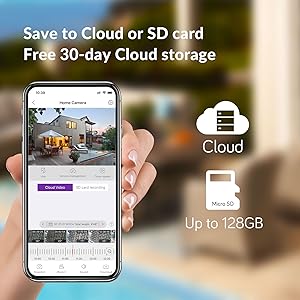
xmartO DT3034 รองรับวิธีการจัดเก็บวิดีโอที่บันทึกไว้สองวิธีหลัก:
- การ์ด Micro SD: กล้องรองรับการ์ด TF (Micro SD) สูงสุด 128GB สำหรับจัดเก็บข้อมูลภายในเครื่อง
- การเก็บข้อมูลบนคลาวด์: บริการจัดเก็บข้อมูลบนคลาวด์ AWS ที่เข้ารหัสลับนั้นมีให้บริการ โดยส่วนใหญ่มักมีช่วงทดลองใช้งานฟรี (เช่น 30 วัน)

5.6 การรวม Alexa
กล้อง xmartO DT3034 สามารถใช้งานร่วมกับ Amazon Alexa ได้ คุณสามารถใช้คำสั่งเสียงเพื่อควบคุมกล้องได้ view แสดงภาพจากกล้องบนอุปกรณ์ที่รองรับ Alexa

6. การบำรุงรักษา
- การทำความสะอาด: ทำความสะอาดเลนส์และตัวเรือนกล้องเป็นระยะด้วยผ้านุ่มๆamp ใช้ผ้าเช็ดทำความสะอาดฝุ่นและเศษสิ่งสกปรก ห้ามใช้สารเคมีรุนแรง
- อัพเดตเฟิร์มแวร์: ตรวจสอบและติดตั้งการอัปเดตเฟิร์มแวร์เป็นประจำผ่านแอป xmartO WallPixel การอัปเดตมักรวมถึงการปรับปรุงประสิทธิภาพ คุณสมบัติใหม่ และการเสริมความปลอดภัย
- วงจรไฟฟ้า: หากกล้องประสบปัญหา ให้ลองปิดและเปิดเครื่องใหม่โดยถอดปลั๊กอะแดปเตอร์ไฟออกแล้วเสียบใหม่
7 การแก้ไขปัญหา
หากคุณพบปัญหาเกี่ยวกับกล้อง xmartO DT3034 โปรดดูปัญหาและวิธีแก้ไขทั่วไปต่อไปนี้:
| ปัญหา | สาเหตุที่เป็นไปได้ / วิธีแก้ไข |
|---|---|
| กล้องออฟไลน์หรือตัดการเชื่อมต่อบ่อยครั้ง |
|
| ระบบติดตามอัตโนมัติไม่ทำงานหรือทำงานไม่แม่นยำ |
|
| สัญญาณเตือนภัยผิดพลาดจากการตรวจจับการเคลื่อนไหว |
|
| ไฟสปอตไลท์หรือไซเรนไม่ทำงาน |
|
| ปัญหาเกี่ยวกับการหมุนกล้อง (แพน/เอียง) |
|
8. ข้อมูลจำเพาะ
| คุณสมบัติ | ข้อมูลจำเพาะ |
|---|---|
| หมายเลขรุ่น | DT3034 |
| ความละเอียดในการจับภาพวิดีโอ | 3 ล้านพิกเซล (2K Super HD) |
| เทคโนโลยีการเชื่อมต่อ | ไร้สาย (Wi-Fi) |
| แหล่งพลังงาน | ใช้ไฟฟ้าแบบมีสาย (12V DC) |
| การใช้งานภายใน/ภายนอกอาคาร | กลางแจ้ง |
| การให้คะแนนการคุ้มครองระหว่างประเทศ | IP66 ทนฝนและแดด |
| ช่วงการมองเห็นตอนกลางคืน | 30 เมตร |
| ตัวเลือกการจัดเก็บข้อมูล | การ์ด Micro SD (สูงสุด 128GB), พื้นที่จัดเก็บข้อมูลบนคลาวด์ |
| คุณสมบัติด้านเสียง | ระบบเสียงสองทางขั้นสูง |
| คุณสมบัติพิเศษ | ระบบติดตามอัตโนมัติ, ไฟส่องสว่างอัตโนมัติ, ระบบมองเห็นกลางคืนแบบสี, ไซเรนอัตโนมัติ, เซ็นเซอร์ตรวจจับความเคลื่อนไหว, การเชื่อมต่อกับ Alexa |
| ขนาด (กว้าง x ยาว x สูง) | 8.35 x 8.23 x 5.51 นิ้ว |
| น้ำหนักสินค้า | 1 ปอนด์ |
9. การรับประกันและการสนับสนุน
xmartO มุ่งมั่นที่จะมอบผลิตภัณฑ์ที่เชื่อถือได้และการสนับสนุนลูกค้าที่ดีเยี่ยม
- รับประกันคืนเงินภายใน 30 วัน และส่งคืนสินค้าได้ฟรี: หากคุณไม่พอใจกับการซื้อของคุณ คุณสามารถส่งคืนได้ภายใน 30 วันเพื่อรับเงินคืนเต็มจำนวน
- การรับประกันจำกัด 1 ปี: กล้อง xmartO DT3034 มีการรับประกันแบบจำกัด 1 ปี สำหรับข้อบกพร่องจากการผลิต
- การสนับสนุนออนไลน์ 24/7: เข้าถึงบริการให้ความช่วยเหลือแบบตัวต่อตัวทางออนไลน์ สำหรับความช่วยเหลือด้านเทคนิคหรือข้อสงสัยใด ๆ