1. บทนำ
This manual provides comprehensive instructions for the installation, operation, and maintenance of your Microsoft Xbox 360 Wireless A/B/G Network Adapter. This adapter enables your Xbox 360 console to connect to a wireless network, facilitating access to Xbox Live, streaming media, and other online features without the need for wired connections.
2. สินค้าหมดview
The Xbox 360 Wireless A/B/G Network Adapter is designed to integrate seamlessly with your Xbox 360 console, providing wireless connectivity. Key features include:
- Compact, high-performance design: Engineered for efficient wireless communication.
- Broad compatibility: Works with 802.11a, 802.11b, and 802.11g wireless routers and access points.
- Dual-band support: Operates on both 2.4 GHz and 5 GHz frequency bands, offering flexibility for home network environments.
- Optimized for range: Ideal for larger homes, multiple rooms, and environments with wireless interference.
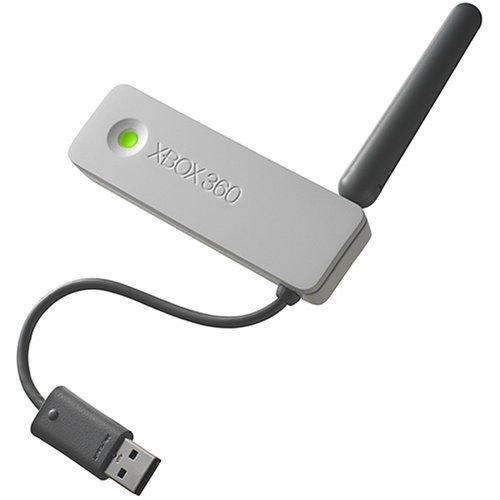
Figure 2.1: The Microsoft Xbox 360 Wireless A/B/G Network Adapter, showing its compact design with a USB connector and an adjustable antenna.

รูปที่ 2.2: ด้านข้าง view of the Wireless Adapter, illustrating the extended antenna and USB cable.
3. การตั้งค่า
Follow these steps to connect and configure your Wireless Network Adapter with your Xbox 360 console:
- ปิดเครื่องคอนโซล: Ensure your Xbox 360 console is powered off before connecting the adapter.
- เชื่อมต่ออะแดปเตอร์: Plug the USB connector of the Wireless Network Adapter into an available USB port on the back of your Xbox 360 console. The adapter is designed to attach directly to the back of the console.
- ปรับเสาอากาศ: Position the adapter's antenna for optimal signal reception.
- เปิดเครื่องคอนโซล: Turn on your Xbox 360 console.
- การเข้าถึงการตั้งค่าเครือข่าย: From the Xbox 360 Dashboard, navigate to the การตั้งค่าระบบ เมนูแล้วเลือก การตั้งค่าเครือข่าย.
- Configure Wireless Network:
- เลือก เครือข่ายไร้สาย. The console will scan for available wireless networks.
- Choose your desired wireless network from the list.
- If prompted, enter your network's wireless password (security key). Ensure correct capitalization.
- Confirm the settings. The console will attempt to connect to the network.
- Test Xbox Live Connection: After successful network connection, you can test your Xbox Live connection from the Network Settings menu to ensure full functionality.

Figure 3.1: The Wireless Adapter connected to the rear USB port of an Xbox 360 console, showing the adapter's front with a green indicator light.

Figure 3.2: The Wireless Adapter connected to the Xbox 360, illustrating the cable routing and the antenna adjusted upwards.
4. คู่มือการใช้งาน
Once the Wireless Network Adapter is successfully configured, your Xbox 360 console will automatically connect to the configured wireless network when powered on. You can then:
- Access Xbox Live for online multiplayer gaming, digital content downloads, and communication.
- Stream photos, music, and videos from compatible devices on your home network, such as a Microsoft Windows XP Media Center based PC.
- Browse the internet using the console's web browser (if available and supported).
To switch between wireless networks or modify network settings, repeat steps 5 and 6 from the Setup section.
5. การบำรุงรักษา
The Wireless Network Adapter requires minimal maintenance. Follow these guidelines to ensure its longevity:
- การทำความสะอาด: Gently wipe the adapter with a soft, dry cloth to remove dust. Avoid using liquid cleaners or abrasive materials.
- การจัดวาง: Ensure the adapter is not obstructed by other objects, which could interfere with wireless signal reception.
- การจัดการ: Avoid bending or twisting the antenna excessively, as this may cause damage.
- พื้นที่จัดเก็บ: If storing the adapter for an extended period, disconnect it from the console and store it in a cool, dry place.
6 การแก้ไขปัญหา
If you encounter issues with your Wireless Network Adapter, refer to the following troubleshooting steps:
- ไม่พบเครือข่าย:
- Ensure the adapter is securely plugged into a USB port on the Xbox 360.
- Verify that your wireless router is powered on and broadcasting a signal.
- Move the Xbox 360 closer to the wireless router or adjust the adapter's antenna.
- Restart both your Xbox 360 and your wireless router.
- Unable to Connect to Network:
- Double-check the wireless password (security key) for accuracy, paying attention to capitalization.
- Confirm that your wireless router is using a compatible security protocol (WPA, WPA2, WEP). บันทึก: Some older adapters may have limited support for newer security protocols like WPA2 or WPA3, potentially only supporting WEP. If your router is set to a newer protocol, you may need to adjust its settings (if possible and secure) or consider a different adapter.
- Ensure your router's MAC filtering is not enabled or that the Xbox 360's MAC address is added to the allowed list.
- Slow Connection or Frequent Disconnections:
- Reduce interference by moving other wireless devices (cordless phones, microwaves) away from the Xbox 360 and router.
- Adjust the adapter's antenna position.
- If your router supports it, try changing the wireless channel to one with less congestion.
- ตรวจสอบให้แน่ใจว่าเฟิร์มแวร์ของเราเตอร์ของคุณเป็นเวอร์ชันล่าสุด
- Adapter Indicator Light: A solid green light typically indicates a successful connection. If the light is off or blinking erratically, recheck connections and power.
7. ข้อมูลจำเพาะ
| คุณสมบัติ | รายละเอียด |
|---|---|
| ยี่ห้อ | ไมโครซอฟต์ |
| แบบอย่าง | Xbox 360 Wireless A/B/G Network Adapter |
| มาตรฐานไร้สาย | IEEE 802.11a, 802.11b, 802.11g |
| ย่านความถี่ | 2.4 GHz, 5 GHz (Dual Band) |
| อินเทอร์เฟซ | ยูเอสบี |
| ขนาด | Approximately 9 x 7.25 x 1.25 inches (Product dimensions, likely packaging) |
| น้ำหนักสินค้า | ประมาณ 4.2 ออนซ์ |
8. การรับประกันและการสนับสนุน
For technical support or warranty inquiries, please refer to the following:
- การสนับสนุนผู้ผลิต: For general product information and support, visit the official Microsoft Xbox support webเว็บไซต์.
- ข้อมูลการรับประกัน: If this product was purchased as "Renewed" or "Certified Refurbished," it typically comes with a minimum 90-day warranty provided by the seller. Please consult your purchase documentation or contact the seller directly for specific warranty terms and conditions.


