1. บทนำ
The ATEN VE8950T is a 4K HDMI Over IP Transmitter designed for extending 4K audio/video signals over a standard Gigabit Ethernet network. This device delivers visually lossless 4K AV signals with low latency, making it suitable for long-distance transmission in various professional environments. Its design focuses on ease of setup and operation, providing a scalable and flexible solution for multi-display 4K signal distribution.
The VE8950T offers an economical digital signage solution, addressing common challenges in AV over IP system implementation. Key benefits include limitless scalability, flexible deployment, simplified IP setup without the need for additional server PCs or software, and support for daisy-chaining to extend reach efficiently.
2. คุณสมบัติหลัก
- 4K HDMI Over IP Extender: Functions as a transmitter for extending HDMI signals over an IP network.
- การส่งสัญญาณวิดีโอคุณภาพสูง: Supports visually lossless video up to 4K at 60 Hz (4:2:0) and 4K at 30 Hz (4:4:4).
- การบีบอัดวิดีโอขั้นสูง: Utilizes ATEN's advanced video lossless compression technology for stunning video quality.
- EDID Expert Technology: Automatically selects optimal EDID settings for smooth power-up, high-quality display, and best video resolution across various screens.
- Flexible AV Connections: Extends AV connections from simple point-to-point to complex multi-point to multi-point setups via LAN, without distance limitations.
3. คำอธิบายฮาร์ดแวร์
3.1. แผงด้านหน้า
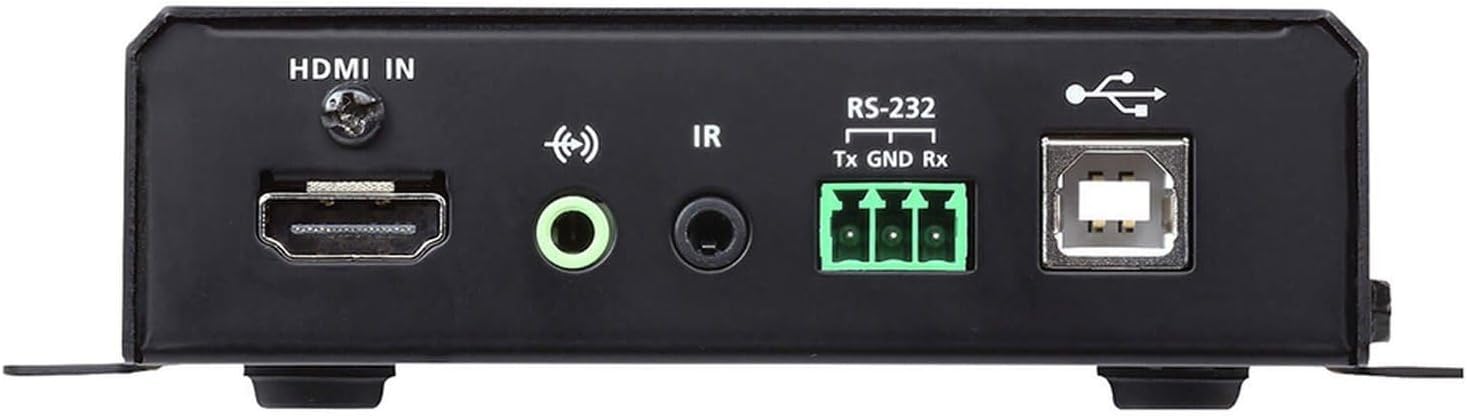
รูปที่ 1: Front Panel of the ATEN VE8950T Transmitter.
- HDMI ใน: Connects to the HDMI source device.
- เสียงเข้า: แจ็ค 3.5 มม. สำหรับอินพุตเสียงอะนาล็อก
- ไออาร์: 3.5mm jack for IR receiver connection.
- อาร์เอส-232: Serial port for control and configuration.
- ยูเอสบี: USB Type B port for connecting to a computer or other USB host device.
3.2. แผงด้านหลัง

รูปที่ 2: Rear Panel of the ATEN VE8950T Transmitter.
- LAN: RJ-45 Ethernet port for network connection.
- ดีซี5วี: Power input jack for the 5V DC power adapter.
3.3. แผงด้านบน

รูปที่ 3: Top Panel of the ATEN VE8950T Transmitter.
- ID NUMBER Display: Three-digit LED display showing the device's ID.
- ปุ่ม +/-: Used to adjust the device ID or navigate menu options.
- ลิงค์ LED: Indicates network link status.
- ไฟ LED: บ่งชี้สถานะพลังงาน
4. การตั้งค่าและการติดตั้ง
Follow these steps to set up your ATEN VE8950T Transmitter:
- ปิดอุปกรณ์: Ensure all devices, including the HDMI source, display, and the VE8950T, are powered off before making any connections.
- เชื่อมต่อแหล่งสัญญาณ HDMI: Use an HDMI cable to connect your HDMI source device (e.g., Blu-ray player, PC) to the HDMI IN port on the VE8950T Transmitter.
- การเชื่อมต่อเครือข่าย: Connect an Ethernet cable from your Gigabit network switch to the แลน port on the VE8950T Transmitter. Ensure the network switch supports Gigabit speeds.
- การเชื่อมต่อไฟฟ้า: เชื่อมต่ออะแดปเตอร์แปลงไฟ 5V DC ที่ให้มาเข้ากับ... กระแสตรง5โวลต์ port on the VE8950T Transmitter, then plug the adapter into a power outlet.
- เปิดเครื่อง: Power on the VE8950T Transmitter. The พลัง ไฟ LED ควรติดสว่าง
- Configure ID (Optional): If using multiple transmitters and receivers, configure the unique ID for each transmitter using the - buttons on the top panel. This ID must match the ID set on the corresponding receiver(s).
- Connect Receiver (Sold Separately): For a complete system, connect a compatible ATEN VE8950R Receiver (sold separately) to your display and the same network.
- Power On Source and Display: Power on your HDMI source device and the display.
For advanced configurations, including web GUI management and video wall setups, refer to the comprehensive user manual available on the ATEN webเว็บไซต์.
5. การดำเนินการ
Once the VE8950T Transmitter and its corresponding receiver(s) are properly connected and powered on, the system will automatically begin transmitting the HDMI signal over the IP network.
- การส่งสัญญาณ: The HDMI video and audio from the source connected to the VE8950T will be extended to the display connected to the receiver.
- ตัวบ่งชี้สถานะ: สังเกตดู ลิงค์ และ พลัง LEDs on the top panel. The POWER LED should be solid, and the LINK LED should indicate active network connection and data transmission.
- Web GUI Management: The VE8950T supports management via a web-based Graphical User Interface (GUI). Access the web GUI by entering the device's IP address into a web browser on a computer connected to the same network. The web GUI allows for advanced configuration, monitoring, and control, including video wall setup and firmware updates.
- การควบคุม RS-232: The RS-232 port can be used for serial control from a control system. Refer to the detailed product manual for RS-232 command protocols.
- การควบคุมอินฟราเรด: If an IR receiver is connected, you can extend IR remote control signals from the display location back to the source device.
6. การบำรุงรักษา
To ensure optimal performance and longevity of your ATEN VE8950T Transmitter, follow these maintenance guidelines:
- การทำความสะอาด: ใช้ผ้านุ่มและแห้งเช็ดทำความสะอาดอุปกรณ์ ห้ามใช้น้ำยาทำความสะอาดชนิดน้ำหรือสเปรย์
- การระบายอากาศ : Ensure proper ventilation around the device to prevent overheating. Do not block any ventilation openings.
- สิ่งแวดล้อม: Operate the device within the specified temperature and humidity ranges. Avoid exposing it to direct sunlight, excessive dust, or moisture.
- อัพเดตเฟิร์มแวร์: ตรวจสอบ ATEN เป็นระยะ website for firmware updates. Keeping the firmware up-to-date can improve performance, add new features, and resolve potential issues.
- การจัดการสายเคเบิล: ตรวจสอบให้แน่ใจว่าสายเคเบิลทั้งหมดเชื่อมต่ออย่างแน่นหนาและจัดวางอย่างเหมาะสม เพื่อป้องกันการหลุดหรือความเสียหายโดยไม่ตั้งใจ
7 การแก้ไขปัญหา
If you encounter issues with your ATEN VE8950T Transmitter, refer to the following troubleshooting tips:
| ปัญหา | สาเหตุที่เป็นไปได้ | สารละลาย |
|---|---|---|
| ไม่มีภาพแสดงผลบนหน้าจอ |
|
|
| คุณภาพวิดีโอไม่ดีหรือภาพกระพริบ |
|
|
| ไม่สามารถเข้าถึงได้ Web GUI |
|
|
If the problem persists, please contact ATEN technical support for further assistance.
8. ข้อมูลจำเพาะ
| หมายเลขรุ่น | VE8950T |
| เทคโนโลยีการเชื่อมต่อ | HDMI, Ethernet (IP) |
| การเข้ารหัสวิดีโอ | เอช.265 |
| ความละเอียดสูงสุด | 4K (3840 x 2160) @ 60Hz (4:2:0), 4K (3840 x 2160) @ 30Hz (4:4:4) |
| โหมดเอาต์พุตเสียง | สเตอริโอ, เซอร์ราวด์ |
| ระบบเสียงรอบทิศทาง | 5.1 การกำหนดค่าช่องสัญญาณ |
| พอร์ต HDMI ทั้งหมด | 1 (อินพุต) |
| วิธีการควบคุม | Remote (IR), RS-232, Web กุ้ยช่าย |
| ขนาดสินค้า | 9.5 x 6.5 x 6.3 นิ้ว |
| น้ำหนักสินค้า | 10.14 ปอนด์ |
9. การรับประกันและการสนับสนุน
ATEN is committed to providing high-quality products and excellent customer service. For support regarding your VE8950T Transmitter, please refer to the following:
- การสนับสนุนด้านเทคนิค: ATEN offers free technical support. For assistance, please contact ATEN's support team. They aim to respond to customer inquiries within 4 hours.
- การรับประกันการบริการ: Information regarding standard warranty coverage and extended warranty service packages can be found on the official ATEN webเว็บไซต์หรือติดต่อฝ่ายบริการลูกค้า
- บริการ RMA: ATEN provides localized repair centers for Return Merchandise Authorization (RMA) services.
- แหล่งข้อมูลออนไลน์: Visit the official ATEN website for product documentation, FAQs, driver downloads, and firmware updates.
For the most current and detailed warranty information, please visit the ร้านค้าอย่างเป็นทางการของ ATEN หรือองค์กรของพวกเขา webเว็บไซต์.


