1. บทนำ
This manual provides essential information for setting up, operating, maintaining, and troubleshooting your Microsoft Surface Pro Model 1796. The Surface Pro is a versatile 2-in-1 device designed to function as both a high-performance laptop and a portable tablet. Please read these instructions carefully to ensure optimal use and longevity of your device.
2. สินค้าหมดview
The Microsoft Surface Pro Model 1796 features a 12.3-inch PixelSense multi-touch display, an Intel Core i5 processor, 4GB of RAM, and a 128GB SSD. It operates on Windows 10 Pro, offering a full desktop experience in a portable form factor. The device supports a detachable keyboard (Surface Pro Signature Type Cover) and a digital pen (Surface Pen), both sold separately, to enhance its functionality.

Figure 2.1: Microsoft Surface Pro in tablet mode, displaying the lock screen.
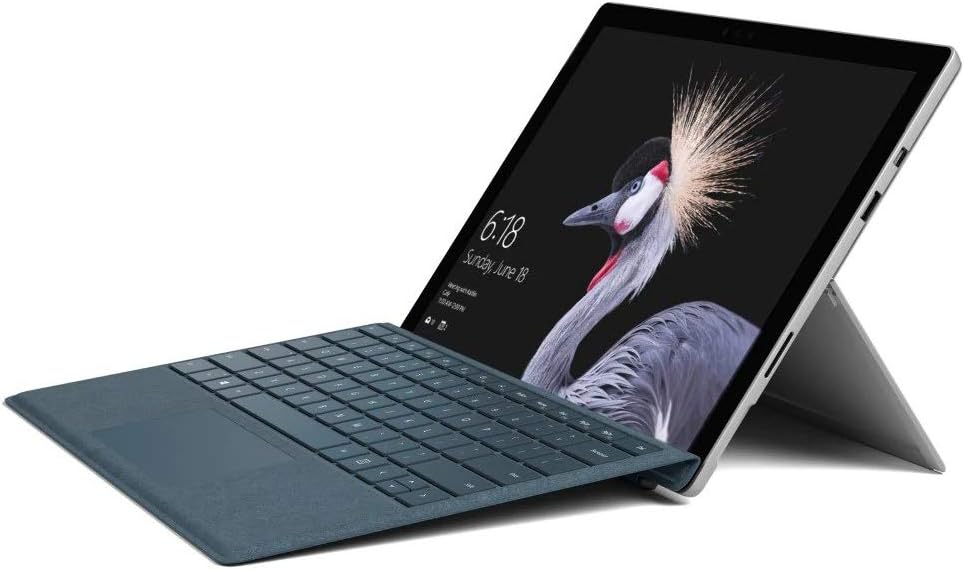
Figure 2.2: Microsoft Surface Pro with Signature Type Cover attached, configured as a laptop.

Figure 2.3: Microsoft Surface Pro tablet and detached Signature Type Cover.
3. การตั้งค่า
3.1 การเปิดเครื่องครั้งแรก
- Connect the power supply to the Surface Pro and a power outlet.
- กดปุ่มเปิด/ปิดที่อยู่บริเวณขอบด้านบนของอุปกรณ์
- Follow the on-screen instructions to complete the initial Windows 10 Pro setup, including language selection, network connection, and user account creation.
3.2 การเชื่อมต่ออุปกรณ์เสริม
- Surface Pro Signature Type Cover: Align the Type Cover with the magnetic connector along the bottom edge of the Surface Pro until it clicks into place.
- ปากกา Surface: The Surface Pen connects via Bluetooth. Go to การตั้งค่า > อุปกรณ์ > บลูทูธและอุปกรณ์อื่นๆ to pair the pen.
3.3 การชาร์จอุปกรณ์
Use the provided power adapter to charge your Surface Pro. The charging port is located on the right side of the device. A full charge provides approximately 13 hours of typical device usage.
4. คู่มือการใช้งาน
4.1 การนำทางพื้นฐาน
- สัมผัส: Use multi-touch gestures on the PixelSense display for navigation, zooming, and scrolling.
- ปกพิมพ์: Utilize the keyboard and trackpad for traditional laptop input.
- ปากกา Surface: Write, draw, and annotate directly on the screen.
4.2 คุณสมบัติของ Windows 10 Pro
Your Surface Pro comes with Windows 10 Pro, offering features such as:
- วียอนเซ่: For fast, secure, password-free sign-in using facial recognition.
- คอร์ทาน่า: Your personal digital assistant.
- ไมโครซอฟต์ เอดจ์: ค่าเริ่มต้น web เบราว์เซอร์
- โหมดแท็บเล็ต: Automatically or manually switch to a touch-optimized interface when the Type Cover is detached.
4.3 การตั้งค่าการแสดงผล
The 12.3-inch PixelSense display has a resolution of 2736 x 1824 pixels. You can adjust display settings such as brightness, resolution, and scaling through การตั้งค่า > ระบบ > การแสดงผล.
5. การบำรุงรักษา
5.1 การทำความสะอาดเครื่อง
- ใช้ผ้านุ่มไม่เป็นขุย งampened with water or an approved screen cleaner to clean the display.
- For the device body, use a soft, dry cloth. Avoid harsh chemicals or abrasive materials.
5.2 การอัปเดตซอฟต์แวร์
Regularly check for and install Windows updates to ensure your device has the latest security patches and features. Go to การตั้งค่า > การอัปเดตและความปลอดภัย > Windows Update.
5.3 การดูแลแบตเตอรี่
- หลีกเลี่ยงอุณหภูมิที่สูงเกินไป เพราะอาจทำให้แบตเตอรี่มีอายุการใช้งานลดลง
- เพื่อสุขภาพแบตเตอรี่ที่ดีที่สุด ควรหลีกเลี่ยงการปล่อยประจุแบตเตอรี่จนหมดเกลี้ยงอย่างต่อเนื่อง หรือการปล่อยให้แบตเตอรี่ชาร์จเต็ม 100% เป็นเวลานาน
6 การแก้ไขปัญหา
6.1 ปัญหาทั่วไป
- อุปกรณ์ไม่เปิดเครื่อง: Ensure the device is charged. Try holding the power button for 10-15 seconds to perform a force restart.
- หน้าจอไม่ตอบสนอง: Restart the device. If the issue persists, check for driver updates.
- ปัญหาประสิทธิภาพการทำงาน: Close unnecessary applications, check for Windows updates, or run a disk cleanup.
6.2 การติดต่อฝ่ายสนับสนุน
For more complex issues or technical assistance, please visit the official Microsoft Support website or contact their customer service. Have your device's model number (FJU-00001) and serial number ready.
7. ข้อมูลจำเพาะ
| คุณสมบัติ | ข้อมูลจำเพาะ |
|---|---|
| ชื่อรุ่น | FJU-00001 |
| ขนาดจอแสดงผล | 12.3 นิ้ว |
| ความละเอียดหน้าจอ | 2736 x 1824 พิกเซล |
| โปรเซสเซอร์ | อินเทล คอร์ i5 (2.6 กิกะเฮิรตซ์) |
| แรม | แรม 4GB DDR3 |
| พื้นที่จัดเก็บ | SSD ความจุ 128GB |
| โคโปรเซสเซอร์กราฟิก | กราฟิก Intel HD 620 |
| ระบบปฏิบัติการ | วินโดวส์ 10 โปร |
| ประเภทไร้สาย | 802.11b, 802.11g, 802.11n |
| อายุการใช้งานแบตเตอรี่โดยเฉลี่ย | 13 ชั่วโมง |
| น้ำหนักสินค้า | 1.7 ปอนด์ |
| ขนาดสินค้า | 11.5 x 0.33 x 7.93 นิ้ว |
| หลัง Webความละเอียดของกล้อง | 5 MP |
8. การรับประกันและการสนับสนุน
Your Microsoft Surface Pro Model 1796 is covered by a limited hardware warranty provided by Microsoft. For detailed warranty terms and conditions, please refer to the documentation included with your purchase or visit the official Microsoft support webไซต์นี้ โปรดเก็บหลักฐานการซื้อไว้เพื่อใช้ยืนยันการรับประกัน
For technical support, driver downloads, and service information, please visit support.microsoft.com. You may need to provide your device's serial number and model information.


