การแนะนำ
This manual provides instructions for the installation, operation, and maintenance of the Black Box SERVSWITCH EC USB Server Cable, Model EHN9000U-0006. This 6-foot (1.8-meter) cable is designed to connect a server to a KVM switch, providing both USB and VGA connectivity.
ข้อมูลด้านความปลอดภัย
Please read and understand all safety instructions before using this product. Failure to follow these instructions may result in damage to the product or connected equipment.
- Do not expose the cable to excessive moisture or extreme temperatures.
- ควรหลีกเลี่ยงการดัดหรือบิดสายเคเบิลอย่างรุนแรง เพราะอาจทำให้สายไฟภายในเสียหายได้
- Ensure all connections are secure before powering on equipment.
- Disconnect power from devices before connecting or disconnecting cables.
เนื้อหาแพ็คเกจ
ตรวจสอบว่าพัสดุของคุณมีสิ่งของต่อไปนี้หรือไม่:
- 1 x Black Box SERVSWITCH EC USB Server Cable (EHN9000U-0006)
สินค้าเกินview
The Black Box SERVSWITCH EC USB Server Cable is a specialized cable designed for KVM (Keyboard, Video, Mouse) applications. It integrates VGA video and USB keyboard/mouse signals into a single cable for streamlined connectivity between a server and a KVM switch.
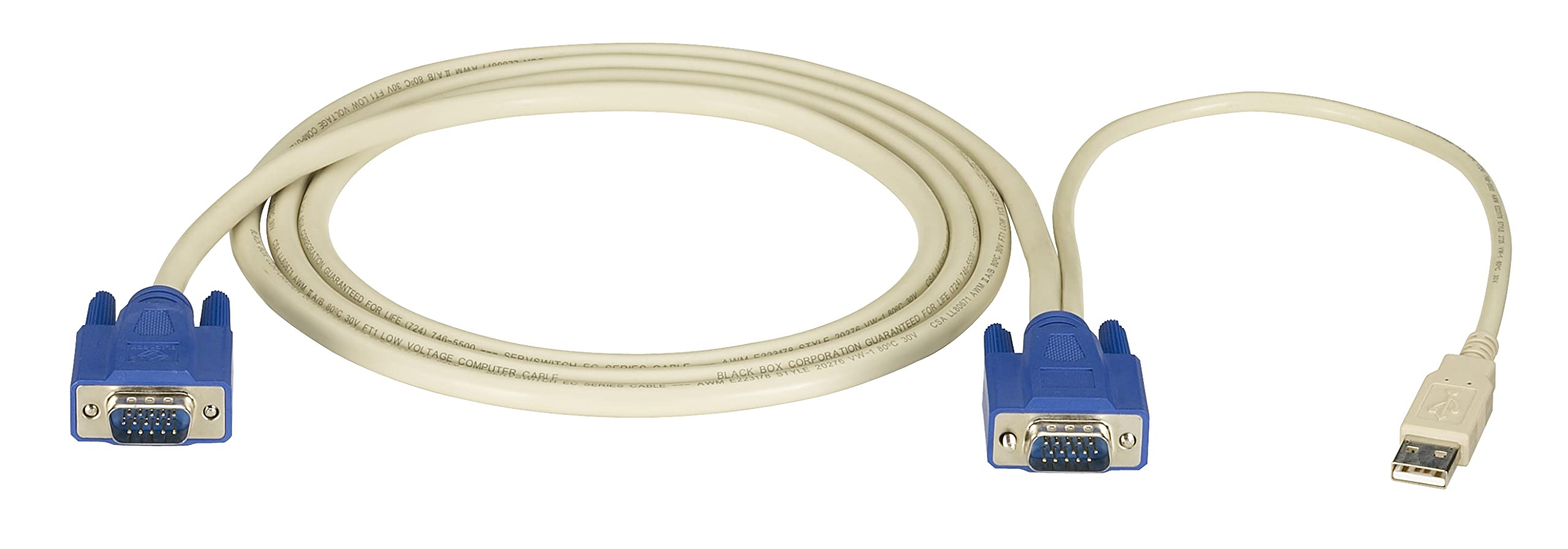
ภาพ: Black Box SERVSWITCH EC USB Server Cable. This image displays the 6-foot cable with its distinct VGA (HD-15) and USB connectors, designed for server-to-KVM switch connections.
คุณสมบัติหลัก:
- การเชื่อมต่อแบบบูรณาการ: Combines VGA video and USB data into one cable.
- ความยาว: 6 ฟุต (1.8 เมตร) เพื่อการจัดวางที่ยืดหยุ่น
- ความเข้ากันได้: Designed for use with Black Box SERVSWITCH KVM systems.
- การออกแบบไม่พันกัน: Helps prevent tangles and simplifies cable management.
การตั้งค่า
- ปิดอุปกรณ์: Ensure both the server and the KVM switch are powered off before making any connections.
- เชื่อมต่อกับเซิร์ฟเวอร์: Locate the VGA output port and an available USB port on your server. Connect the corresponding VGA (HD-15 male) and USB (Type-A male) connectors of the EHN9000U-0006 cable to these ports on the server.
- Connect to KVM Switch: Locate the KVM port on your KVM switch designated for the server. Connect the combined VGA (HD-15 female) and USB (Type-A female) end of the EHN9000U-0006 cable to the KVM switch's input port. Ensure a secure fit for both connectors.
- เปิดเครื่อง: Once all connections are secure, power on the KVM switch, then power on the server.
การดำเนินงาน
Once the cable is properly connected and devices are powered on, the KVM switch should detect the connected server. Use the KVM switch's controls (buttons, hotkeys, or OSD) to switch to the server connected via this cable. You should then have control over the server's video, keyboard, and mouse.
- Refer to your KVM switch's user manual for specific instructions on switching between connected servers.
- Ensure the KVM switch is configured to recognize the USB keyboard and mouse signals.
การซ่อมบำรุง
The Black Box SERVSWITCH EC USB Server Cable requires minimal maintenance. Follow these guidelines to ensure longevity:
- การทำความสะอาด: Use a soft, dry cloth to wipe the cable and connectors. Do not use liquid cleaners or solvents.
- พื้นที่จัดเก็บ: When not in use, store the cable in a cool, dry place, away from direct sunlight and extreme temperatures. Avoid tight coiling to prevent internal damage.
- การจัดการ: Always grasp the connector housing when plugging or unplugging the cable. Avoid pulling on the cable itself.
การแก้ไขปัญหา
| ปัญหา | สาเหตุที่เป็นไปได้ | สารละลาย |
|---|---|---|
| ไม่มีการแสดงวิดีโอ | Loose VGA connection; Incorrect KVM port selected; Server video output issue. | Ensure VGA connectors are fully seated and secured. Select the correct KVM port. Check server's video output directly. |
| คีย์บอร์ด/เมาส์ไม่ตอบสนอง | Loose USB connection; KVM switch USB emulation issue; Server USB port issue. | Ensure USB connectors are fully seated. Verify KVM switch USB settings. Test server USB ports with another device. |
| การเชื่อมต่อไม่ต่อเนื่อง | Damaged cable; Loose connections; Electrical interference. | Inspect cable for visible damage. Re-seat all connections. Ensure cable is not near strong electromagnetic sources. |
ข้อมูลจำเพาะ
- แบบอย่าง: EHN9000U-0006
- ยี่ห้อ: กล่องดำ
- ประเภทสายเคเบิล: ยูเอสบี, วีจีเอ
- Connector Type (Server End): HD-15 Male (VGA), USB Type-A Male
- Connector Type (KVM End): HD-15 Female (VGA), USB Type-A Female
- ความยาว: 6 ฟุต (1.8 เมตร)
- สี: สีดำ/สีแดง
- คุณสมบัติพิเศษ: ยุ่งเหยิงฟรี
- อุปกรณ์ที่รองรับ: Server (with VGA and USB ports)
- ขนาดสินค้า : ขนาดบรรจุภัณฑ์โดยประมาณ 5 x 0.5 x 5 นิ้ว
- น้ำหนักสินค้า: 8.4 ออนซ์ (0.24 กิโลกรัม)
- ยูพีซี: 822088018322
การรับประกันและการสนับสนุน
For warranty information and technical support, please refer to the official Black Box webหรือติดต่อฝ่ายบริการลูกค้า เก็บใบเสร็จรับเงินไว้เพื่อใช้ในการเคลมประกัน
กล่องดำ Webเว็บไซต์: www.blackbox.com


