การแนะนำ
This manual provides essential information for setting up, operating, and maintaining your Microsoft Xbox 360 E 250GB Console. Please read this guide thoroughly before using your console to ensure proper function and longevity.
เนื้อหาแพ็คเกจ
ตรวจสอบว่าแพ็คเกจของคุณมีรายการต่อไปนี้:
- Xbox 360 E 250GB Console
- Xbox 360 Wireless Controller (Black)
- พาวเวอร์ซัพพลายและสายไฟ
- สาย HDMI
- AA Batteries for Wireless Controller
คอนโซลโอเวอร์view
Familiarize yourself with the various ports and buttons on your Xbox 360 E console.

Image: Microsoft Xbox 360 E 250GB Console. This image displays the front and side view of the Xbox 360 E console, showing its compact design and disc drive slot.
แผงด้านหน้า
- ปุ่มเปิด/ปิด: Turns the console on or off.
- ไดรฟ์ดิสก์: Insert game discs or DVDs.
- พอร์ต USB: Connect accessories like USB drives or wired controllers.
- Controller Connect Button: Used to wirelessly sync controllers.
แผงด้านหลัง
- พอร์ตไฟ: เชื่อมต่อแหล่งจ่ายไฟ
- พอร์ต HDMI: Connect to a TV or monitor for high-definition video and audio.
- พอร์ต AV: For older composite or component cables (not included with all models).
- พอร์ตอีเธอร์เน็ต: เชื่อมต่อกับเครือข่ายแบบมีสาย
- พอร์ต USB: Additional ports for accessories.
Wireless Controller Overview
The Xbox 360 Wireless Controller allows for intuitive gameplay. Familiarize yourself with its buttons and functions.
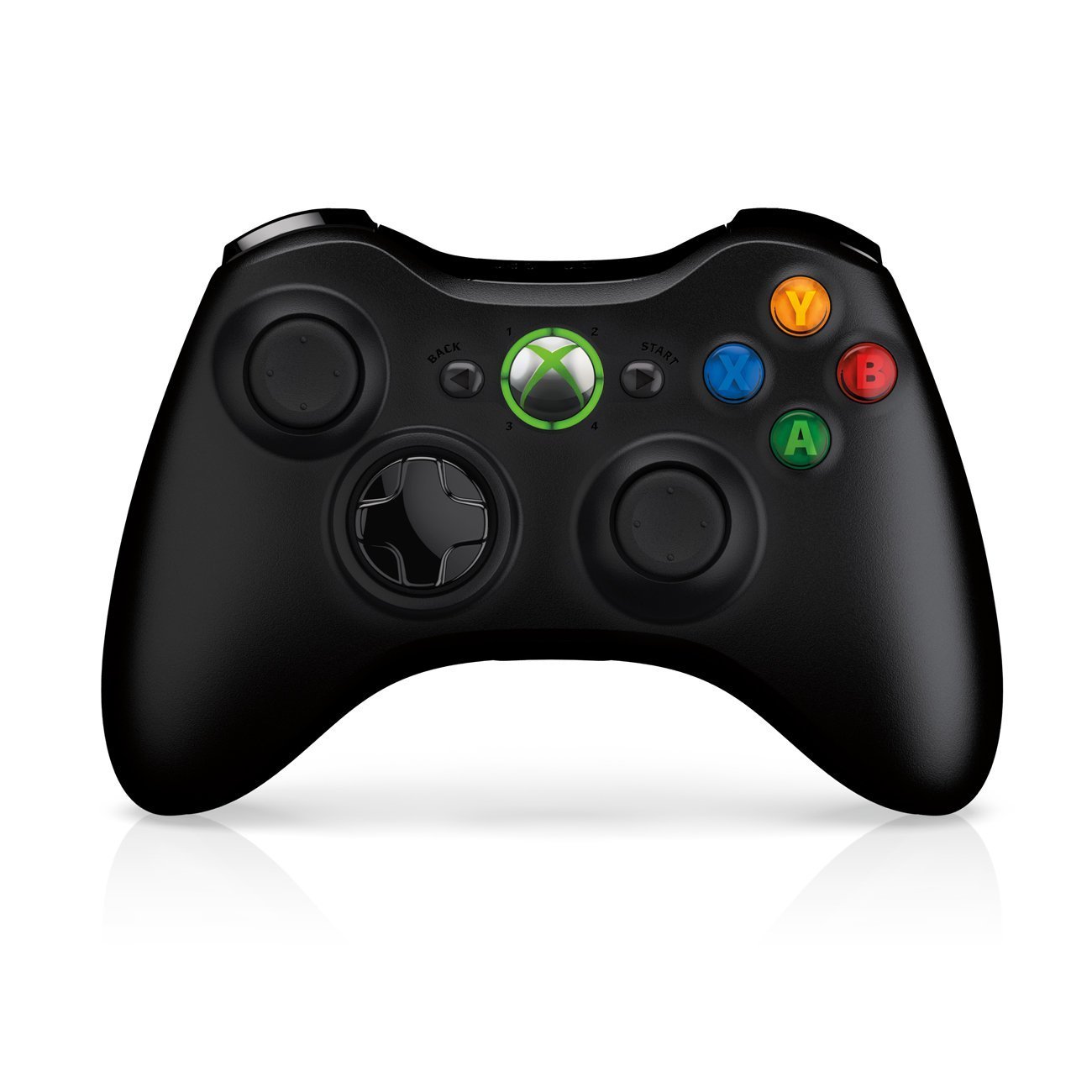
Image: Xbox 360 Wireless Controller. This image displays the front view of the black wireless controller, highlighting the D-pad, analog sticks, face buttons (A, B, X, Y), Guide button, Start button, and Back button.
ปุ่มควบคุมและฟังก์ชันต่างๆ
- แท่งอนาล็อกซ้าย/ขวา: สำหรับการเคลื่อนไหวและควบคุมกล้อง
- ปุ่มควบคุมทิศทาง (D-Pad): For menu navigation and specific game controls.
- ปุ่ม A, B, X, Y: Primary action buttons, color-coded (Green A, Red B, Blue X, Yellow Y).
- ปุ่มเริ่มต้น: Pauses games or opens in-game menus.
- ปุ่มย้อนกลับ: Returns to previous screens or opens specific game functions.
- Guide Button (Xbox Logo): Powers on the console, accesses the Xbox Guide, or turns off the controller.
- ปุ่มกันชนซ้าย/ขวา (LB, RB): ปุ่มด้านข้างไหล่ใช้สำหรับควบคุมการกระทำต่างๆ ในเกม
- ปุ่มทริกเกอร์ซ้าย/ขวา (LT, RT): Analog triggers for precise control, often used for acceleration/braking or firing weapons.
การติดตั้งแบตเตอรี่
The wireless controller requires two AA batteries. To install:
- Press the tab on the top of the battery pack and pull down to remove it.
- ใส่แบตเตอรี่ AA สองก้อน โดยตรวจสอบให้แน่ใจว่าขั้วถูกต้อง (+/-)
- Slide the battery pack back into the controller until it clicks into place.
คู่มือการติดตั้ง
1. การเชื่อมต่อคอนโซล
- การเชื่อมต่อไฟฟ้า: Connect the power cord to the power supply, then connect the power supply to the console's power port. Plug the power cord into a wall outlet.
- การเชื่อมต่อวิดีโอ/เสียง: Connect one end of the HDMI cable to the HDMI port on the back of your Xbox 360 E console. Connect the other end to an available HDMI input on your TV or monitor.
- การเชื่อมต่ออินเทอร์เน็ต (ไม่บังคับ): For wired internet, connect an Ethernet cable from your router/modem to the Ethernet port on the console. For wireless, the console has built-in Wi-Fi.
2 การเชื่อมต่อตัวควบคุมไร้สาย
- Ensure batteries are installed in the controller.
- Turn on the console by pressing the Power button on the console or the Guide button on the controller.
- Press and release the Connect button on the console (small button near the USB ports on the front).
- Within 20 seconds, press and release the Connect button on the controller (small button on the top edge, between the bumpers).
- The lights around the Guide button on the controller and the console will flash and then glow steadily, indicating a successful connection.
3. Initial Power On and System Settings
After connecting, turn on your console. Follow the on-screen prompts to:
- เลือกภาษาและภูมิภาคของคุณ
- Adjust display settings (resolution, aspect ratio).
- Set up your internet connection (wired or wireless).
- Create or sign in to an Xbox Live profile.
Operating Your Console
การเล่นเกมและสื่อต่างๆ
- Turn on your console and TV.
- Open the disc tray by pressing the eject button on the console.
- Place a game disc or DVD/Blu-ray disc into the tray, label side up.
- Close the disc tray. The console should automatically start the game or media. If not, select it from the dashboard.
- Digital games can be launched directly from the Xbox Dashboard.
Connecting to Xbox Live
Xbox Live allows you to play online, download games and content, and access streaming services. Ensure your console is connected to the internet.
- From the Xbox Dashboard, navigate to the "Social" or "Settings" tab.
- Select "Join Xbox Live" or "Network Settings" to configure your connection and create/manage your profile.
- A 1-month Xbox LIVE Gold trial may be included with your console.
การตั้งค่าระบบ
Access system settings to customize your console experience:
- การแสดงผลและเสียง: Adjust resolution, audio output, and screen format.
- พื้นที่จัดเก็บ: Manage your 250GB hard drive, view free space, and delete content.
- การตั้งค่าเครือข่าย: Configure wired or wireless internet connections.
- Family Settings: Set parental controls for content and online access.
การซ่อมบำรุง
Cleaning Your Console
- Always power off and unplug the console before cleaning.
- Use a soft, dry, lint-free cloth to wipe down the exterior of the console and controller.
- ห้ามใช้น้ำยาทำความสะอาดชนิดเหลว สเปรย์ หรือวัสดุที่มีฤทธิ์กัดกร่อน
- Keep ventilation openings clear of dust and obstructions to ensure proper airflow.
การจัดเก็บและการจัดวาง
- Place the console on a stable, flat surface.
- Ensure adequate ventilation around the console. Do not place it in an enclosed cabinet or on soft surfaces that can block vents.
- Avoid exposing the console to direct sunlight, excessive heat, or extreme cold.
การแก้ไขปัญหา
If you encounter issues with your Xbox 360 E console, refer to the following common solutions:
ไม่มีไฟ / เครื่องเล่นเกมไม่เปิด
- Ensure the power cord is securely connected to the console, power supply, and wall outlet.
- Check the power supply unit (PSU) indicator light. If it's off or red, try a different outlet or contact support.
- ลองใช้เต้ารับไฟอื่น
ไม่มีสัญญาณภาพหรือเสียงออก
- Verify the HDMI cable is securely connected to both the console and your TV/monitor.
- ตรวจสอบให้แน่ใจว่าทีวี/จอภาพของคุณตั้งค่าแหล่งสัญญาณ HDMI ถูกต้องแล้ว
- ลองใช้สาย HDMI อื่นหรือพอร์ต HDMI อื่นบนทีวีของคุณ
- ตรวจสอบการตั้งค่าระดับเสียงและการปิดเสียงของทีวีของคุณ
ข้อผิดพลาดในการอ่านดิสก์
- ตรวจสอบให้แน่ใจว่าแผ่นดิสก์สะอาด ปราศจากรอยขีดข่วนหรือรอยเปื้อน เช็ดเบาๆ ด้วยผ้าเนื้อนุ่มจากตรงกลางออกไปด้านนอก
- Try a different game or movie disc to determine if the issue is with the disc or the console.
- Ensure the console is placed on a stable, flat surface and not being moved during disc operation.
Wireless Controller Not Connecting
- Ensure the controller has fresh batteries.
- Resync the controller by pressing the Connect buttons on both the console and controller as described in the "Setup Guide".
- ตรวจสอบให้แน่ใจว่าไม่มีสัญญาณรบกวนไร้สายแรงๆ อยู่ใกล้เคียง
For further assistance, please refer to the official Microsoft Xbox support webเว็บไซต์.
ข้อมูลจำเพาะ
| คุณสมบัติ | รายละเอียด |
|---|---|
| หมายเลขรุ่น | M9V-00001 |
| พื้นที่จัดเก็บ | ฮาร์ดไดรฟ์ 250 GB |
| การเชื่อมต่อแบบไร้สาย | มี Wi-Fi ในตัว |
| ผู้ควบคุม | 1 Black Wireless Controller |
| รหัสภูมิภาค | กทส. |
| ขนาดสินค้า | 12 x 6 x 24 นิ้ว |
| น้ำหนักสินค้า | 10.32 ปอนด์ |
| แบตเตอรี่ที่จำเป็น | 2 AA batteries for controller |
| วันที่วางจำหน่าย | วันที่ 1 มิถุนายน 2013 |
ข้อมูลการรับประกัน
For detailed warranty information regarding your Microsoft Xbox 360 E 250GB Console, please refer to the warranty card included with your product or visit the official Microsoft Xbox support webไซต์ เงื่อนไขการรับประกันอาจแตกต่างกันไปตามภูมิภาคและวันที่ซื้อ
สนับสนุน
If you require technical assistance, have questions about your console, or need to report an issue, please contact Microsoft Xbox Support:
- การสนับสนุนทางออนไลน์: เยี่ยมชมอย่างเป็นทางการ การสนับสนุน Xbox webเว็บไซต์ สำหรับคำถามที่พบบ่อย คำแนะนำในการแก้ไขปัญหา และตัวเลือกการติดต่อ
- การสนับสนุนทางโทรศัพท์: Refer to your product packaging or the Xbox Support webเว็บไซต์สำหรับหมายเลขโทรศัพท์ภูมิภาค


