1. บทนำ
The PAC RP4-VW11 Radiopro4 is a stereo replacement interface designed to integrate an aftermarket radio into select Volkswagen vehicles equipped with a CANbus system. This interface retains essential factory features, including steering wheel controls (SWC) and provides data-controlled accessory and navigation outputs. It also supports the retention of the factory amplifier in premium amplified systems, though fading capability may be limited to two input channels from the aftermarket radio.
The interface is pre-programmed for most vehicle factory SWC functions. Custom programming is available for re-assigning SWC functions or utilizing short press/long press dual command functionality.
2. ข้อมูลด้านความปลอดภัย
Always disconnect the vehicle's negative battery terminal before beginning any installation to prevent electrical shorts and potential damage to the vehicle's electrical system or the interface. Ensure all connections are secure and insulated to avoid short circuits. Consult a professional installer if you are unsure about any steps.
คำเตือนข้อเสนอ 65: ผลิตภัณฑ์นี้ประกอบด้วยสารเคมีที่รัฐแคลิฟอร์เนียทราบว่าก่อให้เกิดมะเร็งและความพิการแต่กำเนิดหรืออันตรายต่อระบบสืบพันธุ์อื่นๆ
3. เนื้อหาบรรจุภัณฑ์
- All-in-One Radio Replacement & Steering Wheel Control Interface (PAC RP4-VW11 Module)
4. การตั้งค่าและการติดตั้ง
4.1. ขั้นตอนก่อนการติดตั้ง
- ถอดแบตเตอรี่: Before starting, disconnect the negative battery terminal of your vehicle.
- ถอดวิทยุโรงงาน: Carefully remove the factory radio from the dashboard to access the wiring harness.
4.2. การเชื่อมต่อสายไฟ
The PAC RP4-VW11 interface connects between your aftermarket radio's harness and the vehicle's factory harness. Match the wire colors between the aftermarket radio harness and the PAC interface harness. Some wires may not connect directly to the vehicle harness, such as an amplifier turn-on wire, parking sense wire, and Steering Wheel Control connections. Refer to the wiring diagram provided with your aftermarket radio and the PAC interface for specific connections.
Below is a general visual guide for wiring connections:
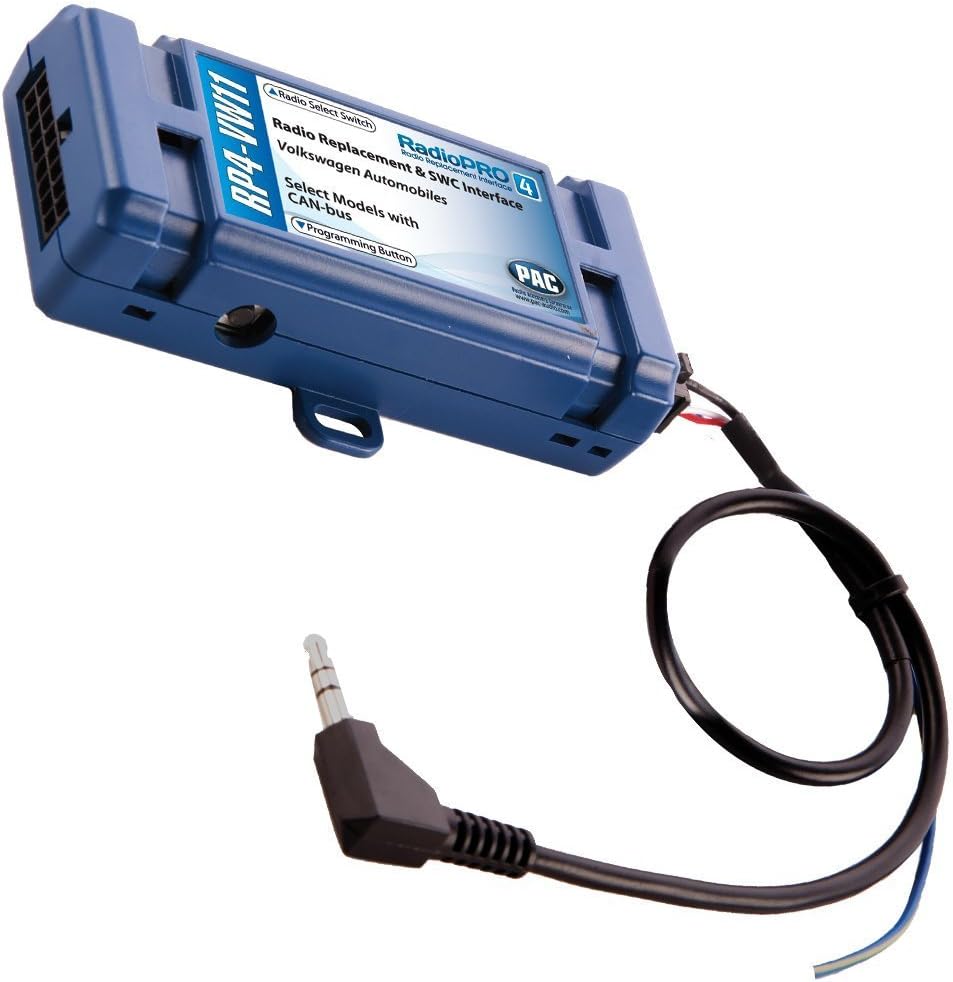
The main PAC RP4-VW11 module is a blue box with various wire connections and a rotary switch for radio selection. The module facilitates the integration of your new stereo with the vehicle's existing systems.
For a visual demonstration of general interface wiring, refer to the video below:
Another video demonstrating a generic wire harness connection is provided below for additional visual reference:
4.3. Setting the Radio Select Switch
Locate the rotary switch on the side of the PAC RP4-VW11 interface. This switch must be adjusted to the proper radio setting before plugging the interface into the vehicle. Refer to the chart below to determine the correct setting for your aftermarket radio brand:
| การตั้งค่า | แบรนด์วิทยุ |
|---|---|
| 1 | อัลไพน์ |
| 2 | เจวีซี |
| 3 | เคนวูด |
| 4 | คลาริออน |
| 7 | Pioneer/Other (Advent, BOYO, Dual, Lightning Audio, Rockford Fosgate, Visteon) |
| 8 | โซนี่ |
| 9 | ฟิวชั่น |
4.4. Programming Steering Wheel Controls
The interface comes pre-programmed for all factory SWC functions. If you wish to re-assign SWC functions or utilize short press/long press dual command functionality, follow these programming instructions:
- หมุนกุญแจไปที่ตำแหน่งสวิตช์กุญแจ
- กดและปล่อยปุ่มการเขียนโปรแกรมที่ด้านข้างของอินเทอร์เฟซ
- Within 7 seconds, press the button on the steering wheel that is to be learned. The LED on the interface will turn off when the button is pressed.
- At this point, you have two options:
- สำหรับฟังก์ชันกดสั้นๆ: ปล่อยปุ่มภายใน 1.5 วินาที ไฟ LED จะเปิดขึ้นอีกครั้ง
- สำหรับการใช้งานแบบกดค้าง: กดปุ่มค้างไว้จนกว่าไฟ LED จะเริ่มกะพริบ ปล่อยปุ่มและไฟ LED จะกลับไปเป็นของแข็ง
- If you need to program more buttons, repeat step 3 for each additional audio function on the steering wheel. If you come across a function in the chart that your steering wheel does not have, or you do not want to program, press and release the program button on the side of the interface to skip that function.
- Once programming is completed, wait seven seconds. The LED will flash three times, indicating the end of programming.
- ทดสอบอินเทอร์เฟซสำหรับการทำงานที่เหมาะสม เมื่อใดก็ตามที่กด SWC ไฟ LED บนอินเทอร์เฟซควรกะพริบ หากฟังก์ชันใดไม่ทำงาน ให้ทำซ้ำขั้นตอนการเขียนโปรแกรม
4.5. หลังการติดตั้ง
- เชื่อมต่อแบตเตอรี่อีกครั้ง: เชื่อมต่อขั้วลบของแบตเตอรี่อีกครั้ง
- ทดสอบฟังก์ชันการทำงาน: Turn on the radio and test all functions, including steering wheel controls, audio output, and any other integrated features.
5. คู่มือการใช้งาน
Once installed and programmed, the PAC RP4-VW11 allows your factory steering wheel controls to operate your aftermarket radio. The specific functions (e.g., Volume Up/Down, Track Up/Down, Source, Mute, Phone) will correspond to how they were programmed during the setup phase. Refer to your aftermarket radio's manual for any specific settings related to external controls.
6. การบำรุงรักษา
The PAC RP4-VW11 interface is designed for long-term reliability and typically requires no regular maintenance. Ensure all wiring connections remain secure. If you experience any issues, refer to the troubleshooting section or contact customer support.
7 การแก้ไขปัญหา
- ไม่มีไฟฟ้าเข้าวิทยุ: Check all power connections, including the constant 12V and accessory 12V wires. Ensure the vehicle's battery is properly connected.
- การควบคุมพวงมาลัยไม่ทำงาน: Verify the rotary switch setting on the PAC module matches your aftermarket radio. Re-attempt the programming steps for the steering wheel controls, ensuring each button press is registered correctly.
- No Fading Capability with Factory Ampเครื่องฟอก: In premium amplified systems, only two input channels from the aftermarket radio can be used, which may limit fading functionality. This is a characteristic of the system and not a defect.
- ฟังก์ชั่นไม่ต่อเนื่อง: Check all wire splices and connections for looseness or corrosion. Ensure the programming button on the interface is not stuck.
8. ข้อมูลจำเพาะ
| คุณสมบัติ | รายละเอียด |
|---|---|
| น้ำหนักสินค้า | 3.52 ออนซ์ |
| ขนาดสินค้า | 9 x 9 x 2 นิ้ว |
| หมายเลขรุ่นสินค้า | RP4-VW11 |
| ผู้ผลิต | AAMP ของอเมริกา |
| อุปกรณ์ที่รองรับ | วิทยุหลังการขาย |
| ประเภทขั้วต่อ | ความถี่วิทยุ |
| สี | สีฟ้า |
9. การรับประกันและการสนับสนุน
For warranty information and technical support, please refer to the documentation included with your product or visit the official PAC website. Contacting customer service directly can provide the most accurate and up-to-date assistance for your specific product model and vehicle.


