
tech4home คู่มือผู้ใช้รีโมทคอนโทรล S1 หลัก
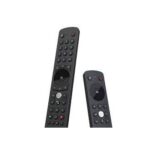
รีโมทคอนโทรล tech4home รุ่น S1 รีโมทคอนโทรลรุ่น S1 วิธีเปิดใช้งาน รีโมทคอนโทรลรุ่น S1 มาพร้อมแบตเตอรี่ AAA 2 ก้อน บรรจุอยู่ในถุงพลาสติก วิธีเปิดใช้งาน…


Tech4home (t4h.) ออกแบบและผลิตนวัตกรรมรีโมทคอนโทรลสำหรับอุตสาหกรรมความบันเทิงภายในบ้าน โดยให้บริการแก่ผู้ให้บริการ IPTV และ Pay-TV ทั่วโลก
เทค4โฮมมักเขียนในรูปแบบนี้ t4h.บริษัทนี้เป็นผู้เล่นสำคัญระดับโลกในการพัฒนาอุปกรณ์และเทคโนโลยีควบคุมระยะไกล โดยมีสำนักงานใหญ่ตั้งอยู่ในประเทศโปรตุเกส บริษัทมีความเชี่ยวชาญในการออกแบบอุปกรณ์ป้อนข้อมูลไร้สายที่ปรับแต่งได้สำหรับผู้ให้บริการ IPTV, เคเบิล, ดาวเทียม และ OTT
ผลิตภัณฑ์ของพวกเขามีตั้งแต่รีโมทอินฟราเรดมาตรฐานไปจนถึงรีโมทบลูทูธพลังงานต่ำ (BLE) ขั้นสูง และรีโมทควบคุมด้วยเสียง แม้ว่า Tech4home จะดำเนินธุรกิจหลักในฐานะพันธมิตรแบบ B2B สำหรับผู้ให้บริการโทรคมนาคม แต่รีโมทคอนโทรลของพวกเขาก็เป็นอุปกรณ์สำคัญในครัวเรือนทั่วโลก โดยมักจะแถมมากับกล่องรับสัญญาณโทรทัศน์เพื่อให้ควบคุมความบันเทิงภายในบ้านได้อย่างราบรื่น
คู่มือล่าสุดจาก manuals+ คัดสรรมาเพื่อแบรนด์นี้




คำถามที่พบบ่อยเกี่ยวกับคู่มือ การลงทะเบียน และการสนับสนุนสำหรับแบรนด์นี้
รีโมท Tech4home ส่วนใหญ่ เช่น รุ่น Main S1 หรือ Notus สามารถใช้งานได้ทันทีหลังจากใส่แบตเตอรี่ หากใช้รุ่น Bluetooth โปรดตรวจสอบให้แน่ใจว่ากล่องรับสัญญาณ (Set-Top Box) เปิดอยู่ และทำตามขั้นตอนการจับคู่เฉพาะที่ระบุไว้ในคู่มือการใช้งาน
โดยทั่วไปแล้ว รีโมทคอนโทรลของ Tech4home ส่วนใหญ่ใช้แบตเตอรี่ AAA 2 ก้อน โปรดตรวจสอบฉลากช่องใส่แบตเตอรี่อีกครั้งเสมอ
ขั้นแรก ตรวจสอบให้แน่ใจว่าได้ใส่แบตเตอรี่ใหม่และถูกต้องแล้ว หากรีโมทใช้บลูทูธ (BLE) ให้ตรวจสอบว่าได้จับคู่กับกล่องรับสัญญาณแล้ว หากเกิดการรบกวน ให้ลองปรับทิศทางกล่องหรือย้ายอุปกรณ์ไร้สายอื่นๆ ออกไป