การแนะนำ
This manual provides essential information for the proper setup, operation, and maintenance of your GOBOULT Mustang Racer Smart Watch. Please read these instructions carefully before using your device to ensure optimal performance and longevity.
มีอะไรอยู่ในกล่อง
Upon unboxing your GOBOULT Mustang Racer Smart Watch, verify that all the following components are present:
- GOBOULT Mustang Racer Smart Watch (Black Blaze)
- สายชาร์จ
- คู่มือการใช้งาน (เอกสารนี้)
- บัตรรับประกัน

Image: The GOBOULT Mustang Racer Smart Watch packaging, showing the watch, charging cable, user manual, and warranty card.
สินค้าเกินview
The GOBOULT Mustang Racer Smart Watch features a robust design with intuitive controls and a vibrant display.
ส่วนประกอบหลัก:
- จอแสดงผล AMOLED ขนาด 1.43 นิ้ว: หน้าจอความละเอียดสูงเพื่อภาพที่คมชัด
- ขอบหมุนได้: A functional bezel for navigating menus and features.
- Paddle Shifter: A unique side button for quick access to functions.
- เซ็นเซอร์: ตั้งอยู่ด้านหลังเพื่อใช้ในการตรวจสอบสุขภาพ
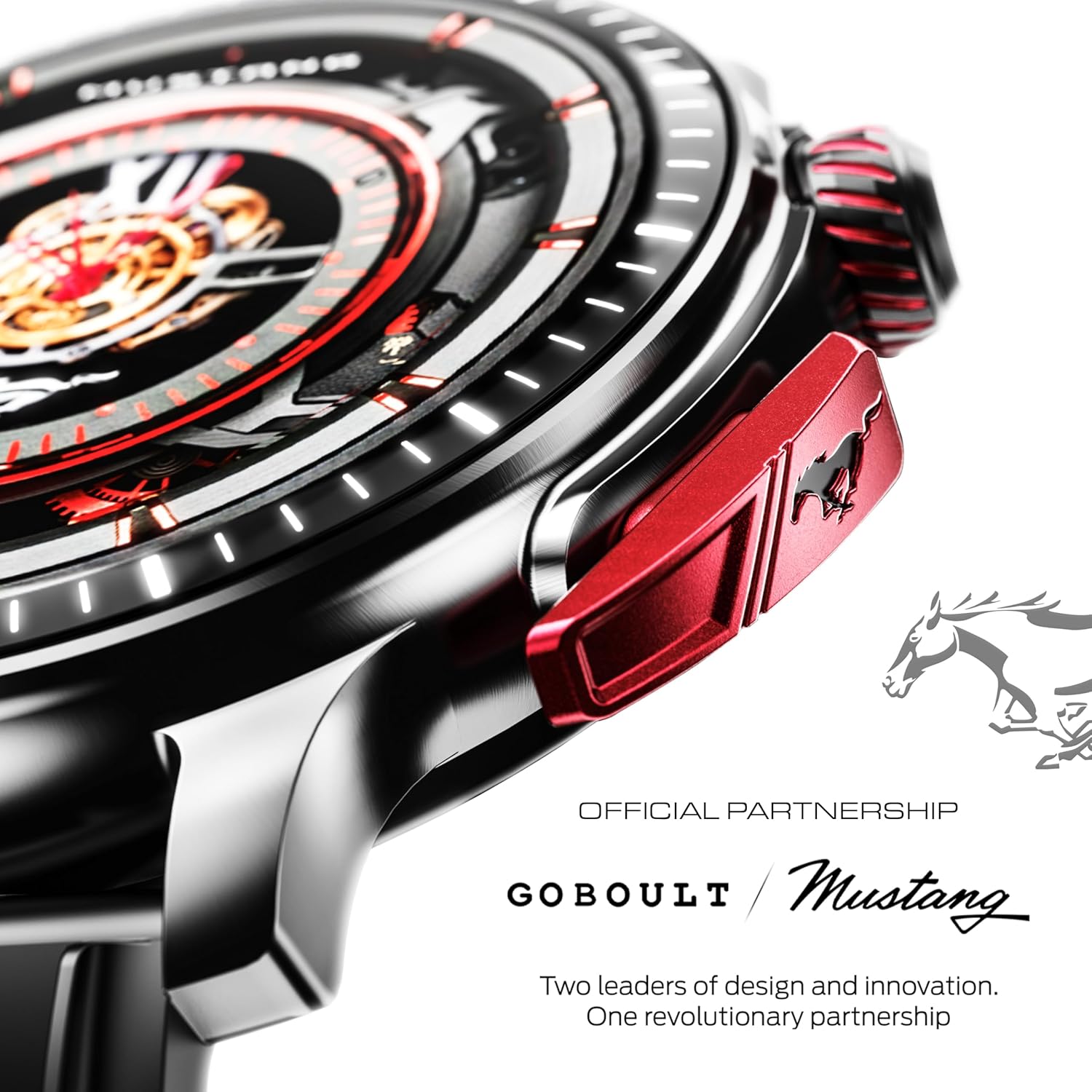
ภาพ: รายละเอียด view of the watch's side, highlighting the red paddle shifter and the textured rotating crown.

Image: The watch face, showcasing the 1.43-inch AMOLED display and the functional paddle shifter.
การตั้งค่า
1. การชาร์จอุปกรณ์
Before initial use, fully charge your smart watch. Connect the provided charging cable to the charging port on the back of the watch and to a standard USB power adapter (not included). A full charge typically takes approximately 120 minutes.
2. การจับคู่กับสมาร์ทโฟนของคุณ
- Download the official GOBOULT companion app from your smartphone's app store.
- ตรวจสอบให้แน่ใจว่าได้เปิดใช้งาน Bluetooth บนสมาร์ทโฟนของคุณแล้ว
- Open the GOBOULT app and follow the on-screen instructions to search for and connect to your Mustang Racer Smart Watch. The watch uses Bluetooth V5.3 for stable connectivity.
- ยืนยันคำขอจับคู่บนนาฬิกาและสมาร์ทโฟนของคุณทั้งสอง

Image: The watch on a wet surface, indicating its Bluetooth V5.3 and IP67 water resistance features.
คำแนะนำการใช้งาน
การโทรด้วยบลูทูธ
The integrated speaker and microphone allow you to make and receive calls directly from your wrist. Once paired with your smartphone, access the call function through the watch interface.
การปรับแต่งหน้าปัดนาฬิกา
Your Mustang Racer Smart Watch offers over 150 watch faces, including exclusive Mustang-themed designs. You can change watch faces through the watch settings or the companion app to match your style.

Image: Various watch faces displayed on the GOBOULT Mustang Racer Smart Watch, demonstrating customization options.
โหมดกีฬา
Track your physical activities with over 120 performance sports modes. Select your desired sport from the watch menu to monitor metrics such as steps, distance, calories burned, and heart rate during your workout.

Image: The watch on a wrist, displaying the sports mode interface.
AI ผู้ช่วยเสียง
Utilize the integrated AI Voice Assistant for hands-free control. Activate the assistant through the watch interface and issue commands for various functions.
แสดงผลตลอดเวลา (AOD)
The Always On Display feature allows the watch face to remain visible at a low power state, providing continuous time and information without needing to raise your wrist or press a button.

Image: The watch face with Always On Display enabled, showing continuous time display.
คุณสมบัติการติดตามสุขภาพ
The GOBOULT Mustang Racer Smart Watch is equipped with advanced sensors to monitor various health metrics:
- 24x7 Heart Rate Monitor: ตรวจสอบอัตราการเต้นของหัวใจอย่างต่อเนื่องตลอดทั้งวันและระหว่างออกกำลังกาย
- เครื่องวัดความอิ่มตัวของออกซิเจนในเลือด (SpO2): ตรวจวัดระดับออกซิเจนในเลือดของคุณ
- การติดตามการนอนหลับ: วิเคราะห์รูปแบบการนอนหลับของคุณ รวมถึงการนอนหลับลึก การนอนหลับตื้น และช่วงเวลาที่ตื่น
- การตรวจวัดความดันโลหิต: ให้ค่าประมาณระดับความดันโลหิตของคุณ
- เครื่องตรวจวัดความเครียด: ช่วยให้คุณเข้าใจและจัดการระดับความเครียดของคุณ
Access detailed health data and trends through the companion app.

Image: The back of the watch, displaying the health monitoring sensors.
ข้อมูลจำเพาะ
| คุณสมบัติ | ข้อมูลจำเพาะ |
|---|---|
| ยี่ห้อ | โกบูลท์ |
| หมายเลขรุ่น | GOBOULT Mustang Racer |
| ขนาดจอแสดงผล | หน้าจอ AMOLED ขนาด 1.43 นิ้ว |
| ประเภทไร้สาย | บลูทูธ V5.3 |
| เวลาในการชาร์จแบตเตอรี่ | 120 นาที |
| ปริมาณพลังงานแบตเตอรี่ | 1.11 วัตต์ชั่วโมง |
| ความต้านทานต่อน้ำ | IP67 |
| น้ำหนักสินค้า | 55 กรัม |
| ส่วนประกอบที่รวมอยู่ | Charging Cable, Smart Watch, User Manual, Warranty Card |
การซ่อมบำรุง
การทำความสะอาด
Regularly clean your watch and strap with a soft, dry cloth. For stubborn dirt, lightly dampชุบผ้าด้วยน้ำ หลีกเลี่ยงการใช้สารเคมีรุนแรงหรือวัสดุที่มีฤทธิ์กัดกร่อน
ความต้านทานต่อน้ำ
The GOBOULT Mustang Racer Smart Watch is IP67 water resistant, meaning it can withstand immersion in up to 1 meter of water for 30 minutes. It is suitable for daily use and can resist splashes and sweat. However, it is not recommended for swimming, diving, or exposure to high-pressure water.
การดูแลแบตเตอรี่
To prolong battery life, avoid fully discharging the watch frequently. Charge it when the battery level is low, and avoid leaving it uncharged for extended periods.
การแก้ไขปัญหา
นาฬิกาไม่เปิด
- ตรวจสอบให้แน่ใจว่านาฬิกาชาร์จเต็มแล้ว เสียบนาฬิกาเข้ากับสายชาร์จและปล่อยให้ชาร์จอย่างน้อย 30 นาที
- กดปุ่มเปิด/ปิดค้างไว้หลายวินาที
ไม่สามารถจับคู่กับสมาร์ทโฟนได้
- Verify that Bluetooth is enabled on your smartphone and the watch.
- Ensure the watch is within the Bluetooth range of your smartphone.
- รีสตาร์ททั้งสมาร์ทโฟนและสมาร์ทวอทช์ของคุณ
- Clear the Bluetooth cache on your smartphone and try pairing again.
ข้อมูลสุขภาพที่ไม่ถูกต้อง
- ตรวจสอบให้แน่ใจว่าสวมนาฬิกาให้พอดีกับข้อมือ แต่ไม่แน่นเกินไป
- ทำความสะอาดเซ็นเซอร์ที่ด้านหลังของนาฬิกา
- หลีกเลี่ยงการเคลื่อนไหวมากเกินไปในระหว่างการวัด
ปัญหาการแสดงผล
- รีสตาร์ทนาฬิกา
- Adjust the brightness settings.
การรับประกันและการสนับสนุน
Your GOBOULT Mustang Racer Smart Watch comes with a warranty. Please refer to the included Warranty Card for details regarding coverage, terms, and conditions.
หากต้องการความช่วยเหลือเพิ่มเติม การสนับสนุนทางเทคนิค หรือการเรียกร้องการรับประกัน โปรดติดต่อฝ่ายบริการลูกค้าของ GOBOULT ผ่านช่องทางอย่างเป็นทางการ webไซต์หรือข้อมูลการติดต่อที่ให้ไว้ในบัตรรับประกันของคุณ