1. บทนำ
This manual provides comprehensive instructions for the setup, operation, and maintenance of your GOBOULT Mustang Racer Smart Watch. Please read this manual thoroughly before using the device to ensure proper functionality and to maximize your user experience. Keep this manual for future reference.
2. อะไรอยู่ในกล่อง
ตรวจสอบว่ามีรายการทั้งหมดอยู่ในแพ็คเกจ:
- GOBOULT Mustang Racer Smart Watch
- สายชาร์จ
- คู่มือการใช้งาน (เอกสารนี้)
- บัตรรับประกัน
3. สินค้าหมดview
Familiarize yourself with the key components of your GOBOULT Mustang Racer Smart Watch.
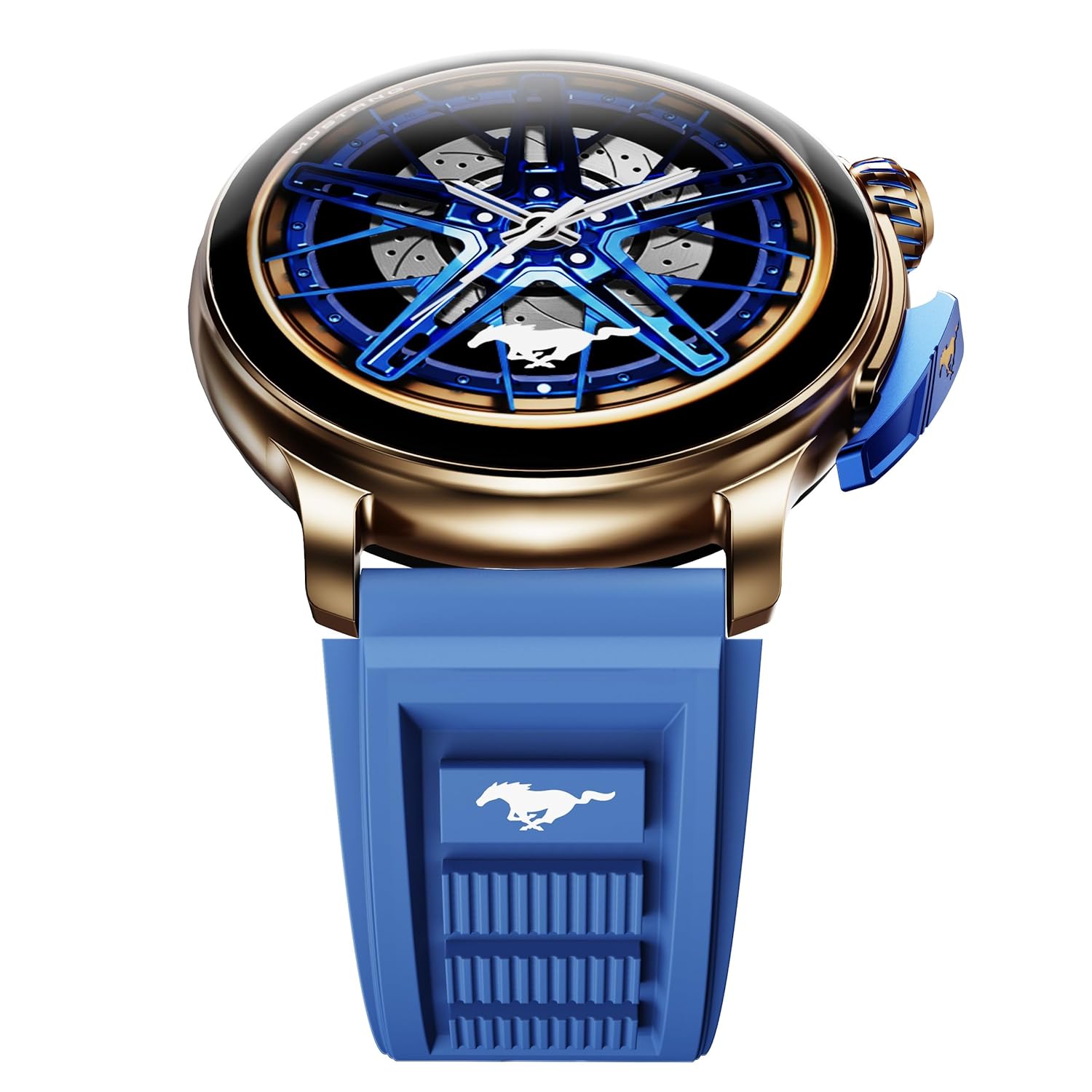
Image: The GOBOULT Mustang Racer Smart Watch, showcasing its 1.43-inch AMOLED display and overall design.
Display and Bezel
The watch features a 1.43-inch AMOLED display with 500 Nits brightness for clear visibility. The functional rotating bezel allows for intuitive navigation through menus and features.

ภาพ: รายละเอียด view of the smartwatch's 1.43-inch AMOLED display and the rotating bezel, highlighting its design and brightness.
กระดุมและมงกุฎ
The watch includes a rotating tyre-tread crown for navigation and selection, along with a functional paddle shifter button for quick access to features.

Image: The smartwatch featuring its functional paddle shifter and rotating crown, designed for enhanced control.
4. การตั้งค่า
4.1. การชาร์จสมาร์ทวอทช์
Before initial use, fully charge your smartwatch. Connect the magnetic charging cable to the charging pins on the back of the watch and plug the USB end into a compatible power adapter (not included) or a computer's USB port. The watch will display a charging indicator. A full charge takes approximately 120 minutes.
4.2. การเปิด/ปิดเครื่อง
- เปิดเครื่อง: Press and hold the main power button (crown) for a few seconds until the GOBOULT logo appears.
- หมดแรง: From the watch face, swipe down to access quick settings, or navigate to the settings menu. Select "Power Off" and confirm. Alternatively, press and hold the main power button until the power-off option appears.
4.3. การจับคู่กับสมาร์ทโฟนของคุณ
To unlock all features, pair your GOBOULT Mustang Racer Smart Watch with the companion app on your smartphone via Bluetooth.
- Download the official GOBOULT app from your smartphone's app store (iOS App Store or Google Play Store).
- ตรวจสอบให้แน่ใจว่าได้เปิดใช้งาน Bluetooth บนสมาร์ทโฟนของคุณแล้ว
- เปิดแอป GOBOULT และทำตามคำแนะนำบนหน้าจอเพื่อสร้างบัญชีหรือเข้าสู่ระบบ
- In the app, select "Add Device" or similar option.
- Select "GOBOULT Mustang Racer" from the list of available devices.
- ยืนยันคำขอจับคู่บนสมาร์ทโฟนและสมาร์ทวอทช์ของคุณทั้งคู่
เมื่อจับคู่แล้ว นาฬิกาจะซิงโครไนซ์ข้อมูลกับโทรศัพท์ของคุณ และคุณสามารถปรับแต่งการตั้งค่าผ่านแอปได้

Image: The smartwatch highlighting its Bluetooth V5.3 connectivity for quick syncing and IP67 water resistance.
5. คู่มือการใช้งาน
5.1. การนำทาง
- ปัดขึ้น/ลง/ซ้าย/ขวา: Navigate through menus, notifications, and quick access panels.
- แตะ: เลือกสินค้าหรือยืนยันการดำเนินการ
- Rotating Bezel/Crown: Rotate to scroll through lists or adjust settings. Press to select or return to the home screen.
- Paddle Shifter Button: Customizable shortcut for frequently used functions (e.g., sports modes).
5.2. การโทรผ่านบลูทูธ
With integrated speaker and microphone, you can make and receive calls directly from your wrist after pairing with your smartphone.
- ตรวจสอบให้แน่ใจว่านาฬิกาของคุณเชื่อมต่อกับโทรศัพท์ของคุณผ่านบลูทูธ
- To make a call: Access the dialer or contacts list on your watch.
- To receive a call: An incoming call notification will appear on your watch. Tap to answer or decline.
5.3. หน้าปัดนาฬิกา
Customize your watch's appearance with over 150 watch faces, including exclusive Mustang designs. Long-press the watch face to change it, or use the companion app for more options.

ภาพ: สมาร์ทวอทช์ที่จัดแสดงasing multiple watch face options, including exclusive Mustang designs.
5.4. โหมดกีฬา
The watch supports over 120 sports modes to track your physical activities. Access sports modes from the main menu or via the paddle shifter shortcut (if configured).
- Select your desired sport.
- Start the activity. The watch will record metrics such as duration, calories burned, and heart rate.
- End the activity to save data. Review your performance in the app.

Image: The smartwatch displaying a sports tracking interface, indicating its capability to monitor various physical activities.
5.5. การติดตามสุขภาพ
The GOBOULT Mustang Racer Smart Watch provides comprehensive health tracking features:
- 24x7 Heart Rate Monitor: ตรวจสอบอัตราการเต้นของหัวใจอย่างต่อเนื่อง
- เครื่องวัดความอิ่มตัวของออกซิเจนในเลือด (SpO2): วัดระดับออกซิเจนในเลือด
- การติดตามการนอนหลับ: Analyzes sleep patterns (deep sleep, light sleep, awake time).
- เครื่องตรวจวัดความเครียด: ให้ข้อมูลเชิงลึกเกี่ยวกับระดับความเครียดของคุณ
- ความดันโลหิต: (Note: Smartwatch blood pressure measurements are for reference only and should not be used for medical diagnosis.)
Access these features from the watch's health menu or view detailed reports in the companion app.

ภาพ: ภายใน view of the smartwatch highlighting its health tracking sensors, with text indicating features like heart rate, SpO2, sleep, and stress monitoring.
5.6. ผู้ช่วยเสียง AI
Activate the AI Voice Assistant on your watch to perform tasks, set reminders, or get information using voice commands. Ensure your watch is connected to your phone for this feature to function.
5.7. การแจ้งเตือนอัจฉริยะ
Receive notifications for calls, messages, and app alerts directly on your watch. Manage notification settings through the GOBOULT app.
5.8. Always On Display
The Always On Display feature allows the time and essential information to remain visible on the screen without needing to raise your wrist or press a button. This feature can be enabled or disabled in the watch settings to manage battery consumption.

Image: The smartwatch displaying the time and a car image, illustrating the Always On Display functionality.
6. คุณสมบัติและข้อมูลจำเพาะ
คุณสมบัติหลัก:
- 1.43" AMOLED Display with 500 Nits Brightness
- Bluetooth Calling (BT V5.3)
- Rotating Bezel for intuitive control
- 150+ Watch Faces, including exclusive Mustang designs
- AI ผู้ช่วยเสียง
- Health Monitoring: SpO2, Heart Rate, Sleep, Stress, Blood Pressure
- 120+ โหมดกีฬา
- ทนน้ำระดับ IP67
- Up to 7-day battery runtime with fast charging
ข้อมูลจำเพาะทางเทคนิค:
| ยี่ห้อ | โกบูลท์ |
| หมายเลขรุ่น | GOBOULT Mustang Racer |
| ขนาดจอแสดงผล | 1.43 นิ้ว |
| ประเภทไร้สาย | บลูทูธ V5.3 |
| เวลาในการชาร์จแบตเตอรี่ | 120 นาที |
| ปริมาณพลังงานแบตเตอรี่ | 1.11 วัตต์ชั่วโมง |
| ความต้านทานต่อน้ำ | IP67 |
| น้ำหนักสินค้า | 55 กรัม |
| ประเทศต้นกำเนิด | จีน |
7. การบำรุงรักษา
7.1. การทำความสะอาดสมาร์ทวอทช์ของคุณ
การทำความสะอาดเป็นประจำจะช่วยรักษารูปลักษณ์และการทำงานของนาฬิกา:
- เช็ดหน้าจอและตัวเครื่องด้วยผ้าที่ไม่เป็นขุยและนุ่ม
- สำหรับรอยเปื้อนฝังแน่น ให้เช็ดออกเล็กน้อยampชุบผ้าด้วยน้ำ หลีกเลี่ยงการใช้สารเคมีรุนแรงหรือวัสดุที่มีฤทธิ์กัดกร่อน
- Clean the charging contacts periodically with a dry cloth to ensure proper charging.
7.2. ความทนทานต่อน้ำ (IP67)
The GOBOULT Mustang Racer Smart Watch is IP67 water resistant, meaning it can withstand immersion in up to 1 meter of fresh water for up to 30 minutes. It is suitable for daily use and light splashes. However, it is not recommended for swimming, showering with hot water, or diving. Avoid exposure to saltwater or chemicals, as this may damage the device.
7.3. การดูแลแบตเตอรี่
- หลีกเลี่ยงการปล่อยแบตเตอรี่จนหมดบ่อยครั้ง
- เก็บนาฬิกาไว้ในที่แห้งและเย็นเมื่อไม่ได้ใช้งานเป็นเวลานาน
- ใช้เฉพาะสายชาร์จที่ให้มาเท่านั้น
8 การแก้ไขปัญหา
| ปัญหา | วิธีแก้ปัญหาที่เป็นไปได้ |
|---|---|
| นาฬิกาไม่เปิดใช้งาน | ตรวจสอบให้แน่ใจว่านาฬิกาชาร์จเต็มแล้ว เสียบนาฬิกาเข้ากับเครื่องชาร์จอย่างน้อย 30 นาที |
| ไม่สามารถจับคู่กับสมาร์ทโฟนได้ |
|
| ข้อมูลสุขภาพที่ไม่ถูกต้อง |
|
| แบตเตอรี่มีอายุสั้น |
|
9. การรับประกันและการสนับสนุน
Your GOBOULT Mustang Racer Smart Watch comes with a warranty as specified on the included Warranty Card. Please refer to the card for details regarding warranty period, coverage, and terms and conditions.
For technical support, product inquiries, or warranty claims, please contact GOBOULT customer service through the contact information provided on your Warranty Card or visit the official GOBOULT webเว็บไซต์.
ส่วนประกอบที่รวมอยู่: Charging Cable, Mustang Racer Apex Blue Smart watch, User Manual, Warranty Card


