การแนะนำ
This manual provides essential instructions for the setup, operation, and maintenance of your ECOVACS GOAT A2000 LiDAR PRO Robotic Lawn Mower. Please read this manual thoroughly before using the product to ensure safe and efficient operation.
The ECOVACS GOAT A2000 LiDAR PRO is a wire-free robotic lawn mower designed for automated lawn care, featuring advanced LiDAR navigation, integrated edge trimming, and smart app control.
การตั้งค่า
1. การแกะกล่องและการวางตำแหน่งเริ่มต้น
Carefully remove all components from the packaging. Place the charging station in a suitable outdoor location with access to power and a clear signal area for the mower.
2. Charging the Mower
Position the GOAT A2000 LiDAR PRO onto its charging station. Ensure proper contact for charging. The mower is equipped with a 3.0Ah battery and 113.4W fast charging, typically recharging in approximately 50 minutes.
3. การติดตั้งและการจับคู่แอป
Download the ECOVACS app from your device's app store. Follow the in-app instructions to pair your GOAT A2000 LiDAR PRO with your smartphone. This enables smart control and mapping functions.
4. Yard Mapping with LiDAR Navigation
The GOAT A2000 LiDAR PRO utilizes a HoloScope 360° Dual-LiDAR system for automatic yard mapping. Initiate the mapping process through the ECOVACS app. The system provides precise 2 cm positioning, even in areas with obstructions like trees or fences.
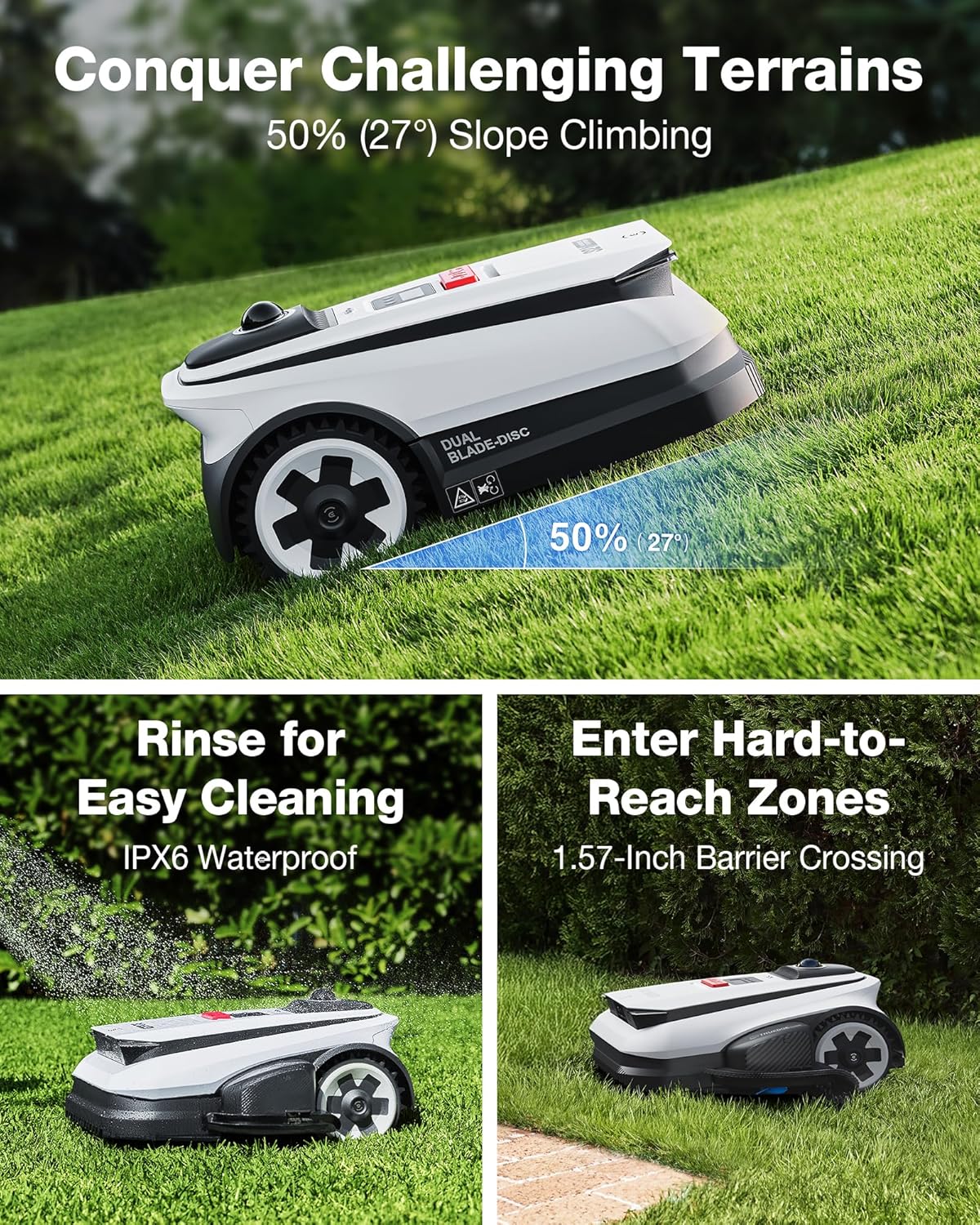
Image: The ECOVACS GOAT A2000 LiDAR PRO using its HoloScope 360 Dual-LiDAR system for precise yard mapping, demonstrating instant setup and 0.8-inch positioning accuracy.
During mapping, the mower identifies the boundaries of your lawn. You can then use the app to define multiple mowing zones, set no-go areas, and customize travel paths between zones.
คำแนะนำการใช้งาน
1. Starting and Stopping Mowing
To start a mowing session, use the ECOVACS app or the physical controls on the mower. To stop, press the designated stop button on the mower or use the app. The mower will return to its charging station when a session is complete or the battery is low.
2 การควบคุมและการปรับแต่งแอปพลิเคชัน
The ECOVACS app allows for comprehensive control:
- Mowing Zones: Create and manage specific areas for mowing.
- No-Go Areas: Designate zones the mower should avoid.
- แม็กซ์ตัดสูง: Adjust the cutting height between 1.2 inches and 3.5 inches.
- Mowing Schedules: Set customized schedules for automated mowing.
- ความเร็วในการตัดหญ้า: Adjust the operational speed as needed.
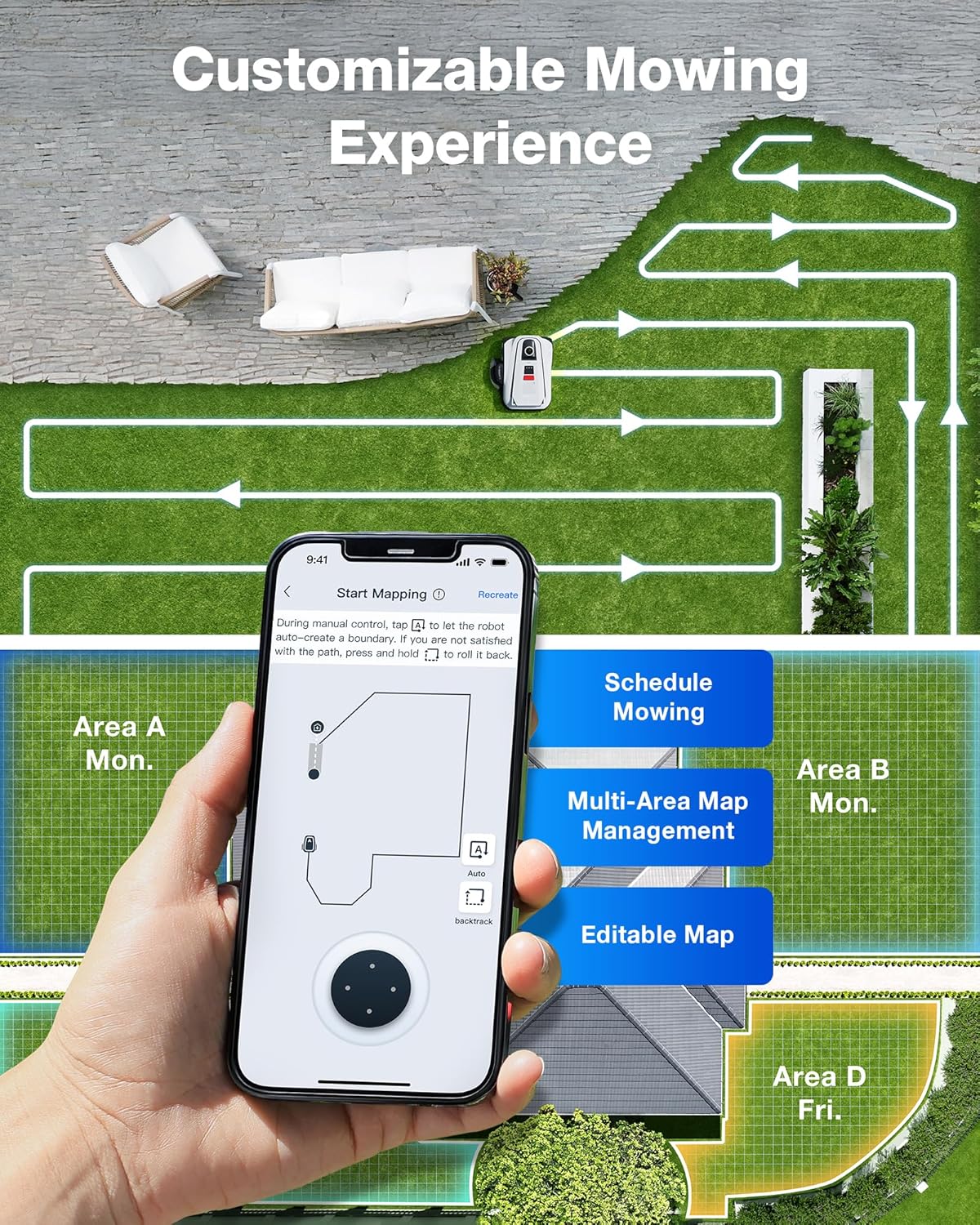
Image: The ECOVACS GOAT A2000 LiDAR PRO's cutting deck with dual gap-free blades, illustrating its ability to mow up to 0.5 acre in 10 hours and offering an adjustable cutting height range of 1.2 to 3.5 inches.

Image: The ECOVACS GOAT A2000 LiDAR PRO demonstrating its 113.4W fast charging capability and a mowing speed of 2.3 feet per second, minimizing downtime.
3. TruEdge Edge Trimming
The integrated TruEdge trimmer allows the GOAT A2000 LiDAR PRO to trim along driveways, sidewalks, flower beds, and irregular lawn borders, reducing the need for manual string trimming.
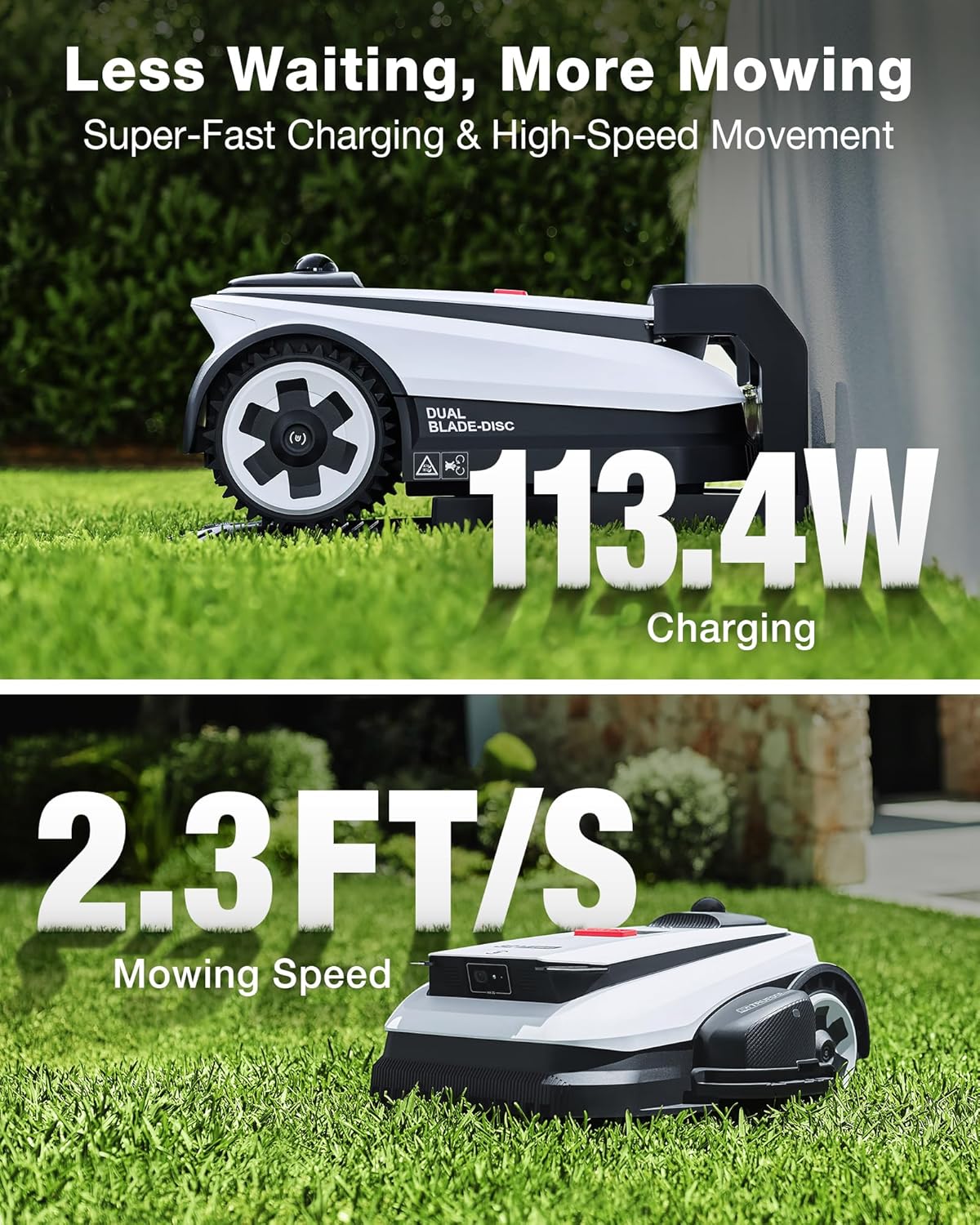
Image: The ECOVACS GOAT A2000 LiDAR PRO showcasing its built-in TruEdge trimmer, designed for precise edge-to-edge cutting without manual intervention.
4. การหลีกเลี่ยงสิ่งกีดขวาง
Equipped with AI Vision and 3D ToF LiDAR, the mower accurately identifies and navigates around over 200 types of obstacles, including toys, patio furniture, pets, and small wildlife. It maintains a safe clearance of 5 cm around objects.
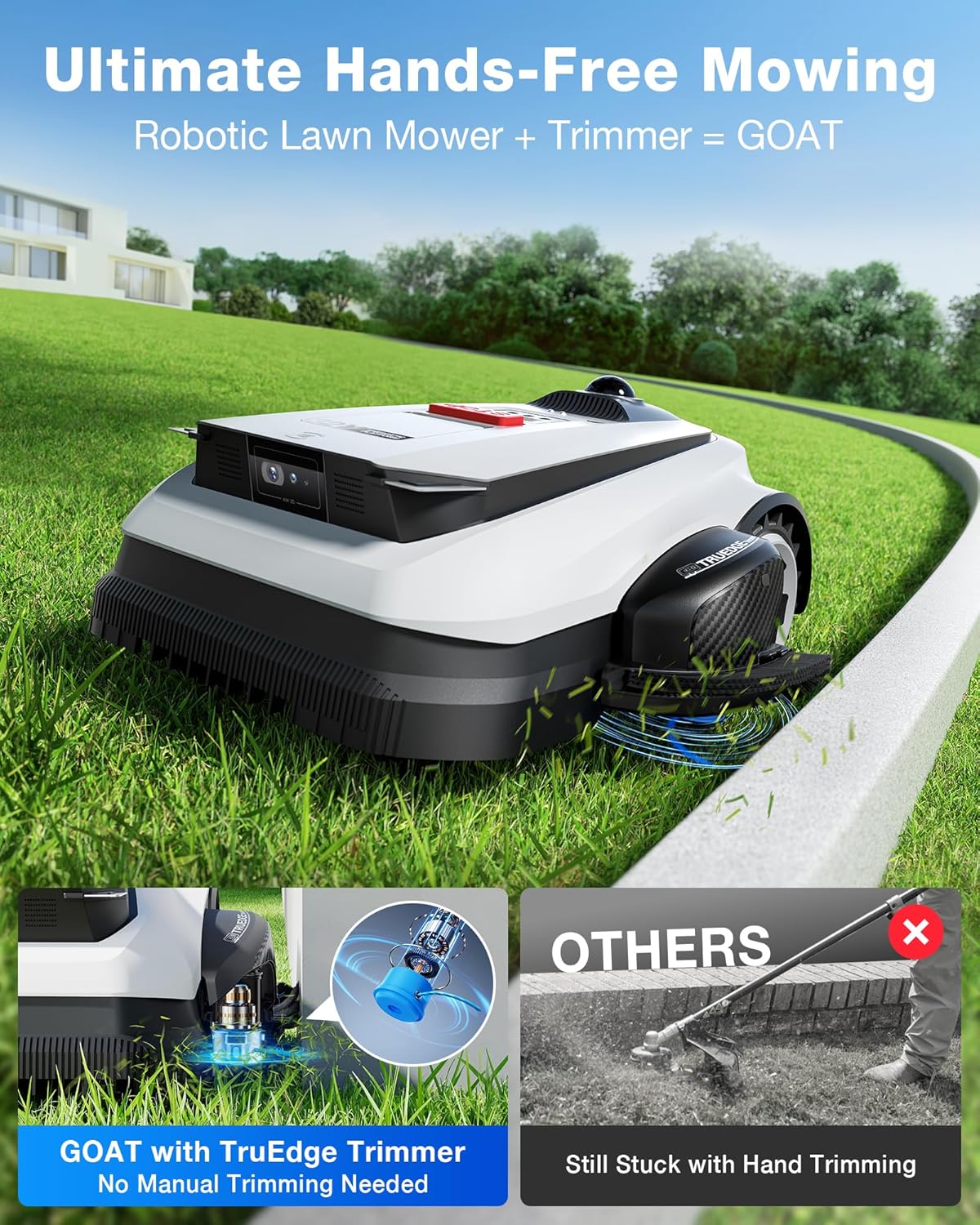
Image: The ECOVACS GOAT A2000 LiDAR PRO demonstrating its AIVI 3D Obstacle Avoidance system, detecting and navigating around objects like a hedgehog and a garden hose.
5. Mowing Performance
The 32V motor and dual-blade disc system provide strong cutting torque for dense, fast-growing grass and uneven terrain. The mower is designed to handle various grass types, including Bermuda, Zoysia, Fescue, and St. Augustine grass.

ภาพ: ด้านข้าง view of the ECOVACS GOAT A2000 LiDAR PRO, highlighting its robust design and ability to navigate various terrains.

ภาพ: ด้านหลัง view of the ECOVACS GOAT A2000 LiDAR PRO, showing its sturdy wheels and overall construction.
การซ่อมบำรุง
1. การทำความสะอาด
The GOAT A2000 LiDAR PRO is IPX6 waterproof, allowing for easy cleaning with water. Regularly clean the cutting deck, wheels, and sensors to ensure optimal performance. Remove any grass clippings or debris that may accumulate.
2. Blade Inspection and Replacement
Periodically inspect the cutting blades for wear or damage. Dull or damaged blades can affect cutting quality. Replace blades as needed, following the instructions provided in the full product manual or on the ECOVACS support webเว็บไซต์.
3. การดูแลแบตเตอรี่
To prolong battery life, ensure the mower is stored in a cool, dry place when not in use for extended periods. Fully charge the battery before long-term storage and recharge it periodically if stored for several months.
การแก้ไขปัญหา
If you encounter issues with your ECOVACS GOAT A2000 LiDAR PRO, consider the following general troubleshooting steps:
- Mower Not Starting: Ensure the battery is charged and properly seated. Check for any error messages on the mower or in the app.
- ปัญหาการนำทาง: Verify that the LiDAR sensors are clean and unobstructed. Ensure the mapping process was completed successfully and that no-go zones are correctly defined.
- ประสิทธิภาพการตัดที่ไม่ดี: Inspect the blades for sharpness and damage. Clean the cutting deck of any accumulated grass.
- ปัญหาการเชื่อมต่อแอพ: Ensure your smartphone's Bluetooth and Wi-Fi are enabled and that the mower is within range. Restart both the app and the mower if necessary.
- ปัญหาการชาร์จไฟ: Check the connection between the mower and the charging station. Ensure the charging station has power.
For more detailed troubleshooting guides and specific error codes, refer to the comprehensive user manual available on the ECOVACS support webเว็บไซต์.
ข้อมูลจำเพาะ
| ยี่ห้อ | อีโคแวคส์ |
| หมายเลขรุ่น | GOAT A2000 LiDAR PRO |
| แหล่งพลังงาน | Battery Powered (32V Platform) |
| ความจุของแบตเตอรี่ | 3.0อา |
| กำลังชาร์จ | ชาร์จเร็ว 113.4W |
| เวลาในการชาร์จ | ประมาณ 50 นาที |
| ระบบนำทาง | HoloScope 360° Dual-LiDAR |
| ความแม่นยำในการวางตำแหน่ง | 2 ซม. |
| การหลีกเลี่ยงอุปสรรค | AI Vision and 3D ToF LiDAR |
| Obstacle Detection Precision | Down to 5 cm |
| ความกว้างในการตัด | 3.6 นิ้ว |
| การปรับความสูงในการตัด | 1.2 - 3.5 นิ้ว |
| Mowing Speed | 2.3 ฟุต/วินาที |
| ระดับการกันน้ำ | IPX6 |
| ขนาดสินค้า (กว้าง x ยาว x สูง) | 76.81 x 43.15 x 57.99 ซม. |
| น้ำหนักผลิตภัณฑ์ | 26.76 กก. |
| วัสดุ | พลาสติก |
| สี | สีขาว |
| ยูพีซี | 850077202339 |
การรับประกันและการสนับสนุน
สำหรับข้อมูลการรับประกันโดยละเอียด โปรดดูบัตรรับประกันที่รวมอยู่ในผลิตภัณฑ์ของคุณหรือเยี่ยมชม ECOVACS อย่างเป็นทางการ webไซต์ เงื่อนไขการรับประกันอาจแตกต่างกันไปในแต่ละภูมิภาค
For technical support, customer service, or to purchase replacement parts, please visit the ECOVACS support page or contact their customer service directly. Contact information can typically be found on the ECOVACS official webเว็บไซต์: www.ecovacs.com


