1. ข้อมูลด้านความปลอดภัยที่สำคัญ
Please read all safety and operating instructions carefully before using this television. Keep this manual for future reference.
- แหล่งพลังงาน: Connect the TV only to a power supply as indicated on the rating label.
- การระบายอากาศ : ตรวจสอบให้แน่ใจว่ามีการระบายอากาศที่เหมาะสม อย่าปิดกั้นช่องระบายอากาศ
- น้ำและความชื้น: อย่าให้ทีวีโดนฝนหรือความชื้น อย่าวางวัตถุที่บรรจุของเหลวไว้บนทีวี
- ความร้อน: ควรวางโทรทัศน์ให้ห่างจากแหล่งความร้อน เช่น เครื่องทำความร้อน ช่องระบายความร้อน เตา หรือเครื่องใช้ไฟฟ้าอื่นๆ ที่ให้ความร้อน
- การทำความสะอาด: ถอดปลั๊กทีวีออกจากเต้ารับที่ผนังก่อนทำความสะอาด ใช้ผ้านุ่มและแห้ง ห้ามใช้น้ำยาทำความสะอาดชนิดน้ำหรือสเปรย์ทำความสะอาด
- การบริการ: อย่าพยายามให้บริการผลิตภัณฑ์นี้ด้วยตนเอง ส่งต่อการบริการทั้งหมดไปยังช่างบริการที่ผ่านการรับรอง
2. การติดตั้งและการประกอบ
2.1 การแกะกล่องทีวี
Carefully remove the TV and all accessories from the packaging. Ensure all components listed below are present.
ส่วนประกอบที่รวมอยู่:
- Blaupunkt 32-inch HD LED TV
- รีโมทคอนโทรล
- สายไฟ
- ชั้นวางทีวี (2 ชิ้น)
- สกรูสำหรับชุดขาตั้ง
- คู่มือการใช้งาน (เอกสารนี้)
- บัตรรับประกัน
2.2 การติดตั้งขาตั้งทีวี
To attach the stand, place the TV face down on a soft, flat surface to prevent screen damage. Align each stand piece with the corresponding slots on the bottom of the TV and secure them with the provided screws.
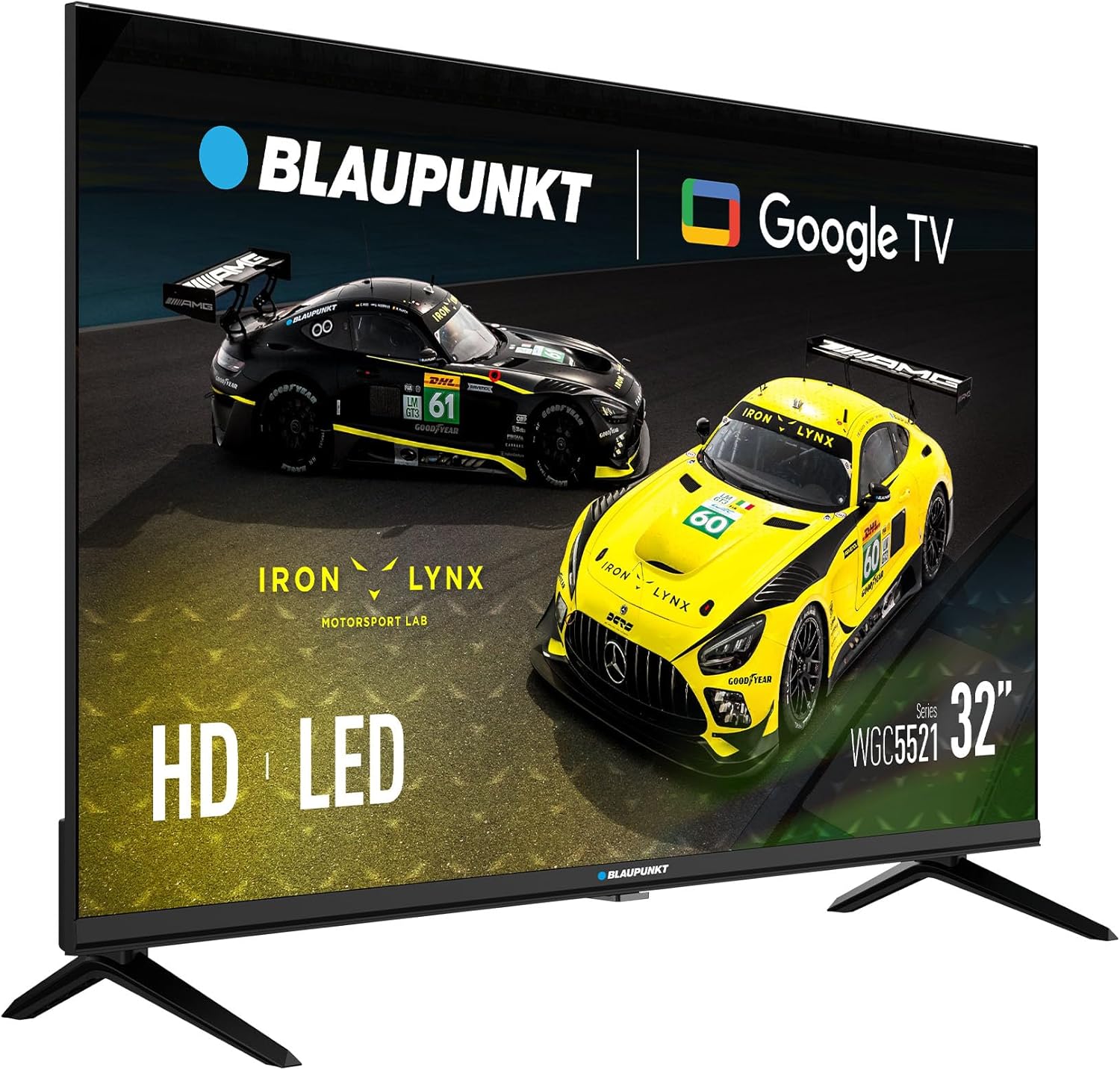
ภาพ: ด้านหน้า view of the Blaupunkt 32-inch HD LED TV with its stand attached, ready for use.
2.3 การติดตั้งบนผนัง (ทางเลือก)
This TV supports VESA 100x100mm wall mounts. Ensure you use a compatible wall mount kit (sold separately) and follow the instructions provided with the wall mount. Remove the stand before wall mounting.

ภาพ: ด้านหลัง view of the Blaupunkt 32-inch HD LED TV, highlighting the VESA mounting points for wall installation.
3. การเชื่อมต่อ
ก่อนทำการเชื่อมต่อใดๆ โปรดตรวจสอบให้แน่ใจว่าทีวีและอุปกรณ์ภายนอกทั้งหมดปิดอยู่และถอดปลั๊กออกจากเต้ารับแล้ว
3.1 การเชื่อมต่อสายไฟ
เชื่อมต่อสายไฟที่ให้มากับช่องเสียบสายไฟของทีวี แล้วเสียบเข้ากับเต้ารับที่ผนัง
3.2 Antenna/Cable/Satellite Connection
- DVB-T2 (Terrestrial): Connect a terrestrial antenna cable to the 'ANT IN' port.
- DVB-S2 (Satellite): Connect a satellite dish cable to the 'SAT IN' port.
- DVB-C (Cable): Connect a cable TV signal to the 'ANT IN' port.
3.3 การเชื่อมต่อ HDMI
Connect external devices such as Blu-ray players, game consoles, or set-top boxes to the HDMI ports (HDMI1, HDMI2) using HDMI cables.
3.4 การเชื่อมต่อ USB
Insert a USB storage device into the USB port to play media files (ภาพถ่าย เพลง วิดีโอ)
สล็อต 3.5 CI
Insert a Conditional Access Module (CAM) and smart card (provided by your service provider) into the CI Slot to access encrypted digital channels.

ภาพ: ด้านข้าง view of the Blaupunkt 32-inch HD LED TV, illustrating the various input and output ports including HDMI and USB.

ภาพ: ด้านหลังเอียง view of the Blaupunkt 32-inch HD LED TV, providing a clearer look at the rear-facing connection ports.
4. คู่มือการใช้งาน
4.1 ตัวช่วยการตั้งค่าเริ่มต้น
After connecting the power cable and turning on the TV for the first time, the Initial Setup Wizard will guide you through the basic settings:
- เลือกภาษา: Choose your preferred language for the TV menu.
- การเชื่อมต่อเครือข่าย: Connect the TV to your Wi-Fi network to access Google TV features and online content.
- การตั้งค่าบัญชี Google: Sign in with your Google account to personalize your experience, download apps, and access Google services.
- การสแกนช่อง: The TV will automatically scan for available digital channels (DVB-T2/S2/C) based on your connection.
4.2 ฟังก์ชั่นการควบคุมระยะไกล
รีโมตคอนโทรลช่วยให้คุณสามารถใช้งานฟังก์ชั่นต่างๆ ของทีวีได้:
- ปุ่มเปิด/ปิด: เปิดหรือปิดทีวี
- ระดับเสียง +/-: ปรับระดับเสียง
- ช่อง +/-: เปลี่ยนช่องทีวี
- อินพุต/แหล่งที่มา: Selects the input source (HDMI1, HDMI2, TV, USB).
- ปุ่มนำทาง: Use arrow keys to move through menus and 'OK' to confirm selections.
- ปุ่มโฮม: เข้าถึงหน้าจอหลักของ Google TV
- ปุ่มแอป: ปุ่มเฉพาะสำหรับบริการสตรีมมิ่งยอดนิยม (หากมี)
4.3 อินเทอร์เฟซ Google TV
The Google TV interface provides access to streaming apps, live TV, and personalized recommendations. Navigate using the remote control to explore content.
4.4 การเล่นสื่อผ่าน USB
ใส่ไดรฟ์ USB ที่มีสื่อ files. The TV will prompt you to open the media player, or you can access it from the Google TV home screen. Supported formats include common photo, music, and video files.
4.5 การตั้งค่าภาพและเสียง
Access the TV's settings menu to adjust picture and sound preferences:
- โหมดภาพ: Choose from presets like Standard, Dynamic, Movie, or customize settings for Brightness, Contrast, Color, and Sharpness. The TV supports HDR for enhanced contrast and color.
- โหมดเสียง: Select from presets like Standard, Music, Movie, or Speech. The TV features Dolby Audio for an immersive sound experience.
5. การบำรุงรักษา
5.1 การทำความสะอาดทีวี
ควรถอดปลั๊กทีวีทุกครั้งก่อนทำความสะอาด
- หน้าจอ: เช็ดหน้าจอเบาๆ ด้วยผ้านุ่มที่ไม่เป็นขุย สำหรับรอยฝังแน่น ให้เช็ดเบาๆampเทน้ำหรือน้ำยาทำความสะอาดหน้าจอชนิดพิเศษลงบนผ้า (อย่าฉีดลงบนหน้าจอโดยตรง)
- คณะรัฐมนตรี: เช็ดตู้ทีวีด้วยผ้าแห้งนุ่มๆ หลีกเลี่ยงการใช้สารทำความสะอาดที่มีฤทธิ์กัดกร่อน แว็กซ์ หรือตัวทำละลาย
5.2 Power Off Procedures
To completely power off the TV, press the power button on the remote control or the TV itself, then unplug the power cable from the wall outlet.
6 การแก้ไขปัญหา
หากคุณพบปัญหา โปรดดูปัญหาและวิธีแก้ไขที่พบบ่อยต่อไปนี้ก่อนติดต่อฝ่ายสนับสนุน
| ปัญหา | วิธีแก้ปัญหาที่เป็นไปได้ |
|---|---|
| ไม่มีไฟฟ้า | Ensure the power cable is securely connected to the TV and the wall outlet. Check if the wall outlet is working. |
| ไม่มีภาพแต่มีเสียง | ตรวจสอบแหล่งสัญญาณเข้า ตรวจสอบให้แน่ใจว่าอุปกรณ์ภายนอกเปิดอยู่และเชื่อมต่ออย่างถูกต้อง ลองใช้สาย HDMI เส้นอื่น |
| ไม่มีเสียงแต่มีภาพ | Check the volume level. Ensure 'Mute' is not activated. Check audio settings and external device audio output. |
| รีโมตคอนโทรลไม่ทำงาน | เปลี่ยนแบตเตอรี่ ตรวจสอบให้แน่ใจว่าไม่มีสิ่งกีดขวางระหว่างรีโมทและเซ็นเซอร์อินฟราเรดของทีวี |
| ไม่สามารถเชื่อมต่อ Wi-Fi ได้ | ตรวจสอบให้แน่ใจว่าเราเตอร์ของคุณเปิดอยู่และใช้งานได้ ป้อนรหัสผ่าน Wi-Fi อีกครั้ง ลองรีสตาร์ททีวีและเราเตอร์ |
| คุณภาพของภาพจากเสาอากาศไม่ดี | Check antenna connection. Adjust antenna position. Perform a new channel scan. |
7. ข้อมูลจำเพาะ
| คุณสมบัติ | ข้อมูลจำเพาะ |
|---|---|
| แบบอย่าง | 32WGC5521S |
| ขนาดจอแสดงผล | 32 นิ้ว |
| เทคโนโลยีการแสดงผล | นำ |
| ปณิธาน | ความคมชัดสูง (1366 x 768) |
| อัตราการรีเฟรช | 60 เฮิรตซ์ |
| คุณสมบัติพิเศษ | HDR, Google TV (GTV), Dolby Audio |
| ระบบปฏิบัติการ | กูเกิลทีวี |
| การเชื่อมต่อ | 2x HDMI, 1x USB, CI Slot, DVB-T2/S2/C Tuner |
| โหมดเอาต์พุตเสียง | สเตอริโอ |
| การใช้พลังงาน | 26 วัตต์ |
| เล่มที่tage | 220 โวลต์ |
| ความเข้ากันได้ของ VESA | 100 x 100 มม. |
| ขนาด (กว้าง x สูง x ลึก) | 71.6 x 42.3 x 5.8 ซม. (ไม่รวมขาตั้ง) |
| น้ำหนัก | 3.98 กก. |
8. การรับประกันและการสนับสนุน
8.1 การรับประกันสินค้า
This product comes with a warranty. Please refer to the included Warranty Card for detailed terms, conditions, and registration information. Keep your proof of purchase for warranty claims.
8.2 การสนับสนุนลูกค้า
If you experience any issues not covered in the troubleshooting section or require further assistance, please contact Blaupunkt customer support. Contact details can typically be found on the warranty card or the official Blaupunkt webเว็บไซต์.


