1. คำแนะนำด้านความปลอดภัยที่สำคัญ
โปรดอ่านคำแนะนำด้านความปลอดภัยและการใช้งานทั้งหมดอย่างละเอียดก่อนใช้งานโทรทัศน์เครื่องนี้ เก็บคำแนะนำเหล่านี้ไว้เพื่อใช้อ้างอิงในอนาคต
- พลัง: ตรวจสอบให้แน่ใจว่าทีวีเชื่อมต่อกับแหล่งจ่ายไฟที่มีแรงดันไฟฟ้าถูกต้องtage. Unplug the TV during lightning storms or when unused for long periods.
- การระบายอากาศ : อย่าปิดกั้นช่องระบายอากาศ เว้นระยะห่างรอบๆ ทีวีให้เพียงพอเพื่อให้มีการไหลเวียนของอากาศที่ดี
- น้ำและความชื้น: อย่าให้ทีวีโดนฝนหรือความชื้น อย่าวางสิ่งของที่บรรจุของเหลว เช่น แจกัน บนทีวี
- ความร้อน: ควรวางโทรทัศน์ให้ห่างจากแหล่งความร้อน เช่น เครื่องทำความร้อน ช่องระบายความร้อน เตา หรือเครื่องใช้ไฟฟ้าอื่นๆ ที่ให้ความร้อน
- การทำความสะอาด: ถอดปลั๊กทีวีก่อนทำความสะอาด ใช้ผ้านุ่มและแห้ง ห้ามใช้น้ำยาทำความสะอาดชนิดน้ำหรือสเปรย์ทำความสะอาด
- การจัดวาง: Place the TV on a stable, flat surface. Avoid placing it in direct sunlight or near strong magnetic fields.
- การบริการ: อย่าพยายามให้บริการผลิตภัณฑ์นี้ด้วยตนเอง ส่งต่อการบริการทั้งหมดไปยังช่างบริการที่ผ่านการรับรอง
2. เนื้อหาบรรจุภัณฑ์
ตรวจสอบว่าสินค้าทั้งหมดที่ระบุไว้ด้านล่างอยู่ในบรรจุภัณฑ์ของคุณหรือไม่ หากมีสินค้าใดขาดหายหรือเสียหาย โปรดติดต่อผู้ค้าปลีกของคุณ
- Blaupunkt Smart TV 32" HD LED (Model 32HCT6000S)
- รีโมทคอนโทรล
- สายไฟ
- ขาตั้ง (2 ชิ้น)
- คู่มือการใช้งาน (เอกสารนี้)

3. การตั้งค่า
3.1 การติดตั้งขาตั้ง
ในการติดตั้งขาตั้งเข้ากับทีวี ให้ทำตามขั้นตอนต่อไปนี้:
- วางทีวีคว่ำหน้าลงบนพื้นผิวที่นุ่มและสะอาดอย่างระมัดระวังเพื่อป้องกันไม่ให้หน้าจอเสียหาย
- Align each stand foot with the corresponding screw holes on the bottom rear of the TV.
- Secure each stand foot using the provided screws. Ensure they are tightened firmly.
- ยกทีวีขึ้นอย่างระมัดระวังให้ตั้งตรงบนพื้นผิวที่มั่นคง

3.2 การติดตั้งบนผนัง (ทางเลือก)
The Blaupunkt 32HCT6000S TV is compatible with VESA wall mounts. The VESA mounting pattern for this model is not explicitly stated in the provided data, but typically for a 32-inch TV, it would be 100x100mm or 200x200mm. Consult your wall mount's instructions and ensure it is suitable for the TV's weight (4 kg).
- คำเตือน: Wall mounting should be performed by qualified personnel using appropriate mounting hardware.
- Remove the stand feet before wall mounting.
- Ensure the wall can support the weight of the TV and the mount.
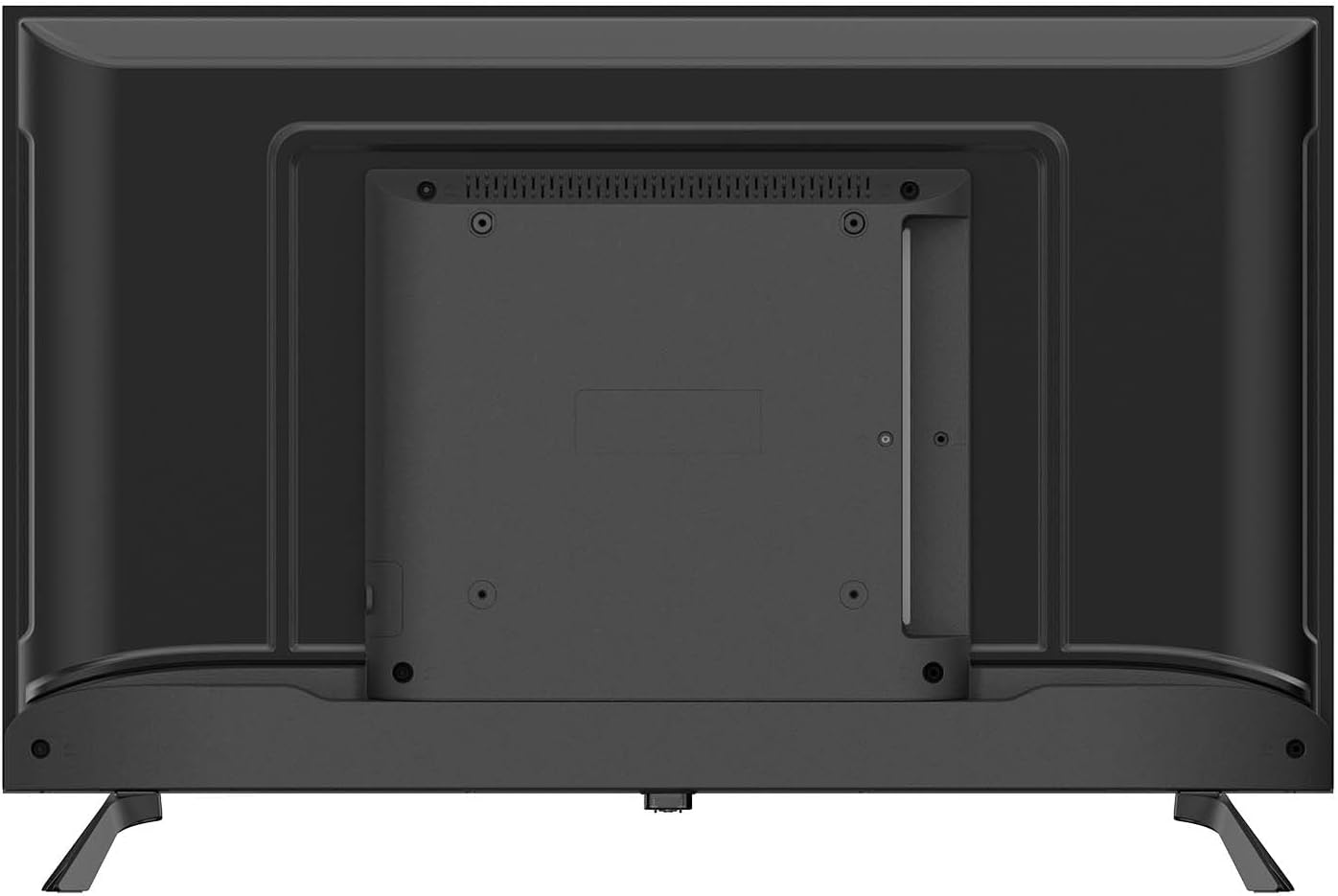
3.3 การเชื่อมต่ออุปกรณ์ต่อพ่วง
เชื่อมต่ออุปกรณ์ภายนอกของคุณเข้ากับทีวีโดยใช้พอร์ตที่มีอยู่:
- HDMI (x2): สำหรับเชื่อมต่ออุปกรณ์ความละเอียดสูง เช่น เครื่องเล่นบลูเรย์ เครื่องเล่นเกม หรือกล่องรับสัญญาณทีวี
- พอร์ต USB2.0 (x2): สำหรับเชื่อมต่ออุปกรณ์จัดเก็บข้อมูล USB เพื่อเล่นสื่อ fileหรือสำหรับการอัปเดตซอฟต์แวร์
- RJ-45 (Ethernet) (x1): สำหรับการเชื่อมต่ออินเตอร์เน็ตแบบใช้สาย
- CI+ (Common Interface Plus) (x1): สำหรับเสียบ CAM (Conditional Access Module) และสมาร์ทการ์ด เพื่อเข้าถึงบริการทีวีดิจิตอลแบบเข้ารหัส
- AV In (x1): สำหรับเชื่อมต่ออุปกรณ์รุ่นเก่าโดยใช้สายวิดีโอคอมโพสิตและสายสัญญาณเสียงสเตอริโอ
- Optical SPDIF Output (x1): For connecting to an external audio system or soundbar for digital audio output.
- Antenna Input (DVB-C/T/T2/S2): For connecting an aerial or satellite dish for digital television reception.

3.4 การเชื่อมต่อสายไฟ
After connecting all desired peripherals, plug the power cable into the TV's power input, then plug the other end into a suitable wall outlet. The TV is designed for 240 Volt power supply.
4. Initial Setup and Operating
4.1 การเปิดเครื่องครั้งแรก
เมื่อคุณเปิดทีวีเป็นครั้งแรก ตัวช่วยตั้งค่าจะแนะนำคุณตลอดขั้นตอนการกำหนดค่าเริ่มต้น:
- เลือกภาษา: Choose your preferred language for the TV menu.
- การเชื่อมต่อเครือข่าย: Connect to your home network via Wi-Fi (2.4G or 5G) or Ethernet. Follow the on-screen prompts to enter your Wi-Fi password if necessary.
- การสแกนช่อง: The TV will automatically scan for available digital channels (DVB-C/T/T2/S2). This may take several minutes.
- เขตเวลาและวันที่: ตั้งค่าเขตเวลาและวันที่ให้ถูกต้อง
4.2 การทำงานพื้นฐาน
- เปิด/ปิดเครื่อง: กดปุ่มเปิดปิดบนรีโมทคอนโทรลหรือบนทีวีโดยตรง
- การเลือกช่อง: Use the 'CH+' / 'CH-' buttons to change channels or enter channel numbers directly.
- การควบคุมระดับเสียง: Use the 'VOL+' / 'VOL-' buttons to adjust the volume.
- แหล่งสัญญาณเข้า: Press the 'SOURCE' button on the remote to select between HDMI, AV, TV, or other connected inputs.
- การนำทางเมนู: Use the arrow keys and 'OK' button on the remote to navigate through the TV's menus and settings.
4.3 Smart TV Features (Tizen OS 8.0)
Your Blaupunkt Smart TV runs on Tizen OS 8.0, providing access to a variety of smart features:
- การใช้งาน: Access pre-installed apps like Netflix and YouTube. You can download additional apps from the Tizen app store.
- มิเรอร์หน้าจอ: Share content from your compatible smartphone or tablet directly to the TV screen.
- Bluetooth 5.1: Connect Bluetooth-enabled devices such as headphones, soundbars, or game controllers wirelessly.
- แอร์เพลย์: AirPlay functionality will be available after November 2025, allowing seamless streaming from Apple devices.
- EPG (คู่มือรายการอิเล็กทรอนิกส์): View program schedules for digital channels.
- ล็อคโดยผู้ปกครอง: Set restrictions on channels or programs based on age ratings.
- เวลานอน: Configure the TV to automatically turn off after a set period.
4.4 การควบคุมระยะไกล
The included infrared remote control allows full control over your TV's functions. Ensure there are no obstructions between the remote and the TV's IR sensor. Insert two AAA batteries (not included) into the remote control, observing the correct polarity.
5. การบำรุงรักษา
5.1 การทำความสะอาดทีวี
- หน้าจอ: เช็ดหน้าจอเบาๆ ด้วยผ้านุ่มที่ไม่เป็นขุย สำหรับรอยฝังแน่น ให้เช็ดเบาๆampเทน้ำหรือน้ำยาทำความสะอาดหน้าจอชนิดพิเศษลงบนผ้า (อย่าฉีดลงบนหน้าจอโดยตรง)
- Casing: ใช้ผ้าแห้งนุ่มๆ เช็ดทำความสะอาดทีวีasing. Avoid using abrasive cleaners, waxes, or solvents.
- ควรถอดปลั๊กทีวีออกจากเต้ารับไฟฟ้าทุกครั้งก่อนทำความสะอาด
5.2 พื้นที่จัดเก็บ
หากคุณจำเป็นต้องเก็บรักษาทีวีไว้เป็นเวลานาน:
- Unplug the TV and disconnect all cables.
- Remove the stand if possible and pack it separately.
- Store the TV in its original packaging in a dry, dust-free environment.
- หลีกเลี่ยงอุณหภูมิและความชื้นที่สูงเกินไป
6 การแก้ไขปัญหา
หากคุณประสบปัญหาเกี่ยวกับทีวี โปรดดูปัญหาทั่วไปและวิธีแก้ไขต่อไปนี้:
| ปัญหา | วิธีแก้ปัญหาที่เป็นไปได้ |
|---|---|
| ไม่มีไฟฟ้า | ตรวจสอบว่าสายไฟเสียบเข้ากับทีวีและเต้ารับที่ผนังแน่นดีแล้วหรือไม่ ลองใช้เต้ารับอื่น |
| ไม่มีภาพแต่มีเสียง | ตรวจสอบให้แน่ใจว่าได้เลือกแหล่งสัญญาณเข้าที่ถูกต้อง ตรวจสอบการเชื่อมต่อสายเคเบิลกับอุปกรณ์ภายนอก |
| ไม่มีเสียงแต่มีภาพ | ตรวจสอบระดับเสียงและสถานะปิดเสียง ตรวจสอบให้แน่ใจว่าระบบเสียงภายนอกเชื่อมต่อและเปิดใช้งานอย่างถูกต้อง |
| รีโมตคอนโทรลไม่ทำงาน | ตรวจสอบและเปลี่ยนแบตเตอรี่ ตรวจสอบให้แน่ใจว่าไม่มีสิ่งกีดขวางระหว่างรีโมทและเซ็นเซอร์อินฟราเรดของทีวี |
| ไม่สามารถเชื่อมต่อ Wi-Fi ได้ | ตรวจสอบให้แน่ใจว่าเราเตอร์ Wi-Fi ของคุณเปิดอยู่และใช้งานได้ ป้อนรหัสผ่าน Wi-Fi อีกครั้งอย่างระมัดระวัง ลองรีสตาร์ททั้งทีวีและเราเตอร์ |
| คุณภาพของภาพไม่ดี | Check antenna/cable connections. Adjust picture settings (brightness, contrast, sharpness). |
หากปัญหายังคงมีอยู่หลังจากลองวิธีแก้ไขเหล่านี้แล้ว โปรดติดต่อฝ่ายสนับสนุนลูกค้า
7. ข้อมูลจำเพาะ
Detailed technical specifications for the Blaupunkt 32HCT6000S Smart TV:
| คุณสมบัติ | ข้อมูลจำเพาะ |
|---|---|
| แบบอย่าง | 32HCT6000S |
| ขนาดหน้าจอ | 32 นิ้ว |
| เทคโนโลยีการแสดงผล | เอชดี แอลอีดี |
| ปณิธาน | 1366 x 768 พิกเซล (720p) |
| อัตราส่วนภาพ | 16:9 น. |
| อัตราการรีเฟรช | 60 เฮิรตซ์ |
| Viewอิงแองเกิล | 178° |
| ความสว่างของแผง | 200–240 cd/m² |
| ระบบปฏิบัติการ | ระบบปฏิบัติการ Tizen 8.0 |
| เอาท์พุตเสียง | 2 x 6 วัตต์ |
| เทคโนโลยีเสียง | Dolby Digital Plus, NICAM/Stereo |
| บลูทูธ | 5.1 (and compatible older versions) |
| ไวไฟ | IEEE 802.11 ac/b/g/n, 2T2R, 2.4G + 5G |
| พอร์ต HDMI | 2 |
| พอร์ต USB 2.0 | 2 |
| Ethernet (RJ-45) | 1 |
| CI+ สล็อต | 1 |
| AV In | 1 |
| เอาต์พุต SPDIF แบบออปติคัล | ใช่ |
| จูนเนอร์ | DVB-C / T / T2 / S2 |
| Power Consumption (in use) | 26 วัตต์ |
| ชั้นพลังงาน | E |
| พลังงานสแตนด์บาย | ≤ 0.5 วัตต์ |
| ขนาดเมื่อรวมขาตั้ง (กว้าง x ลึก x สูง) | 720 x 198 x 478 มม. |
| ขนาดไม่รวมขาตั้ง (กว้าง x ลึก x สูง) | 720 x 82 x 424 มม. |
| น้ำหนักสุทธิ | 4.0 กก. |
| ความเข้ากันได้ในการติดตั้ง | VESA compatible (Mounting on table) |
8. การรับประกันและการสนับสนุน
Your Blaupunkt Smart TV is covered by a manufacturer's warranty. Please refer to the warranty card included in your package or visit the official Blaupunkt webเว็บไซต์สำหรับข้อกำหนดและเงื่อนไขการรับประกันโดยละเอียด
For technical support, troubleshooting assistance, or service inquiries, please contact Blaupunkt customer service. Contact information can typically be found on the manufacturer's webไซต์หรือในเอกสารการรับประกันของคุณ


