1. บทนำ
This manual provides essential information for the safe and efficient use of your DOOGEE Note56 Android 16 smartphone. Please read it thoroughly before using your device.

ภาพ: ด้านหน้าและด้านหลัง view of the DOOGEE Note56 smartphone, showcasing its design and key specifications like 6150mAh battery, Android 16, 6.56-inch display, and 90Hz refresh rate.
2. การตั้งค่า
2.1. เนื้อหาบรรจุภัณฑ์
ตรวจสอบว่าแพ็คเกจของคุณมีรายการต่อไปนี้:
- DOOGEE Note56 Smartphone
- อะแดปเตอร์แปลงไฟ
- สาย USB
- เครื่องมือถอดซิม
- เคสป้องกัน
- คู่มือการเริ่มต้นฉบับย่อ (คู่มือนี้)
2.2. การติดตั้งซิมการ์ดและการ์ด TF
The DOOGEE Note56 supports dual SIM cards and a TF (microSD) card for expandable storage.
- ค้นหาถาดใส่การ์ด SIM ที่ด้านข้างของอุปกรณ์
- ใส่เครื่องมือถอดซิมเข้าไปในรูเล็ก ๆ ข้างถาดแล้วกดเบา ๆ จนกว่าถาดจะดีดออกมา
- Place your Nano-SIM cards and/or TF card into the designated slots on the tray. Ensure the gold contacts face downwards.
- ใส่ถาดกลับเข้าไปในโทรศัพท์อย่างระมัดระวังจนกระทั่งล็อคเข้าที่
2.3. การเปิดเครื่องครั้งแรกและการกำหนดค่าพื้นฐาน
- กดปุ่มเปิด/ปิดค้างไว้จนกว่าโลโก้ DOOGEE จะปรากฏขึ้น
- ทำตามคำแนะนำบนหน้าจอเพื่อเลือกภาษา เชื่อมต่อกับเครือข่าย Wi-Fi และตั้งค่าบัญชี Google ของคุณ
- Configure security settings such as screen lock (PIN, pattern, password) and face recognition.
2.4. การชาร์จอุปกรณ์
Connect the USB cable to the power adapter and then to the phone's charging port. Plug the adapter into a power outlet. The battery indicator will show charging status. For optimal battery life, use the provided charger.
3. คู่มือการใช้งาน
3.1. ระบบปฏิบัติการ Android 16
The DOOGEE Note56 runs on the latest Android 16 system, offering an optimized and intuitive user experience. It features improved application launch speeds, enhanced responsiveness, and a refined user interface. A new Privacy Space function allows for hiding sensitive data and applications, ensuring secure usage.

ภาพ: เหนือview of the Android 16 operating system interface, displaying various applications, settings menus, and system information.
3.2. คุณสมบัติการแสดงผล
The device is equipped with a 6.56-inch IPS waterdrop display, providing a smooth visual experience with a 90Hz high refresh rate. The 720x1612 HD+ resolution and 90% screen-to-body ratio enhance viewing of movies and videos. Two eye-friendly modes are included to reduce eye strain during prolonged use.

ภาพ: ภาพระยะใกล้ view of the DOOGEE Note56's 6.56-inch IPS display, illustrating its vibrant colors and the smooth 90Hz refresh rate.
3.3. ฟังก์ชันของกล้อง
Capture vivid and beautiful photos with the 8MP main camera and take clear selfies with the 5MP front camera. The device utilizes AI functions for enhanced photography, including:
- การจดจำฉาก AI: Automatically detects and optimizes settings for 12 different scenes.
- โหมดกลางคืน: ช่วยปรับปรุงคุณภาพของภาพถ่ายในสภาพแสงน้อย
- โหมดแนวตั้ง: Creates professional-looking photos with blurred backgrounds.
- เอชดีอาร์: Enhances dynamic range for balanced exposure.
- โหมดโปร: Offers manual control over camera settings.
- จับภาพรอยยิ้ม: ถ่ายภาพอัตโนมัติเมื่อตรวจจับรอยยิ้มได้
- พาโนรามา: Captures wide-angle scenic shots.
- ถ่ายภาพต่อเนื่อง: ถ่ายภาพหลายภาพติดต่อกันอย่างรวดเร็ว
- ฟิลเตอร์สนุกๆ: Apply various creative effects to your photos.

Image: Diagram illustrating the 8MP rear camera and 5MP front camera specifications, along with icons representing various AI scene recognition modes.

Image: The camera interface of the DOOGEE Note56, highlighting features like HDR, Pro Mode, Smile Capture, Panorama, Continuous Shooting, Night Mode, and Fun Filters, with a sample photo.

Image: The 5MP front camera's capabilities for selfies, demonstrating Beauty Mode and Portrait Effect for bright, natural, and shareable self-portraits.
3.4. หน่วยความจำและที่เก็บข้อมูล
The DOOGEE Note56 is equipped with 24GB RAM (3GB physical RAM + 21GB extended RAM) and 64GB of internal storage (ROM). It supports TF card expansion up to 2TB, providing ample space for photos, videos, and applications. This powerful memory configuration ensures smooth multitasking and minimizes lag during gaming or heavy app usage.

ภาพ: ภายใน view diagram highlighting the 64GB ROM and 24GB RAM (composed of 3GB physical and 21GB extended RAM) for seamless performance.
3.5 การเชื่อมต่อและการนำทาง
The device supports Bluetooth 4.2 for stable wireless connections and 4G Dual SIM for broad network compatibility both domestically and internationally. For navigation, it integrates three major positioning systems: GPS, GLONASS, and Galileo, ensuring accurate location services from urban areas to remote locations.
3.6. คุณสมบัติอัจฉริยะอื่นๆ
- Instant Face Recognition: Unlock your device quickly and securely using your face.
- วิทยุ FM: Enjoy local radio stations without an internet connection.
- แจ็คหูฟัง 3.5 มม.: Connect your wired headphones for audio playback and calls.
- Smart Body Sensor: (Specific functionality not detailed, refers to general smart sensor capabilities).
- โหมดระบบคู่: Allows for separate user environments.
- ซุปเปอร์คลิปบอร์ด: Enhanced clipboard functionality.
- Screen Optimization & Color Customization: Adjust display settings for personal preference.

Image: Visual representation of instant face recognition, accurate GPS navigation, and the FM radio interface on the DOOGEE Note56.

ภาพ: ภาพตัดปะแสดงasing various smart OS features of the DOOGEE Note56, including smart body sensor, dual system mode, super clipboard, RAM expansion, screen optimization, and screen color customization.
4. การบำรุงรักษา
4.1. การจัดการแบตเตอรี่
The DOOGEE Note56 features a 6150mAh large capacity battery, designed for extended use. It supports approximately 1000 charge/discharge cycles and offers up to 4 years of durable battery life. The device also supports 5W reverse charging, allowing it to act as a power bank for other devices.
- เพื่อยืดอายุการใช้งานแบตเตอรี่ให้สูงสุด ควรหลีกเลี่ยงอุณหภูมิที่สูงเกินไป
- อย่าปล่อยแบตเตอรี่จนหมดเป็นประจำ
- ควรใช้ที่ชาร์จเดิมจากโรงงานเพื่อประสิทธิภาพการชาร์จที่ดีที่สุด
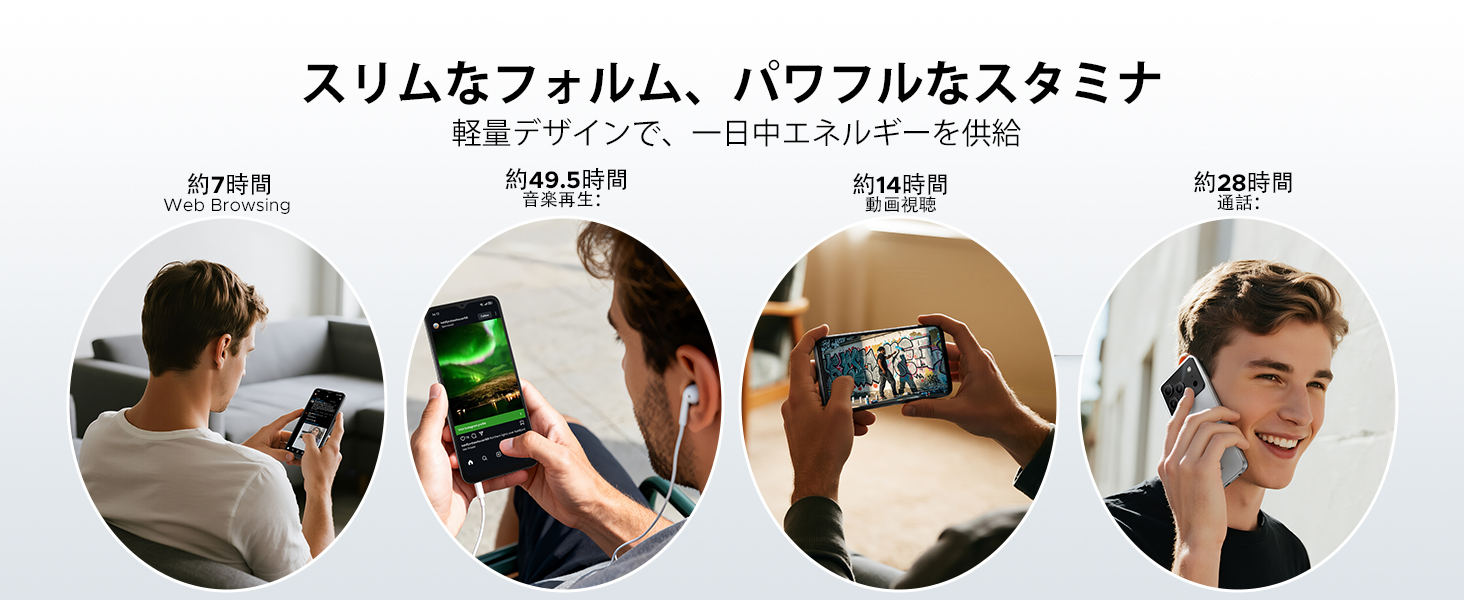
Image: Diagram illustrating the 6150mAh silicon-carbon battery, highlighting its features such as 1000 charge cycles, 4 years of durability, 20% smaller size, and 5W reverse charging capability.

Image: Infographic showing estimated battery life for different activities on the DOOGEE Note56: approximately 7 hours for web browsing, 49.5 hours for music playback, 14 hours for video watching, and 28 hours for calls.
4.2. การทำความสะอาดและการดูแลรักษา
- ใช้ผ้านุ่มไม่เป็นขุยทำความสะอาดหน้าจอและตัวเครื่อง
- หลีกเลี่ยงการใช้สารเคมีรุนแรงหรือวัสดุที่มีฤทธิ์กัดกร่อน
- ควรเก็บอุปกรณ์ให้ห่างจากฝุ่นละอองและความชื้นมากเกินไป
4.3. การอัปเดตซอฟต์แวร์
Regularly check for and install software updates to ensure your device has the latest features, security patches, and performance improvements. You can usually find this option in the device's settings under 'System' or 'About phone'.
5 การแก้ไขปัญหา
If you encounter issues with your DOOGEE Note56, refer to the following common troubleshooting steps:
- อุปกรณ์ไม่เปิด: ตรวจสอบให้แน่ใจว่าแบตเตอรี่ชาร์จเต็มแล้ว กดปุ่มเปิด/ปิดค้างไว้อย่างน้อย 10-15 วินาทีเพื่อบังคับให้รีสตาร์ท
- แอปขัดข้องหรือค้าง: ปิดและเปิดแอปใหม่ ล้างแคชและข้อมูลของแอปใน การตั้งค่า > แอป หากปัญหายังคงอยู่ ให้ถอนการติดตั้งและติดตั้งแอปใหม่
- ปัญหาการเชื่อมต่อเครือข่าย: Check if Airplane Mode is off. Restart the device. Verify your SIM card is correctly inserted and your mobile data plan is active. For Wi-Fi, try forgetting the network and reconnecting.
- ปัญหาการชาร์จ: Ensure the charging cable and adapter are securely connected and undamaged. Try a different outlet or charger. Clean the charging port gently.
- ประสิทธิภาพช้า: ปิดแอปที่ทำงานอยู่เบื้องหลังโดยไม่จำเป็น ล้างแคชเป็นประจำ และพิจารณาเพิ่มพื้นที่จัดเก็บข้อมูลให้เพียงพอ
สำหรับปัญหาที่ซับซ้อนมากขึ้น โปรดดูส่วนการสนับสนุน
6. ข้อมูลจำเพาะ
| คุณสมบัติ | ข้อมูลจำเพาะ |
|---|---|
| ขนาดหน้าจอ | 6.56 นิ้ว |
| ความจุของแบตเตอรี่ | 6150 มิลลิแอมป์ |
| สี | สีดำ (มีสีอื่นๆ ให้เลือก) |
| ชื่อยี่ห้อ | ดูจี้ |
| ผู้ผลิต | ดูจี้ |
| ปีที่ออกจำหน่าย | 2025 |
| ส่วนประกอบที่รวมอยู่ | อะแดปเตอร์แปลงไฟ |
| ระบบปฏิบัติการที่รองรับ | แอนดรอยด์ 16 |
| คุณสมบัติอื่น ๆ | SIM-free |
| ชื่อรุ่น | หมายเหตุ56 |
| ประเภทจอภาพ | ไอพีเอส |
| ขนาดแพ็คเกจ | 19.3 x 10.5 x 5.1 ซม.; 410 กรัม |
| การอ้างอิงผู้ผลิต | หมายเหตุ56 |
| ขนาด RAM ที่ติดตั้ง | 24GB |
| ความจุของหน่วยความจำ | 64GB |
7. การรับประกันและการสนับสนุน
7.1. ข้อมูลการรับประกัน
The DOOGEE Note56 comes with a รับประกัน 1 ปี from the date of purchase, ensuring peace of mind for your usage. This warranty covers manufacturing defects under normal use conditions.
7.2. วิธีการติดต่อฝ่ายสนับสนุน
In the unlikely event of a product defect or if you require technical assistance, please contact our support team through the following methods:
- Via Amazon Purchase History: Navigate to your Amazon purchase history and contact our store directly regarding your order.
- ผ่านทางหน้ารายละเอียดสินค้า: On the product page, click on the store name located below the 'Add to Cart' button. Then, click the 'Ask a Question' button displayed in the upper right corner to send us an inquiry.


