1. สินค้าหมดview
The BN-LINK WiFi Smart Plug (Model CP-J31WT) allows you to control your home appliances remotely, set schedules, and use voice commands for a smarter, more convenient lifestyle. This compact plug is designed for ease of use and integrates seamlessly with popular smart home platforms.

Image: BN-LINK WiFi Smart Plug overview with icons for WiFi, timer, app control, voice control, remote operation, and group control.
คุณสมบัติหลัก:
- รีโมทคอนโทรล: Turn appliances ON/OFF from anywhere using your smartphone.
- การควบคุมด้วยเสียง: เข้ากันได้กับ Alexa และ Google Home เพื่อการใช้งานแบบแฮนด์ฟรี
- ฟังก์ชั่นจับเวลา: Schedule appliances to turn ON/OFF automatically, saving energy and preventing overcharging.
- การออกแบบที่กะทัดรัด: Small size ensures it doesn't block adjacent outlets.
- คุณสมบัติด้านความปลอดภัย: Equipped with high-temperature flame-retardant material, overload protection, electric shock prevention, and anti-tracking design.

Image: Diagram highlighting the smart plug's features: LED indicator, ON/OFF button, WiFi connection, timer function, remote operation, and voice control.
2. ข้อมูลด้านความปลอดภัย
โปรดอ่านและทำความเข้าใจคำแนะนำด้านความปลอดภัยทั้งหมดก่อนใช้ผลิตภัณฑ์นี้ การไม่ปฏิบัติตามคำแนะนำเหล่านี้อาจส่งผลให้เกิดไฟฟ้าช็อต ไฟไหม้ หรือบาดเจ็บสาหัสได้
- ห้ามถอดประกอบหรือดัดแปลงอุปกรณ์
- ห้ามใช้ในสภาพแวดล้อมที่เปียกชื้นหรือใกล้แหล่งน้ำ
- ตรวจสอบให้แน่ใจว่าเสียบปลั๊กเข้ากับเต้ารับจนสุดแล้ว
- ห้ามใช้เกินพิกัดโหลดสูงสุด 15A / 1500W
- เก็บให้พ้นจากมือเด็ก
- ถอดปลั๊กอุปกรณ์ออกจากเต้าเสียบก่อนทำความสะอาด
- ผลิตภัณฑ์นี้ได้รับการออกแบบสำหรับใช้ภายในอาคารเท่านั้น
คุณสมบัติความปลอดภัยในตัว:
- High-Temperature Flame-Retardant Material: Reduces fire risk.
- ระบบป้องกันการโอเวอร์โหลด: Automatically cuts power to prevent damage from excessive current.
- Electric Shock Prevention Design: Enhanced safety against accidental contact.
- Anti-Tracking Design: Prevents dust accumulation and potential short circuits.
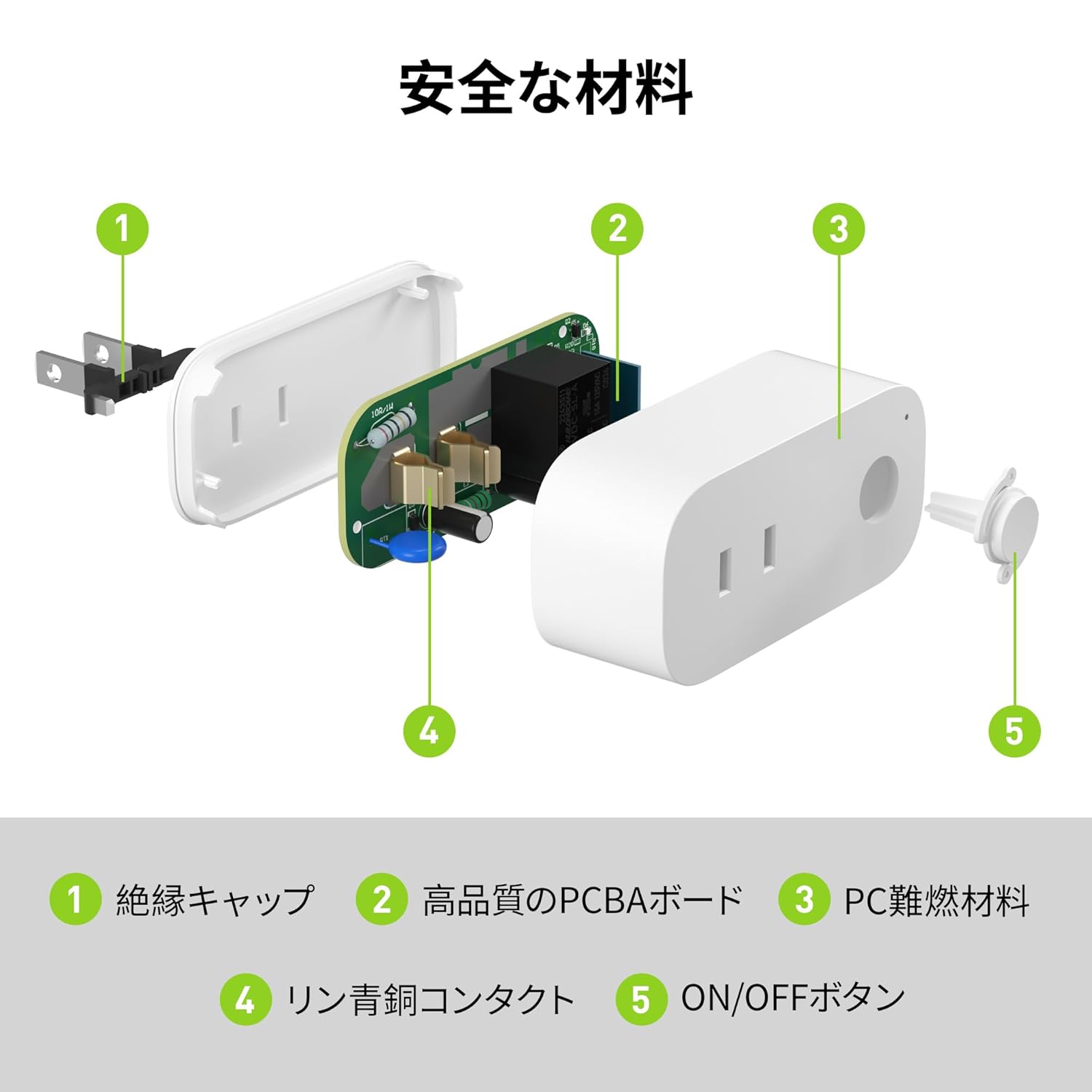
Image: Internal components of the smart plug, highlighting safety features such as the insulation cap, high-quality PCBA board, PC flame-retardant material, phosphor bronze contacts, and the ON/OFF button.
3. คำแนะนำในการตั้งค่า
3.1. การตั้งค่าเริ่มต้น
- Unpack the BN-LINK Smart Plug from its packaging.
- Plug the smart plug into a standard wall outlet.
- Observe the indicator light on the plug. It should start blinking. If it does not blink, press and hold the ON/OFF button for approximately 5 seconds until it starts blinking rapidly.
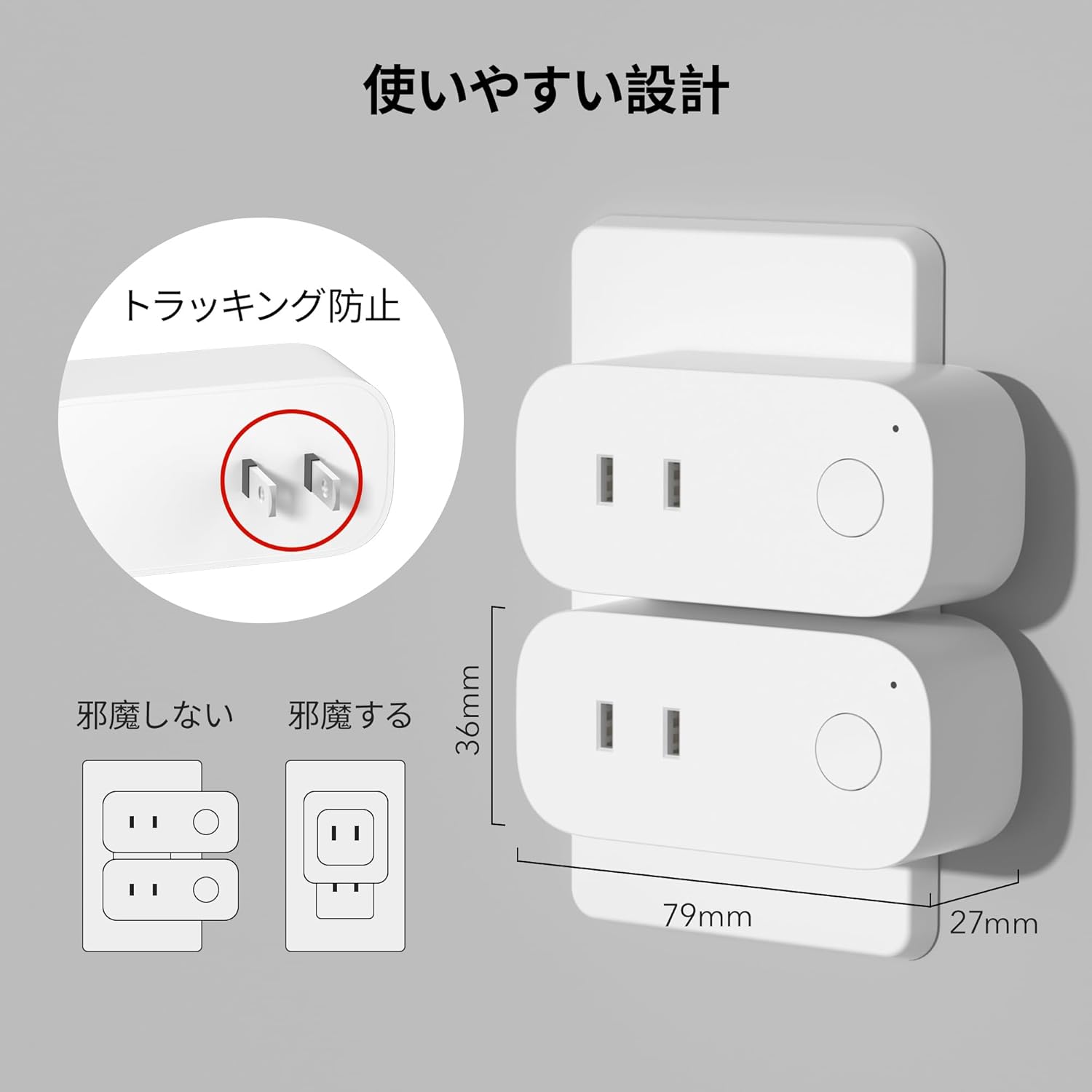
Image: The compact design of the smart plug, illustrating how it fits into an outlet without obstructing the adjacent one. Dimensions are also shown.
3.2 การติดตั้งแอปและการเชื่อมต่อ Wi-Fi
To utilize all smart features, you need to install the BN-LINK app and connect the plug to your 2.4GHz Wi-Fi network. This device only supports 2.4GHz Wi-Fi.
- Download the "BN-LINK" app from your smartphone's app store (Google Play Store for Android or Apple App Store for iOS).
- เปิดแอปและสร้างบัญชีหรือเข้าสู่ระบบหากคุณมีอยู่แล้ว
- แตะไอคอน "+" หรือ "เพิ่มอุปกรณ์" เพื่อเริ่มกระบวนการจับคู่
- Select "Smart Plug" from the device list.
- Follow the on-screen instructions to connect the smart plug to your 2.4GHz Wi-Fi network. Ensure your phone is also connected to the 2.4GHz network during setup.
- Once connected, you can rename your smart plug for easy identification (e.g., "Living Room Lamp"เครื่องชงกาแฟ"
Video: This video demonstrates the process of connecting the smart plug to the BN-LINK app and your Wi-Fi network, including resetting the device and confirming indicator light status.
Video: This video provides a step-by-step guide on setting up the ePlugBT and connecting it to Wi-Fi, which is similar to the BN-LINK Smart Plug setup process.
4. คู่มือการใช้งาน
4.1. การควบคุมระยะไกลผ่านแอป
Once connected to Wi-Fi, you can control your appliances from anywhere with an internet connection.
- Open the BN-LINK app.
- Tap on the device name you wish to control.
- Use the ON/OFF toggle button within the app to switch your appliance on or off.

Image: Remote operation of the smart plug via the BN-LINK app on a smartphone. The image shows the app's ON/OFF control for a device connected to the smart plug, with a WiFi router in the background.

Image: A user controlling a smart plug remotely with their smartphone in a modern kitchen environment.
4.2. การควบคุมด้วยเสียง
Integrate your smart plug with Amazon Alexa or Google Home for convenient voice commands.
- Ensure your smart plug is successfully connected to the BN-LINK app and your Wi-Fi network.
- เปิดแอป Alexa หรือ Google Home
- Follow the app's instructions to add a new device or skill, searching for "BN-LINK" or "Smart Plug."
- เมื่อเชื่อมโยงแล้ว คุณสามารถใช้คำสั่งเสียง เช่น:
- "Alexa เปิด [ชื่ออุปกรณ์]"
- "เฮ้ กูเกิล ปิด [ชื่ออุปกรณ์] หน่อย"

Image: A user in a living room controlling a lamp connected to a smart plug using voice commands with an Alexa device. The image also indicates Google Home compatibility.

Image: A smart plug connected to an outlet, being controlled by a Google Home device. A person is shown in bed, illustrating hands-free operation.
4.3. Timer Function and Scheduling
Set custom schedules to automate your appliances and manage energy consumption.
- In the BN-LINK app, select your smart plug.
- ไปที่ส่วน "ตัวจับเวลา" หรือ "กำหนดการ"
- Set specific ON/OFF times for your appliances. You can create daily, weekly, or one-time schedules.
- Use the countdown timer for temporary automation, such as turning off a charger after a set period to prevent overcharging.

Image: The BN-LINK app displaying timer and scheduling features. Examples show a coffee maker turning on at 7:15 AM and a lamp turning off at 10:00 PM, demonstrating automated control.

Image: A smart plug connected to a microwave, with the app interface showing a timer set to turn the device ON at 7:00.
5. การบำรุงรักษา
To ensure optimal performance and longevity of your BN-LINK Smart Plug, follow these maintenance guidelines:
- การทำความสะอาด: ถอดปลั๊กอัจฉริยะออกจากเต้ารับไฟฟ้าก่อนทำความสะอาด ใช้ผ้าแห้งและนุ่มเช็ดทำความสะอาดพื้นผิว ห้ามใช้น้ำยาทำความสะอาดหรือสเปรย์
- พื้นที่จัดเก็บ: If not in use for an extended period, unplug the device and store it in a cool, dry place away from direct sunlight and moisture.
- การตรวจสอบ: Periodically check the plug and outlet for any signs of damage, wear, or overheating. If any issues are found, discontinue use and contact customer support.
6 การแก้ไขปัญหา
If you encounter issues with your BN-LINK Smart Plug, refer to the following common problems and solutions:
| ปัญหา | สาเหตุที่เป็นไปได้ | สารละลาย |
|---|---|---|
| อุปกรณ์ไม่สามารถเชื่อมต่อ Wi-Fi ได้ | Incorrect Wi-Fi password, 5GHz Wi-Fi network, weak signal, or device not in pairing mode. |
|
| รีโมทคอนโทรลไม่ทำงาน | No internet connection on phone or smart plug, or app issue. |
|
| ระบบควบคุมด้วยเสียงไม่ตอบสนอง | Incorrect device name, smart assistant not linked, or internet connection issue. |
|
| ปลั๊กไม่ตอบสนอง | พลังแห่งโอtage, device malfunction, or firmware issue. |
|
7. ข้อมูลจำเพาะ
| คุณสมบัติ | รายละเอียด |
|---|---|
| ยี่ห้อ | บีเอ็น-ลิงค์ |
| หมายเลขรุ่น | CP-J31WT |
| น้ำหนักสินค้า | 70 กรัม |
| ขนาดแพ็คเกจ | 8.2 x 4.7 x 4.3 ซม. |
| ขนาด | แพ็ค 1 ชิ้น |
| ประเภทสวิตซ์ | 1 ทาง |
| ส่วนประกอบที่รวมอยู่ | Smart Plug body, Instruction Manual |
| แบตเตอรี่ที่ใช้ | เลขที่ |
| โหมดการทำงาน | เปิดปิด |
| คะแนนปัจจุบัน | 15 Amps |
| ปฏิบัติการฉบับที่tage | 100 โวลต์ |
| ประเภทขั้วต่อ | ปลั๊กอิน |
| วัสดุ | พลาสติก |
| ประเภทวงจร | 1 ทาง |
8. การรับประกันและการสนับสนุน
BN-LINK products are designed for quality and reliability. For warranty information and customer support, please refer to the contact details provided in the product packaging or visit the official BN-LINK webเว็บไซต์.
For further assistance, you may also contact the seller directly through the Amazon platform.
แหล่งข้อมูลออนไลน์:
- Official BN-LINK Webเว็บไซต์: www.bn-link.com (โปรดทราบ: นี่เป็นเพียงตัวอย่างชั่วคราว) URL, replace with actual if available)
- หน้าสินค้าบน Amazon: Amazon.co.jp Product Page


