1. บทนำ
This manual provides comprehensive instructions for the installation, operation, and maintenance of your EZVIZ HB90x Smart Outdoor Security Camera. Please read this manual carefully before using the product to ensure proper functionality and safety. Keep this manual for future reference.
2. ข้อมูลด้านความปลอดภัย
- ตรวจสอบให้แน่ใจว่าติดตั้งกล้องในตำแหน่งที่มั่นคงเพื่อป้องกันการตก
- Use only the specified power adapter and solar panel provided by EZVIZ.
- อย่าวางกล้องไว้ในที่ที่มีอุณหภูมิสูง ความชื้นสูง หรือสภาพแวดล้อมที่มีฤทธิ์กัดกร่อน
- ควรหลีกเลี่ยงการวางกล้องไว้ใกล้สนามแม่เหล็กไฟฟ้าที่มีความเข้มสูง
- Do not attempt to disassemble or modify the camera. Contact qualified personnel for service.
- เก็บกล้องและอุปกรณ์เสริมให้พ้นมือเด็ก
3. เนื้อหาบรรจุภัณฑ์
ตรวจสอบว่ามีรายการทั้งหมดอยู่ในแพ็คเกจของคุณ:
- EZVIZ HB90x Surveillance Camera
- แบตเตอรี่ลิเธียม (ติดตั้งมาแล้วหรือซื้อแยกต่างหาก)
- แผงพลังงานแสงอาทิตย์
- ฮาร์ดแวร์สำหรับติดตั้ง (สกรู, ปลั๊กผนัง)
- คู่มือเริ่มต้นอย่างรวดเร็ว
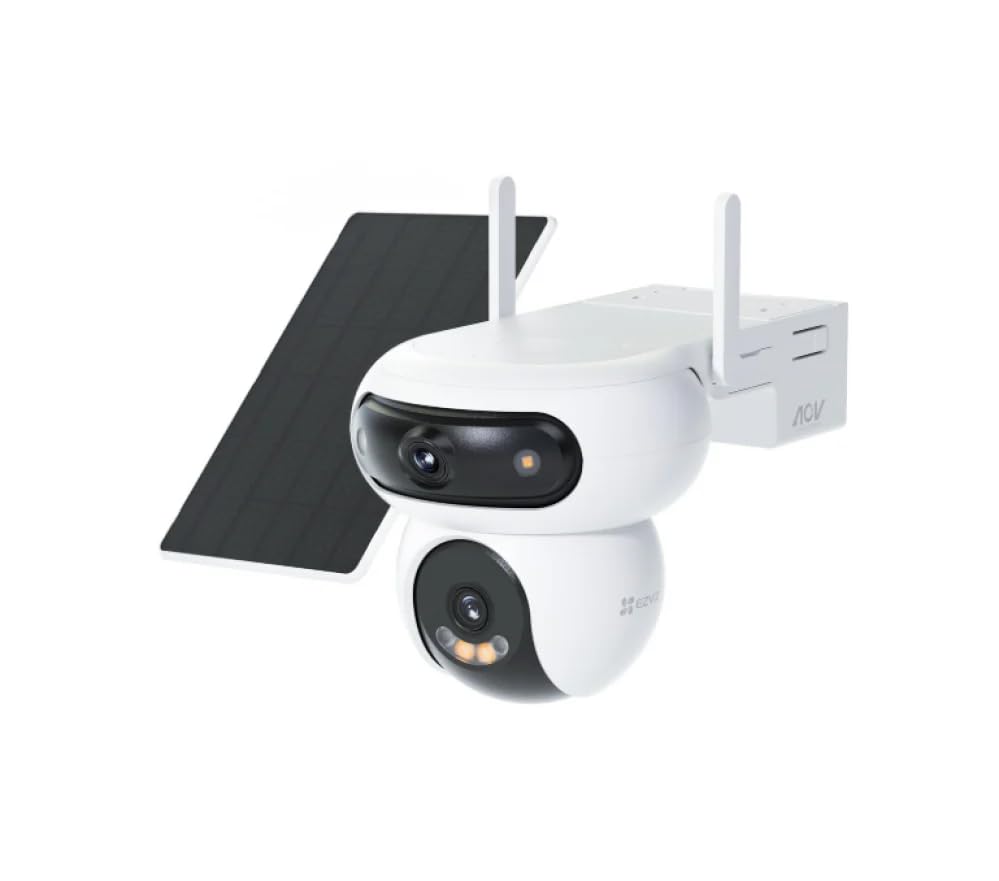
รูปที่ 1: EZVIZ HB90x Smart Outdoor Security Camera with its solar panel. This image illustrates the main camera unit and the accompanying solar panel, which provides continuous power.
4. สินค้าหมดview
The EZVIZ HB90x is an advanced outdoor security camera designed for comprehensive surveillance. Key features include:
- Dual 2K Lenses: Provides high-resolution video capture for detailed monitoring.
- ครอบคลุม 360°: เสนอสาขาที่กว้างขวางของ viewช่วยขจัดจุดบอด
- 10400 mAh Battery & Solar Panel: Ensures continuous operation with sustainable power.
- การเชื่อมต่อ 4G: Operates independently without Wi-Fi, ideal for remote locations.
- การมองเห็นสีกลางคืน: Delivers clear, full-color images even in low-light conditions.
- การตรวจจับการเคลื่อนไหวอัจฉริยะ: Intelligent system with instant alerts for detected activity.
- การออกแบบที่ทนต่อสภาพอากาศ: โครงสร้างทนทาน เหมาะสำหรับใช้งานกลางแจ้งในสภาพอากาศต่างๆ
- การจัดเก็บข้อมูลภายในเครื่อง: Supports MicroSD card up to 512GB for local video storage.
5. การตั้งค่า
5.1 การชาร์จเริ่มต้น
Before first use, ensure the camera's internal battery is fully charged. Connect the solar panel to the camera and place the solar panel in direct sunlight for several hours. Alternatively, you can use a compatible 5V USB power adapter (not included) to charge the camera directly.
5.2 การติดตั้งซิมการ์ด
The HB90x camera utilizes 4G connectivity. Locate the SIM card slot, usually protected by a rubber cover on the camera body. Insert a activated Nano-SIM card into the slot with the gold contacts facing down, ensuring it clicks into place. Close the rubber cover securely to maintain weather resistance.
Note: A Nano-SIM card with an active data plan is required for 4G connectivity.
5.3 การติดตั้งการ์ด MicroSD (ทางเลือก)
For local video storage, insert a MicroSD card (up to 512GB, Class 10 or higher recommended) into the designated slot. Ensure the camera is powered off before inserting or removing the MicroSD card. Close the protective cover after installation.
5.4 การติดตั้งแอปและการสร้างบัญชี
- ดาวน์โหลดแอป EZVIZ จาก App Store (iOS) หรือ Google Play Store (Android)
- Open the app and follow the on-screen instructions to create an EZVIZ account.
- เข้าสู่ระบบบัญชี EZVIZ ของคุณ
5.5 การเพิ่มกล้องลงในแอป
- In the EZVIZ app, tap the "+" icon on the home screen to add a device.
- Scan the QR code located on the camera body or on the quick start guide.
- Follow the in-app prompts to complete the camera setup. This typically involves confirming the camera's power status and network connection (4G).
5.6 การติดตั้งกล้อง
The HB90x is designed for wall mounting. Choose a location that provides the desired viewing angle and ensures the solar panel receives adequate direct sunlight throughout the day. Avoid obstructions that might block the camera's view or the solar panel's exposure.
- Use the provided mounting template (if available) to mark the drill holes on the wall.
- เจาะรูและเสียบพุกยึดผนัง
- ยึดขายึดเข้ากับผนังโดยใช้สกรู
- Attach the camera to the mounting bracket and adjust its angle.
- Mount the solar panel in a location where it receives maximum sunlight and connect its cable to the camera.
6. การใช้งานกล้อง
6.1 สด View
Open the EZVIZ app and select your HB90x camera from the device list. The live view interface will display the real-time video feed. You can switch between the dual lenses if supported by the app interface.
6.2 การควบคุมการหมุนและการเอียง
ไลฟ์สด view screen, use the on-screen joystick or swipe gestures to remotely pan (horizontal movement) and tilt (vertical movement) the camera to adjust its viewing angle and utilize the 360° coverage.
6.3 การบันทึกและการเล่นวิดีโอ
- การบันทึกด้วยตนเอง: แตะปุ่มบันทึกในระหว่างการถ่ายทอดสด view interface to start or stop manual recording. Videos are saved to your phone or the installed MicroSD card.
- การบันทึกเหตุการณ์: The camera automatically records when motion is detected. These recordings are stored on the MicroSD card or EZVIZ CloudPlay (subscription required).
- การเล่นซ้ำ: Access recorded videos through the "Playback" or "History" section in the EZVIZ app. Select the date and time to review เหตุการณ์ต่างๆ
6.4 การตรวจจับการเคลื่อนไหวและการแจ้งเตือน
Configure motion detection settings in the EZVIZ app. You can adjust sensitivity, define detection zones, and set schedules for alerts. When motion is detected, the camera will send instant notifications to your smartphone.
6.5 การมองเห็นตอนกลางคืน
The HB90x features advanced color night vision. In low-light conditions, the camera automatically switches to night vision mode, utilizing its dual LED lamps to provide clear, full-color images up to 30 meters.
7. การบำรุงรักษา
- การทำความสะอาด: เช็ดเลนส์กล้องและแผงโซลาร์เซลล์ด้วยผ้าเนื้อนุ่มเป็นประจำamp ใช้ผ้าเช็ดทำความสะอาดฝุ่นและสิ่งสกปรก ห้ามใช้สารเคมีรุนแรง
- อัพเดตเฟิร์มแวร์: Check for and install firmware updates via the EZVIZ app to ensure optimal performance and security.
- สุขภาพแบตเตอรี่: Monitor the battery level in the app. Ensure the solar panel is clean and positioned to receive maximum sunlight for efficient charging.
- การ์ด MicroSD: Periodically check the MicroSD card for errors or fill status. Format the card via the app if necessary (this will erase all data).
8 การแก้ไขปัญหา
| ปัญหา | สาเหตุที่เป็นไปได้ | สารละลาย |
|---|---|---|
| กล้องไม่สามารถเปิดได้ | Low battery or solar panel not charging. | Ensure solar panel is in direct sunlight. Charge the camera using a 5V USB adapter. |
| No 4G connection. | SIM card not inserted correctly, no data plan, or poor signal. | Check SIM card insertion. Verify data plan with your carrier. Relocate camera to an area with better 4G signal. |
| ไม่สามารถ view live feed in app. | No 4G connection, app issue, or camera offline. | Check 4G status. Restart the EZVIZ app. Restart the camera. |
| ไม่ได้รับการแจ้งเตือนการตรวจจับการเคลื่อนไหว | Detection settings incorrect, app notifications disabled. | Review motion detection settings in the app. Enable notifications for the EZVIZ app in your phone's settings. |
| คุณภาพการมองเห็นในเวลากลางคืนไม่ดี | Dirty lens or external light interference. | Clean the camera lenses. Ensure no strong light sources are directly facing the camera at night. |
9. ข้อมูลจำเพาะ
| คุณสมบัติ | รายละเอียด |
|---|---|
| ชื่อรุ่น | HB90x |
| ยี่ห้อ | อีซวิซ |
| ประเภทการติดตั้ง | ติดผนัง |
| ความละเอียดในการบันทึกวิดีโอ | 2560 x 1440 (2K) |
| สี | Aura White |
| จำนวนรายการ | 2 (Camera and Solar Panel) |
| ส่วนประกอบที่รวมอยู่ | Lithium Battery, Surveillance Camera, Mounting Hardware, Solar Power Panel |
| จำนวนช่องสัญญาณ | 2 (เลนส์คู่) |
| เทคโนโลยีการสื่อสารไร้สาย | 4G |
| ฟอร์มแฟกเตอร์ | กล้องกลางแจ้งเลนส์คู่ |
| ความละเอียดวิดีโอที่มีประสิทธิภาพ | 2560.0 พิกเซล |
| Viewอิงแองเกิล | 360 องศา |
| ช่วงการมองเห็นตอนกลางคืน | 30 เมตร |
| อัตราเฟรม | 30 เฟรมต่อวินาที |
| วัสดุ | Water-resistant Metal Plastic |
| เล่มที่tage | 5 โวลต์ |
| พลัง | 8 วัตต์ |
| ขนาดรายการ (ยาว x กว้าง x สูง) | 15 x 15.2 x 25 เซนติเมตร |
| ระดับความต้านทานต่อน้ำ | กันน้ำ |
| น้ำหนัก | 750 กรัม |
| คุณสมบัติพิเศษ | 10400 mAh Rechargeable Battery, 360 Degree Coverage, Solar Power Panel, Night Vision, Waterproof |
| การใช้ที่แนะนำ | Outdoor Control, Security Surveillance, Home Surveillance |
| โปรโตคอลการเชื่อมต่อ | 4G |
| ประเภทตัวควบคุม | แอปพลิเคชั่นมือถือ |
10. ข้อมูลการรับประกัน
EZVIZ products come with a limited warranty. For detailed warranty terms and conditions, including coverage period and service procedures, please refer to the warranty card included in your product package. You can also visit the official EZVIZ webเว็บไซต์สำหรับข้อมูลการรับประกันล่าสุด
11. การสนับสนุนลูกค้า
For technical assistance, troubleshooting, or service inquiries, please contact EZVIZ customer support. You can find contact information and frequently asked questions on the official EZVIZ webเว็บไซต์:
Please have your product model number (HB90x) and purchase information ready when contacting support.


