1. บทนำ
The Antec P30 ARGB Mid-Tower ATX Case is designed for high-performance PC builds, combining aesthetic appeal with optimized cooling capabilities. It features a metal mesh front panel with premium wood accents, ensuring both style and efficient airflow. This manual provides essential information for the proper installation, operation, and maintenance of your Antec P30 ARGB case.

The Antec P30 ARGB case features a metal mesh front panel with wood accents and pre-installed ARGB fans.
2. การตั้งค่าและการติดตั้ง
2.1 การแกะบรรจุภัณฑ์และการตรวจสอบ
Carefully remove the case from its packaging. Inspect for any damage that may have occurred during transit. Retain the packaging for future transportation or storage.
2.2 การถอดแผงด้านข้าง
The Antec P30 ARGB features a tool-free tempered glass side panel for easy access to internal components. Gently pull the top edge of the glass panel outwards to unlatch it, then lift it off the hinges. For the steel side panel, loosen the two captive thumbscrews at the rear and slide the panel backward to remove.

The tempered glass side panel can be easily removed without tools for convenient access.
2.3 การติดตั้งเมนบอร์ด
Install your ATX, Micro-ATX, or ITX motherboard onto the pre-installed standoffs. Secure it with the provided screws. Ensure all necessary cables can reach their respective headers.
2.4 การติดตั้ง GPU
The case supports graphics cards up to 405mm in length, accommodating modern RTX 50 Series GPUs and other high-end components. Remove the necessary PCIe slot covers and install your GPU, securing it with screws.

The case provides generous space for large graphics cards, up to 405mm in length.
2.5 การติดตั้งระบบระบายความร้อน
The P30 ARGB comes with five pre-installed PWM fans: two 140mm ARGB fans at the front, two 120mm reverse fans on the PSU shroud, and one 120mm ARGB fan at the rear. These fans are configured for optimal airflow.
- รองรับหม้อน้ำ: The top panel supports a 360mm radiator for advanced liquid cooling solutions.
- ความสูงของตัวทำความเย็นซีพียู: เคสนี้รองรับพัดลมระบายความร้อน CPU ที่มีความสูงได้ถึง 175 มม.
- Optimized GPU Airflow: The bottom-mounted reverse fans provide direct airflow to the GPU, enhancing cooling efficiency.

The top panel supports a 360mm radiator for liquid cooling.
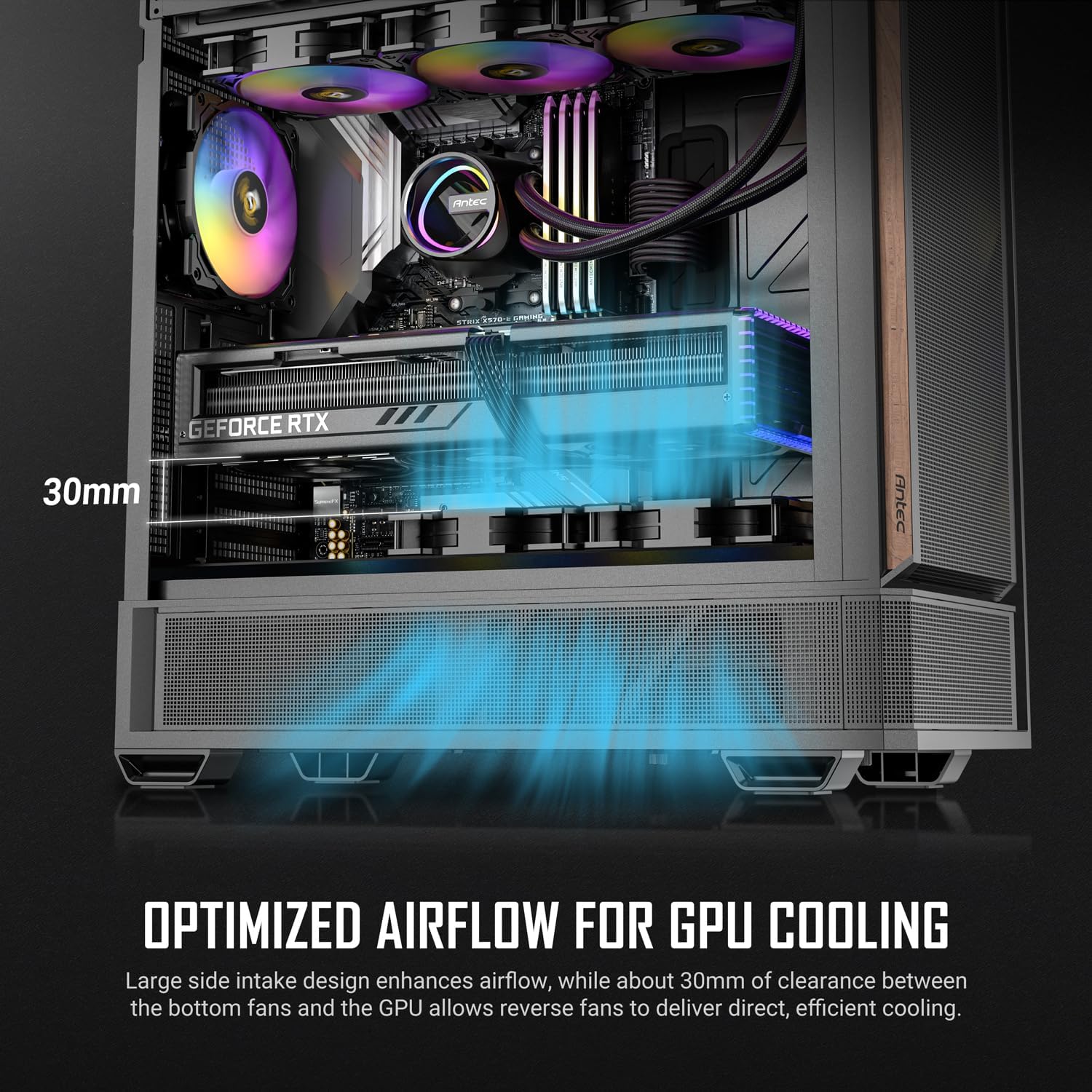
Optimized airflow design ensures efficient GPU cooling.

The case supports CPU coolers up to 175mm in height.
2.6 การติดตั้งไดรฟ์จัดเก็บข้อมูล
The case provides mounting options for 3.5" and 2.5" storage drives. Refer to the internal layout diagram for specific locations. Install your HDDs or SSDs and connect the necessary power and data cables.
2.7 การติดตั้งแหล่งจ่ายไฟ
Install your standard ATX power supply unit in the bottom-mounted PSU shroud. Secure it with screws from the rear of the case. Route power cables through the designated cutouts.
2.8 การจัดการสายเคเบิล
The P30 ARGB includes four rubber grommets and three Velcro straps to facilitate neat cable management behind the motherboard tray. Utilize these features to organize cables and improve airflow.

Rubber grommets and Velcro straps assist in effortless cable management.
2.9 Front Panel I/O Connections
Connect the front panel I/O cables (Power, Reset, Headphone/Mic Combo Jack, USB 3.0, Type-C 3.2 Gen 2) to their corresponding headers on your motherboard. Ensure correct polarity for power and reset switches.

The top I/O panel provides convenient access to essential ports.
วิดีโอแสดงผลิตภัณฑ์อย่างเป็นทางการasing the Antec P30 ARGB case features and design.
3. คู่มือการใช้งาน
3.1 เปิด/ปิดเครื่อง
Press the power button located on the top I/O panel to turn your system on or off. A short press typically powers on, while a longer press (usually 4-5 seconds) initiates a forced shutdown.
3.2 การควบคุมแสง ARGB
The pre-installed ARGB fans can be controlled via your motherboard's ARGB software (if compatible) or a dedicated ARGB controller (if included or purchased separately). Refer to your motherboard manual for ARGB header locations and software instructions.
4. การบำรุงรักษา
4.1 การทำความสะอาดเคส
To maintain optimal airflow and appearance, regularly clean the case. Use a soft, damp cloth to wipe down exterior surfaces. For mesh panels, a soft brush or compressed air can remove dust buildup. Ensure the system is powered off and unplugged before cleaning.
4.2 Interior Dust Removal
Periodically remove the side panels and use compressed air to clear dust from internal components, especially fans, heatsinks, and filters. This helps prevent overheating and prolongs component lifespan.
5 การแก้ไขปัญหา
5.1 ระบบไม่เปิดเครื่อง
- Check all power connections, including the PSU to the wall outlet, PSU to motherboard (24-pin and CPU 8-pin), and front panel power switch header to the motherboard.
- ตรวจสอบให้แน่ใจว่าสวิตช์จ่ายไฟอยู่ในตำแหน่ง 'เปิด'
- ตรวจสอบให้แน่ใจว่าสายเคเบิลปุ่มเปิดปิดด้านหน้าเชื่อมต่อกับเมนบอร์ดอย่างถูกต้องแล้ว
5.2 Fans Not Spinning/ARGB Not Lighting Up
- Confirm that all fan power cables (PWM) are securely connected to the motherboard or fan controller.
- Check ARGB cables for secure connection to the motherboard's ARGB header or a dedicated controller.
- Ensure ARGB software or controller settings are correctly configured.
5.3 Front Panel USB/Audio Ports Not Working
- Verify that the USB 3.0, Type-C, and audio headers from the front panel are correctly plugged into the corresponding ports on your motherboard.
- Check your motherboard's BIOS/UEFI settings to ensure USB and audio ports are enabled.
6. ข้อมูลจำเพาะ
| คุณสมบัติ | รายละเอียด |
|---|---|
| ยี่ห้อ | แอนเทค |
| ชื่อรุ่น | P30 ARGB |
| ประเภทเคส | มิดทาวเวอร์ |
| ความเข้ากันได้ของเมนบอร์ด | ATX, Micro ATX, ITX |
| วัสดุ | โลหะ, กระจกนิรภัย |
| สี | สีดำ |
| น้ำหนักสินค้า | 15.1 ปอนด์ |
| ขนาดสินค้า (ลึก x กว้าง x สูง) | ลึก 18.82 นิ้ว x กว้าง 8.74 นิ้ว x สูง 18.31 นิ้ว |
| พัดลมที่ติดตั้งล่วงหน้า | 2 x 140mm PWM ARGB (front), 2 x 120mm PWM Reverse (PSU shroud), 1 x 120mm PWM ARGB (rear) |
| ฐานรองหม้อน้ำ | Up to 360mm (top) |
| ความสูงสูงสุดของตัวระบายความร้อนซีพียู | 175มม. |
| ความยาวสูงสุดของ GPU | 405มม. |
| ช่องใส่ไดรฟ์จัดเก็บข้อมูล | 2 x 3.5"/2.5", 1 x 2.5" |
| พอร์ต I / O ด้านหน้า | Power, Reset, Headphone/Mic Combo, 2 x USB 3.0, 1 x Type-C 3.2 Gen 2 |
| คุณสมบัติพิเศษ | Tool-less Tempered Glass, Optimized GPU Airflow, Cable Management Features |

Detailed fan and radiator compatibility diagram.
7. การรับประกันและการสนับสนุน
7.1 ข้อมูลการรับประกัน
The Antec P30 ARGB Mid-Tower ATX Case comes with a 2-year warranty from the date of purchase. This warranty covers defects in materials and workmanship under normal use. Please retain your proof of purchase for warranty claims.
7.2 การสนับสนุนด้านเทคนิค
For technical assistance, troubleshooting, or warranty inquiries, please visit the official Antec website or contact their customer support. You may find FAQs, driver downloads, and contact information on their support page.
Official Antec Webเว็บไซต์: www.antec.com


