1. สินค้าหมดview
The LIGE Smart Watch EF24-A is a versatile and durable smartwatch designed for active lifestyles. It features a 1.7-inch HD display, long-lasting 1000mAh battery, Bluetooth calling, comprehensive health tracking, and over 100 sports modes. This manual provides essential information for setting up, operating, and maintaining your device.
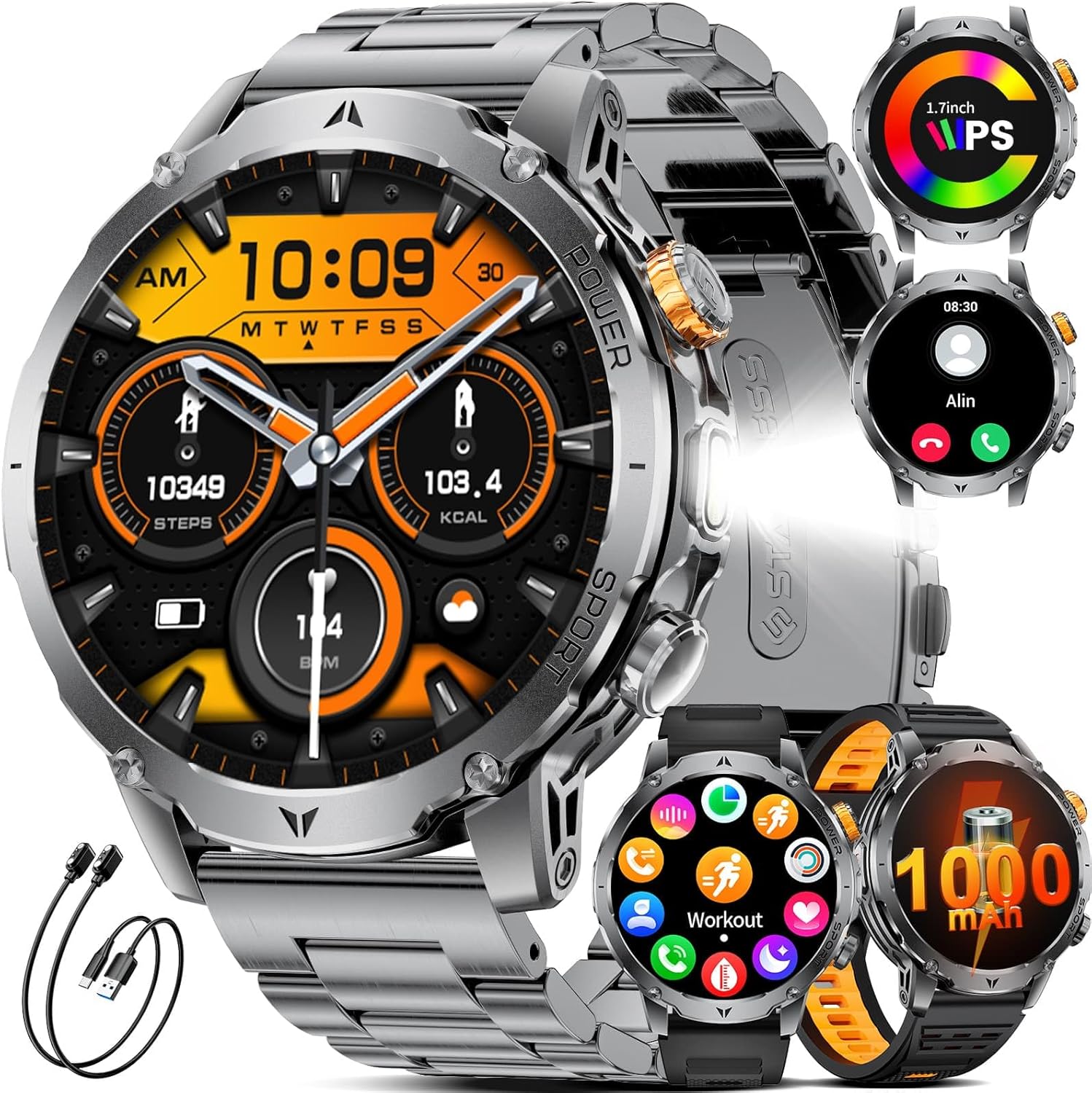
Figure 1: LIGE Smart Watch EF24-A. This image displays the smartwatch with a metal strap, showcasing its round face and robust design.
2. อะไรอยู่ในกล่อง
Upon opening your LIGE Smart Watch EF24-A package, you should find the following items:
- Smart Watch (1 unit)
- Watch Bands (3 units: 1 stainless steel, 2 silicone)
- Charging Cables (2 units: USB and Type-C magnetic charging cables)
- คู่มือผู้ใช้ (1 หน่วย)

Figure 2: Package contents including the smartwatch, three watch bands, and two charging cables.
3. คู่มือการติดตั้ง
3.1 การชาร์จสมาร์ทวอทช์
Before initial use, fully charge your smartwatch. The device comes with two magnetic charging cables (USB and Type-C) for convenience.
- Connect one of the magnetic charging cables to a compatible USB or Type-C power adapter (not included) or a computer's USB port.
- Align the magnetic end of the cable with the charging contacts on the back of the smartwatch. The watch will snap into place and display a charging indicator.
- Allow approximately 2 hours for a full charge. A full charge provides up to 15 days of typical daily use and over 60 days of standby time.

Figure 3: The smartwatch being charged using both USB and Type-C magnetic cables, highlighting the 1000mAh battery capacity.
3.2 การติดตั้งแอปและการจับคู่อุปกรณ์
เพื่อปลดล็อกศักยภาพสูงสุดของสมาร์ทวอทช์ของคุณ โปรดดาวน์โหลดและติดตั้งแอปพลิเคชันที่ใช้งานร่วมกันบนสมาร์ทโฟนของคุณ
- Scan the QR code in the manual or on the watch packaging, or search for the designated app (e.g., 'FitCloudPro' as commonly used by LIGE) in your smartphone's app store (compatible with iOS 8.0+ and Android 4.4+).
- Install and open the app. Follow the on-screen instructions to create an account or log in.
- เปิดใช้งานบลูทูธบนสมาร์ทโฟนของคุณ
- In the app, navigate to the device pairing section and search for your smartwatch (e.g., 'EF24-A').
- Select your device from the list to initiate pairing. Confirm the pairing request on both your phone and the smartwatch.
3.3 การติดตั้งสายรัด
The LIGE Smart Watch EF24-A comes with three interchangeable straps: a stainless steel band and two silicone straps. To change a strap:
- Locate the quick-release pins on the back of the watch straps.
- Slide the pin inwards to detach the current strap from the watch body.
- Align the new strap with the watch lugs and slide the pin inwards. Release the pin once the strap is in place to secure it. Gently pull on the strap to ensure it is firmly attached.
4. คู่มือการใช้งาน
4.1 การนำทางพื้นฐาน
The smartwatch features a full touch screen and physical buttons for navigation:
- ปัดขึ้น/ลง: เลื่อนดูเมนูและการแจ้งเตือน
- ปัดไปทางซ้าย/ขวา: เข้าถึงฟังก์ชันหรือวิดเจ็ตต่างๆ ได้อย่างรวดเร็ว
- แตะ: เลือกสินค้าหรือยืนยันการดำเนินการ
- กดปุ่มด้านข้าง: The watch typically has a power/home button and a customizable function button. Refer to the watch settings for specific button assignments.

Figure 4: Various menu interfaces and navigation options on the smartwatch display.
4.2 การโทรและการแจ้งเตือนบลูทูธ
With its advanced dual-core chip and BLE 5.3 support, the smartwatch offers stable Bluetooth calling and real-time notifications.
- การโทรออก/รับสาย: Once paired, you can answer or make calls directly from your watch using the built-in speaker and microphone.
- การแจ้งเตือนข้อความ: Receive real-time alerts from social apps (e.g., Facebook, Twitter, WhatsApp) and other smartphone notifications directly on your wrist. Ensure notification permissions are enabled in the companion app.

Figure 5: The smartwatch displaying incoming calls and various app notifications.
4.3 หน้าปัดนาฬิกา
Personalize your smartwatch with a wide selection of watch faces.
- The watch comes with 7 built-in faces.
- The companion app offers over 400 additional UI designs. You can also upload a photo to create a unique personal background.
- To change watch faces, long-press the home screen or select from the watch face settings in the app.

Figure 6: A selection of customizable watch faces available for the smartwatch, including options for DIY backgrounds.
4.4 ฟังก์ชันไฟฉาย
The smartwatch includes a powerful LED flashlight for various situations.
- Access the flashlight function from the watch's menu.
- It offers different modes, including constant light, warning mode, and SOS mode.

Figure 7: The smartwatch's powerful LED flashlight being used in various outdoor and emergency scenarios.
4.5 คุณสมบัติอื่นๆ
The LIGE Smart Watch EF24-A offers a range of practical features:
- ผู้ช่วยเสียง AI: สั่งการนาฬิกาของคุณโดยใช้คำสั่งเสียง
- การควบคุมเพลง: ควบคุมการเล่นเพลงบนสมาร์ทโฟนของคุณโดยตรงจากนาฬิกา
- กล้องจากระยะไกล: ใช้นาฬิกาของคุณเป็นชัตเตอร์ระยะไกลสำหรับกล้องโทรศัพท์ของคุณ
- การแสดงสภาพอากาศ: รับข้อมูลอัปเดตสภาพอากาศแบบเรียลไทม์
- นาฬิกาปลุก: ตั้งนาฬิกาปลุกได้โดยตรงบนนาฬิกาของคุณ
- ตัวจับเวลา: Utilize the built-in timer function.
- ค้นหาหมายเลขโทรศัพท์: ค้นหาสมาร์ทโฟนที่เชื่อมต่ออยู่โดยการทำให้สมาร์ทโฟนส่งเสียงดัง
- เตือนการนั่งเฉยๆ: รับการแจ้งเตือนเพื่อเริ่มดำเนินการหลังจากไม่มีการใช้งานเป็นระยะเวลานาน
- เตือนน้ำ: รับการแจ้งเตือนให้ดื่มน้ำตลอดทั้งวัน

Figure 8: A collage showing the smartwatch's music control, weather display, alarm clock, camera control, find phone, sedentary reminder, and water reminder features.
5. การติดตามสุขภาพ
The LIGE Smart Watch EF24-A is equipped with sensors to monitor various health metrics. หมายเหตุ: ตัวเลขการวัดใช้เพื่อเป็นข้อมูลอ้างอิงเท่านั้น และไม่ใช่ข้อมูลทางการแพทย์
5.1 การตรวจวัดอัตราการเต้นของหัวใจ
The watch tracks your heart rate 24 hours a day. All data can be synced to the app to record physical changes.
- ถึง view your current heart rate, navigate to the heart rate section on your watch.
- The app provides detailed historical data and analysis.

Figure 9: The smartwatch displaying real-time heart rate and blood oxygen levels, with a user actively monitoring their health.
5.2 การตรวจวัดระดับออกซิเจนในเลือด (SpO2)
Monitor your blood oxygen levels directly from your wrist.
- Access the blood oxygen feature on your watch to take a measurement.
- ตรวจสอบให้แน่ใจว่านาฬิกากระชับพอดีกับข้อมือของคุณเพื่อให้ได้ค่าที่อ่านได้แม่นยำ
5.3 การตรวจสอบคุณภาพการนอนหลับ
The smartwatch automatically tracks your sleep patterns, providing insights into awake, light, and deep sleep stagใช่
- สวมนาฬิกาขณะนอนหลับเพื่อติดตามการนอนหลับโดยอัตโนมัติ
- View detailed sleep analysis in the companion app to understand your sleep quality.

Figure 10: The smartwatch displaying sleep quality data, including total sleep duration and different sleep stages, with a person sleeping in the background.
5.4 Pressure Detection and Breathing Training
The watch can help you stay on top of stress levels and guide you through breathing exercises.
- Access the pressure detection feature to monitor your stress.
- Use the breathing training function to relax and recover.

Figure 11: The smartwatch displaying pressure detection data, with a graph showing stress levels over time, and a user engaged in focused work.
6. โหมดกีฬา
The LIGE Smart Watch EF24-A offers over 100 sports modes to track your physical activities. It monitors key metrics such as steps taken, distance covered, calories expended, and exercise duration.
- To start a workout, navigate to the 'Workout' or 'Sports' section on your watch.
- Select your desired activity (e.g., walking, running, cycling, tennis, mountaineering, basketball, badminton, rope skipping).
- The watch will begin tracking your activity. End the workout when finished to save the data.
- Review detailed workout summaries in the companion app.

Figure 12: The smartwatch displaying various sports modes and tracking metrics like steps, distance, and calories, with images of people engaged in different sports activities.
7. การบำรุงรักษา
7.1 ความทนทานและการกันน้ำ
The LIGE Smart Watch EF24-A is built with military-grade protection standards, offering exceptional resistance to scratches, impacts, and harsh environmental conditions. It is IP68 waterproof, protecting it from splashes, rain, and sweat, and suitable for swimming (without hot water or steam).
- ควรหลีกเลี่ยงการนำนาฬิกาไปสัมผัสกับน้ำร้อน ไอน้ำ หรือน้ำแรงดันสูง
- ห้ามกดปุ่มนาฬิกาใต้น้ำ
- หลังจากโดนน้ำ ให้เช็ดนาฬิกาให้แห้งด้วยผ้านุ่ม

Figure 13: The smartwatch highlighting its water-resistant, cold-resistant, shock-resistant, and dust-resistant properties.
7.2 การทำความสะอาดและการดูแล
- Regularly clean the watch body and straps with a soft, damp ผ้า.
- หลีกเลี่ยงการใช้สารเคมีรุนแรงหรือวัสดุขัดถู เพราะอาจทำให้พื้นผิวเสียหายได้
- ตรวจสอบให้แน่ใจว่าหน้าสัมผัสการชาร์จสะอาดและแห้งก่อนชาร์จเพื่อป้องกันการกัดกร่อน
8 การแก้ไขปัญหา
If you encounter issues with your LIGE Smart Watch EF24-A, try the following troubleshooting steps:
8.1 ปัญหาการเชื่อมต่อ
- ตรวจสอบให้แน่ใจว่าได้เปิดใช้งาน Bluetooth บนสมาร์ทโฟนของคุณแล้ว และนาฬิกาอยู่ในระยะการทำงาน
- รีสตาร์ททั้งสมาร์ทโฟนและสมาร์ทวอทช์ของคุณ
- Unpair and re-pair the device through the companion app.
- Check if the companion app is running in the background and has necessary permissions.
8.2 ข้อกังวลเกี่ยวกับอายุการใช้งานแบตเตอรี่
- Ensure the watch is fully charged using the provided magnetic cables.
- Reduce screen brightness and turn off unnecessary features (e.g., continuous heart rate monitoring, always-on display) to conserve battery.
- Check for app updates, as software optimizations can improve battery performance.
8.3 การแสดงผลไม่ตอบสนอง
- ลองรีสตาร์ทนาฬิกาโดยกดปุ่มเปิด/ปิดค้างไว้
- ตรวจสอบให้แน่ใจว่าหน้าจอสะอาดและแห้ง
- If the issue persists, perform a factory reset (note: this will erase all data on the watch).
9. ข้อมูลจำเพาะ
| คุณสมบัติ | ข้อมูลจำเพาะ |
|---|---|
| หมายเลขรุ่น | EF24-A |
| ขนาดจอแสดงผล | 1.7 นิ้ว |
| ความละเอียดการแสดงผล | 360*360 พิกเซล |
| ความจุของแบตเตอรี่ | ลิเธียมโพลีเมอร์ 1000 mAh |
| อายุการใช้งานแบตเตอรี่ตามการใช้งานทั่วไป | นานถึง 15 วัน |
| เวลาสแตนด์บาย | Above 60 days |
| เวลาในการชาร์จ | ประมาณ 2 ชั่วโมง |
| การเชื่อมต่อ | บลูทูธ 5.3 |
| ระบบปฏิบัติการ | Android (4.4 and above), iOS (8.0 and above) |
| ความต้านทานต่อน้ำ | IP68 |
| ขนาดสินค้า | 5.91 x 2.76 x 0.79 นิ้ว |
| น้ำหนักสินค้า | 8.8 ออนซ์ (0.25 กิโลกรัม) |

Figure 14: Visual comparison of the 1.7-inch display size of the LIGE Smart Watch EF24-A against other smartwatches.
10. การรับประกันและการสนับสนุน
10.1 ข้อมูลการรับประกัน
LIGE stands behind the quality of its products. The LIGE Smart Watch EF24-A comes with a 24-month worry-free product warranty. This warranty includes services such as replacement, return, or accessory replacement.
10.2 การสนับสนุนลูกค้า
If you have any questions or concerns about your smartwatch, please do not hesitate to contact our customer support team. Our team is always ready to provide you with the support you need.
- Refer to the contact information provided in your product packaging or on the official LIGE webเว็บไซต์สำหรับช่องทางการให้ความช่วยเหลือ
- Please have your model number (EF24-A) and purchase details ready when contacting support.
11. วิดีโอผลิตภัณฑ์
11.1 Military Smart Watch for Men EF24 Overview
วิดีโอ 1: วิดีโอนี้ให้ข้อมูลโดยละเอียดเกี่ยวกับเรื่องนี้view of the LIGE Smart Watch EF24, showcasing its design, various watch faces, flashlight function, and charging capabilities. It also highlights health monitoring features like heart rate and blood pressure, along with music control and weather updates.
11.2 Smart Watch for Men EF24 Features and Durability
Video 2: This video demonstrates the durability of the LIGE Smart Watch EF24, showing its resistance to impact and water. It also illustrates key functionalities such as charging, various sports modes, health tracking (heart rate, blood oxygen, pressure), call handling, notifications, and the flashlight feature.