1. บทนำ
The IK Multimedia TONEX Plug is a portable AI-powered headphone amplifier designed for guitar and bass players. It provides access to a vast library of tone models, functions as a USB-C audio interface, and supports Bluetooth audio streaming for practice and recording. This manual provides essential information for setting up, operating, and maintaining your TONEX Plug.

Image: The TONEX Plug connected to a guitar, ready for use with headphones.
2. ข้อมูลด้านความปลอดภัยที่สำคัญ
- อ่านคำแนะนำเหล่านี้อย่างละเอียดก่อนใช้งาน
- เก็บคู่มือนี้ไว้เพื่อใช้อ้างอิงในอนาคต
- อย่าให้เครื่องโดนน้ำหรือความชื้น
- หลีกเลี่ยงอุณหภูมิที่สูงเกินไปและแสงแดดโดยตรง
- ใช้เฉพาะเอกสารแนบ/อุปกรณ์เสริมที่ระบุเท่านั้น
- อย่าพยายามถอดประกอบหรือดัดแปลงตัวเครื่อง แนะนำให้ช่างผู้ชำนาญเข้ารับบริการทั้งหมด
- การฟังเพลงในระดับเสียงสูงเป็นเวลานานอาจทำให้การได้ยินเสียหายอย่างถาวร ควรปรับระดับเสียงให้อยู่ในระดับที่สบายหูเสมอ
3. เนื้อหาบรรจุภัณฑ์
ตรวจสอบว่ามีรายการทั้งหมดอยู่ในแพ็คเกจของคุณ:
- TONEX Plug Ampชีวิต
- สายชาร์จ USB-C

Image: The TONEX Plug and its included USB-C charging cable.
4. การตั้งค่า
4.1 การชาร์จอุปกรณ์
Before first use, fully charge your TONEX Plug. Connect the included USB-C cable to the USB-C port on the device and the other end to a compatible USB power adapter (not included) or a computer's USB port. The LED indicator will show charging status.

Image: The TONEX Plug connected to a smartphone via USB-C, demonstrating its charging and audio interface capabilities.
4.2 การเชื่อมต่อกับเครื่องดนตรีของคุณ
The TONEX Plug features a flexible 1/4-inch jack. Plug this directly into the output jack of your electric guitar or bass. The flexible design allows it to fit various instrument body shapes.

Image: The TONEX Plug inserted into the output jack of an electric guitar, with headphones connected for silent practice.
4.3 การเชื่อมต่อหูฟัง
Plug your headphones into the 3.5mm headphone output jack located on the side of the TONEX Plug. Ensure the volume is set to a low level before putting on headphones.
5. คู่มือการใช้งาน
5.1 การเปิด/ปิดเครื่อง
กดปุ่มค้างไว้ พลัง button for a few seconds to turn the device on or off. The LED indicators will illuminate upon power-on.
5.2 การปรับระดับเสียง
ใช้ ปริมาณ + และ ปริมาณ - buttons on the side of the device to adjust the headphone output level.
5.3 Navigating Presets and Tuner
The TONEX Plug allows you to store and recall up to 30 user presets across 10 color-coded banks. Use the พรีเซ็ต buttons to cycle through your saved tones. Press the TUNER button to activate the built-in chromatic LED tuner for accurate instrument tuning.
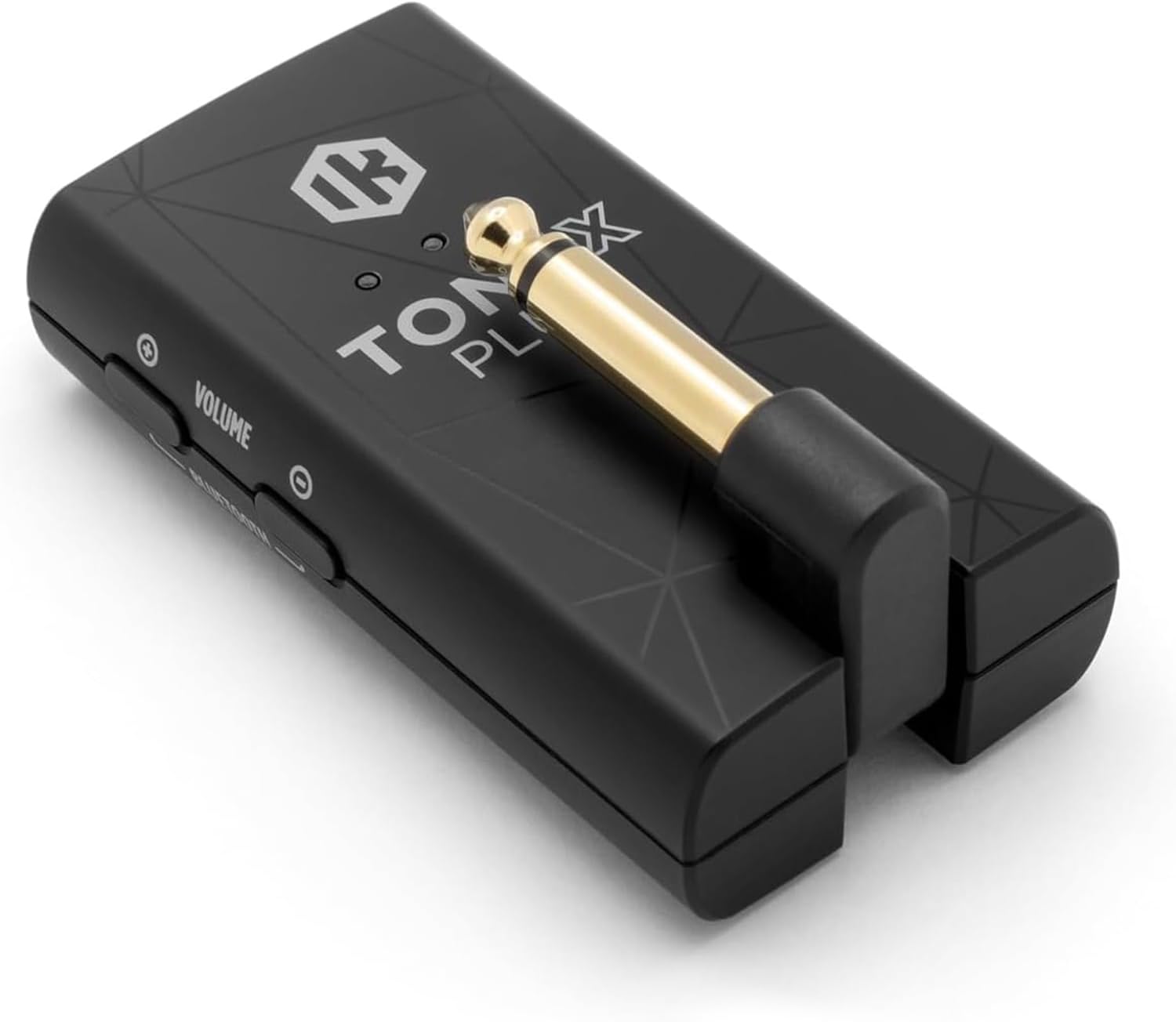
ภาพ: รายละเอียด view of the TONEX Plug's controls, including Power, Preset, Tuner, Volume, and Bluetooth buttons.
5.4 Bluetooth Streaming and TONEX Control App
The TONEX Plug supports Bluetooth audio streaming, allowing you to play along with music from your mobile device. It also connects wirelessly to the TONEX Control App (iOS/Android) for advanced tone management.
- เปิดใช้งานบลูทูธบนอุปกรณ์มือถือของคุณ
- กดปุ่มค้างไว้ บลูทู ธ button on the TONEX Plug to enter pairing mode.
- Select "TONEX Plug" from your device's Bluetooth settings.
- Open the TONEX Control App to browse ToneNET, load new sounds, edit presets, and access a full signal chain with six essential effects (noise gate, compressor, delay, modulation, reverb) and comprehensive EQ controls.
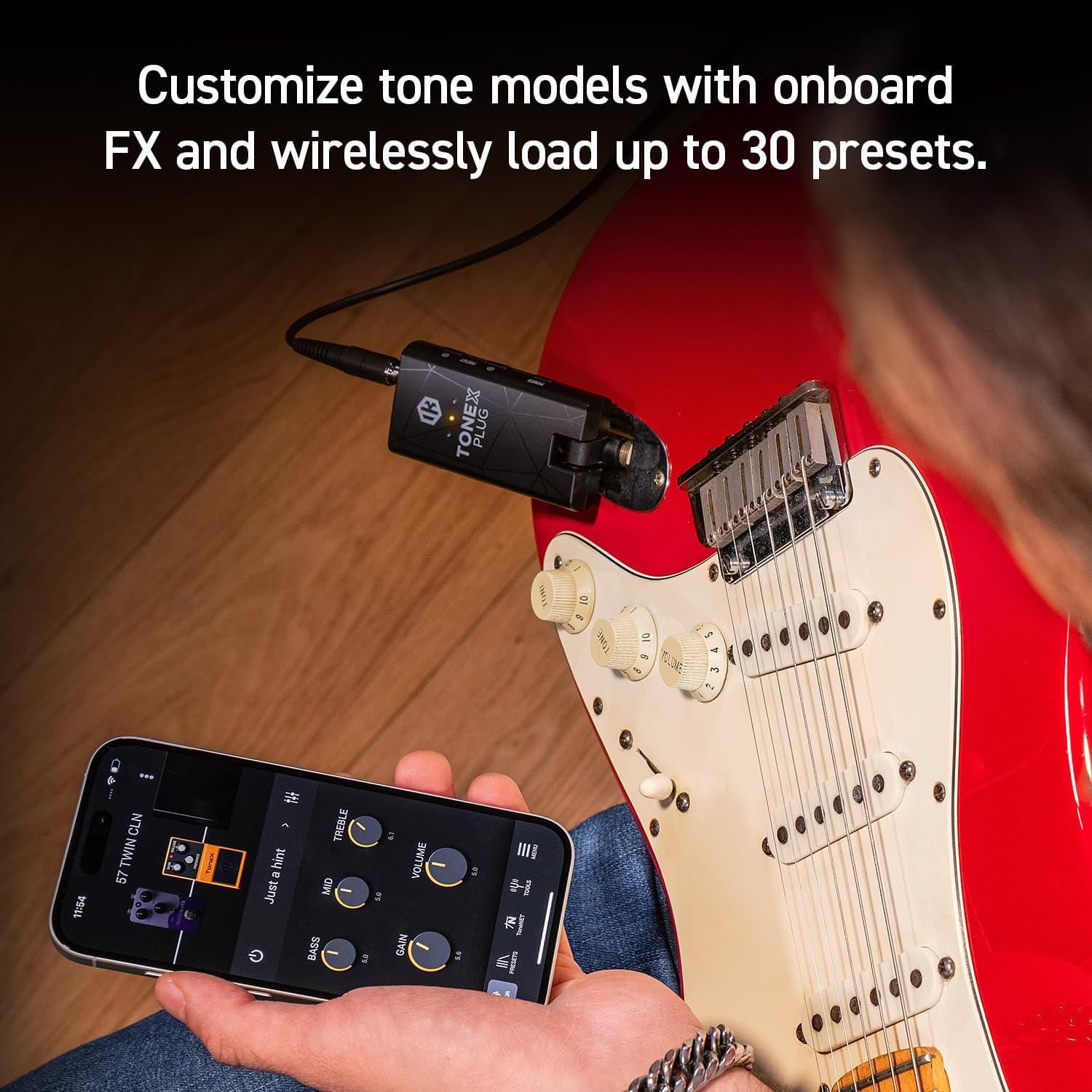
Image: The TONEX Control App interface on a smartphone, demonstrating real-time tone customization while connected to the TONEX Plug.
5.5 USB-C Audio Interface Functionality
The TONEX Plug can function as a premium USB-C audio interface. Connect the device to your computer or mobile device using the USB-C cable to record high-fidelity digital audio directly. This allows you to use the TONEX Plug's tone models and effects within your digital audio workstation (DAW).
5.6 ผลิตภัณฑ์เกินview วีดีโอ
วิดีโอ: ผลิตภัณฑ์อย่างเป็นทางการview of the IK Multimedia TONEX Plug, demonstrating its features and connectivity.
6. การบำรุงรักษา
- การทำความสะอาด: Use a soft, dry cloth to clean the exterior of the TONEX Plug. Do not use abrasive cleaners or solvents.
- การดูแลแบตเตอรี่ The internal rechargeable battery provides up to 6 hours of continuous playtime. For optimal battery life, avoid fully discharging the unit frequently and store it in a cool, dry place when not in use for extended periods.
- พื้นที่จัดเก็บ: Store the device in a protective case or pouch (if applicable) to prevent damage from dust or impacts.
7 การแก้ไขปัญหา
| ปัญหา | สาเหตุที่เป็นไปได้ | สารละลาย |
|---|---|---|
| ไม่มีเสียงจากหูฟัง | Volume too low, headphones not fully plugged in, TONEX Plug not powered on, instrument not connected. | Increase volume, ensure headphones are securely connected, power on the device, check instrument connection. |
| ไม่สามารถเชื่อมต่อผ่านบลูทูธได้ | TONEX Plug not in pairing mode, Bluetooth off on mobile device, interference. | Ensure TONEX Plug is in pairing mode (hold Bluetooth button), enable Bluetooth on your device, try pairing in a different location. |
| Device not recognized as audio interface. | Incorrect USB-C cable, driver issues (for computer), device not powered on. | Use the provided USB-C cable, ensure device is powered on, check your computer's audio settings or install necessary drivers from IK Multimedia's webเว็บไซต์. |
| แบตเตอรี่มีอายุสั้น | แบตเตอรี่ชาร์จไม่เต็ม เป็นแบตเตอรี่เก่า | Ensure full charge before use. Battery performance may degrade over time. |
If you encounter issues not listed here, please refer to the official IK Multimedia support resources.
8. ข้อมูลจำเพาะ
- แบบอย่าง: TONEX Plug
- ยี่ห้อ: ไอเค มัลติมีเดีย
- น้ำหนักสินค้า: 2.89 ออนซ์
- ขนาดสินค้า : ลึก 0.79 นิ้ว x กว้าง 1.57 นิ้ว x สูง 2.95 นิ้ว
- Output Channel Quantity: 1
- อายุการใช้งานแบตเตอรี่: สูงสุด 6 ชั่วโมง (ชาร์จไฟได้)
- การเชื่อมต่อ: 1/4" instrument input, 3.5mm headphone output, USB-C (charging/audio interface), Bluetooth
- Tone Models: Access to 40,000+ AI Machine Modeling Tone Models
- ผลกระทบ: Noise gate, compressor, delay, modulation, reverb, EQ
9. การรับประกันและการสนับสนุน
The IK Multimedia TONEX Plug comes with a manufacturer's warranty. For detailed warranty information, product registration, and technical support, please visit the official IK Multimedia webหรือติดต่อฝ่ายบริการลูกค้า เก็บหลักฐานการซื้อไว้เพื่อใช้ในการเคลมประกัน
เป็นทางการ Webเว็บไซต์: www.ikmultimedia.com


