1. บทนำ
This manual provides detailed instructions for the setup, operation, and maintenance of your GEEKOM Mini PC IT12. This compact desktop computer is equipped with a 12th Gen Intel Core i7-1260P processor, 32GB of DDR4 RAM, and a 1TB NVMe PCIe 4.0 SSD, running Windows 11 Pro. Its design focuses on efficient performance and versatile connectivity for various applications.
2. คู่มือการติดตั้ง
2.1. การแกะกล่องและการตรวจสอบเบื้องต้น
นำส่วนประกอบทั้งหมดออกจากบรรจุภัณฑ์อย่างระมัดระวัง ตรวจสอบว่าสินค้าทั้งหมดที่ระบุไว้ในส่วน "สิ่งที่อยู่ในกล่อง" อยู่ในสภาพสมบูรณ์และไม่เสียหาย
- 1x GEEKOM Mini PC IT12
- สาย HDMI 1x
- 1x ขาตั้ง VESA
- อะแดปเตอร์ไฟฟ้า 1x
- 1x คู่มือการใช้งาน
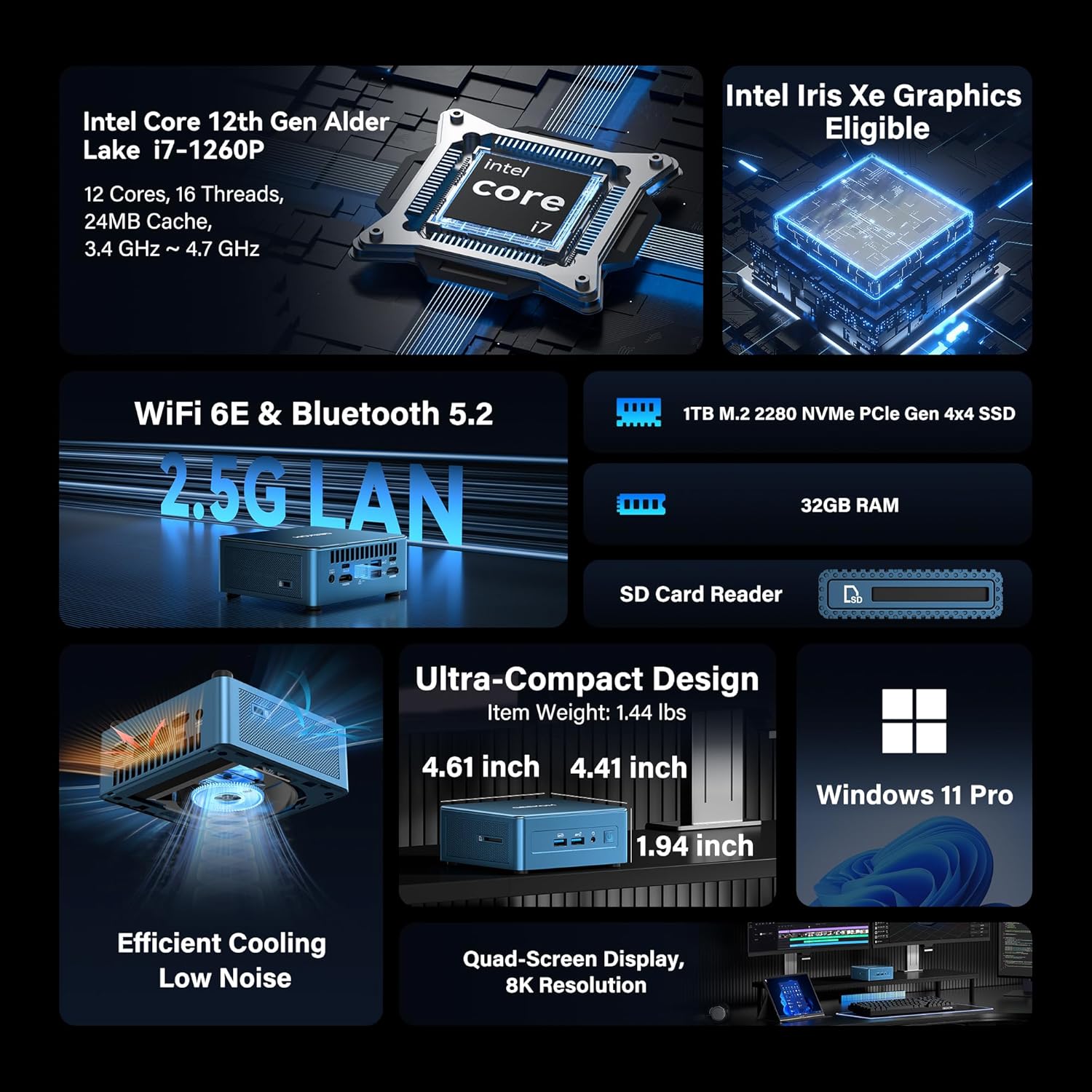
Image: GEEKOM Mini PC IT12 and its accessories, including the mini PC unit, power adapter, HDMI cable, and VESA mount.
Unboxing Video Guide
Video: A hands-on unboxing of the GEEKOM Mini PC, showing the contents of the box and the initial presentation of the device and its accessories.
2.2. การเชื่อมต่ออุปกรณ์ต่อพ่วง
- เชื่อมต่อจอแสดงผล: Use the provided HDMI cable to connect your monitor to one of the HDMI 2.0 ports on the back of the Mini PC. Alternatively, use a USB4 port for DisplayPort output.
- เชื่อมต่อคีย์บอร์ดและเมาส์: Plug your USB keyboard and mouse into the available USB 3.2 Gen 2 ports on the front or USB ports on the back.
- เชื่อมต่อพลังงาน: Connect the power adapter to the DC-in port on the back of the Mini PC, then plug the adapter into a power outlet.
- การเชื่อมต่อเครือข่าย: For a wired connection, connect an Ethernet cable to the 2.5GbE LAN port. For wireless, ensure the Wi-Fi antenna is connected (if external) or rely on the internal Wi-Fi 6E.

ภาพ: ด้านหลัง view of the GEEKOM Mini PC IT12, showing the arrangement of ports including DC-in, USB4, HDMI, 2.5GbE LAN, USB 3.2, and USB 2.0. Cables are connected to some ports.
2.3. การบูตครั้งแรก
Press the power button on the front of the Mini PC. The system will boot into Windows 11 Pro. Follow the on-screen instructions to complete the initial Windows setup.
3. คู่มือการใช้งาน
3.1. เปิด/ปิดเครื่อง
- เปิดเครื่อง: กดปุ่มเปิดปิดที่แผงด้านหน้า
- หมดแรง: คลิกปุ่มเริ่มใน Windows จากนั้นเลือกเปิด/ปิดเครื่อง > ปิดเครื่อง
- เริ่มต้นใหม่อีกครั้ง: คลิกปุ่มเริ่มใน Windows จากนั้นเลือกเปิด/ปิดเครื่อง > เริ่มระบบใหม่
3.2. การกำหนดค่าการแสดงผล
The GEEKOM Mini PC IT12 supports up to four displays simultaneously via its dual USB4 (8K DP1.4) and dual HDMI 2.0 (4K@120Hz) ports. To configure multiple displays in Windows 11:
- คลิกขวาบนเดสก์ท็อปและเลือก "การตั้งค่าการแสดงผล"
- Under "Multiple displays", you can detect, identify, and arrange your displays.
- Choose your preferred display mode (e.g., Extend these displays, Duplicate these displays).

Image: A GEEKOM Mini PC IT12 connected to two large monitors and a tablet, demonstrating its quad-display capability for a multi-screen workstation.
3.3. เครือข่ายและการเชื่อมต่อ
- LAN แบบมีสาย: The 2.5Gb Ethernet port provides high-speed internet access.
- ไวไฟ 6E: Connect to wireless networks for fast and stable internet.
- Bluetooth 5.2: Pair with compatible Bluetooth devices such as keyboards, mice, and headphones.
4. การบำรุงรักษาและการอัพเกรด
4.1. ระบบระบายความร้อน
The IT12 Mini PC features an upgraded IceBlast cooling system with an all-copper module and a silent fan. To ensure optimal performance and longevity, keep the ventilation grilles clear of obstructions. Regularly clean dust from the vents using compressed air.

ภาพ: ระเบิด view diagram illustrating the internal components of the GEEKOM Mini PC IT12, highlighting the IceBlast cooling system with its fan and copper heat pipes.
4.2. การขยายพื้นที่เก็บข้อมูลและหน่วยความจำ
The GEEKOM Mini PC IT12 offers flexible upgrade options:
- แรม : The 32GB DDR4 RAM can be expanded up to 96GB.
- NVMe SSD: The 1TB NVMe PCIe 4.0 SSD can be expanded up to 4TB.
- พื้นที่เก็บข้อมูลเพิ่มเติม: The unit includes additional slots for M.2 2242 SATA SSD (up to 2TB) and 2.5" SATA HDD (up to 4TB) expansion.
For detailed instructions on how to access internal components for upgrades, please refer to the official GEEKOM support resources or consult a qualified technician.

รูปภาพ: แผนภาพรายละเอียดแสดงasing the expandable storage options within the GEEKOM Mini PC IT12, illustrating slots for M.2 NVMe PCIe SSD, M.2 SATA SSD, and a 2.5-inch SATA HDD/SSD.
5 การแก้ไขปัญหา
5.1. ไม่มีอำนาจ
- ตรวจสอบให้แน่ใจว่าอะแดปเตอร์ไฟฟ้าเชื่อมต่อกับมินิพีซีและเต้ารับไฟฟ้าที่ใช้งานได้แน่นหนา
- ตรวจสอบว่าเต้ารับไฟฟ้าใช้งานได้โดยเสียบอุปกรณ์อื่น
- ตรวจสอบอะแดปเตอร์ไฟฟ้าเพื่อดูว่ามีร่องรอยความเสียหายที่มองเห็นได้หรือไม่
5.2. ไม่มีการแสดงผล
- Confirm the display cable (HDMI or USB4) is firmly connected to both the Mini PC and the monitor.
- ตรวจสอบให้แน่ใจว่าจอภาพเปิดอยู่และตั้งค่าแหล่งอินพุตที่ถูกต้อง
- ลองใช้สายจอภาพหรือจอภาพอื่นหากมี
5.3 ปัญหาการเชื่อมต่อเครือข่าย
- มีสาย: Check the Ethernet cable connection and router status.
- ไร้สาย: Verify Wi-Fi is enabled in Windows settings and you are connected to the correct network. Restart your router if necessary.
5.4. ปัญหาด้านประสิทธิภาพของระบบ
- ตรวจสอบให้แน่ใจว่ามินิพีซีมีการระบายอากาศที่เพียงพอและไม่ร้อนเกินไป
- ปิดแอปพลิเคชันที่ไม่จำเป็นซึ่งทำงานอยู่เบื้องหลัง
- ตรวจสอบการอัปเดต Windows และไดรเวอร์ที่มีอยู่
6. ข้อมูลจำเพาะ
| คุณสมบัติ | รายละเอียด |
|---|---|
| โปรเซสเซอร์ | 12th Gen Intel Core i7-1260P (12 Cores, 16 Threads, up to 4.70 GHz, 24MB Cache) |
| กราฟฟิก | กราฟิก Intel Iris Xe (รวม) |
| แรม | หน่วยความจำ DDR4 32GB (สามารถเพิ่มได้ถึง 96GB) |
| พื้นที่จัดเก็บ | 1TB NVMe PCIe 4.0 SSD (Expandable to 4TB) + M.2 2242 SATA SSD slot (up to 2TB) + 2.5" SATA HDD (up to 4TB) |
| ระบบปฏิบัติการ | วินโดวส์ 11 โปร |
| เอาท์พุตวิดีโอ | 2x USB4 (8K DP1.4), 2x HDMI 2.0 (4K@120Hz) - Supports Quad Display |
| พอร์ต USB | พอร์ต USB 4 จำนวน 2 ช่อง, พอร์ต USB 3.2 Gen 2 จำนวน 3 ช่อง, พอร์ต USB 2.0 จำนวน 1 ช่อง |
| เครือข่าย | 2.5Gb Ethernet, Wi-Fi 6E, Bluetooth 5.2 |
| เครื่องอ่านการ์ด | SD Card Reader (UHS-II) |
| ขนาด (กxยxส) | 4.6 x 4.4 x 1.9 นิ้ว |
| น้ำหนัก | 3.3 ปอนด์ |
7. ประสิทธิภาพการใช้พลังงาน
The GEEKOM Mini PC IT12 is designed for low power consumption, making it an energy-efficient alternative to traditional desktop PCs. Its 12th Gen Intel Core P-series CPU (28W single-CPU power draw) consumes significantly less power than high-performance H/HK series processors (45W+), reducing electricity costs and enabling 24/7 reliable operation with a quiet experience.
Video: A comparison demonstrating the energy consumption between a traditional desktop PC and the GEEKOM Mini PC IT12 under both light and heavy workloads.
8. การรับประกันและการสนับสนุน
Your GEEKOM Mini PC IT12 comes with a 3-year limited warranty. For technical assistance or warranty claims, please contact GEEKOM support through the following channels:
- การสนับสนุนผู้ขาย Amazon: Log into your Amazon buyer's account, find your order, and click "Get help" for product assistance.
- การสนับสนุนทางอีเมล์: ส่งอีเมลไปยังทีมบริการหลังการขายได้ที่ shirley.li@geekom.tw.
GEEKOM is committed to providing dedicated US-based technical support and ensures full certification including CE, FCC, CB, and CC for guaranteed safety and compliance.


