การแนะนำ
This manual provides detailed instructions for setting up, operating, maintaining, and troubleshooting your GEEKOM GeekBook X14 Pro laptop. Please read this manual thoroughly before using your device to ensure proper functionality and longevity. Keep this manual for future reference.
มีอะไรอยู่ในกล่อง
Upon unboxing your GEEKOM GeekBook X14 Pro, verify that all the following items are included:
- GEEKOM GeekBook X14 Pro Laptop
- GEEKOM GeekBook X14 Pro Premium Packaging
- 65W PD GaN Fast Charger
- สาย USB-C ถึง USB-C
- สถานีเชื่อมต่อ
- คู่มือการใช้งาน

สินค้าเกินview
The GEEKOM GeekBook X14 Pro is an ultra-light and thin laptop designed for professionals. It features a magnesium alloy unibody chassis, weighing only 999g and tapering to 6mm at its thinnest point.

คุณสมบัติหลัก:
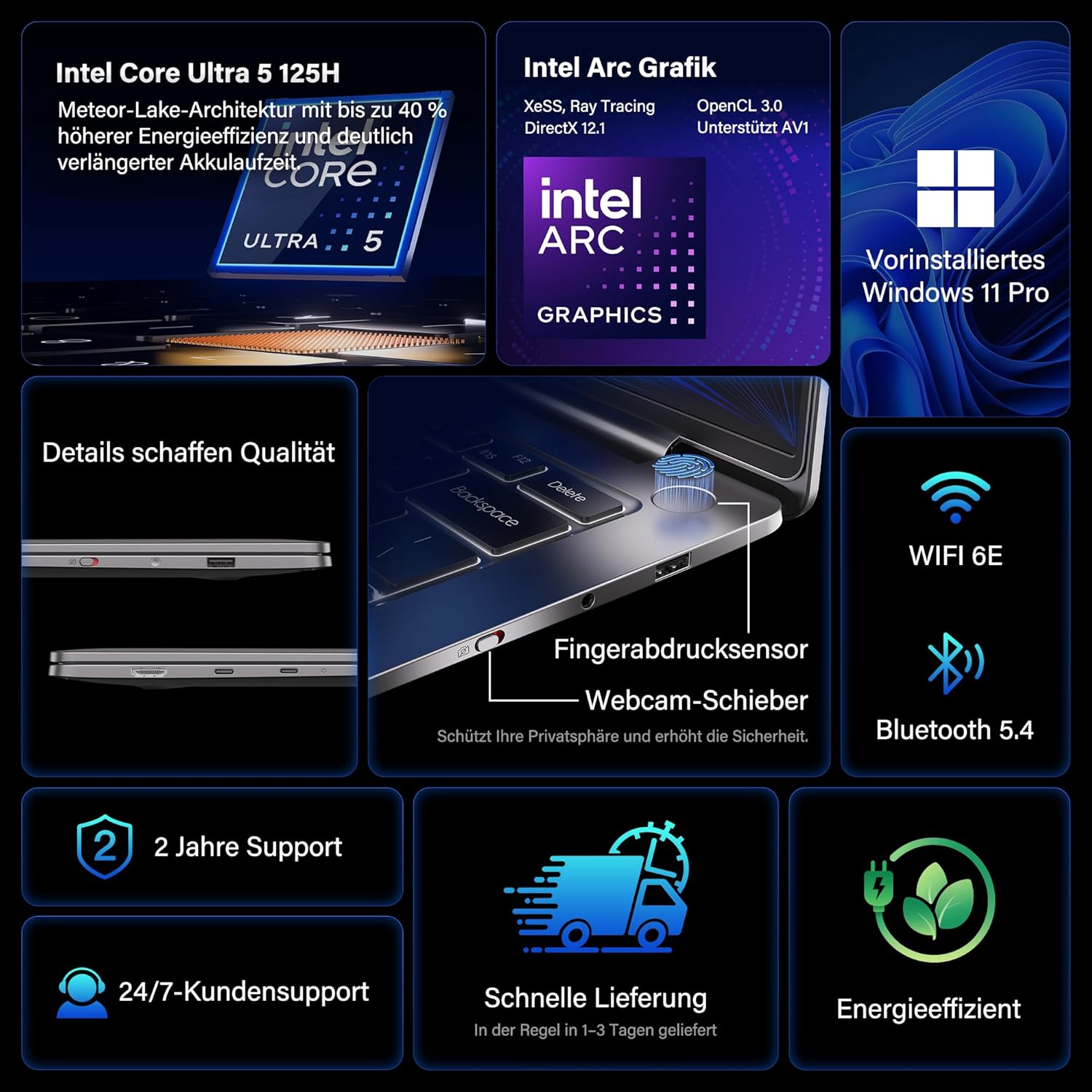
- โปรเซสเซอร์: Intel Core Ultra 5 125H (14 cores, 18 threads, up to 4.5 GHz)
- กราฟิก: Intel Arc Graphics with Xe-LPG architecture
- แสดง: 14-inch 2.8K OLED (2880 x 1800) with 120Hz refresh rate, 100% DCI-P3, up to 450 nits brightness
- หน่วยความจำ: 32GB LPDDR5x RAM (7500 MT/s)
- พื้นที่จัดเก็บ: SSD PCIe 4.0 NVMe ขนาด 1TB
- ระบบปฏิบัติการ: ติดตั้ง Windows 11 Pro มาให้แล้ว
- การเชื่อมต่อ: 2x USB4 (40 Gbps), 1x USB 3.2 Gen 1 Type-A (5 Gbps), HDMI 2.0, Wi-Fi 6E, Bluetooth 5.4
- ความปลอดภัย: Fingerprint sensor in power button, physical webcam slider
- เสียง: ดีทีเอส:เอ็กซ์ อัลตร้า ออดิโอ
- แบตเตอรี่: 72 Wh, up to 16 hours battery life, 65W USB-C fast charging
- การระบายความร้อน: GEEKOM IceBlade 2.0 cooling system with adjustable fan profiles

พอร์ตและตัวเชื่อมต่อ:
- 2x USB4 (40 Gbps)
- 1x USB 3.2 Gen 1 Type-A (5 Gbps)
- 1x HDMI2.0 การเชื่อมต่อ
- แจ็คเสียง 1x 3.5 มม.
- Power Input (via USB-C)

การตั้งค่า
1. การเปิดเครื่องครั้งแรกและการชาร์จ
- Connect the 65W PD GaN Fast Charger to a power outlet and then to one of the USB-C ports on your laptop.
- ควรปล่อยให้แล็ปท็อปชาร์จไฟอย่างน้อย 30 นาทีก่อนใช้งานครั้งแรก หรือจนกว่าไฟแสดงสถานะแบตเตอรี่จะแสดงว่ามีประจุเพียงพอ
- Press the power button (integrated with the fingerprint sensor) to turn on the laptop.
2. การตั้งค่า Windows 11 Pro
Follow the on-screen prompts to complete the initial Windows 11 Pro setup. This includes:
- เลือกภูมิภาคและเค้าโครงแป้นพิมพ์ของคุณ
- การเชื่อมต่อกับเครือข่าย Wi-Fi
- Signing in with a Microsoft account or creating a local account.
- Setting up privacy settings.
3. การตั้งค่าเซ็นเซอร์ลายนิ้วมือ
For enhanced security and quick login, set up the fingerprint sensor:
- ไปที่ การตั้งค่า > บัญชี > ตัวเลือกการลงชื่อเข้าใช้.
- ภายใต้ "วิธีลงชื่อเข้าใช้" เลือก ระบบการจดจำลายนิ้วมือ (Windows Hello) และปฏิบัติตามคำแนะนำเพื่อลงทะเบียนลายนิ้วมือของคุณ
คำแนะนำการใช้งาน
คุณสมบัติการแสดงผล
The 14-inch 2.8K OLED display offers vibrant colors and sharp details. With a 120Hz refresh rate, scrolling and animations are smooth. The display covers 100% DCI-P3 color gamut and reaches up to 450 nits brightness, ensuring clear visibility in various lighting conditions.

ผลงาน
Equipped with an Intel Core Ultra 5 125H processor, 32GB LPDDR5x RAM, and a 1TB PCIe 4.0 NVMe SSD, the GeekBook X14 Pro delivers efficient performance for demanding tasks, quick application launches, and seamless multitasking.

การเชื่อมต่อ
The laptop supports Wi-Fi 6E for fast and stable wireless internet connections and Bluetooth 5.4 for connecting peripherals. The two USB4 ports offer high-speed data transfer (40 Gbps) and support up to three 4K external displays simultaneously via the included mini docking station or direct connection.
เสียง
Experience clear and spatial audio with DTS:X Ultra technology, enhancing your video calls, movies, and music playback.
Cooling System (GEEKOM IceBlade 2.0)
The GEEKOM IceBlade 2.0 cooling system ensures optimal performance even under sustained load. It features a quiet fan and a dual-heatpipe design to efficiently dissipate heat. You can switch between three intelligent fan profiles (Silent, Standard, Performance) by pressing Fn + P to balance noise and cooling efficiency.

แบตเตอรี่และการชาร์จ
The 72 Wh battery provides up to 16 hours of usage. The included 65W USB-C PD GaN fast charger can charge the battery up to 80% in approximately one hour, allowing for quick power-ups on the go.

Webcam Privacy Slider
For enhanced privacy, the laptop includes a physical slider to cover the webลูกเบี้ยวเมื่อไม่ใช้งาน
การซ่อมบำรุง
การทำความสะอาด
- ใช้ผ้านุ่มที่ไม่เป็นขุยในการทำความสะอาดหน้าจอและตัวเครื่อง
- สำหรับรอยเปื้อนฝังแน่น ให้เช็ดเบาๆampเทน้ำหรือน้ำยาทำความสะอาดที่ปลอดภัยต่อหน้าจอลงบนผ้า
- หลีกเลี่ยงการใช้สารเคมีรุนแรง วัสดุที่มีฤทธิ์กัดกร่อน หรือความชื้นที่มากเกินไป
- ตรวจสอบให้แน่ใจว่าแล็ปท็อปปิดอยู่และถอดปลั๊กออกก่อนทำความสะอาด
การอัพเดตซอฟต์แวร์
Regularly check for and install Windows updates and driver updates to ensure optimal performance, security, and compatibility. You can check for Windows updates via การตั้งค่า > การอัปเดต Windows.
การแก้ไขปัญหา
แล็ปท็อปเปิดไม่ติด
- Ensure the charger is securely connected to both the laptop and a working power outlet.
- Allow the laptop to charge for at least 30 minutes.
- Try a different power outlet or USB-C port if available.
ปัญหาการแสดงผล
- If the screen is black, ensure the laptop is powered on and not in sleep mode. Press any key or the power button briefly.
- Check display settings in Windows if external monitors are not detected or showing incorrect resolution.
ประสิทธิภาพการทำงานช้า
- ปิดแอปพลิเคชันที่ไม่จำเป็นซึ่งทำงานอยู่เบื้องหลัง
- ตรวจสอบให้แน่ใจว่า Windows และไดรเวอร์ได้รับการอัปเดตแล้ว
- ตรวจสอบว่ามีพื้นที่ว่างใน SSD เพียงพอหรือไม่
- Monitor CPU/RAM usage in Task Manager to identify resource-intensive processes.
ปัญหาการเชื่อมต่อ
- ไวไฟ : Restart your router and the laptop. Ensure Wi-Fi is enabled in Windows settings.
- บลูทูธ: Ensure Bluetooth is enabled and devices are in pairing mode. Remove and re-pair devices if issues persist.
- USB/HDMI: Ensure cables are securely connected. Test with different cables or ports if possible.
สำหรับความช่วยเหลือเพิ่มเติม โปรดดูส่วนการรับประกันและการสนับสนุน
ข้อมูลจำเพาะ
| คุณสมบัติ | รายละเอียด |
|---|---|
| ยี่ห้อ | จีคอม |
| ชื่อรุ่น | GeekBook X14 Pro |
| หมายเลขรุ่น | NX14CM |
| สี | สีเทาไททาเนียม |
| ฟอร์มแฟกเตอร์ | Ultra-portable and Ultra-light Notebook |
| ขนาดหน้าจอ | 14 นิ้ว |
| ความละเอียดหน้าจอ | 2.8K (2880 x 1800 pixels, 16:10) |
| ประเภทโปรเซสเซอร์ | อินเทล คอร์ อัลตร้า 5 125H |
| ความเร็วของโปรเซสเซอร์ | สูงสุด 4.5 GHz |
| ขนาดแรม | 32GB |
| เทคโนโลยีแรม | LPDDR5x |
| ความเร็วสัญญาณนาฬิกาหน่วยความจำ | 7500 เมกะเฮิรตซ์ |
| ขนาดฮาร์ดดิสก์ | 1TB |
| ประเภทฮาร์ดดิสก์ | SSD (PCIe x4) |
| โคโปรเซสเซอร์กราฟิก | กราฟิก Intel Arc |
| ประเภทไร้สาย | 802.11ax (Wi-Fi 6E), บลูทูธ 5.4 |
| พอร์ต USB | 2x USB4, 1x USB 3.2 Gen 1 Type-A |
| พอร์ต HDMI | 1 (HDMI 2.0) |
| ระบบปฏิบัติการ | วินโดวส์ 11 โปร |
| อายุการใช้งานแบตเตอรี่โดยเฉลี่ย | Up to 16 Hours (72 Wh) |
| น้ำหนักสินค้า | 999g (Laptop only) |
| คุณสมบัติพิเศษ | Fingerprint sensor, Webcam privacy slider, DTS:X Ultra Audio, GEEKOM IceBlade 2.0 cooling, Mini docking station included |
การรับประกันและการสนับสนุน
The GEEKOM GeekBook X14 Pro comes with a รับประกัน 2 ปี. GEEKOM provides ฝ่ายสนับสนุนลูกค้าตลอด 24 ชั่วโมงทุกวัน for any technical assistance or inquiries you may have.
หากต้องการความช่วยเหลือ โปรดไปที่ GEEKOM อย่างเป็นทางการ website or contact their customer service directly. Keep your purchase receipt and product serial number handy when contacting support.
The product undergoes extensive reliability testing, including thermal shock, vibration, humidity, and impact tests, to ensure durability and high quality.


