1. บทนำ
This manual provides comprehensive instructions for the setup, operation, and maintenance of your FIFINE BM38W RGB Microphone Boom Arm. Please read this guide thoroughly before use to ensure proper functionality and longevity of the product.
2. อะไรอยู่ในกล่อง
- FIFINE BM38W RGB Microphone Boom Arm
- ซี-ซีแอลamp สำหรับติดตั้งบนโต๊ะ
- อะแดปเตอร์เกลียว 3/8”
- อะแดปเตอร์เกลียว 5/8”
- USB-A/Type-C cable for RGB power
3. คุณสมบัติหลัก
- โครงสร้างเหล็กกล้าแข็งแรงทนทาน: The BM38W features thickened reinforced steel for stability, supporting microphones up to 3.3 lbs (1.5KG) without wobbling or sagging.
- Controllable RGB Modes: Offers 9+ RGB lighting effects to enhance your desk setup. Short-press to switch modes/colors, long-press for 5 seconds to turn on/off.
- เข้ากันได้สากล: Includes 3/8” thread screw and 5/8” adapter for compatibility with most microphones.
- การปรับมุมหลายมุม: Features a 360° swivel base and a 180° flexible arm for precise microphone positioning.
- การตั้งค่าแบบไม่ต้องใช้เครื่องมือ: Designed for easy installation without drilling or additional tools. The silicone pad on the C-clamp protects your desk.
4. คำแนะนำในการตั้งค่า
- แนบ C-Clamp: Securely fasten the C-clamp to your desk. Ensure the silicone pad is positioned to protect the desk surface. The clamp supports desks up to 2.1 inches thick.
- เสียบแขนบูม: Insert the base of the boom arm into the designated hole on the C-clamp. Hand-tighten the knob to secure it.
- ติดตั้งไมโครโฟนของคุณ: Attach your microphone to the 3/8” thread screw on the boom arm. Use the included 5/8” adapter if your microphone requires it.
- เชื่อมต่อพลังงาน RGB: Connect the provided USB-A/Type-C cable from the boom arm to a USB port on your computer or a power adapter to activate the RGB lighting.

Figure 4.1: Illustration of the C-clamp installation on a desk.

Figure 4.2: Step-by-step guide for tool-free installation.

Figure 4.3: Microphone thread adapters for broad compatibility.
Setup Video Guides
วิดีโอ 4.1: การรายงานอย่างตรงไปตรงมาview of the FIFINE microphone boom arm stand, including unboxing and setup demonstration.
Video 4.2: Demonstration of the boom arm's setup and its ability to hold various microphones securely.
5. คู่มือการใช้งาน
5.1 การควบคุมแสง RGB
The boom arm features integrated RGB lighting with multiple modes. To control the lighting:
- เปลี่ยนโหมด/สี: Short-press the RGB button located on the boom arm to cycle through the available lighting effects and colors.
- เปิด/ปิด: Long-press the RGB button for 5 seconds to turn the lighting on or off.

Figure 5.1: RGB lighting controls and effects.

Figure 5.2: Dynamic RGB lighting in action.
5.2 Adjustments and Positioning
The boom arm offers flexible positioning to suit your needs:
- ฐานหมุนได้ 360°: The base allows for full rotation, enabling you to swing the arm into or out of position effortlessly.
- 180° Flexible Arm: The articulated arm sections can be adjusted 180 degrees to achieve your desired microphone height and distance.
- การออกแบบพับได้: When not in use, the arm can be folded flat against your desk to save space.

Figure 5.3: Multi-angle adjustment capabilities.

Figure 5.4: Foldable design for convenient storage.
5.3 สถานการณ์การใช้งาน
The FIFINE BM38W is ideal for various applications:
- พอดคาสติ้ง: Position your microphone perfectly for clear audio recording.
- การเล่นเกม: Keep your microphone out of the way while ensuring optimal voice pickup during gameplay.
- สตรีมมิ่ง: Enhance your live streams with professional microphone placement and dynamic RGB lighting.
- การบันทึก: Achieve precise microphone angles for studio-quality audio capture.
Video 5.1: Demonstration of the microphone stand's utility for streaming setups.
วิดีโอ 5.2: การแสดงasing the boom arm's benefits for gaming and streaming.
Video 5.3: Highlighting the boom arm's versatility for content creators.
6. ข้อมูลจำเพาะ
| คุณสมบัติ | รายละเอียด |
|---|---|
| ยี่ห้อ | ฟิไฟน์ |
| ชื่อรุ่น | BM38W |
| สี | สีขาว |
| วัสดุ | เหล็กอัลลอยด์ |
| ประเภทฐาน | Clamp |
| Microphone Stand Thread Size | 3/8 inch, 5/8 Inch |
| คำแนะนำน้ำหนักสูงสุด | 3.3 ปอนด์ (1.5 กก.) |
| เอฟเฟกต์แสง RGB | 9+ modes (Static Single Color, Multicolored Flicker, Single-colored Flowing, Multi-colored Flowing, RGB Stacking, Multi-colored Breathing, Dual-channels Flowing, Multi-colored Gradient, Rainbow Flowing) |

Figure 6.1: Weight capacity of the boom arm.
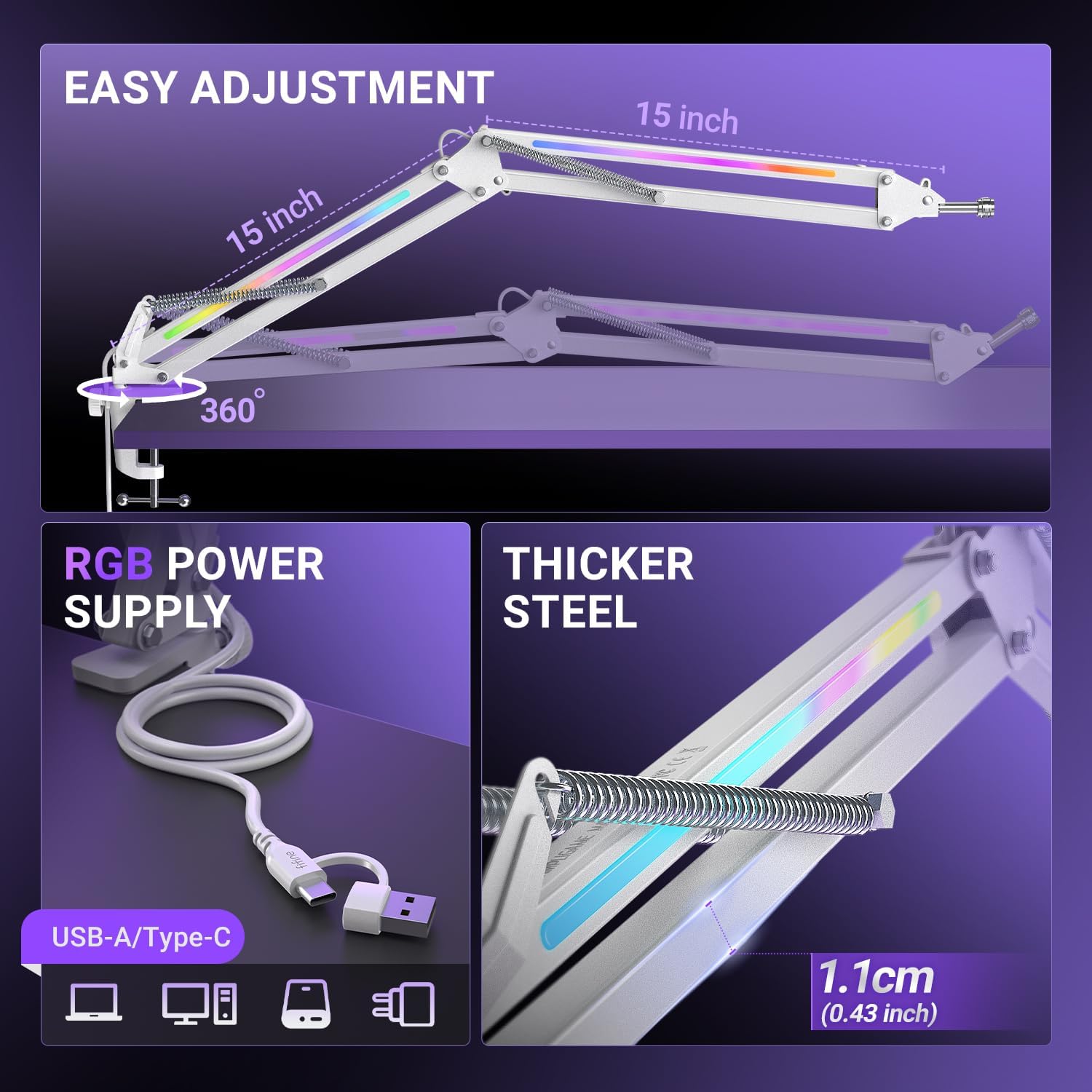
Figure 6.2: RGB power connection and steel thickness.
7. การบำรุงรักษา
- การทำความสะอาด: Wipe the boom arm with a soft, dry cloth to remove dust and debris. Avoid using harsh chemicals or abrasive cleaners.
- ข้อต่อ: Periodically check the tightness of all screws and joints. Tighten if necessary to maintain stability.
- การจัดการสายเคเบิล: Ensure the USB cable for RGB lighting is not excessively bent or strained, especially when adjusting the arm, to prevent damage.
8 การแก้ไขปัญหา
- Boom Arm Sagging: Ensure your microphone's weight does not exceed the 3.3 lbs (1.5KG) capacity. Check that all adjustment knobs and the C-clamp ถูกทำให้รัดกุมอย่างปลอดภัย
- ไฟ RGB ไม่ทำงาน: Verify that the USB-A/Type-C cable is securely connected to both the boom arm and a powered USB port. Try a different USB port or power source. Long-press the RGB button for 5 seconds to ensure it is turned on.
- Difficulty Adjusting Arm: Loosen the adjustment knobs slightly before attempting to reposition the arm. Re-tighten once the desired position is achieved.
9. การรับประกันและการสนับสนุน
This FIFINE BM38W RGB Microphone Boom Arm comes with a รับประกันหนึ่งปี from the date of purchase. For warranty claims, technical support, or any product-related inquiries, please contact FIFINE customer service through their official webหรือร้านค้าที่ซื้อผลิตภัณฑ์ โปรดเก็บหลักฐานการซื้อไว้เพื่อยืนยันการรับประกัน