1. บทนำ
The ORICO AP80F is a versatile 6-in-1 USB-C Magnetic M.2 Docking Station designed to expand the capabilities of your mobile devices and computers. It integrates a high-speed M.2 NVMe SSD enclosure, dual SD/TF card slots, a USB-C 10Gbps data port, a Headset/Mic (USB-C 480Mbps) port, and PD 100W fast charging. This device is ideal for professionals requiring instant ProRes 4K video capture and efficient data management.

รูปที่ 1: เกินview of the ORICO AP80F 6-in-1 Magnetic M.2 NVMe SSD Enclosure with its various ports and magnetic attachment.
2. เนื้อหาบรรจุภัณฑ์
โปรดตรวจสอบว่าสินค้าทั้งหมดมีอยู่ในแพ็คเกจ:
- 1 × Magnetic M.2 NVMe 2230/2242/2260/2280 SSD Enclosure
- 1 × 0.13m C to C Cable
- 1 × Magnetic Ring & 1 × Thermal Silicone Pad
- 1 ×ไขควง
- 2 ×สกรู
- 1 × คู่มือผู้ใช้

Figure 2: All components included in the ORICO AP80F product package.
3. คุณสมบัติของผลิตภัณฑ์
- ฟังก์ชั่น 6-in-1: Combines M.2 NVMe SSD enclosure, dual SD/TF card slots (UHS-I compatible, up to 104MB/s read), USB-C 10Gbps data port, USB-C Headset/Mic (480Mbps), and PD 100W fast charging.
- การถ่ายโอนข้อมูลความเร็วสูง: Up to 10Gbps (USB 3.2 Gen 2) for rapid file transfers, enabling instant capture and storage of ProRes 4K video.
- การยึดติดด้วยแม่เหล็กที่แข็งแรง: Built-in powerful magnetic array compatible with MagSafe for secure attachment to iPhone 15/16/17 Pro/Max/Plus and other magnetic devices/cases.
- M.2 SSD Universal Compatibility: Supports full-size NVMe SSDs (2230/2242/2260/2280) up to 4TB. Note: Only compatible with NVMe protocol, not SATA.
- การกระจายความร้อนที่มีประสิทธิภาพ: โลหะผสมอลูมิเนียม casing acts as a passive heat sink, complemented by silicone thermal pads, ensuring stable performance during high-load tasks.
- Direct ProRes Recording: Enables direct 4K ProRes recording to the SSD with compatible iPhone models, freeing internal storage.
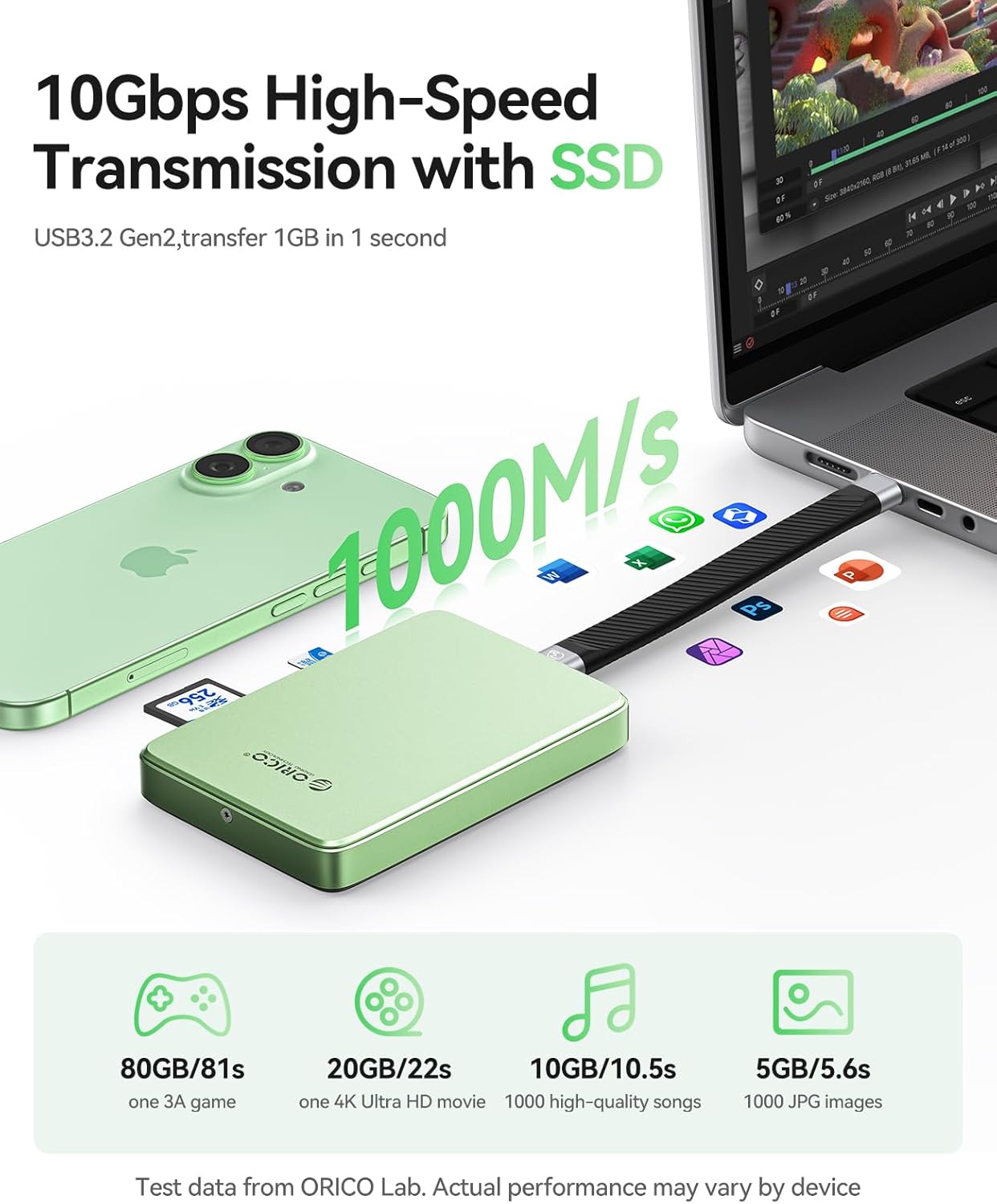
Figure 3: The ORICO AP80F offers 10Gbps high-speed data transmission, transferring 1GB in 1 second.
4. การตั้งค่าและการติดตั้ง
4.1. การติดตั้ง SSD
The ORICO AP80F features a tool-free design for easy SSD installation:
- Unscrew and remove the bottom cover of the enclosure.
- Insert your M.2 NVMe SSD (2230/2242/2260/2280) at a 30° angle into the slot.
- ยึด SSD ด้วยสกรูที่ให้มา
- Place the thermal silicone pad on top of the SSD for optimal heat dissipation.
- Close the bottom cover and tighten the screws.

รูปที่ 4: คำแนะนำทีละขั้นตอนสำหรับการติดตั้ง M.2 NVMe SSD ลงในกล่อง
4.2. การติดแม่เหล็ก
The enclosure features a strong magnetic array for secure attachment:
- For MagSafe-compatible devices (e.g., iPhone 15/16/17 Pro/Max), simply align the enclosure with the back of your device until it snaps into place.
- For non-MagSafe devices or cases, use the provided magnetic ring. Adhere the magnetic ring to the back of your device or case to enable magnetic attachment.

Figure 5: The magnetic design allows for secure, hand-held use with compatible devices.
5. คู่มือการใช้งาน
5.1. การเชื่อมต่อกับอุปกรณ์
Use the provided USB-C to USB-C cable to connect the enclosure to your iPhone (15/16/17 series), iPad, MacBook, Android device, or Windows/Linux computer. The device will be recognized as external storage.
5.2. การถ่ายโอนและการจัดการข้อมูล
- SSD Data Transfer: Once connected, you can access the installed M.2 NVMe SSD through your device's file manager (e.g., Files app on iOS/iPadOS). Transfer fileที่ความเร็วสูงสุด 10Gbps
- SD/TF Card Management: Insert SD or Micro SD (TF) cards into the dedicated slots. You can import photos/videos from cameras directly to your device or the installed SSD.
- ProRes Recording: For compatible iPhone models (iPhone 15/16/17 Pro/Max), you can directly record 4K ProRes video to the installed M.2 NVMe SSD, bypassing internal storage limitations.

Figure 6: Direct 4K ProRes 60/120fps recording to the SSD is supported by compatible iPhone models.
5.3. PD 100W Fast Charging
The enclosure features a dedicated PD 100W pass-through charging port. Connect a power adapter to this port to simultaneously power the enclosure, charge your connected device (up to 85W PD output), and ensure stable operation for high-capacity SSDs.
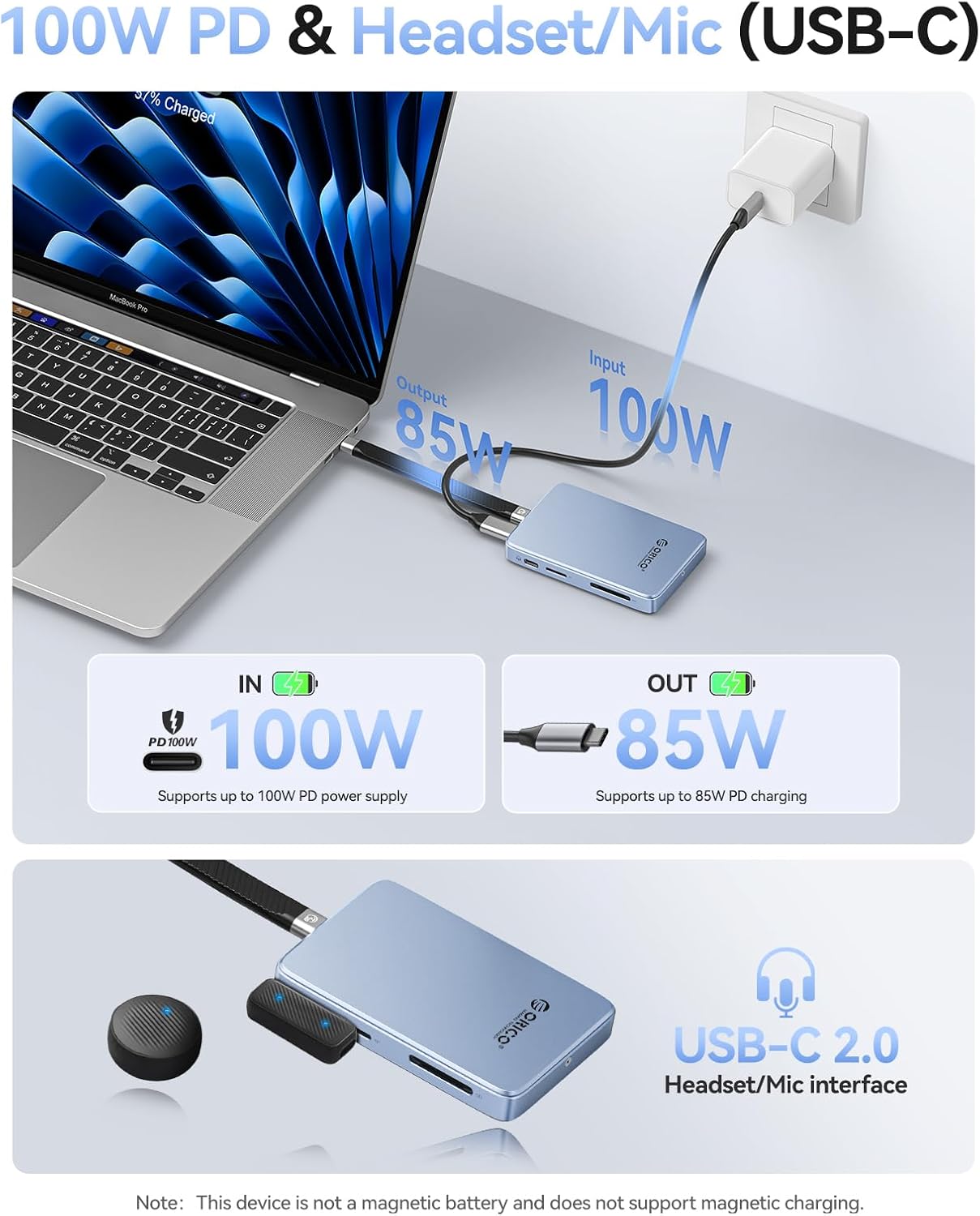
Figure 7: The PD 100W port allows for simultaneous data transfer and fast charging.
5.4. Headset/Mic (USB-C) Port
Utilize the USB-C 480Mbps audio combo port to connect microphones or monitoring headphones for precise recording and real-time audio monitoring. Note: Real-time headphone audio monitoring is not available during recording; audio can be heard via headphones only during playback.
6. ความเข้ากันได้
The ORICO AP80F offers broad compatibility:
- SSD Protocol: NVMe (M Key, B+M Key). Not compatible with SATA protocol.
- ขนาดของ SSD: 2230, 2242, 2260, 2280
- อุปกรณ์ที่รองรับ: iPhone 15/16/17 Pro/Max/Plus, iPad Pro, MacBook, Android devices, Windows/Linux computers.
- SD/TF Card Formats: UHS-I compatible (SD, SDHC, SDXC, Micro SD).

Figure 8: The enclosure supports a wide range of SSDs, devices, and operating systems.
7. การบำรุงรักษา
โลหะผสมอลูมิเนียมasing and included thermal pads are designed for efficient heat dissipation. To ensure optimal performance and longevity:
- Ensure the enclosure's heat sink fins are not obstructed during operation.
- รักษาอุปกรณ์ให้สะอาดและปราศจากฝุ่น
- หลีกเลี่ยงการให้เครื่องสัมผัสกับอุณหภูมิหรือความชื้นที่สูงหรือสูงเกินไป
8 การแก้ไขปัญหา
- SSD Not Recognized / Power Issues: SSDs with capacities above 2TB may require external power via the PD 100W port to function correctly, especially when connected to smartphones or devices with limited power output.
- ความร้อนสูงเกินไป: Ensure the heat dissipation fins and any fan openings are not blocked by your hand or other objects during use. Blocked airflow can lead to overheating and reduced performance.
- ความเข้ากันได้กับ SSD: This enclosure is only compatible with NVMe (M Key or B+M Key) SSDs. It will not work with SATA protocol SSDs. Verify your SSD's protocol before installation.
- เสียงพัดลม: The device may produce a slight hum from the internal cooling fan during operation. This is normal and generally not distracting unless held very close to the ear.
9. ข้อมูลจำเพาะ
| คุณสมบัติ | รายละเอียด |
|---|---|
| ยี่ห้อ | โอริโก้ |
| หมายเลขรุ่น | AP80F |
| อัตราการถ่ายโอนข้อมูล | 10 กิกะบิตต่อวินาที (USB 3.2 เจนเนอเรชั่น 2) |
| ความจุของหน่วยความจำ | Up to 4 TB (NVMe SSD) |
| SSD ที่เข้ากันได้ | M.2 NVMe (2230/2242/2260/2280) |
| SD/TF Card Support | UHS-I compatible (SD, SDHC, SDXC, Micro SD) up to 104MB/s read |
| การส่งกำลัง | PD 100W (Input), up to 85W (Output) |
| Headset/Mic Port | USB-C 480Mbps Audio Combo Port |
| วัสดุ | อะคริโลไนไตรล์ บิวทาไดอีน สไตรีน (ABS), อะลูมิเนียม |
| น้ำหนักสินค้า | 5.9 ออนซ์ |
| ขนาดแพ็คเกจ | 5.31 x 4.69 x 0.83 นิ้ว |
10. การรับประกันและการสนับสนุน
ผลิตภัณฑ์ ORICO มาพร้อมกับการรับประกันจากผู้ผลิตตามมาตรฐาน สำหรับข้อมูลการรับประกันโดยละเอียด การสนับสนุนทางเทคนิค หรือข้อสงสัยเกี่ยวกับการบริการ โปรดดูที่เว็บไซต์อย่างเป็นทางการของ ORICO webหรือติดต่อฝ่ายบริการลูกค้าโดยตรง เก็บใบเสร็จรับเงินไว้เพื่อใช้ในการเคลมประกัน
11. วิดีโอผลิตภัณฑ์อย่างเป็นทางการ
ORICO 10Gbps Magnetic M.2 NVMe SSD Enclosure
วิดีโอนี้ให้ภาพรวมอย่างรวดเร็วview of the ORICO 10Gbps Magnetic M.2 NVMe SSD Enclosure, highlighting its key features and magnetic attachment.
Magnetic NVMe SSD Enclosure AP42
A short video demonstrating the magnetic features and general use of the AP42 NVMe SSD Enclosure.
ORICO Magnetic M.2 2230/2242 NVMe SSD Enclosure
This video showcases the ORICO Magnetic M.2 NVMe SSD Enclosure, focusing on its compatibility with various M.2 SSD sizes.
ORICO 10Gbps USB C HUB & M.2 2230 NVMe Enclosure
A demonstration of the ORICO 10Gbps USB-C Hub and M.2 2230 NVMe Enclosure, highlighting its hub functionalities.


