1. บทนำ
Welcome to the FUNYET NY-03 16-inch Laptop user manual. This guide provides essential information for setting up, operating, maintaining, and troubleshooting your new laptop. Please read this manual thoroughly to ensure optimal performance and longevity of your device.
2. ข้อมูลด้านความปลอดภัย
เพื่อป้องกันความเสียหายต่ออุปกรณ์ของคุณ หรือการบาดเจ็บต่อตัวคุณเองและผู้อื่น โปรดปฏิบัติตามข้อควรระวังด้านความปลอดภัยดังต่อไปนี้:
- อย่าให้แล็ปท็อปโดนอุณหภูมิที่สูงหรือต่ำเกินไป แสงแดดโดยตรง หรือความชื้นสูง
- หลีกเลี่ยงการวางวัตถุหนักบนแล็ปท็อป
- Keep liquids away from the device. In case of spills, immediately power off and disconnect the charger.
- โปรดใช้เฉพาะอะแดปเตอร์แปลงไฟที่ให้มากับแล็ปท็อปเท่านั้น
- Do not attempt to disassemble or repair the laptop yourself. Contact qualified service personnel for assistance.
- ตรวจสอบให้แน่ใจว่ามีการระบายอากาศที่เหมาะสมเพื่อป้องกันความร้อนสูงเกินไป อย่าปิดกั้นช่องระบายอากาศ
3. เนื้อหาบรรจุภัณฑ์
ตรวจสอบว่ามีรายการทั้งหมดอยู่ในบรรจุภัณฑ์ผลิตภัณฑ์ของคุณ:
- FUNYET NY-03 16-inch Laptop
- อะแดปเตอร์แปลงไฟ
- คู่มือการใช้งาน (เอกสารนี้)
4. สินค้าหมดview
Familiarize yourself with the physical features and components of your FUNYET NY-03 laptop.
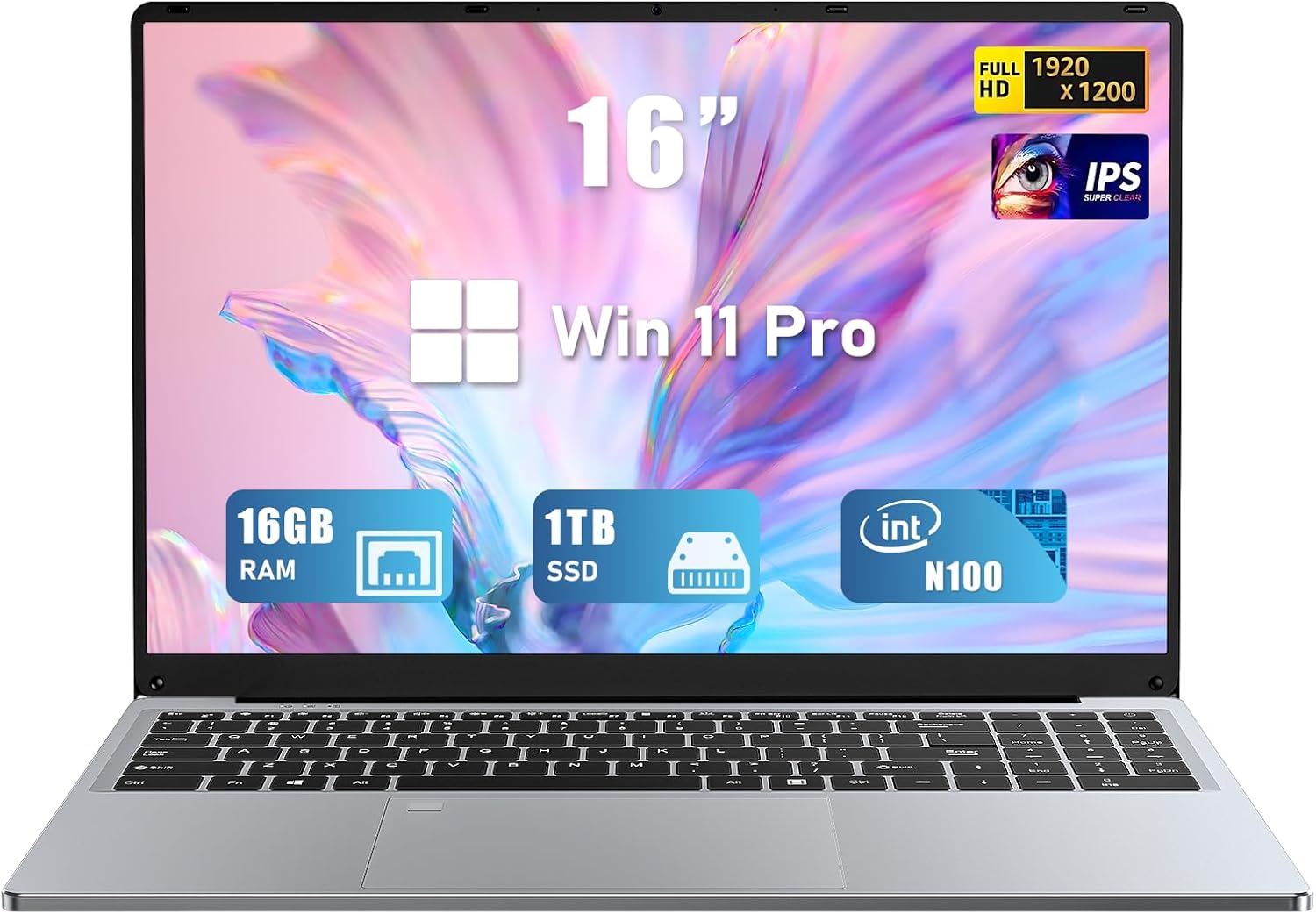
รูปที่ 4.1 : ด้านหน้า view of the FUNYET NY-03 16-inch Laptop, showcasinด้วยการออกแบบที่เพรียวบางและจอแสดงผลขนาดใหญ่
4.1. ส่วนประกอบภายนอก
- จอแสดงผล IPS ความละเอียด Full HD ขนาด 16.0 นิ้ว: หน้าจอความละเอียดสูงเพื่อภาพที่คมชัด
- แป้นพิมพ์พร้อมไฟแบ็คไลท์: Full-size keyboard with adjustable backlighting for comfortable typing in various lighting conditions.
- Large Touchpad: Responsive touchpad for precise navigation.
- บูรณาการ Webลูกเบี้ยว: Located above the display for video calls.
- เครื่องอ่านลายนิ้วมือ: Integrated for secure and quick login.
4.2. พอร์ตและขั้วต่อ

รูปที่ 4.2: ด้านข้าง view of the FUNYET NY-03 laptop highlighting the various input/output ports.
- พอร์ต USB 3.0: สำหรับเชื่อมต่ออุปกรณ์ USB ความเร็วสูง
- พอร์ต USB 2.0: สำหรับเชื่อมต่ออุปกรณ์ USB มาตรฐาน
- พอร์ตมินิ HDMI: สำหรับเชื่อมต่อกับจอแสดงผลภายนอก
- อินพุตไฟ DC: สำหรับการเชื่อมต่ออะแดปเตอร์ไฟฟ้า
- แจ็คเสียงขนาด 3.5 มม.: สำหรับการเชื่อมต่อหูฟังหรือลำโพงภายนอก
4.3. วิดีโอผลิตภัณฑ์
วิดีโอ 4.1: จบแล้วview of the FUNYET 16-inch laptop, demonstrating its design and key features. This video provides a visual guide to the laptop's physical aspects and functionality.
Video 4.2: A detailed look at the FUNYET 16-inch gaming laptop, showcasing its various components and user experience. This video highlights the laptop's build quality and interface.
5. การตั้งค่า
5.1. การเปิดเครื่องครั้งแรก
- Connect the power adapter to the DC power input port on your laptop and then to a power outlet.
- กดปุ่มเปิด/ปิดที่อยู่บนแป้นพิมพ์เพื่อเปิดแล็ปท็อป
- Follow the on-screen instructions to complete the initial Windows 11 Pro setup, including language, region, and network settings.
5.2. การเชื่อมต่อเครือข่าย
หากต้องการเชื่อมต่อกับเครือข่าย Wi-Fi:
- คลิกไอคอน Wi-Fi ในแถบงาน
- เลือกเครือข่ายที่คุณต้องการจากรายการ
- ป้อนรหัสผ่านเครือข่ายหากระบบแจ้งให้ป้อน แล้วคลิก เชื่อมต่อ.
6. การใช้งานแล็ปท็อปของคุณ
6.1. การดำเนินการพื้นฐาน
- เปิด/ปิดเครื่อง: กดปุ่มเปิด/ปิดเครื่องเพื่อเปิดเครื่อง หากต้องการปิดเครื่อง ให้คลิกปุ่ม Start จากนั้นคลิก Power > Shut down
- แป้นพิมพ์: The backlit keyboard allows for comfortable typing. Use the Fn keys (e.g., Fn + F5/F6) to adjust backlight brightness.
- ทัชแพด: รองรับการใช้งานท่าทางสัมผัสหลายนิ้วสำหรับการนำทาง โปรดดูการตั้งค่าของ Windows สำหรับการปรับแต่งเพิ่มเติม
- เครื่องอ่านลายนิ้วมือ: Set up your fingerprint for secure and fast login via Windows Hello in Settings > Accounts > Sign-in options.
6.2. คุณสมบัติการแสดงผล

Figure 6.1: The 16-inch FHD IPS display with a 1920x1200 resolution, offering a vibrant and immersive viewการสร้างประสบการณ์
The 16.0-inch FHD IPS display provides a resolution of 1920x1200 pixels, ensuring sharp and vibrant visuals. The micro-bezel design enhances the immersive viewการสร้างประสบการณ์
6.3. การปฏิบัติงาน

Figure 6.2: Visual representation of the Intel 12th Gen N100 Processor, highlighting its 4 cores and 3.4 GHz turbo frequency for efficient performance.
Powered by an Intel 12th Gen N100 processor with 4 cores and 4 threads, operating up to 3.4 GHz, the laptop delivers seamless performance for daily tasks. With 16GB of RAM and a 1TB high-speed SSD, it efficiently handles multitasking and provides ampที่เก็บของ
6.4. การเชื่อมต่อ
The laptop supports 802.11a/b/g/n/ac Wi-Fi for fast internet access and Bluetooth for connecting wireless peripherals.
6.5. การจัดการแบตเตอรี่

Figure 6.3: Illustration of the laptop's long battery life, indicating up to 8 hours of usage on a single charge.
The laptop is equipped with a 6000mAH rechargeable battery, offering up to 8 hours of battery life. To maximize battery longevity, ensure the laptop is fully charged before first use and avoid frequent deep discharges.
6.6. Operating System: Windows 11 Pro
Your laptop comes pre-installed with Windows 11 Pro, offering enhanced security, productivity features, and a modern user interface. Explore features like Snap Layouts, Widgets, and Microsoft Teams integration for an optimized computing experience.
7. การบำรุงรักษา
- การทำความสะอาด: ใช้ผ้าเนื้อนุ่มที่ไม่เป็นขุยเช็ดทำความสะอาดหน้าจอและตัวเครื่องภายนอก หลีกเลี่ยงการใช้สารทำความสะอาดที่มีฤทธิ์กัดกร่อนหรือตัวทำละลาย
- การอัปเดตซอฟต์แวร์: ตรวจสอบและติดตั้งการอัปเดต Windows เป็นประจำเพื่อให้มั่นใจถึงความเสถียรและความปลอดภัยของระบบ
- พื้นที่จัดเก็บ: ควรเก็บแล็ปท็อปไว้ในที่แห้งและเย็นเมื่อไม่ได้ใช้งาน
8 การแก้ไขปัญหา
หัวข้อนี้จะกล่าวถึงปัญหาทั่วไปที่คุณอาจพบกับแล็ปท็อปของคุณ
- แล็ปท็อปไม่สามารถเปิดเครื่องได้: ตรวจสอบให้แน่ใจว่าเสียบอะแดปเตอร์แปลงไฟแน่นดีแล้ว และแบตเตอรี่ชาร์จเต็มแล้ว ลองเสียบกับปลั๊กไฟอื่นดู
- ไม่มีการเชื่อมต่อ Wi-Fi: ตรวจสอบว่าเปิดใช้งาน Wi-Fi ในการตั้งค่า Windows แล้วหรือไม่ รีสตาร์ทเราเตอร์และแล็ปท็อปของคุณ
- ประสิทธิภาพช้า: Close unnecessary applications, check for malware, and ensure sufficient free space on the SSD.
- ปัญหาหน้าจอ: Adjust display brightness. If the screen remains blank or distorted, try connecting to an external monitor via Mini HDMI to diagnose.
9. ข้อมูลจำเพาะ
| คุณสมบัติ | ข้อมูลจำเพาะ |
|---|---|
| ยี่ห้อ | ฟันเยต |
| ชื่อรุ่น | นิวยอร์ก 03 |
| ขนาดหน้าจอ | 16 นิ้ว |
| ความละเอียดหน้าจอ | 1920 x 1200 พิกเซล (FHD IPS) |
| โปรเซสเซอร์ | Intel 12th Gen N100 (up to 3.4GHz) |
| แรม | แรม 16GB DDR4 |
| พื้นที่จัดเก็บ | เอสเอสดี 1TB |
| ระบบปฏิบัติการ | วินโดวส์ 11 โปร |
| การ์ดจอ | แบบบูรณาการ (Intel UHD Graphics) |
| ประเภทไร้สาย | 802.11a/b/g/n/ac, บลูทูธ |
| พอร์ต | 1x USB 3.0, 1x USB 2.0, 1x Mini HDMI, 1x DC Power Input, 1x 3.5mm Audio Jack |
| คุณสมบัติพิเศษ | คีย์บอร์ดเรืองแสง, เครื่องอ่านลายนิ้วมือ |
| แบตเตอรี่ | 6000mAH (up to 8 hours) |
| น้ำหนักสินค้า | 5.1 ปอนด์ |
| ขนาดสินค้า | 14 x 9 x 0.8 นิ้ว |
10. การรับประกันและการสนับสนุน
Your FUNYET NY-03 laptop comes with a รับประกัน 1 ปี. For any issues or queries, please contact FUNYET customer support. They aim to reply within 24 hours.
- บริการลูกค้า: Enjoy worry-free usage with dedicated round-the-clock customer service.
- ข้อมูลติดต่อ: Refer to the contact details provided in your product packaging or on the official FUNYET webเว็บไซต์สำหรับการสนับสนุน


