การแนะนำ
The Edillas 1.57 Inch Kid Digital Watch is designed for children aged 5-16, offering a large, easy-to-read display and multiple functions. This manual provides detailed instructions for setting up and operating your watch, ensuring you can utilize all its features effectively.
- 1.57-Inch Large Digital Display: Features oversized numerals for effortless time-telling.
- Multi-Function Digital Watch: Includes date display, 12/24-hour format, alarm, stopwatch, and countdown timer.
- ไฟแบ็คไลท์ LED: ช่วยให้ง่าย viewในสภาพแสงน้อย
- กันน้ำได้ลึก 30 เมตร: Suitable for daily use like hand washing and splashes, but not for swimming or diving.
- Comfortable Adjustable Strap: Made with soft silicone for a customizable and comfortable fit.
- โครงสร้างทนทาน: Features a scratch-resistant reinforced resin glass lens and sturdy build.
เฝ้าดูแลview
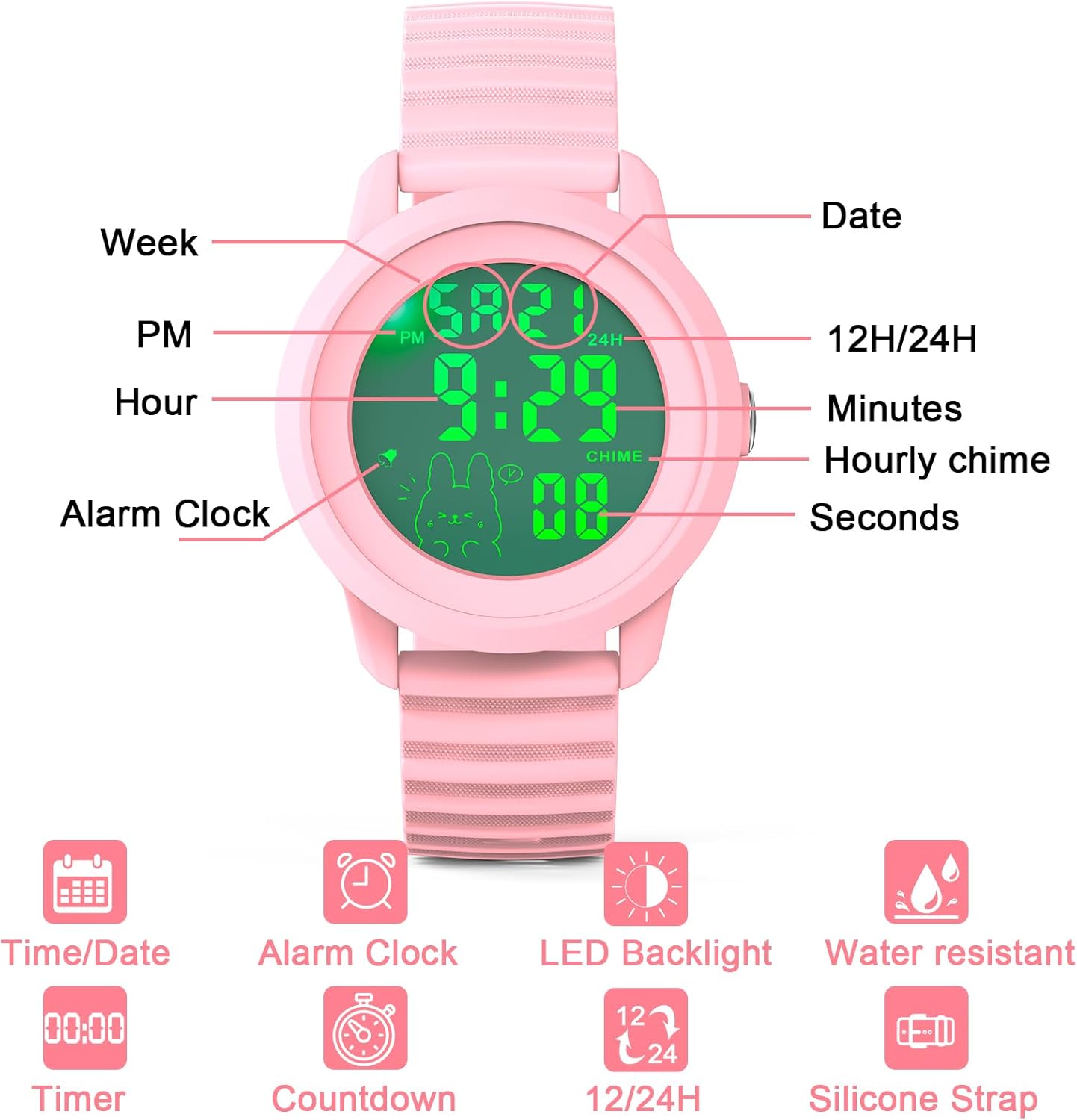
Familiarize yourself with the watch display and its various indicators.

คำแนะนำการตั้งค่า
Setting Time, Date, and Day of Week
Follow these steps to accurately set the time, date, and day of the week on your Edillas Digital Watch.
1 วิดีโอ: How to set the time, date, and day of the week. This video demonstrates the process of adjusting the watch's time, date, and day settings.
12H/24H Time Format
The watch supports both 12-hour and 24-hour time formats. This setting is typically adjusted within the time setting mode. Refer to Video 1 for detailed instructions on how to switch between these formats.

คำแนะนำการใช้งาน
ฟังก์ชั่นแบ็คไลท์
To activate the backlight, press and hold the 'MODE' button for 2 seconds. The backlight will illuminate the display for 3 seconds, making it visible in the dark.

2 วิดีโอ: How to activate the backlight. This video demonstrates how to turn on the watch's backlight feature.
ฟังก์ชั่นปลุก
The alarm feature helps set reminders. You can set a specific alarm time and choose to activate or deactivate the hourly ตีระฆัง

3 วิดีโอ: How to set the alarm time. This video guides you through setting a specific alarm time.
4 วิดีโอ: How to turn the alarm and hourly chime on and off. This video shows how to manage the alarm and hourly chime settings.
ตัวนับเวลาถอยหลัง
The countdown timer is useful for various activities, from homework sessions to playtime limits.

5 วิดีโอ: How to use and set the countdown function. This video demonstrates how to set and use the countdown timer.
ฟังก์ชั่นจับเวลา
Use the stopwatch to measure elapsed time for sports, games, or other activities.

6 วิดีโอ: How to use the stopwatch function. This video demonstrates how to operate the stopwatch.
การซ่อมบำรุง
ความต้านทานต่อน้ำ
The Edillas Digital Watch features 30m water resistance, making it suitable for everyday activities such as hand washing, splashes, and light rain. However, it is not suitable for swimming, diving, or prolonged submersion in water. Avoid operating the buttons underwater to prevent water ingress.

อายุการใช้งานแบตเตอรี่
The watch uses an imported battery designed for longevity, offering up to 5 years of use under normal conditions.

ความทนทาน
Constructed with a scratch-resistant reinforced resin glass lens and sturdy materials, the watch is built to withstand everyday bumps and minor impacts. It has passed a 2-meter drop test, ensuring functionality even after accidental drops. Please note that drop resistance data is for reference only; intentional tests are not recommended.

การแก้ไขปัญหา
Turning Off Hourly ตีระฆัง
ถ้าโฮurly chime is active and you wish to turn it off:
- Ensure the watch is in Time Display Mode.
- Press and hold the 'MODE' button and the 'R' button simultaneously.
- Repeat the action to toggle the hourly chime on or off.
For further assistance, please refer to the alarm setting video (Video 4) or contact customer support.
ข้อมูลจำเพาะ
| คุณสมบัติ | รายละเอียด |
|---|---|
| หมายเลขรุ่น | Edi 918 |
| ประเภทจอภาพ | ดิจิตอล |
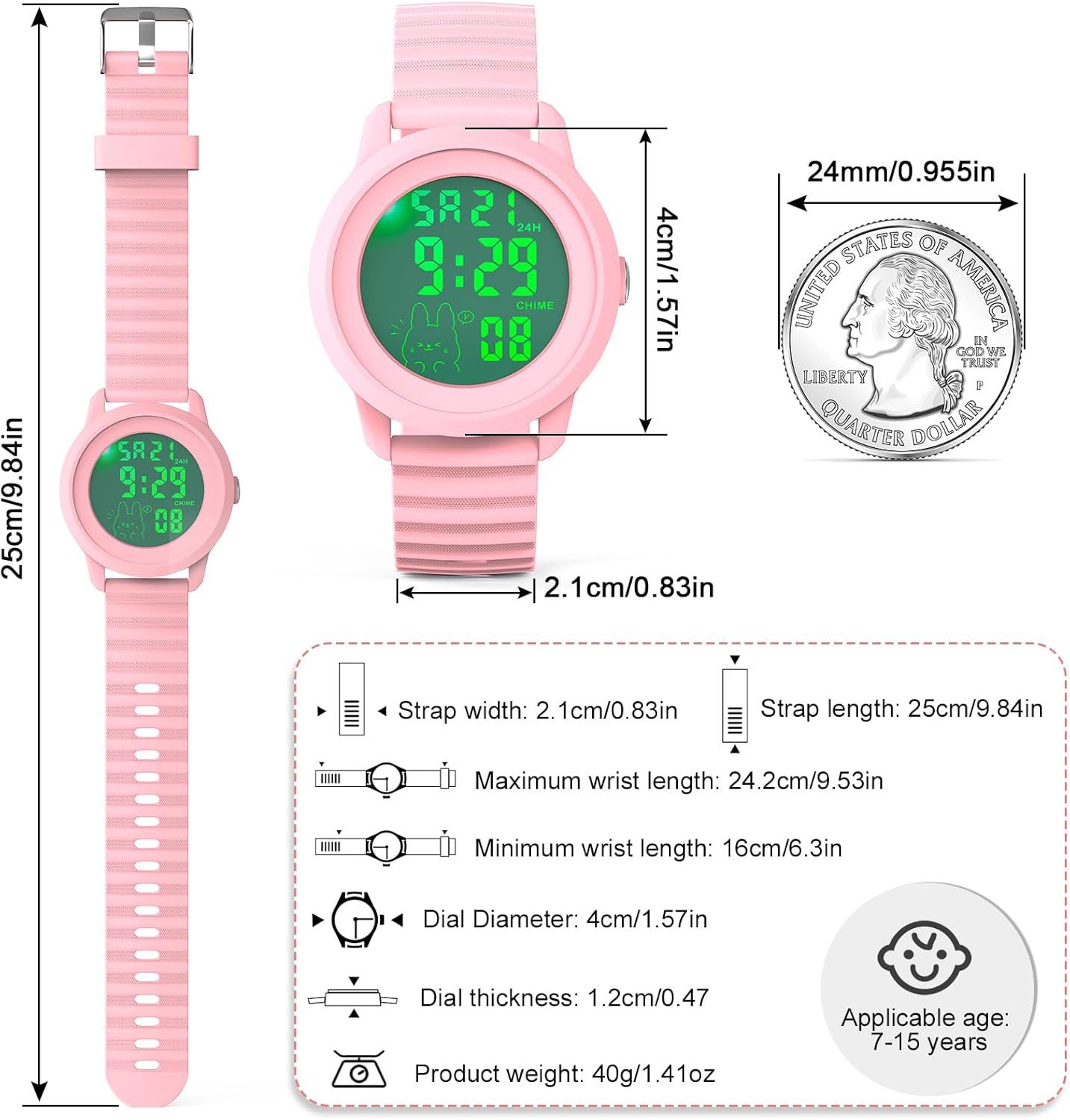
| ขนาดหน้าจอ | 1.57 นิ้ว |
| ความต้านทานต่อน้ำ | 30m (Not for swimming/diving) |
| วัสดุสายรัด | ซิลิโคนอ่อนนุ่ม |
| ประเภทตัวล็อค | หัวเข็มขัด |
| แบตเตอรี่ | แบตเตอรี่ที่ไม่ได้มาตรฐาน 1 ก้อน (รวมอยู่ด้วย) |
| น้ำหนักผลิตภัณฑ์ | 1.41 ออนซ์ (40 กรัม) |
| เส้นผ่านศูนย์กลางหน้าปัด | 1.57 นิ้ว (4 ซม.) |
| ความหนาของหน้าปัด | 0.47 นิ้ว (1.2 ซม.) |
| ความยาวสาย | 9.84 นิ้ว (25 ซม.) |
| ความกว้างสายคล้อง | 0.83 นิ้ว (2.1 ซม.) |
| อายุที่สามารถใช้งาน | 5-16 ปี |
การรับประกันและการสนับสนุน
Edillas is committed to providing reliable products and satisfactory service. Your purchase includes:
- บริการหลังการขาย 2 ปี: For any product-related issues.
- 30-Days No Reason Return: คืนสินค้าได้โดยไม่ยุ่งยากภายใน 30 วันนับจากวันที่ซื้อ
- 12-Hour Online Customer Service: Dedicated support available to assist you.
If you have any questions, concerns, or require assistance, please do not hesitate to contact us.
อีเมลติดต่อ: yadelaiiaftersale@163.com


