1. บทนำ
The Fender Mustang LTX100 is a 100-watt modeling combo amplifier designed for guitarists seeking versatile tone and performance. This ampคุณสมบัติ lifier 25 amp models, 25 studio-quality effects, and 100 preset slots for extensive sound customization. It is equipped with a 12-inch Celestion G12FSD-100 speaker, an integrated color display with a chromatic tuner, Bluetooth audio streaming, and USB-C connectivity for recording and app control. This manual provides essential information for the proper setup, operation, and maintenance of your Mustang LTX100 ampชีวิต.

Figure 1.1: Fender Mustang LTX100 Ampเครื่องขยายเสียงพร้อมอุปกรณ์เสริมครบชุด
2. ข้อมูลด้านความปลอดภัย
Please read and understand all safety instructions before operating your Fender Mustang LTX100 ampเครื่องขยายเสียง เก็บคู่มือนี้ไว้เพื่อใช้อ้างอิงในอนาคต
- คำเตือน: To reduce the risk of fire or electric shock, do not expose this appliance to rain or moisture. Do not remove the cover. Refer servicing to qualified personnel only.
- คำเตือน: เพื่อป้องกันไฟฟ้าช็อต อย่าใช้ปลั๊ก (โพลาไรซ์) นี้กับสายไฟต่อ เต้ารับ หรือเต้ารับอื่นๆ เว้นแต่จะสามารถเสียบใบมีดเข้าไปจนสุดเพื่อป้องกันใบมีดสัมผัสได้
- คำเตือน: ผลิตภัณฑ์นี้ประกอบด้วยสารเคมีที่รัฐแคลิฟอร์เนียทราบว่าก่อให้เกิดมะเร็งและข้อบกพร่องทางการเกิดหรืออันตรายต่อการสืบพันธุ์อื่น ๆ
- ให้แน่ใจว่า amplifier is connected to a grounded power outlet.
- Do not block ventilation openings. Maintain adequate space around the ampเครื่องเพิ่มแรงดันเพื่อการไหลเวียนของอากาศที่เหมาะสม
- หลีกเลี่ยงการวาง amplifier near heat sources such as radiators, heat registers, stoves, or other apparatus (including ampเครื่องให้ความร้อน) ที่ผลิตความร้อน
- ปกป้องสายไฟไม่ให้ถูกเหยียบหรือถูกหนีบ โดยเฉพาะที่ปลั๊ก เต้ารับไฟฟ้า และจุดที่สายไฟออกจากเครื่อง
- ถอดปลั๊กอุปกรณ์นี้ในระหว่างพายุฝนฟ้าคะนองหรือเมื่อไม่ได้ใช้งานเป็นเวลานาน
3. การตั้งค่า
3.1 การแกะและการจัดวาง
นำไฟล์ amplifier and all accessories from the packaging. Inspect the unit for any signs of damage. Place the amplifier on a stable, level surface, ensuring adequate space for ventilation.
3.2 การเชื่อมต่อสายไฟ
- ให้แน่ใจว่า ampสวิตช์เปิดปิดของเครื่องขยายเสียงอยู่ในตำแหน่ง OFF
- Connect the provided power cord to the INPUT POWER receptacle on the rear panel of the ampชีวิต.
- Plug the other end of the power cord into a suitable grounded AC power outlet.
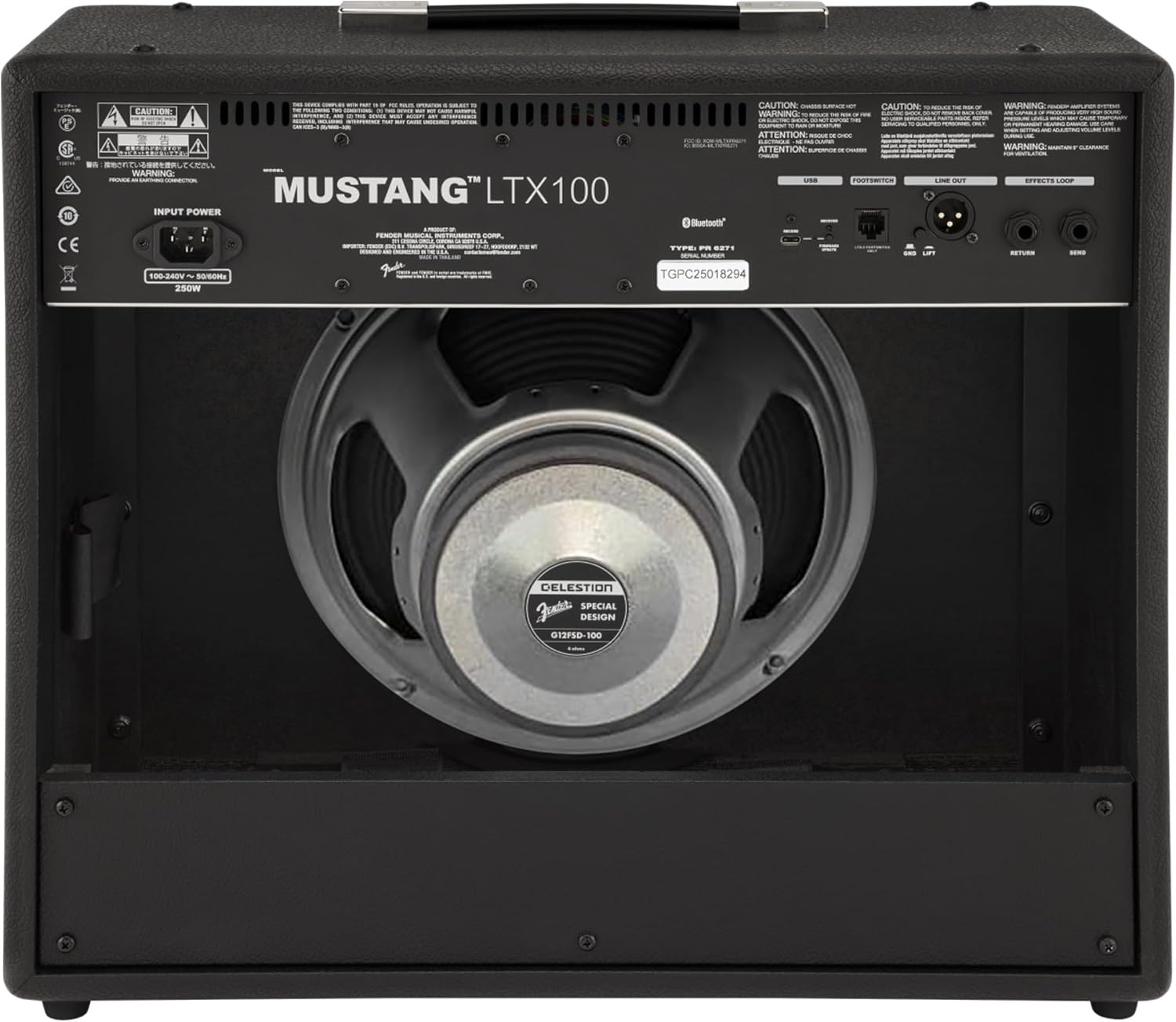
รูปที่ 3.1: การเชื่อมต่อแผงด้านหลัง
3.3 Instrument and Accessory Connections
- อินพุตเครื่องมือ: Connect your guitar using a standard 1/4-inch instrument cable to the INPUT jack on the front panel.
- อินพุตเสริม: For connecting external audio devices (e.g., MP3 player, phone), use a 3.5mm stereo cable to the AUX input on the front panel.
- เอาท์พุตหูฟัง: For silent practice, connect headphones to the HEADPHONE OUT jack on the rear panel.
- สายออก XLR: For connecting to a PA system or recording interface, use XLR cables to the LINE OUT jacks on the rear panel. A ground lift switch is provided to eliminate hum.
- เอฟเฟกต์ลูป: External effects pedals can be connected via the SEND and RETURN jacks on the rear panel.
- ยูเอสบี-C: Connect to a computer for recording, firmware updates, and Fender Tone 3.0 app control.
4. คู่มือการใช้งาน
4.1 การควบคุมแผงด้านหน้าview

รูปที่ 4.1: การควบคุมแผงด้านหน้า
- อินพุต: แจ็คขนาด 1/4 นิ้ว สำหรับเชื่อมต่อกีตาร์ของคุณ
- ช่องเสริม: อินพุตสเตอริโอ 3.5 มม. สำหรับอุปกรณ์เสียงภายนอก
- ได้รับ: Controls the input level and amount of overdrive/distortion for the selected amp แบบอย่าง.
- ปริมาณ: Adjusts the output level of the selected amp แบบอย่าง.
- เสียงแหลม: ปรับการตอบสนองความถี่สูง
- กลาง: ปรับการตอบสนองความถี่กลาง
- เบส: ปรับการตอบสนองความถี่ต่ำ
- MASTER: ควบคุมปริมาณการส่งออกโดยรวมของ ampชีวิต.
- การแสดงผล: Color LCD screen for navigating menus, selecting amp models, effects, and viewing tuner.
- ENCODER KNOB: Used to scroll through menus and adjust parameters on the display. Press to select.
- กลับ: กลับไปยังเมนูหรือหน้าจอก่อนหน้า
- บันทึก: Stores current settings as a preset.
- เมนู: Accesses the main menu for system settings, global parameters, and more.
- แตะ: Used for setting delay and modulation effect tempos. Hold to activate the chromatic tuner.
- เปิด/ปิด: สวิตช์ไฟสำหรับ ampชีวิต.
4.2 การเปิดเครื่องและการใช้งานพื้นฐาน
- Ensure all connections are secure and the MASTER volume is set to a low level.
- Press the ON/OFF switch to power on the amplifier. The display will illuminate.
- เลือก amp model and effect using the encoder knob and display.
- Adjust the GAIN, VOLUME, TREBLE, MIDDLE, and BASS knobs to shape your desired tone.
- Gradually increase the MASTER volume to achieve the desired listening level.
4.3 การใช้ Amp โมเดลและเอฟเฟกต์
The Mustang LTX100 offers 25 distinct amp models and 25 studio-quality effects. Use the encoder knob to browse through the available options on the display. Once an amp model or effect is selected, its parameters can be adjusted using the encoder knob or the dedicated tone knobs (Treble, Middle, Bass) if applicable.
4.4 ค่าที่ตั้งล่วงหน้า
การ amplifier comes with 70 factory presets and allows for 100 user-defined presets. To save your custom settings:
- Dial in your desired amp model, effects, and tone settings.
- กดปุ่มบันทึก
- Use the encoder knob to select a user preset slot.
- Press the encoder knob to confirm and save your preset.
4.5 การสตรีมเสียงบลูทูธ
To stream audio from a mobile device:
- เปิดใช้งานบลูทูธบนอุปกรณ์มือถือของคุณ
- บน amplifier, navigate to the Bluetooth menu via the display.
- Select "Pair New Device" and choose "Mustang LTX100" from your device's Bluetooth list.
- Once paired, you can play audio through the ampชีวิต.
4.6 Fender Tone 3.0 App
The Fender Tone 3.0 app (available for iOS and Android) provides wireless control over your amplifier. It allows you to edit, save, and share presets, as well as access additional features. Connect your amplifier to your mobile device via Bluetooth to use the app.
5. การบำรุงรักษา
5.1 การทำความสะอาด
- ตัดการเชื่อมต่อ .เสมอ ampถอดปลั๊กเครื่องขยายเสียงออกจากเต้ารับก่อนทำความสะอาด
- ใช้ผ้าแห้งนุ่มๆ เช็ดทำความสะอาดพื้นผิวภายนอก
- ห้ามใช้สารทำความสะอาดที่มีฤทธิ์กัดกร่อน ตัวทำละลาย หรือขี้ผึ้ง เพราะอาจทำให้พื้นผิวเสียหายได้
- Avoid spraying liquids directly onto the ampชีวิต.
5.2 พื้นที่จัดเก็บ
- จัดเก็บ amplifier in a dry, cool environment, away from direct sunlight and extreme temperatures.
- If storing for an extended period, cover the ampเพื่อป้องกันฝุ่นละออง
6 การแก้ไขปัญหา
| ปัญหา | สาเหตุที่เป็นไปได้ | สารละลาย |
|---|---|---|
| ไม่มีไฟฟ้า | ไม่ได้เสียบสายไฟ; ปลั๊กไฟไม่ทำงาน; Ampสวิตช์ไฟเครื่องขยายเสียงปิด | Check power cord connection; Test outlet with another device; Ensure power switch is ON |
| ไม่มีเสียง | Instrument cable faulty/disconnected; Guitar volume off; Amplifier volume/master low; Headphones connected | Check/replace instrument cable; Turn up guitar volume; Increase amplifier volume/master; Disconnect headphones |
| เสียงเพี้ยน | Gain too high; Master volume too high; Faulty cable/instrument | Reduce GAIN; Reduce MASTER volume; Test with different cable/instrument |
| ปัญหาการเชื่อมต่อบลูทูธ | อุปกรณ์ไม่ได้อยู่ในโหมดจับคู่; Amplifier not discoverable; Interference | Ensure device is in pairing mode; Re-initiate pairing on amplifier; Move closer to amplifier; Restart both devices |
7. ข้อมูลจำเพาะ
| คุณสมบัติ | รายละเอียด |
|---|---|
| ชื่อรุ่น | Mustang LTX100 |
| หมายเลขรุ่น | 2311800000 |
| กำลังขับ | 100 วัตต์ |
| ลำโพง | 1 x 12″ Celestion G12FSD-100 |
| Amp นางแบบ | 25 |
| ผลกระทบ | 25 (distortion, overdrive, compression, modulation, delay, reverb, octave, etc.) |
| พรีเซ็ต | 70 factory presets + 100 user slots |
| แสดง | Color LCD with onboard chromatic tuner |
| การเชื่อมต่อ | Bluetooth audio, USB-C bidirectional audio |
| เอาท์พุต | XLR line out (with ground lift), headphone out |
| ข้อมูลอินพุต | 1/4″ instrument input, 3.5 mm aux input |
| การสนับสนุนแอป | Fender Tone 3.0 app (iOS/Android) |
| การก่อสร้าง | คอมโบ amplifier, rugged build |
| น้ำหนักสินค้า | 26.4 ปอนด์ |
| ขนาดสินค้า | 22.3 x 19.9 x 12.3 นิ้ว |
| วัสดุ | โลหะ |
| แหล่งพลังงาน | สายไฟ |
8. การรับประกันและการสนับสนุน
For detailed warranty information, product registration, and technical support, please visit the official Fender website. You can also find FAQs, software updates, and additional resources there.
Official Fender Store: ร้าน Fender บน Amazon


