1. สินค้าหมดview
The Mars Gaming MC-3TCORELCD is an ATX gaming case designed for PC enthusiasts. It features an integrated 7.2-inch IPS screen, triple removable tempered glass panels, and a dual-chamber structure for efficient cable management and optimized airflow. This manual provides instructions for assembly, operation, and maintenance of the MC-3TCORELCD case.

Figure 1: Mars Gaming MC-3TCORELCD ATX Gaming Case.
2. การตั้งค่าและการติดตั้ง
This section details the steps for installing your components into the MC-3TCORELCD case.
2.1 การเตรียมคดี
- ถอดแผงด้านข้างออก: The MC-3TCORELCD features triple tempered glass panels that are removable without screws. Carefully detach the front, side, and central panels to access the interior.
- ชุดอุปกรณ์เสริม: Locate the accessory kit containing screws, cable ties, and other mounting hardware.

รูปที่ 2: ภาพพาโนรามา view with removable triple tempered glass for easy access.
2.2 การติดตั้งเมนบอร์ด
The case supports ATX, MicroATX, and Mini-ITX motherboards, including those with inverted connectors.
- ติดตั้งสแตนด์ออฟ: Ensure the correct standoffs are installed for your motherboard form factor.
- ติดตั้งเมนบอร์ด: วางเมนบอร์ดลงบนแท่นรองอย่างระมัดระวัง และยึดให้แน่นด้วยสกรูที่ให้มา
2.3 การติดตั้งไดรฟ์
The case provides internal bays for storage devices.
- ฮาร์ดดิสก์ขนาด 3.5 นิ้ว: Up to 2x 3.5" HDDs can be installed.
- SSD ขนาด 2.5 นิ้ว: Up to 3x 2.5" SSDs can be installed.
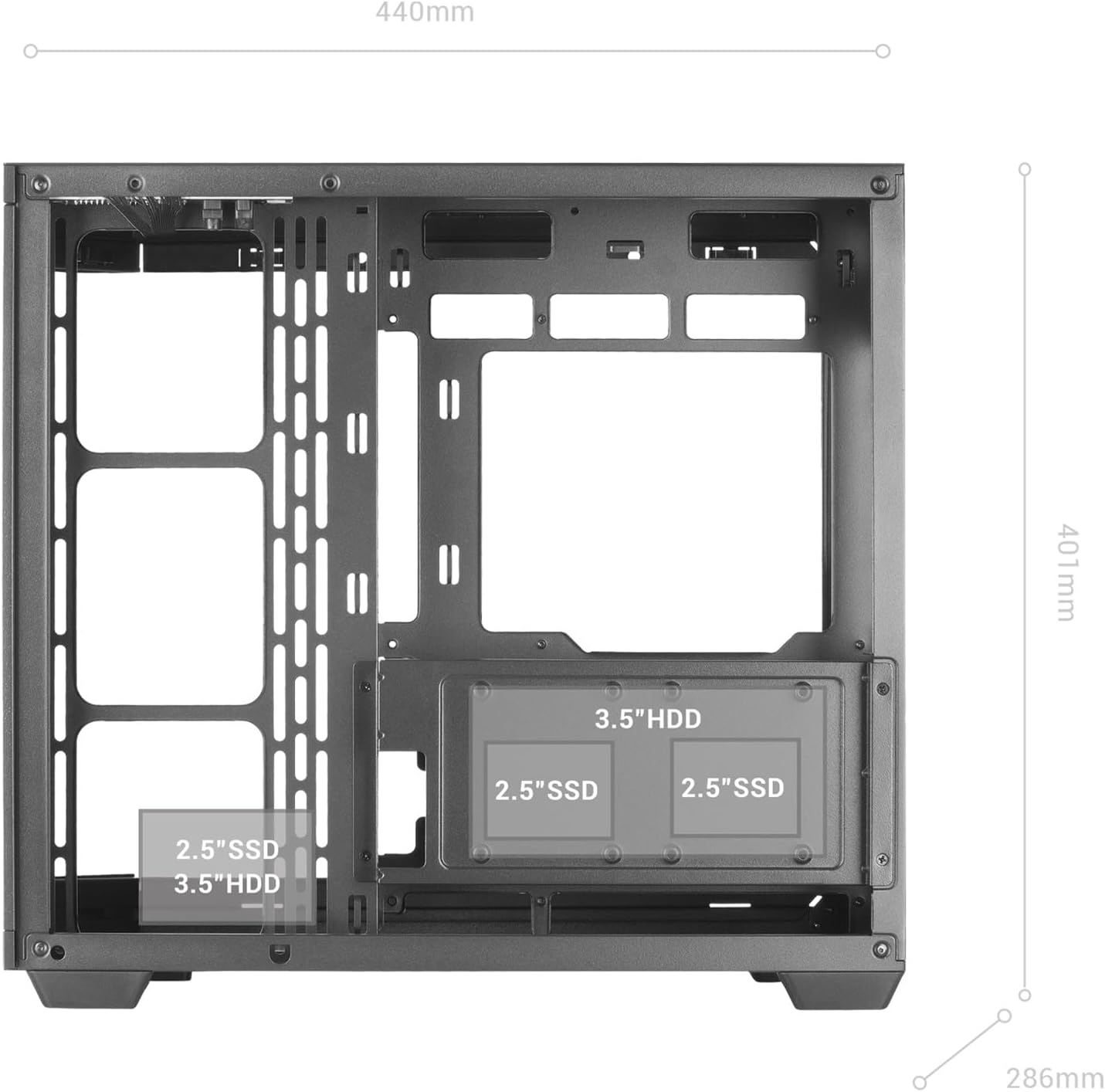
Figure 3: Internal layout indicating drive bay positions.
2.4 Power Supply and Cable Management
The dual-chamber design facilitates clean cable routing.
- ติดตั้งพาวเวอร์ซัพพลาย: Mount your ATX power supply in the designated bottom-mount area.
- สายเคเบิลเส้นทาง: Utilize the dual-chamber structure to route cables behind the motherboard tray, minimizing clutter and improving airflow.

Figure 4: Double side chamber for efficient cable management.
2.5 การติดตั้งระบบระบายความร้อน
The case supports extensive air and liquid cooling solutions.
- แฟนๆ: Install up to 10x 120mm fans or a combination of 7x 120mm and 2x 140mm fans.
- การระบายความร้อนด้วยของเหลว: Supports liquid cooling radiators up to 360mm.

Figure 5: Liquid cooling and fan installation options.
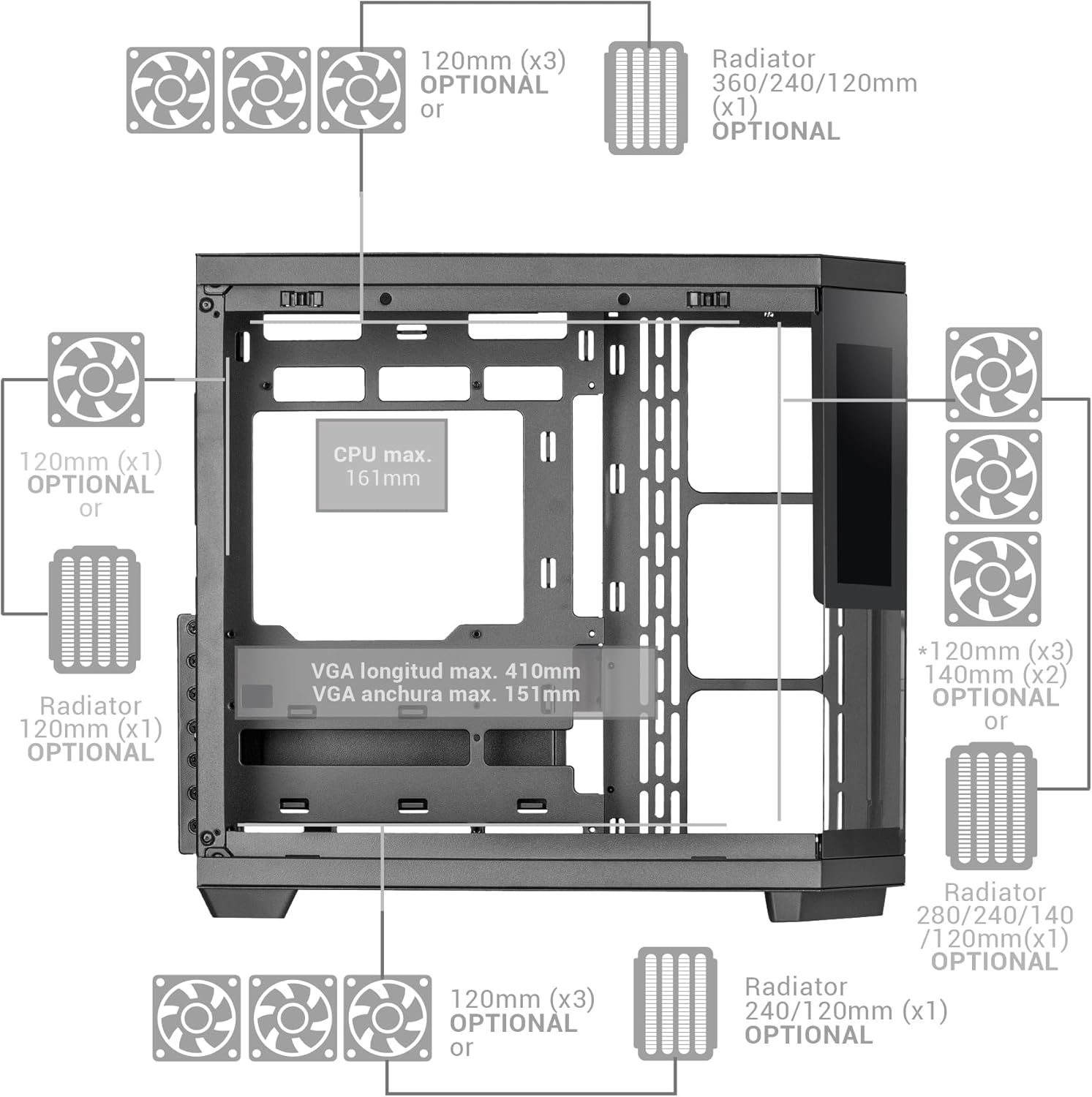
Figure 6: Detailed fan and radiator compatibility diagram.
2.6 Top Panel Connectivity
Connect the front panel headers from your motherboard to the corresponding ports on the case's top panel.
- พอร์ต USB-C
- พอร์ต USB 3.0
- พอร์ต USB 2.0
- HD Audio + Microphone Jacks

Figure 7: Top panel connectivity ports.
3. Operating the IPS Screen
The integrated 7.2-inch IPS screen allows for real-time system monitoring and custom visual displays.
- การติดตั้งซอฟต์แวร์: Install the dedicated control software for the IPS screen (refer to the manufacturer's website for download).
- การเชื่อมต่อ: Ensure the screen is properly connected to your motherboard or graphics card as per the installation guide.
- การปรับแต่ง: Use the software to display system telemetry (temperatures, usage), custom images, animations, or videos.

Figure 8: Customizable 7.2-inch IPS screen in operation.
4. การบำรุงรักษา
การบำรุงรักษาอย่างสม่ำเสมอจะช่วยให้เคสพีซีของคุณทำงานได้อย่างมีประสิทธิภาพสูงสุดและมีอายุการใช้งานยาวนานขึ้น
- ตัวกรองฝุ่น: The case includes two magnetic dust filters. Regularly remove and clean these filters to prevent dust buildup and maintain efficient airflow.
- การทำความสะอาดภายใน: With the removable tempered glass panels, the interior is easily accessible for cleaning. Use compressed air to remove dust from components and a soft, dry cloth for surfaces.
- แผงกระจก: Clean tempered glass panels with a microfiber cloth and a glass cleaner suitable for electronics.
5 การแก้ไขปัญหา
หัวข้อนี้จะกล่าวถึงปัญหาทั่วไปที่คุณอาจพบเจอ
- การระบายอากาศไม่ดี: Ensure all fan positions are utilized effectively and dust filters are clean. Verify that cables are managed to not obstruct airflow.
- IPS Screen Not Displaying: Check all cable connections to the motherboard/graphics card. Ensure the control software is installed and running correctly. Consult the software's troubleshooting guide.
- ปัญหาความพอดีของส่วนประกอบ: Refer to the specifications for maximum component dimensions (GPU length, CPU cooler height). Ensure components are correctly seated and secured.
6. ข้อมูลจำเพาะ
| คุณสมบัติ | รายละเอียด |
|---|---|
| ยี่ห้อ | มาร์ส เกมมิ่ง |
| ชื่อรุ่น | MC3TCORELCD |
| สี | สีดำ |
| ประเภทเคส | มิดทาวเวอร์ |
| วัสดุ | กระจกนิรภัย |
| ความเข้ากันได้ของเมนบอร์ด | ATX, Micro ATX, Mini ITX |
| ช่องใส่ไดรฟ์ภายใน | 2x 3.5" HDD / 3x 2.5" SSD |
| ความยาวสูงสุดของ GPU | 410มม. |
| ความกว้างสูงสุดของ GPU | 151มม. |
| ความสูงสูงสุดของตัวระบายความร้อนซีพียู | 161มม. |
| ความจุพัดลม | Up to 10x 120mm or 7x 120mm + 2x 140mm |
| รองรับการระบายความร้อนด้วยของเหลว | หม้อน้ำขนาดสูงสุด 360 มม. |
| ประเภทการติดตั้งแหล่งจ่ายไฟ | Bottom Mount (ATX) |
| วิธีการทำความเย็น | อากาศ |
| คุณสมบัติพิเศษ | Dust filter, 7.2" IPS Customizable Screen, Triple Removable Tempered Glass, Dual Chamber Structure |
| Top Panel Connectivity | USB-C, USB 3.0, USB 2.0, HD Audio + Mic |
| น้ำหนักสินค้า | 6.58 กิโลกรัม |
7. ข้อมูลการรับประกัน
ผลิตภัณฑ์นี้มาพร้อมกับ การรับประกันจากผู้ผลิต 3 ปี. Please retain your proof of purchase for warranty claims. For detailed terms and conditions, refer to the official Mars Gaming webไซต์หรือติดต่อฝ่ายสนับสนุนลูกค้า
8. การสนับสนุน
For further assistance, technical support, or to download the latest drivers and software for the IPS screen, please visit the official Mars Gaming webเว็บไซต์:
You may also contact Mars Gaming customer service through the contact information provided on their webเว็บไซต์.


