การแนะนำ
This manual provides essential information for setting up, operating, and maintaining your Apple iPhone 17 Pro Max. This device features a 6.9-inch OLED display, is powered by iOS 26, and includes advanced camera capabilities. It is designed for seamless performance and connectivity across various networks.

Image: Apple iPhone 17 Pro Max, showcasinด้วยการออกแบบที่เพรียวบางและการแสดงผลที่สดใส
มีอะไรอยู่ในกล่อง
Upon unboxing your Apple iPhone 17 Pro Max, you should find the following items:
- Apple iPhone 17 Pro Max (256GB, Cosmic Orange, Unlocked)
- สาย USB (ทั่วไป, ได้รับการรับรอง MFi)
Note: Headphones and a SIM card are not included with this device.
การตั้งค่าเริ่มต้น
- ใส่ซิมการ์ด: This phone is unlocked and compatible with any carrier of choice on GSM and CDMA networks (e.g., AT&T, T-Mobile, Sprint, Verizon, US Cellular, Cricket, Metro, Tracfone, Mint Mobile, etc.). When you receive the phone, insert a SIM card from a compatible carrier. Please check with your carrier to verify compatibility.
- เปิดเครื่อง: กดปุ่มด้านข้างค้างไว้จนกระทั่งโลโก้ Apple ปรากฏขึ้น
- เชื่อมต่อกับ Wi-Fi: ทำตามคำแนะนำบนหน้าจอเพื่อเชื่อมต่อกับเครือข่าย Wi-Fi
- เปิดใช้งานบริการ: Complete the on-screen setup process to activate your device's service.
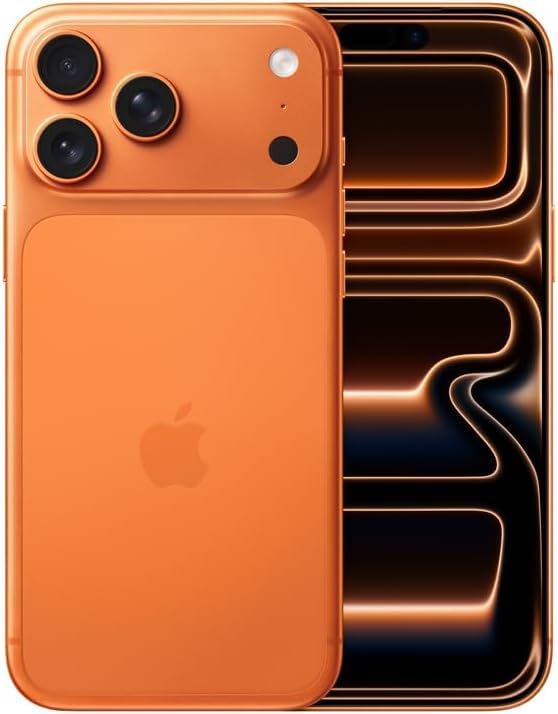
ภาพ: ด้านหน้าและด้านหลัง view of the Apple iPhone 17 Pro Max, highlighting its camera system and overall form factor.
การใช้งานอุปกรณ์ของคุณ
การแสดงผลและการนำทาง
The iPhone 17 Pro Max features a 6.9-inch Super Retina XDR display with ProMotion technology, offering adaptive refresh rates for smooth scrolling and responsiveness. Navigate your device using intuitive touch gestures.
ระบบกล้องถ่ายภาพ
Your iPhone is equipped with an advanced camera system designed to capture high-quality photos and videos. The rear camera module includes multiple lenses for various photographic needs, such as wide-angle, ultra-wide, and telephoto shots. The front camera supports high-resolution selfies and video calls.
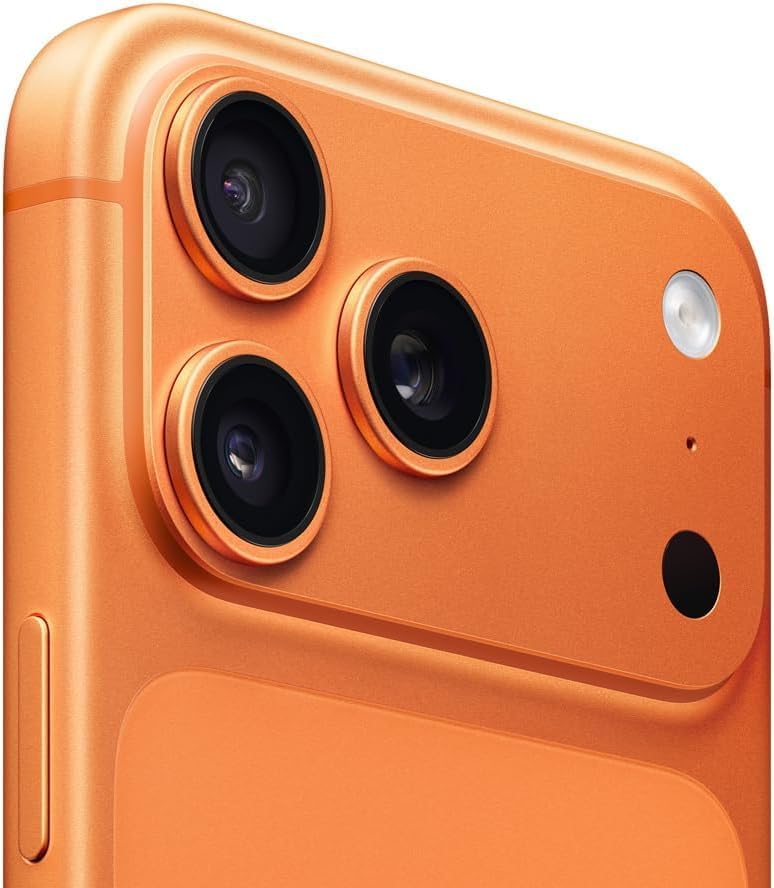
ภาพ: รายละเอียด view of the iPhone 17 Pro Max's triple-lens camera system and flash.
ปุ่มและการควบคุม
- ปุ่มด้านข้าง: Used for power on/off, Siri activation, and Apple Pay.
- ปุ่มปรับระดับเสียง: ปรับระดับเสียงสื่อและการโทร
- ปุ่มดำเนินการ: A customizable button for quick access to features like Camera, Silent Mode, Voice Memo, Accessibility, or Torch.

ภาพ: ด้านข้าง view of the iPhone 17 Pro Max, illustrating the placement of the volume and action buttons.
การบำรุงรักษาและการดูแล
สุขภาพแบตเตอรี่
Your device has been tested for battery health and is guaranteed to have a minimum battery capacity of 80% of its original capacity. To maximize battery lifespan, avoid extreme temperatures and keep your software updated.
การดูแลทั่วไป
Clean your iPhone regularly with a soft, lint-free cloth. Avoid using abrasive materials or harsh chemicals. The device is designed with durability in mind, but proper care will help maintain its appearance and functionality.
การแก้ไขปัญหา
Carrier Compatibility
If you experience issues with network connectivity, ensure your SIM card is correctly inserted and that your carrier is compatible with an unlocked device. Contact your carrier's customer support for assistance with network settings or service activation.
ปัญหาด้านซอฟต์แวร์
For minor software glitches, try restarting your iPhone. If problems persist, ensure your iOS is updated to the latest version. You can check for updates in การตั้งค่า > ทั่วไป > อัปเดตซอฟต์แวร์.
ข้อมูลจำเพาะ
| คุณสมบัติ | รายละเอียด |
|---|---|
| ยี่ห้อ | แอปเปิล |
| ชื่อรุ่น | ไอโฟน 17 โปรแม็กซ์ |
| หมายเลขรุ่นสินค้า | เอ3257 |
| ระบบปฏิบัติการ | iOS26 ระบบปฏิบัติการ |
| ขนาดหน้าจอ | 6.9 นิ้ว |
| ความจุของหน่วยความจำ | 256GB |
| ขนาดหน่วยความจำ RAM ที่ติดตั้ง | 256GB |
| ผู้ให้บริการไร้สาย | ปลดล็อคแล้ว |
| เทคโนโลยีเซลลูล่าร์ | 5G |
| เทคโนโลยีการเชื่อมต่อ | บลูทูธ, ยูเอสบี, ไวไฟ |
| ระดับพลังงานแบตเตอรี่ | 4000 มิลลิวินาทีamp ชั่วโมง |
| น้ำหนักสินค้า | 8.2 ออนซ์ |
| สี | Cosmic Orange |
การรับประกันและการสนับสนุน
This renewed Apple iPhone 17 Pro Max is backed by the Amazon Renewed Guarantee. This includes a 90-day replacement or refund window, providing peace of mind for your purchase. For any issues or support, please refer to the Amazon Renewed program details or contact Amazon customer service.


