การแนะนำ
The DREAME L40 Ultra Gen 2 is an advanced robot vacuum and mop designed to provide comprehensive floor cleaning. Featuring 25,000Pa suction power, an extendable side brush and mop, and an all-in-one self-emptying and cleaning dock, this device offers automated cleaning for various floor types. This manual provides essential information for safe operation, setup, maintenance, and troubleshooting.
เนื้อหาแพ็คเกจ
แกะกล่องอย่างระมัดระวังและตรวจสอบให้แน่ใจว่าสินค้าทุกชิ้นครบถ้วนและอยู่ในสภาพดี หากมีสินค้าชิ้นใดขาดหายหรือเสียหาย โปรดติดต่อฝ่ายบริการลูกค้า

Image: All components included in the DREAME L40 Ultra Gen 2 package. This includes the robot vacuum, base station, pre-installed main brush, pre-installed brush guard, pre-installed side brush, pre-installed dust box with filter, two pre-installed mop pads, two mop pad holders, two pre-installed dust bags, a base station ramp extension, a quick start guide, and the user manual.
- หุ่นยนต์ดูดฝุ่น (x1)
- สถานีฐาน (x1)
- แปรงหลัก (ติดตั้งไว้ล่วงหน้า) (x1)
- Brush Guard (pre-installed) (x1)
- แปรงด้านข้าง (ติดตั้งไว้ล่วงหน้า) (x1)
- Dust Box (pre-installed, including filter) (x1)
- Mop Pads (pre-installed) (x2)
- ที่ใส่แผ่นม็อป (2 ชิ้น)
- Dust Bags (pre-installed) (x2)
- สถานีฐานรamp Extension (x1)
- คู่มือเริ่มต้นอย่างรวดเร็ว (x1)
- คู่มือผู้ใช้ (x1)
การตั้งค่า
1. การจัดวางตำแหน่งสถานีฐาน
Place the all-in-one base station on a hard, flat surface against a wall. Ensure there is at least 0.5 meters (1.6 feet) of clear space on both sides and 1.5 meters (4.9 feet) in front of the base station for optimal robot navigation and docking. Connect the power cord to the base station and plug it into a power outlet.
2. การชาร์จครั้งแรก
Place the robot vacuum onto the base station. Ensure the charging contacts on the robot align with those on the base station. The robot will automatically begin charging. For first-time use, fully charge the robot before operation, which typically takes approximately 6 hours.
3. การเชื่อมต่อแอพ
Download the DreameHome app from your mobile device's app store. Follow the in-app instructions to add your DREAME L40 Ultra Gen 2. This involves connecting the robot to your 2.4GHz Wi-Fi network. The app allows for advanced control, mapping, scheduling, and customization of cleaning preferences.
การดำเนินการ
โหมดการทำความสะอาด
The robot offers various cleaning modes accessible via the DreameHome app. These include vacuum-only, mop-only, and vacuum & mop combined modes. You can adjust suction power and water flow levels to suit different floor types and cleaning needs.

Image: The robot vacuum demonstrating its powerful 25,000Pa suction, capable of 100% particle pickup and 99% hair removal, effectively cleaning various debris like hair, paper scraps, and cat litter.
ระบบถูพื้นขั้นสูง
The DuoScrub Mopping System utilizes two high-speed rotary mops with 32-level moisture control for precise cleaning. The robot can adjust the mop's moisture level from slightly dry to wet, ensuring effective stain removal and quick drying.
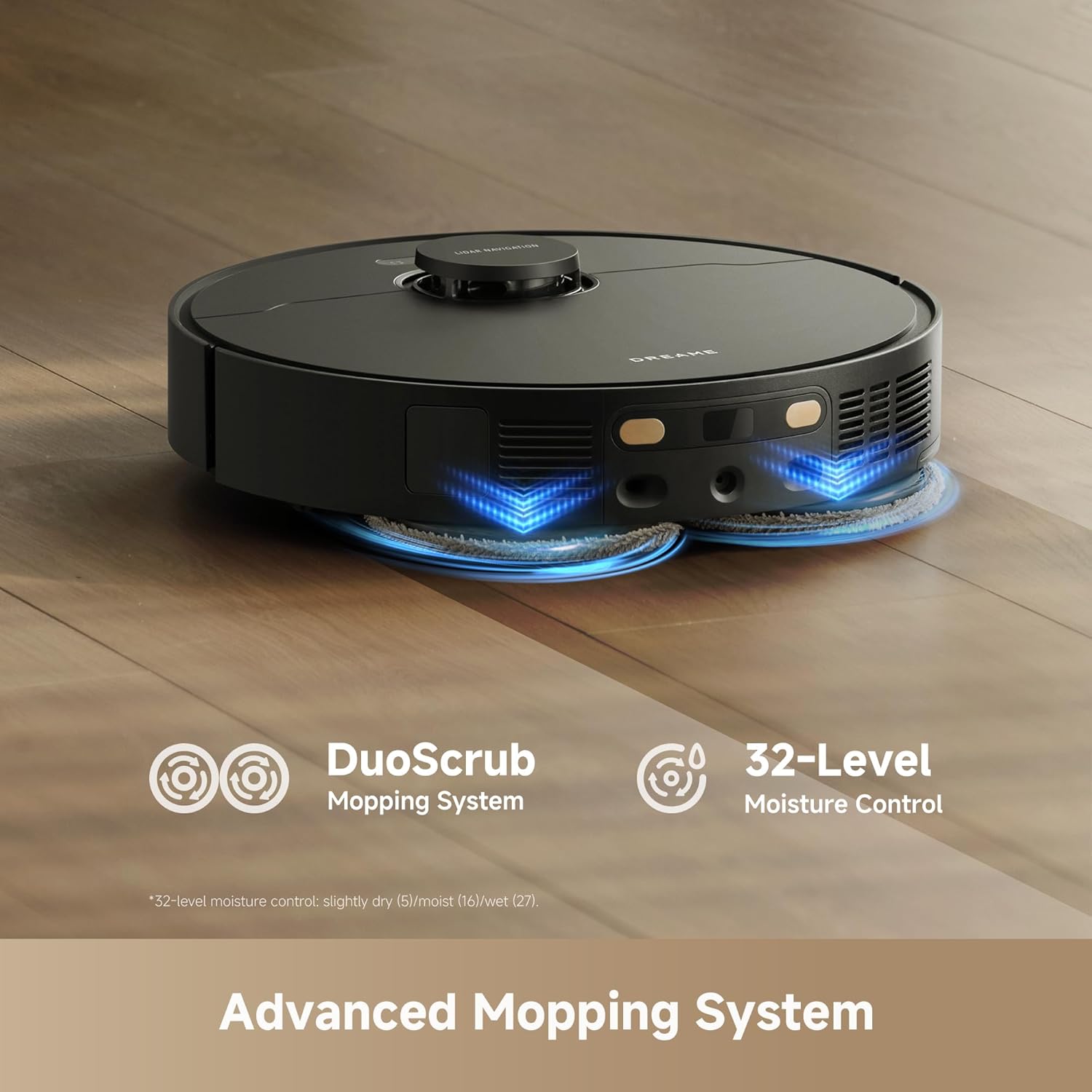
Image: The robot vacuum actively mopping a hard floor, showcasing its DuoScrub Mopping System and the precision of its 32-level moisture control for optimal cleaning.
Corner and Edge Cleaning
The L40 Ultra Gen 2 features an extendable side brush and mop that reaches into corners and along edges, ensuring thorough cleaning where traditional robot vacuums might miss. This design allows for 100% corner coverage and 99% edge coverage.

Image: The robot vacuum's extendable side brush and mop mechanism, illustrating its ability to clean deep into corners and along wall edges for comprehensive coverage.
บริการทำความสะอาดพรม
The robot is equipped with intelligent carpet detection. When a carpet is detected, the mops automatically lift up to 10.5mm to prevent wetting the carpet during mopping cycles. For vacuuming, the suction power can be boosted on carpets for deeper cleaning. You can also set carpet avoidance zones in the app.
การนำทางและการหลีกเลี่ยงอุปสรรค
Utilizing Smart Pathfinder and 3DAdapt technologies, the L40 Ultra Gen 2 maps your home with precision and avoids obstacles such as shoes, cables, and pet waste. This ensures efficient cleaning paths and reduces the risk of getting stuck or damaging items.

Image: The robot vacuum intelligently navigating a room, demonstrating its ability to detect and avoid obstacles using advanced sensors and mapping technology.
แอพและการควบคุมด้วยเสียง
Control the robot through the DreameHome app for scheduling, zone cleaning, no-go zones, and real-time monitoring. The robot also supports voice control via Alexa, Siri, and Google Home for convenient hands-free operation. Ensure your Wi-Fi is 2.4GHz for connectivity.
วิดีโอ: จบแล้วview of the DREAME L40 Ultra Gen 2 robot vacuum and mop in action, showcasing its various cleaning features and capabilities.
การซ่อมบำรุง
All-in-One Self-Cleaning Dock
The base station is designed for minimal manual maintenance. It performs several automated functions:
- การล้างข้อมูลอัตโนมัติ: The robot automatically empties its dustbin into a 3.2L dust bag in the dock, providing up to 100 days of hands-free dust disposal.
- การซักถูพื้น: The dock washes the mop pads during and after cleaning cycles using 20 spray nozzles and a flat integrated washboard design, ensuring mops stay clean.
- การอบแห้งด้วยลมร้อน: After washing, the mop pads are dried with hot air to prevent mildew and odors.
- ระบบเติมน้ำอัตโนมัติ: The dock refills the robot's water tank for mopping operations.
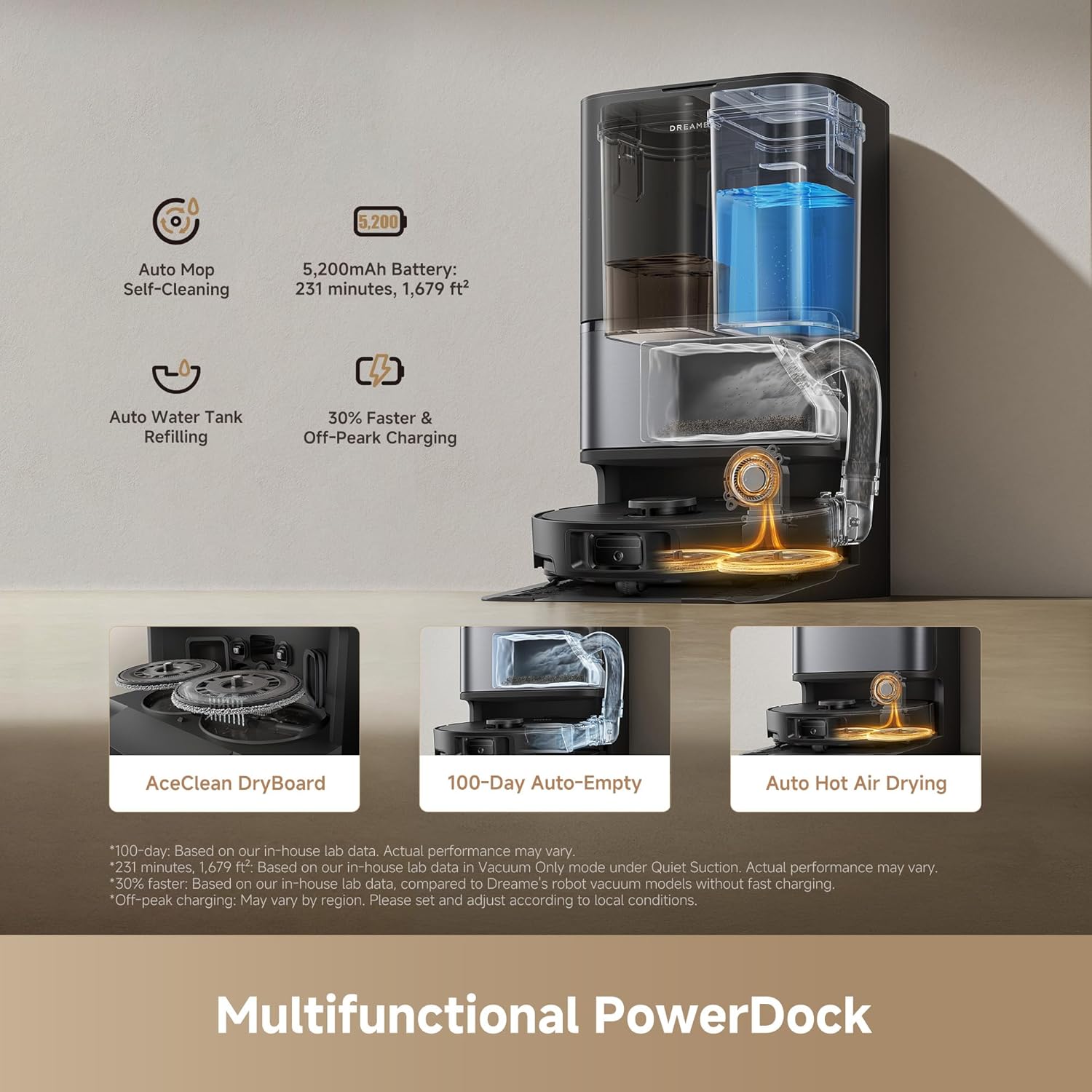
Image: The multifunctional PowerDock, illustrating its capabilities including automatic mop self-cleaning, water tank refilling, 100-day auto-empty, and hot air drying for the mop pads.

Image: The self-cleaning mechanism of the mop pads within the dock, demonstrating how water is sprayed to clean the pads and dirty water is collected, ensuring 99% mop stain removal.
การทำความสะอาดชิ้นส่วนหุ่นยนต์
- แปรงหลัก: Regularly remove hair and debris tangled around the main brush. Use the cleaning tool provided.
- แปรงด้านข้าง: Check the side brush for tangled hair or debris and clean as needed. Replace if worn.
- Dust Box and Filter: Although the dock auto-empties, periodically remove the dust box and clean the filter. The filter is washable; allow it to air dry completely before reinstallation.
- แผ่นม็อบ: While the dock cleans them, inspect mop pads for excessive wear or stubborn stains. Replace if necessary.
- เซ็นเซอร์: Wipe all sensors on the robot and base station with a clean, dry cloth to ensure optimal navigation and performance.
Optional Auto-Detergent Dispenser
An optional auto-detergent dispenser module is available for separate purchase. Once installed, this module enables the base station to automatically dispense cleaning solution for mop washing, which can be activated and managed through the DreameHome app.
การแก้ไขปัญหา
| ปัญหา | สาเหตุที่เป็นไปได้ | สารละลาย |
|---|---|---|
| หุ่นยนต์ไม่เปิดขึ้น | แบตเตอรี่อ่อน; กดปุ่มเปิด/ปิดไม่ถูกต้อง | วางหุ่นยนต์ลงบนแท่นชาร์จ กดปุ่มเปิด/ปิดค้างไว้ 3 วินาที |
| หุ่นยนต์ไม่สามารถชาร์จได้ | Charging contacts dirty; Base station not powered | Clean charging contacts on robot and dock; Ensure base station is plugged in and powered |
| หุ่นยนต์ติดขัดบ่อยมาก | สิ่งกีดขวางในเส้นทาง; เซ็นเซอร์สกปรก | Clear obstacles; Clean all sensors; Set no-go zones in app |
| ประสิทธิภาพการทำความสะอาดแย่ | Dustbin full; Brushes tangled; Filter clogged; Mop pads dirty | Check dust bag in dock; Clean main/side brushes; Clean/replace filter; Ensure mop pads are clean |
| แผ่นม็อปเปียกไม่พอ | Water tank empty; Water flow setting too low | Check water tank in dock; Adjust water flow in DreameHome app |
| ปัญหาการเชื่อมต่อแอพ | Incorrect Wi-Fi band; Router issues | Ensure 2.4GHz Wi-Fi; Restart router and robot; Re-pair device in app |
ข้อมูลจำเพาะ
| คุณสมบัติ | รายละเอียด |
|---|---|
| ยี่ห้อ | ฝัน |
| ชื่อรุ่น | L40 Ultra Gen2 |
| หมายเลขรุ่นสินค้า | RLL53SE |
| พลังดูด | 25,000ปาสคาล |
| คุณสมบัติพิเศษ | DuoScrub Mopping System, Auto-empty, Hot Air Drying, Mop Washing, Precise Obstacle Avoidance, Smart Carpet Cleaning |
| สี | สีดำ |
| ขนาดสินค้า | ยาว 13.8 นิ้ว x กว้าง 13.4 นิ้ว x สูง 23.3 นิ้ว |
| ส่วนประกอบที่รวมอยู่ | Filter, Mop Pad, Side Brush |
| ประเภทตัวกรอง | โฟม |
| อายุการใช้งานแบตเตอรี่ | 200 minutes (up to 231 minutes in Quiet Mode) |
| ความจุของแบตเตอรี่ | 5,200mAh |
| เล่มที่tage | 110 โวลต์ |
| แหล่งพลังงาน | สายไฟ |
| วิธีการควบคุม | App, Voice (Alexa, Siri, Google Home) |
| ฟอร์มแฟกเตอร์ | หุ่นยนต์ |
| ความเข้ากันได้ของสมาร์ทโฮม | Smart Home Compatible |
| น้ำหนักสินค้า | 38 ปอนด์ |
| คำแนะนำด้านพื้นผิว | ไม้ หินอ่อน กระเบื้อง |
| ยูพีซี | 810142562744 |
การรับประกันและการสนับสนุน
ข้อมูลการรับประกัน
DREAME products typically come with a standard product warranty. The DREAME L40 Ultra Gen 2 includes up to a 3-year product warranty. Please refer to the warranty card included in your package or visit the official DREAME website for detailed terms and conditions regarding warranty coverage, including specific durations and what is covered.
การสนับสนุนลูกค้า
For technical assistance, troubleshooting, or warranty claims, please contact DREAME customer support. You can find contact information (phone, email, or live chat) on the official DREAME website. Have your product model number (L40 Ultra Gen 2 or RLL53SE) and proof of purchase ready when contacting support.
DREAME offers dedicated customer support and a 30-day hassle-free return policy. Trusted, fast, and local warranty repair services are also available.