1. คู่มือการติดตั้ง
This section provides instructions for the initial setup of your OPPO A6 Pro 5G CPH2781 smartphone.
1.1 การแกะกล่องและการตรวจสอบเบื้องต้น
นำส่วนประกอบทั้งหมดออกจากบรรจุภัณฑ์อย่างระมัดระวัง ตรวจสอบว่ามีส่วนประกอบต่อไปนี้อยู่:
- OPPO A6 Pro 5G CPH2781 device
- 80W SUPERVOOC Flash Charge adapter
- สาย USB Type-C
- เครื่องมือถอดซิม
- คู่มือเริ่มต้นใช้งานฉบับย่อและข้อมูลด้านความปลอดภัย
ตรวจสอบอุปกรณ์เพื่อดูว่ามีรอยเสียหายที่มองเห็นได้หรือไม่ก่อนดำเนินการต่อ
1.2 การติดตั้งซิมการ์ดและที่เก็บข้อมูล
The OPPO A6 Pro 5G supports Dual SIM functionality. Follow these steps to install your SIM cards:
- ค้นหาถาดใส่การ์ด SIM ที่ด้านข้างของอุปกรณ์
- ใส่เครื่องมือถอดซิมเข้าไปในรูเล็ก ๆ ข้างถาดแล้วกดเบา ๆ จนกว่าถาดจะดีดออกมา
- ใส่การ์ดนาโนซิมของคุณลงในช่องที่กำหนดไว้บนถาด ตรวจสอบให้แน่ใจว่าหน้าสัมผัสสีทองคว่ำลง
- ใส่ถาดใส่ซิมการ์ดกลับเข้าไปในเครื่องอย่างระมัดระวังจนกระทั่งได้ยินเสียงคลิกเข้าที่
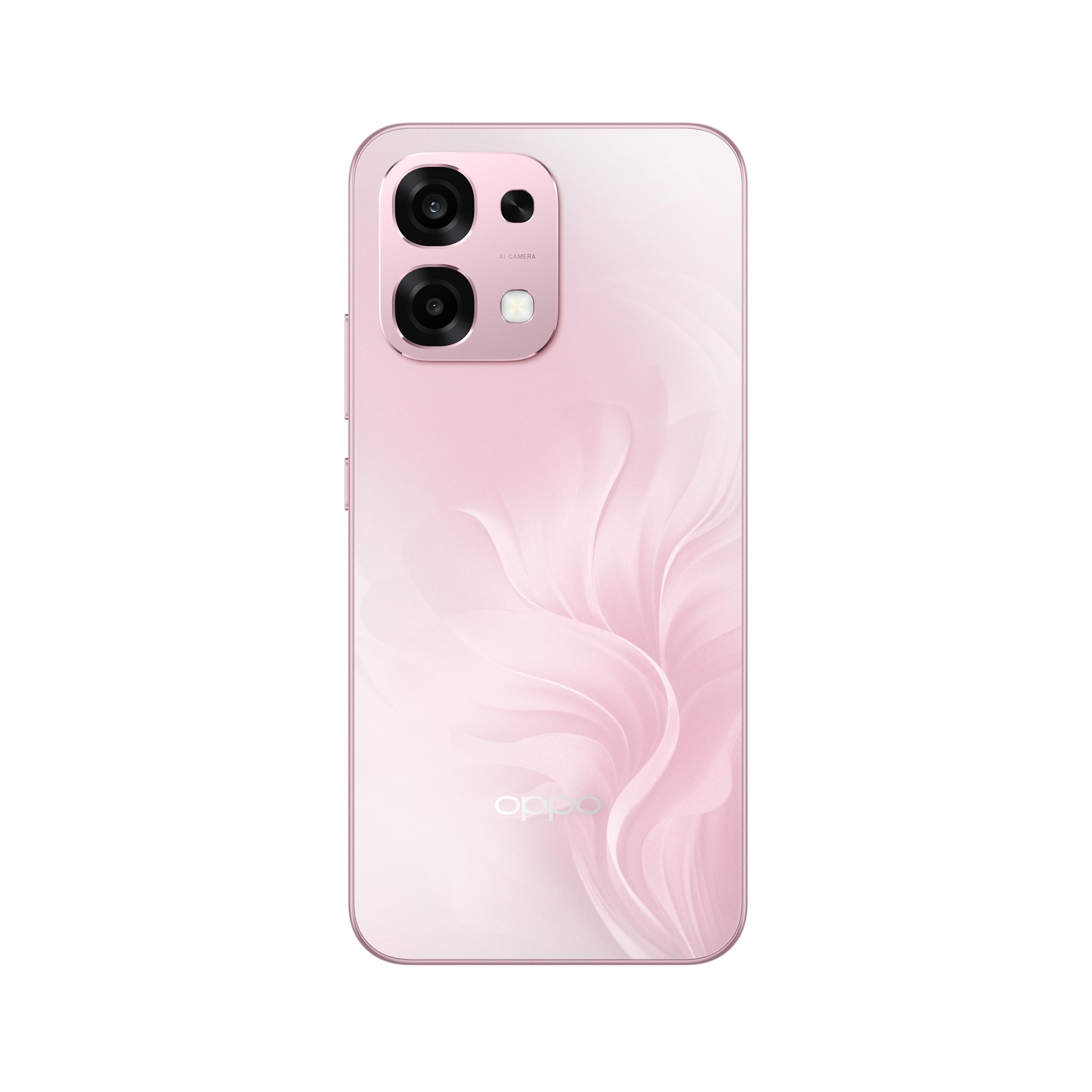
รูปที่ 1: ด้านหลัง view of the OPPO A6 Pro 5G CPH2781, highlighting the camera array and device color.
1.3 การเปิดเครื่องและการกำหนดค่าเริ่มต้น
วิธีเปิดอุปกรณ์ของคุณเป็นครั้งแรก:
- กดปุ่มเปิด/ปิด (อยู่ด้านขวา) ค้างไว้จนกว่าโลโก้ OPPO จะปรากฏบนหน้าจอ
- ทำตามคำแนะนำบนหน้าจอเพื่อเลือกภาษา ภูมิภาค และเชื่อมต่อกับเครือข่าย Wi-Fi
- ลงชื่อเข้าใช้ด้วยบัญชี Google ของคุณหรือสร้างบัญชีใหม่เพื่อเข้าถึงบริการของ Google และ Play Store
- Complete the setup wizard, including setting up screen lock methods (PIN, pattern, password, or Face Recognition).
1.4 การชาร์จอุปกรณ์
Your OPPO A6 Pro 5G is equipped with 80W SUPERVOOC Flash Charge technology for rapid charging. Use the provided 80W SUPERVOOC adapter and USB Type-C cable for optimal charging performance.
- เชื่อมต่อสาย USB Type-C เข้ากับพอร์ตชาร์จที่ด้านล่างของโทรศัพท์
- Connect the other end of the cable to the 80W SUPERVOOC adapter.
- เสียบอะแดปเตอร์เข้ากับเต้ารับไฟฟ้า
- ไฟแสดงสถานะการชาร์จจะปรากฏบนหน้าจอ
2. คู่มือการใช้งาน
This section covers the basic operation and key features of your OPPO A6 Pro 5G CPH2781.
2.1 Navigating ColorOS
Your device runs on ColorOS, OPPO's customized Android operating system. Common navigation gestures include:
- ปัดขึ้น: Access the app drawer (if enabled) or return to the home screen.
- เลื่อนลง: เปิดแผงการแจ้งเตือนและเมนูการตั้งค่าด่วน
- ปัดไปทางซ้าย/ขวา: Navigate between home screen pages.
- แตะ: เลือกรายการหรือเปิดแอป
- กดแบบยาว: เข้าถึงเมนูบริบทหรือย้ายไอคอนแอป
2.2 คุณสมบัติการแสดงผล
The OPPO A6 Pro 5G features a 6.57-inch 120Hz AMOLED Ultra Bright Display, providing vivid colors and smooth scrolling. You can adjust display settings such as brightness, color mode, and refresh rate in the Settings menu under "Display & Brightness".
2.3 การใช้งานกล้อง
The device is equipped with an advanced camera system. To open the camera, tap the Camera app icon on your home screen or lock screen. Key features include:
- โหมดถ่ายภาพ: โหมดมาตรฐาน, โหมดภาพบุคคล, โหมดกลางคืน, โหมดโปร, โหมดพาโนรามา
- การบันทึกวิดีโอ: Supports various resolutions and frame rates.
- กล้อง AI: Utilizes artificial intelligence for scene recognition and optimal photo settings.

Figure 2: Detail of the OPPO A6 Pro 5G CPH2781 camera module.
2.4 คุณสมบัติ AI
The OPPO A6 Pro 5G integrates several AI-powered features to enhance user experience:
- AI Eraser 2.0: For intelligent object removal in photos.
- AI Assistance for Documents: Helps in scanning and managing documents.
- AI Assistant for Notes: Enhances note-taking capabilities.
2.5 การเชื่อมต่อ
Your device supports 5G cellular technology, Bluetooth, and LTE. AI LinkBoost 3.0 automatically optimizes network performance for stable connections.
- ไวไฟ : เชื่อมต่อกับเครือข่ายไร้สายผ่าน การตั้งค่า > Wi-Fi
- บลูทูธ: Pair with other Bluetooth devices via Settings > Bluetooth.
- เครือข่ายมือถือ: Manage 5G/LTE settings via Settings > Mobile Network.
3. การบำรุงรักษาและการดูแล
Proper maintenance ensures the longevity and optimal performance of your OPPO A6 Pro 5G CPH2781.
3.1 การดูแลแบตเตอรี่
The device is equipped with a 6500mAh battery. To maximize battery life:
- หลีกเลี่ยงอุณหภูมิที่สูงหรือต่ำเกินไป
- Use the provided 80W SUPERVOOC Flash Charge adapter and cable.
- หลีกเลี่ยงการปล่อยแบตเตอรี่จนหมดบ่อยครั้ง
- เปิดใช้งานโหมดประหยัดพลังงานเมื่อจำเป็น
3.2 ความทนทานต่อน้ำและฝุ่นละออง
The OPPO A6 Pro 5G CPH2781 has an IP69 rating, indicating resistance to dust and high-pressure water jets. While resistant, it is not waterproof under all conditions. To maintain resistance:
- ตรวจสอบให้แน่ใจว่าถาดใส่ซิมการ์ดปิดสนิทและผนึกเรียบร้อยแล้ว
- หลีกเลี่ยงการจุ่มอุปกรณ์ลงในน้ำ
- Do not expose the device to saltwater, chlorinated water, or other liquids.
- If the device gets wet, wipe it dry with a clean, soft cloth before charging.
3.3 การป้องกันทางกายภาพ
The device is certified to military standards for durability. It also comes with a built-in screen protector. For additional protection:
- Consider using a protective case.
- ควรหลีกเลี่ยงการทำอุปกรณ์ตกหรือการให้อุปกรณ์ได้รับแรงกระแทกรุนแรง
- ทำความสะอาดหน้าจอและตัวเครื่องด้วยผ้านุ่มที่ไม่เป็นขุย
4 การแก้ไขปัญหา
This section addresses common issues you might encounter with your OPPO A6 Pro 5G CPH2781.
4.1 อุปกรณ์ไม่เปิดเครื่อง
- ตรวจสอบให้แน่ใจว่าแบตเตอรี่ชาร์จเต็มแล้ว เสียบอุปกรณ์เข้ากับเครื่องชาร์จอย่างน้อย 10 นาที
- Perform a forced restart by pressing and holding the Power button and Volume Up button simultaneously for about 10-15 seconds.
4.2 การเชื่อมต่อเครือข่ายไม่ดี
- ตรวจสอบว่าคุณได้ใส่ซิมการ์ดอย่างถูกต้องหรือไม่
- ตรวจสอบให้แน่ใจว่าได้เปิดใช้งานข้อมูลมือถือในเมนูการตั้งค่าแล้ว
- ลองรีสตาร์ทอุปกรณ์
- รีเซ็ตการตั้งค่าเครือข่าย (การตั้งค่า > การตั้งค่าระบบ > สำรองข้อมูลและรีเซ็ต > รีเซ็ตโทรศัพท์ > รีเซ็ตการตั้งค่าเครือข่าย)
- ตรวจสอบให้แน่ใจว่าคุณอยู่ในพื้นที่ที่มีสัญญาณเครือข่าย
4.3 แอปขัดข้องหรือหยุดทำงาน
- ปิดและเปิดแอปใหม่อีกครั้ง
- Clear the app's cache and data (Settings > Apps > App management > [App Name] > Storage usage > Clear cache/Clear data).
- อัปเดตแอปเป็นเวอร์ชันล่าสุดจาก Google Play Store
- Ensure your ColorOS is up to date (Settings > About device > Up to date).
4.4 แบตเตอรี่หมดเร็ว
- ตรวจสอบการใช้งานแบตเตอรี่ใน การตั้งค่า > แบตเตอรี่ เพื่อระบุแอปที่กินพลังงาน
- ลดความสว่างหน้าจอและตั้งค่าเวลาปิดหน้าจออัตโนมัติ
- ปิดใช้งานคุณสมบัติที่ไม่จำเป็น เช่น GPS, Bluetooth หรือ Wi-Fi เมื่อไม่ได้ใช้งาน
- Enable power-saving mode.
5. ข้อมูลจำเพาะ
Below are the key technical specifications for the OPPO A6 Pro 5G CPH2781.
| คุณสมบัติ | ข้อมูลจำเพาะ |
|---|---|
| ยี่ห้อ | ออปโป้ |
| ชื่อรุ่น | A6 Pro (CPH2781) |
| ระบบปฏิบัติการ | คัลเลอร์โอเอส |
| หน่วยความจำแรม | 8 GB (ขยายได้ถึง 16 GB) |
| ความจุในการเก็บข้อมูล | 256GB |
| รุ่นซีพียู | มีเดียเทก เฮลิโอ จี100 |
| ขนาดหน้าจอ | 6.57 นิ้ว |
| ประเภทจอภาพ | อโมเลด |
| อัตราการรีเฟรช | 120 เฮิรตซ์ |
| ความจุของแบตเตอรี่ | 6500 มิลลิแอมป์ |
| เทคโนโลยีการชาร์จ | ระบบชาร์จเร็ว 80W SUPERVOOC |
| เทคโนโลยีเซลลูล่าร์ | 5G |
| จำนวนช่องใส่ซิมการ์ด | ซิมคู่ |
| ระดับความต้านทานต่อน้ำ | IP69 (กันน้ำ) |
| การรักษาความปลอดภัยด้วยไบโอเมตริกซ์ | การจดจำใบหน้า |
| ประเภทขั้วต่อ | USB ประเภท C |
| สื่อในตัว | ฟิล์มกันรอยหน้าจอ |
6. ข้อมูลการรับประกัน
Your OPPO A6 Pro 5G CPH2781 comes with a การรับประกันจากผู้ผลิต 2 ปีการรับประกันนี้ครอบคลุมถึงข้อบกพร่องในวัสดุและฝีมือการผลิตภายใต้การใช้งานปกติ
Please retain your proof of purchase for warranty claims. The warranty does not cover damage caused by misuse, accidents, unauthorized modifications, or normal wear and tear. For detailed terms and conditions, please refer to the warranty card included in your product packaging or visit the official OPPO webเว็บไซต์.
7. การสนับสนุนลูกค้า
For further assistance, technical support, or service inquiries regarding your OPPO A6 Pro 5G CPH2781, please contact OPPO customer service through the following channels:
- OPPO อย่างเป็นทางการ Webเว็บไซต์: เยี่ยม ฝ่ายสนับสนุน OPPO สำหรับคำถามที่พบบ่อย คำแนะนำในการแก้ไขปัญหา และข้อมูลการติดต่อ
- OPPO Store: คุณสามารถเยี่ยมชมเว็บไซต์ทางการได้ ร้าน OPPO บน Amazon สำหรับข้อมูลผลิตภัณฑ์และอุปกรณ์เสริมที่เกี่ยวข้อง
- ศูนย์บริการ: Locate authorized OPPO service centers in your region for in-person support.
When contacting support, please have your device model (CPH2781) and serial number ready.


