การแนะนำ
Thank you for choosing the FLEXISPOT ErgoX-PRO Ergonomic Office Chair. This manual provides essential information for the proper assembly, operation, maintenance, and troubleshooting of your new chair. Please read these instructions carefully before use and retain them for future reference.
ข้อมูลด้านความปลอดภัยที่สำคัญ
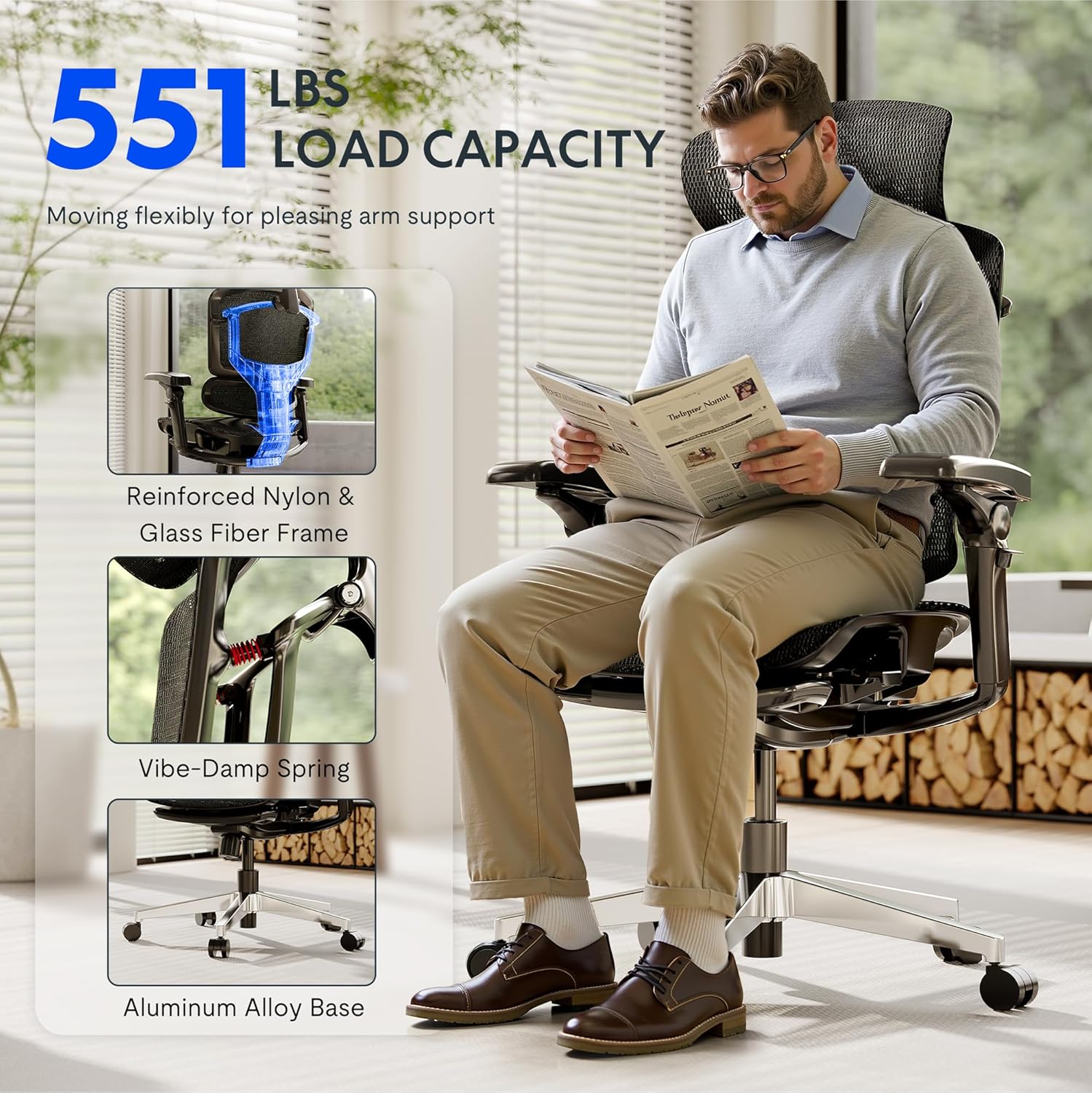
- ห้ามบรรทุกน้ำหนักเกินพิกัดสูงสุดที่กำหนด 551 ปอนด์.
- Ensure proper assembly following the provided instructions. Incorrect assembly can lead to instability and injury.
- Use adjustable features carefully to avoid misuse and ensure stability during use.
- ขณะปรับแต่ง ควรระวังอย่าให้มือและนิ้วอยู่ใกล้ชิ้นส่วนที่กำลังเคลื่อนไหว
- ห้ามยืนบนเก้าอี้
- Only use the chair on a stable, level surface.
การติดตั้งและการประกอบ
The FLEXISPOT ErgoX-PRO chair requires assembly. Please follow the steps below and refer to the assembly video for visual guidance. All necessary tools are included.
ขั้นตอนการประกอบ:
- แกะส่วนประกอบ: Carefully remove all parts from the packaging and lay them out. Verify all components are present against the parts list in the included user manual.
- ติดล้อเข้ากับฐาน: Insert the five casters into the holes at the end of each leg of the aluminum alloy base. Press firmly until they click into place.
- ใส่แก๊สยก: วางกระบอกไฮดรอลิกสำหรับยกเก้าอี้ลงในรูตรงกลางของฐานเก้าอี้ที่ประกอบเสร็จแล้ว
- ติดตั้งกลไกเข้ากับที่นั่ง: ยึดกลไกควบคุมเข้ากับด้านล่างของเบาะนั่งโดยใช้สกรูที่ให้มา ตรวจสอบให้แน่ใจว่าด้านหน้าของกลไกอยู่ในแนวเดียวกับด้านหน้าของเบาะนั่ง
- ติดที่วางแขน: Fasten the 7D linkage armrests to the sides of the seat mechanism using the designated screws.
- เชื่อมต่อพนักพิง: Attach the backrest to the seat mechanism using the provided screws.
- ติดตั้งพนักพิงศีรษะ: Secure the 4D adjustable headrest to the top of the backrest.
- Assemble Footrest (if applicable): Attach the footrest assembly to the designated points on the chair frame.
- เชื่อมต่อเบาะนั่งกับระบบแก๊สลิฟท์: วางเบาะและพนักพิงที่ประกอบเสร็จแล้วลงบนกระบอกไฮดรอลิกอย่างระมัดระวัง ตรวจสอบให้แน่ใจว่าอยู่ตรงกลางและมั่นคง
วิดีโอประกอบ:
Video: How to install FlexiSpot Ergox-Pro? This video demonstrates the step-by-step assembly process for the ErgoX-PRO chair, from unboxing to final setup.
คำแนะนำการใช้งาน
The FLEXISPOT ErgoX-PRO chair offers multiple adjustment options to customize your seating experience for optimal comfort and support.
การปรับเก้าอี้:
- การปรับความสูงของที่นั่ง: Locate the lever on the right side beneath the seat. Pull the lever up to raise the seat; release to lock. To lower, pull the lever up while seated.
- การปรับความลึกของเบาะนั่ง: Use the lever on the left side beneath the seat to slide the seat forward or backward by 2.8 inches (7cm), accommodating different thigh lengths.
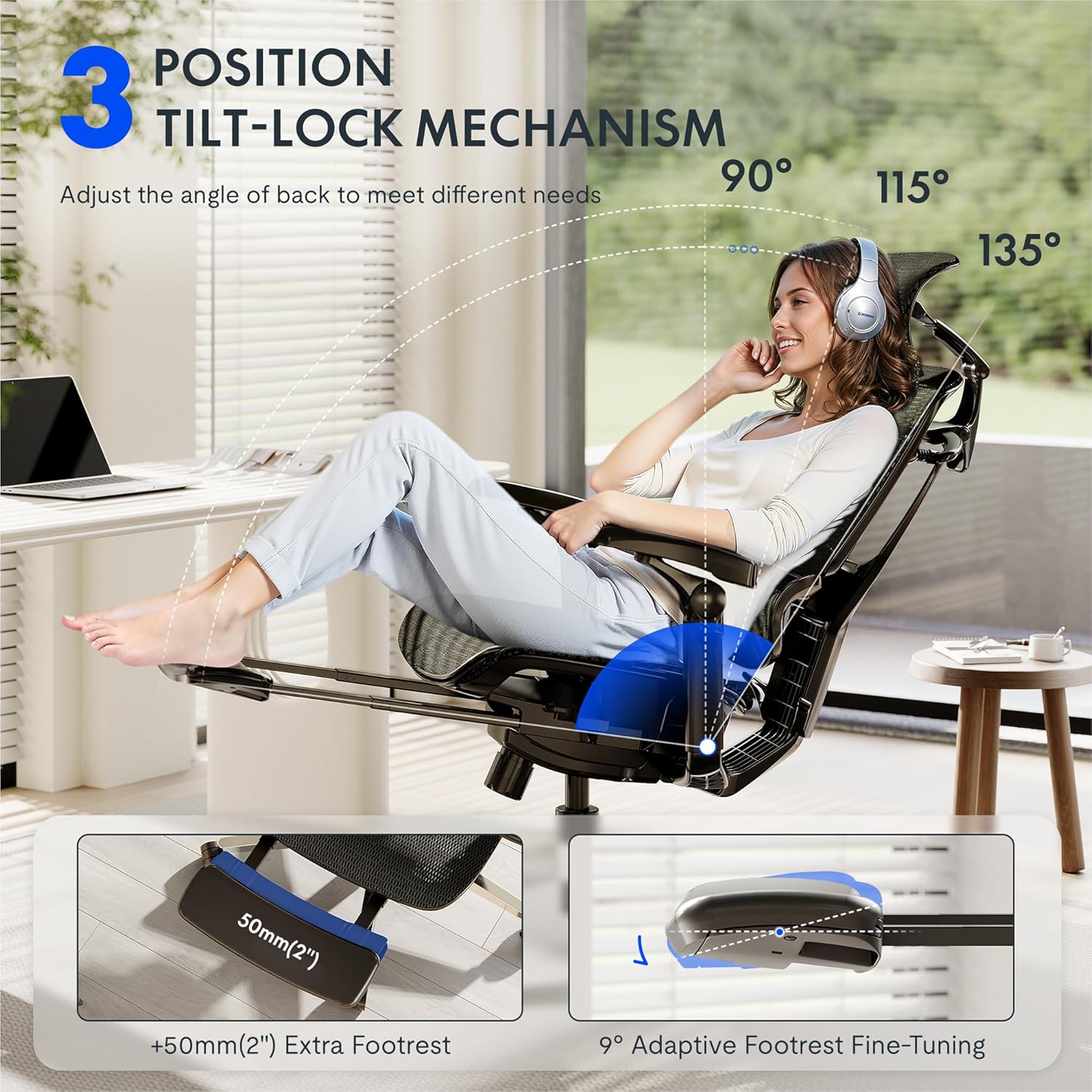
- ระบบปรับเอนและล็อคการเอียงพนักพิง: The chair features a 3-position tilt base (90°/115°/135°). Use the recline lever to adjust the angle and lock it into your desired position. The 12-level fine-tuned backrest with spring cushioning ensures natural movement.
- 5D Dynamic Lumbar Support: The lumbar support is designed to adapt to your posture. It can be adjusted for height and depth to provide targeted support to your lower back.
- ที่วางศีรษะปรับได้ 4 มิติ: The headrest can be adjusted for height, angle (45°, 160°, 120° rotation), and front/back position (1.8 inches) to support your head and neck. It can also function as a back cushion.
- 7D Linkage Armrests: These full-motion armrests move with your body. Adjust them for height (3 inches up/down), rotation (40°), left/right movement (360°), and front/back (2.4 inches) to provide continuous support for various activities.
- Footrest (if applicable): Extend the footrest from beneath the seat for additional relaxation. It offers 9° adaptive fine-tuning.
Adjustment Demonstration Video:
Video: Set Up & Adjust the ErgoX Pro Chair for Maximum Comfort. This video illustrates how to effectively use the various adjustment features of your ErgoX-PRO chair.
Key Features Visuals:



การซ่อมบำรุง
To ensure the longevity and optimal performance of your FLEXISPOT ErgoX-PRO chair, regular maintenance is recommended.
- การทำความสะอาด: สำหรับการทำความสะอาดทั่วไป ให้ใช้ผ้านุ่มๆamp cloth. For the mesh components, dry clean onlyหลีกเลี่ยงสารเคมีรุนแรงหรือน้ำยาทำความสะอาดที่มีฤทธิ์กัดกร่อน
- การตรวจสอบ: ตรวจสอบสกรูและสลักเกลียวทั้งหมดเป็นระยะเพื่อให้แน่ใจว่าขันแน่นดี ขันให้แน่นอีกครั้งหากจำเป็น
- การดูแลผู้ฝึกสอน: ควรทำความสะอาดล้อเลื่อนให้ปราศจากเส้นผมและเศษสิ่งสกปรก เพื่อให้การเคลื่อนที่ราบรื่น
การแก้ไขปัญหา
หากคุณพบปัญหาใดๆ เกี่ยวกับเก้าอี้ โปรดดูวิธีแก้ไขปัญหาทั่วไปต่อไปนี้:
- เก้าอี้ปรับความสูงไม่ได้: Ensure the gas lift lever is fully engaged or disengaged as required. Check if the gas lift cylinder is properly seated in the base and mechanism.
- Backrest Tilt Not Working: Verify that the tilt lock mechanism is disengaged. Some users report needing to apply more force or adjust the tension knob (if present) to achieve desired tilt.
- Armrests Move Too Easily: The 7D armrests are designed for dynamic movement. If they feel excessively loose, ensure all assembly screws are securely tightened.
- เสียงดังเอี๊ยดอ๊าด: Check all connection points and tighten any loose screws. Applying a small amount of silicone lubricant to moving parts (e.g., gas lift, tilt mechanism) can help.
- เก้าอี้รู้สึกไม่มั่นคง: Re-check all assembly steps to ensure all components are correctly installed and tightened. Ensure the chair is on a flat, even surface.
If these steps do not resolve the issue, please contact FLEXISPOT customer support for further assistance.
ข้อมูลจำเพาะ
| ยี่ห้อ | เฟล็กซิสพอท |
| ชื่อรุ่น | Ergonomic Task Chair (ErgoX PRO-Mesh+FT) |
| สี | ออบซิเดียนสีดำ |
| ขนาดสินค้า | ลึก 28.3 นิ้ว x กว้าง 28.3 นิ้ว x สูง 55.9 นิ้ว |
| คำแนะนำน้ำหนักสูงสุด | 551 ปอนด์ |
| สไตล์ด้านหลัง | 12-L High-back, Mesh |
| คุณสมบัติพิเศษ | Adjustable Headrest, Adjustable Height, Ergonomic, Adjustable Armrest, Dynamic Lumbar Support, Tilt, Back Support, Adjustable Recliner |
| วัสดุ | AeroWeave 5.0 Mesh |
| ส่วนประกอบที่รวมอยู่ | Armrest, Headrest, Wheels, Backrest, Seat, User manual, Assembly tools |
| ยูพีซี | 840521507332 |
มิติเหนือview:

การรับประกันและการสนับสนุน
For warranty information, product support, or to purchase replacement parts, please refer to the official FLEXISPOT website or contact their customer service directly. Contact details are typically provided in the packaging or on the brand's official support pages.
การสนับสนุนทางออนไลน์: เยี่ยมชม FLEXISPOT Store on Amazon สำหรับทรัพยากรเพิ่มเติมและตัวเลือกการติดต่อ


