1. บทนำ
The BLUETTI Elite 10 Mini Portable Power Station is a compact and versatile power solution designed for various applications, including camping, travel, and emergency backup. Featuring a 128Wh LiFePO4 battery and a 200W AC outlet, it provides reliable power for small electronic devices. Its lightweight and airline-friendly design makes it an ideal companion for on-the-go power needs.

Figure 1: BLUETTI Elite 10 Mini Portable Power Station, showcasinด้วยดีไซน์ที่กะทัดรัดและแผงด้านหน้า
2. คำแนะนำด้านความปลอดภัย
Please read and understand all safety instructions before operating the BLUETTI Elite 10. Failure to follow these instructions may result in electric shock, fire, or serious injury.
- อย่าถอดประกอบซ่อมแซมหรือดัดแปลงเครื่อง
- เก็บเครื่องให้ห่างจากไฟ น้ำ และอุณหภูมิที่สูงหรือต่ำมาก
- หลีกเลี่ยงการทำตกหรือให้เครื่องได้รับแรงกระแทกรุนแรง
- ใช้เฉพาะอุปกรณ์เสริมและสายชาร์จที่ได้รับอนุญาตเท่านั้น
- ตรวจสอบให้แน่ใจว่ามีการระบายอากาศที่เหมาะสมในระหว่างการใช้งานและการชาร์จ
- เก็บให้พ้นจากมือเด็ก
3. คุณสมบัติของผลิตภัณฑ์
- Versatile Power Output: Equipped with a 200W AC outlet, 100W USB-C fast charging, and multiple DC ports to power various devices.
- ขนาดกะทัดรัดและพกพาสะดวก: Weighs approximately 4.0 lbs (1.8 kg) with an ergonomic handle, making it easy to carry.
- Airline-Friendly Capacity: 128Wh battery capacity falls within the 100–160Wh range, allowing it to be carried on most major airlines with prior approval (limit 2 per passenger).
- เครื่องจ่ายไฟสำรอง (UPS): Features a built-in 10ms UPS and 350W bypass output for seamless power during outagใช่
- ตัวเลือกการชาร์จที่หลากหลาย: Supports 150W AC charging (full in 70 mins), 100W solar charging, and 100W car charging.
- การควบคุมแอพอัจฉริยะ: Connect via Bluetooth to customize charging modes, adjust lighting, and monitor power status in real time.
- ไฟ LED แบบบูรณาการ: Offers 3 lighting modes (warm/cool light, SOS) for up to 50 hours of illumination.
4. การเริ่มต้นและการตั้งค่า
4.1. การแกะกล่องและเนื้อหาภายในบรรจุภัณฑ์
เมื่อเปิดบรรจุภัณฑ์ ให้แน่ใจว่ามีส่วนประกอบทั้งหมดครบถ้วน:
- BLUETTI Elite 10 Mini Power Station
- สายชาร์จ AC
- สายชาร์จรถยนต์
- คู่มือการใช้งาน

Figure 2: Contents of the BLUETTI Elite 10 package.
4.2. การชาร์จครั้งแรก
Before first use, fully charge the BLUETTI Elite 10. Connect the AC charging cable to the AC input port on the unit and then to a wall outlet. The display will indicate charging status. A full charge via AC takes approximately 70 minutes.
5. สินค้าหมดview
5.1. แผงด้านหน้า
The front panel features the main display, control buttons, and various output ports:
- เอาต์พุต DC (12V/5A): For compatible DC devices.
- หน้าจอแสดงผล: แสดงค่าน้ำเข้า/ออกtage เปอร์เซ็นต์แบตเตอรี่tage และระยะเวลาการทำงานที่เหลืออยู่
- ปุ่ม DC: Activates DC output ports.
- ปุ่มเปิด/ปิด: เปิด/ปิดเครื่อง
- ปุ่มไฟฟ้ากระแสสลับ: Activates the AC output outlet.
- USB-C 100W Output: สำหรับอุปกรณ์ USB-C ที่รองรับการชาร์จเร็ว
- USB-A 15W Outputs (x2): Standard USB-A ports for charging.
- USB-C 15W Output: Additional USB-C port.
Figure 3: Front panel layout of the BLUETTI Elite 10.
5.2. Side and Rear Panels
The side and rear panels house additional input/output ports and the LED light:
- DC/PV Input (12-28V/8A, 100W Max): For solar or car charging.
- AC Output (120V/200W): Standard wall outlet for AC-powered devices.
- อินพุตไฟฟ้ากระแสสลับ: For charging the unit via wall outlet.
- ไฟ LED: Multi-mode light for illumination.

Figure 4: Rear panel showing AC output and LED light.
5.3. ขนาดและน้ำหนัก
The Elite 10 is designed for portability:
- ขนาด : ขนาดโดยประมาณ 7.8 นิ้ว (ยาว) x 5.7 นิ้ว (กว้าง) x 4.3 นิ้ว (สูง) (19.8 ซม. x 14.5 ซม. x 11 ซม.)
- น้ำหนัก: ประมาณ 4.0 ปอนด์ (1.8 กก.)

Figure 5: Visual representation of the Elite 10's compact size.
6. คู่มือการใช้งาน
6.1. การเปิด/ปิดเครื่อง
Press and hold the main power button on the front panel to turn the unit on or off. The display will illuminate upon activation.
6.2 การใช้งานเต้ารับไฟฟ้ากระแสสลับ
To use the AC outlet, press the 'AC' button on the front panel. The AC icon on the display will light up. Plug your AC-powered device into the AC output port on the rear panel. Ensure your device's power consumption does not exceed 200W.
6.3 การใช้งานเอาต์พุต DC
To use the DC output ports (USB-C, USB-A, 12V/5A), press the 'DC' button on the front panel. The DC icon on the display will light up. Connect your devices to the appropriate USB or 12V DC output ports.
6.4. Charging the Elite 10
The Elite 10 supports three charging methods:
- การชาร์จไฟ AC: Connect the AC charging cable to the AC input port and a wall outlet. Max 150W, full charge in approximately 70 minutes.
- การชาร์จพลังงานแสงอาทิตย์: Connect a compatible solar panel (e.g., BLUETTI PV60L/PV60F/PV100) to the DC/PV input port. Max 100W.
- การชาร์จรถยนต์: Connect the car charging cable to the DC/PV input port and your vehicle's cigarette lighter socket. Max 100W.

Figure 6: Various charging methods for the Elite 10.
6.5. ฟังก์ชันเครื่องสำรองไฟ (UPS)
When the Elite 10 is connected to an AC wall outlet and has devices plugged into its AC output, it can function as a UPS. In case of a power outage, the unit will automatically switch to battery power within 10 milliseconds, providing continuous power to connected devices up to 350W bypass output.
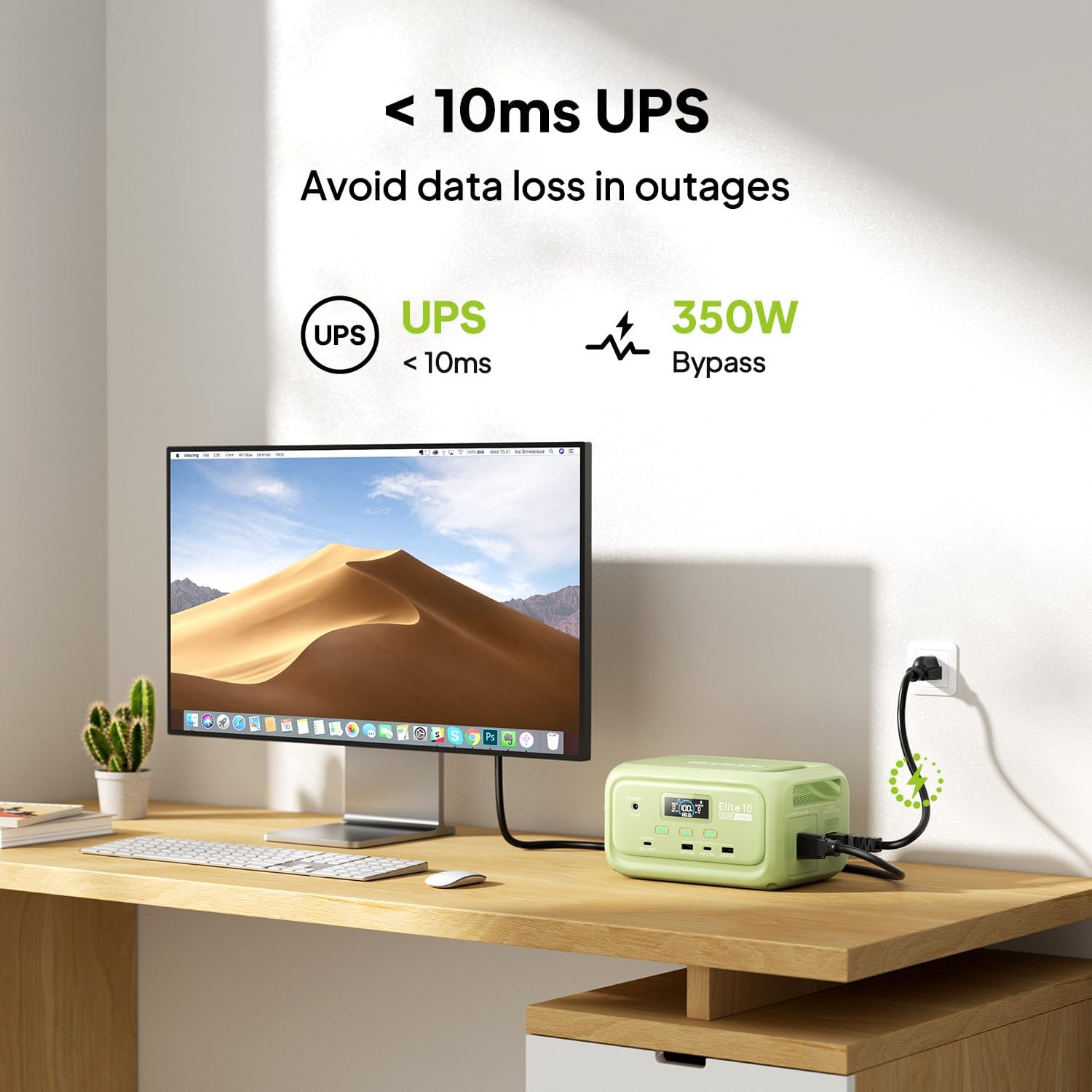
Figure 7: Illustration of the Elite 10's UPS capability.
6.6. ไฟ LED
The LED light on the rear panel offers three modes: warm light, cool light, and SOS. Press the dedicated light button to cycle through modes or turn it off. The light can provide up to 50 hours of illumination.
6.7. การควบคุมแอปอัจฉริยะ
Download the BLUETTI app and connect to your Elite 10 via Bluetooth. The app allows you to monitor power status, customize charging modes, and adjust lighting settings remotely.

Figure 8: Managing the Elite 10 via the BLUETTI mobile application.
7. การบำรุงรักษาและการจัดเก็บ
- การทำความสะอาด: Use a dry, soft cloth to clean the unit. Do not use abrasive cleaners or solvents.
- อุณหภูมิ: Store and operate the unit within the recommended temperature range (typically 0°C to 40°C or 32°F to 104°F).
- การจัดเก็บระยะยาว: If storing for extended periods, charge the unit to 50-80% every 3-6 months to prolong battery life. Store in a cool, dry place.
8 การแก้ไขปัญหา
If you encounter issues with your BLUETTI Elite 10, refer to the following common solutions:
- หน่วยไม่เปิด: ตรวจสอบให้แน่ใจว่าแบตเตอรี่ชาร์จเต็มแล้ว หากไม่ ให้เสียบเข้ากับเต้ารับไฟฟ้าเพื่อชาร์จ
- ไม่มีเอาต์พุตจากพอร์ต: Verify that the respective DC or AC output buttons are pressed and their indicators are lit. Check if the device connected requires more power than the unit can provide.
- การชาร์จช้า: Ensure you are using the original BLUETTI charging cables. Check the power source for adequate output.
- ระบบป้องกันการโอเวอร์โหลด: หากเครื่องดับลง อาจเกิดจากการโอเวอร์โหลด ถอดอุปกรณ์บางอย่างออก แล้วลองเปิดเครื่องใหม่
For persistent issues, contact BLUETTI customer support.
9. ข้อมูลจำเพาะ
| คุณสมบัติ | รายละเอียด |
|---|---|
| แบบอย่าง | อีลิท 10 |
| ความจุของแบตเตอรี่ | แบตเตอรี่ลิเธียมเฟอร์พอโลน 128 วัตต์ชั่วโมง |
| เอาท์พุตไฟฟ้ากระแสสลับ | 120V/200W (คลื่นไซน์บริสุทธิ์) |
| เอาท์พุต USB-C | 1x100วัตต์, 1x15วัตต์ |
| เอาต์พุต USB-A | 2x15วัตต์ |
| เอาท์พุท DC | 12V/5A |
| อินพุต DC/PV | 12-28V/8A, 100W สูงสุด |
| เวลาในการชาร์จ AC | Approx. 70 minutes (150W Max) |
| ฟังก์ชั่น UPS | 10ms switchover, 350W bypass |
| ขนาด (กว้าง x ยาว x สูง) | 7.8" x 5.7" x 4.3" (19.8 ซม. x 14.5 ซม. x 11 ซม.) |
| น้ำหนัก | 4.0 ปอนด์ (1.8 กก.) |
10. การรับประกันและการสนับสนุน
The BLUETTI Elite 10 Mini Portable Power Station comes with a standard manufacturer's warranty. Please refer to the warranty card included in your package or visit the official BLUETTI webเว็บไซต์สำหรับข้อกำหนดและเงื่อนไขการรับประกันโดยละเอียด
For technical support, troubleshooting assistance, or any product-related inquiries, please contact BLUETTI customer service through their official channels.


