1. บทนำ
This manual provides detailed instructions for the installation, operation, and maintenance of your WEILAILIFE AHD Recorder. This 8-channel, 5-megapixel (5MP) Digital Video Recorder (DVR) system includes a built-in 4TB hard disk drive, offering high-resolution video surveillance and remote monitoring capabilities. It is designed to provide reliable security for your home or business.
คุณสมบัติที่สำคัญ ได้แก่:
- ความละเอียดสูงพิเศษ 5 ล้านพิกเซล: Captures clear video at 2592 x 1944 pixels, ensuring detailed surveillance.
- ซูเปอร์ไนท์วิชั่น: Equipped with IR-LEDs for automatic infrared mode activation in low light, providing clear visibility up to 20 meters at night.
- ความต้านทานต่อสภาพอากาศ IP67: Durable construction designed to withstand extreme weather conditions (-40°C to 60°C), suitable for both indoor and outdoor use.
- การบีบอัดวิดีโอ H.265: Advanced compression technology that allows for more than double the recording time compared to H.264, while maintaining video quality.
- แอปพลิเคชันมือถือฟรี: ระยะไกล viewing and control via the "Honestview" or "Eseecloud" app for iOS and Android devices, with no monthly fees.
2. คู่มือการติดตั้ง
2.1 เนื้อหาบรรจุภัณฑ์
ก่อนเริ่มการติดตั้ง โปรดตรวจสอบให้แน่ใจว่ามีอุปกรณ์ครบทุกชิ้น:
- WEILAILIFE 5MP HD-Analog 8-Channel Network Video Recorder with 4TB HDD (x1)
- DVR Power Supply (x1)
- สาย HDMI (x1)
- 1m LAN Cable (x1)
- รีโมทคอนโทรล (x1)
- เมาส์ USB (x1)
- คู่มือการใช้งาน (x1)
2.2 การเชื่อมต่อฮาร์ดแวร์
ปฏิบัติตามขั้นตอนเหล่านี้เพื่อเชื่อมต่อระบบ DVR ของคุณ:
- เชื่อมต่อกล้อง: Attach up to 8 AHD cameras (sold separately) to the "VIDEO IN" ports (V1-V8) on the back of the DVR.
- เชื่อมต่อจอภาพ: Use the provided HDMI cable to connect the DVR to a monitor or TV. Alternatively, use a VGA cable for VGA-compatible displays.
- เชื่อมต่อเมาส์: Plug the USB mouse into one of the USB ports on the back of the DVR.
- เชื่อมต่อเครือข่าย: สำหรับรีโมท viewing, connect the DVR to your router using the provided LAN cable.
- เชื่อมต่อพลังงาน: Plug the DVR power supply into the DC12V port and then into a power outlet. The system will power on automatically.
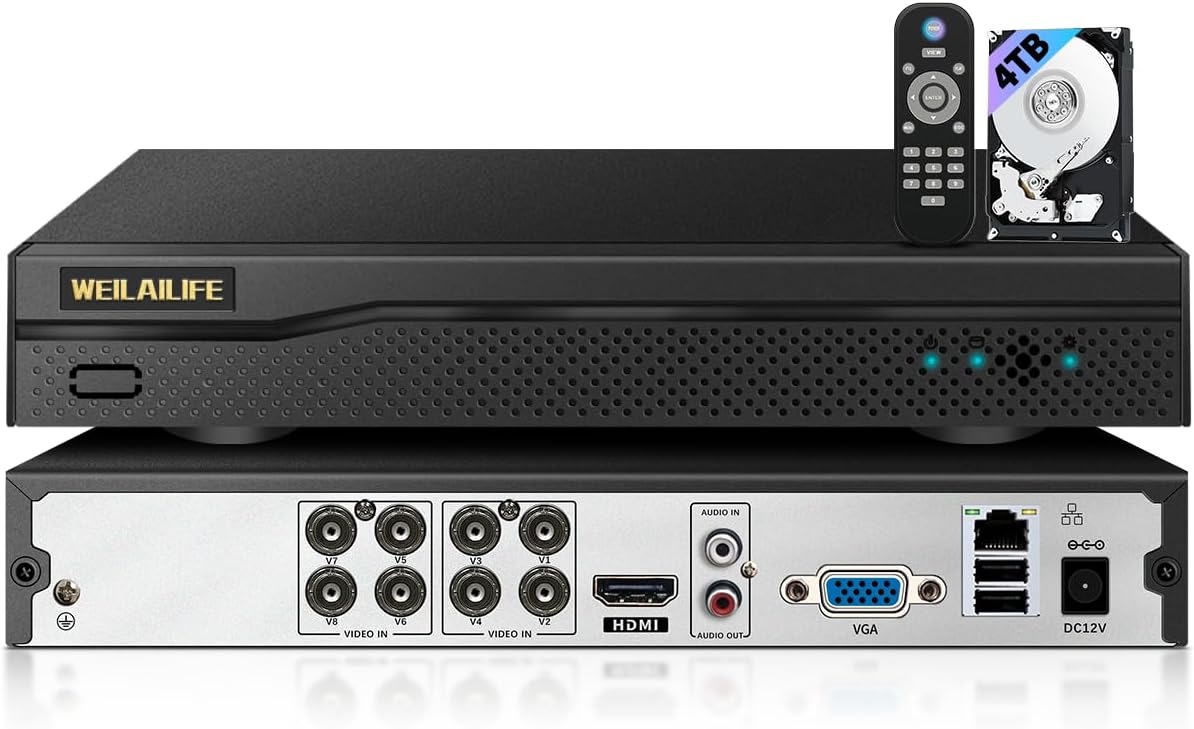
ภาพ: ด้านหน้าและด้านหลัง view of the WEILAILIFE AHD Recorder, illustrating the various connection ports for cameras, display, network, and power, along with the included remote control and 4TB hard drive.
2.3 Remote Monitoring Setup
To access your security system remotely:
- ดาวน์โหลดแอพ: Download the free "Honestview" or "Eseecloud" app from the App Store (iOS) or Play Store (Android) on your smartphone or tablet.
- ติดตั้งแอพ: ปฏิบัติตามคำแนะนำบนหน้าจอเพื่อติดตั้งแอปพลิเคชัน
- เข้าสู่ระบบ/ลงทะเบียน: เปิดแอปและสร้างบัญชีหรือเข้าสู่ระบบหากคุณมีอยู่แล้ว
- เพิ่มอุปกรณ์: Follow the app's instructions to add your DVR device. This typically involves scanning a QR code on the DVR or manually entering its ID.
- View ฟีดสด: เมื่อเชื่อมต่อแล้ว คุณสามารถ view live camera feeds and manage settings from your mobile device.

Image: Illustration of remote monitoring capabilities, showing the security camera feed accessible on various devices including smartphones, tablets, and computers via the dedicated mobile application.
3. คู่มือการใช้งาน
3.1 การบันทึกพื้นฐาน
The DVR is pre-configured to record continuously. The 4TB hard drive provides ample storage, and older footage will be automatically overwritten when the disk is full, ensuring continuous recording.
3.2 การตรวจจับการเคลื่อนไหวและการแจ้งเตือน
The system supports motion detection, which can trigger alerts and recording. You can customize motion detection areas to focus on specific zones and avoid false alarms from irrelevant movements.
- Setting Detection Areas: Access the DVR's menu using the USB mouse. Navigate to the motion detection settings and define the specific areas you wish to monitor. Areas outside the defined zone will be ignored.
- การแจ้งเตือน: When motion is detected, the system can send push notifications to your mobile app and/or email alerts. Ensure your network connection is stable for timely notifications.

Image: A visual representation of the motion detection feature, showing a person being detected by a camera, triggering both an app notification and an email alert.
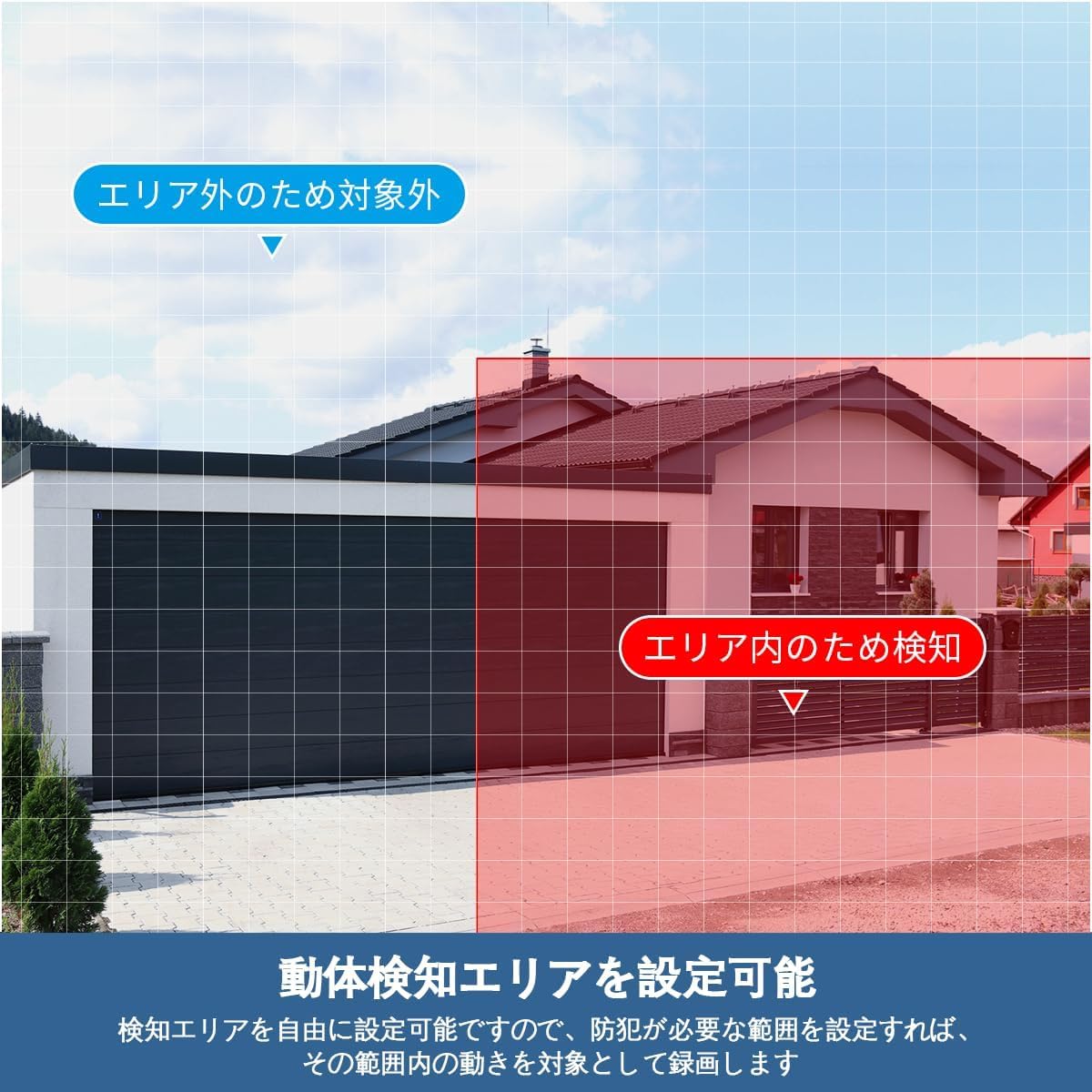
ภาพ: อดีตample of setting a motion detection area, highlighting how users can specify regions for active surveillance while ignoring others.
3.3 Day/Night Vision
The cameras automatically switch between day (color) and night (infrared black and white) modes based on ambient light conditions. This ensures continuous surveillance regardless of the time of day.

Image: A split image demonstrating the automatic day/night switching capability, with one side showing a clear color image during the day and the other showing a clear black-and-white infrared image at night.
3.4 การทำงานของรีโมทคอนโทรล
The included remote control allows for convenient navigation and control of the DVR system when connected to a monitor.

Image: A user operating the DVR system with a remote control, displaying multiple camera feeds on a television screen, demonstrating the ease of control.
4. การบำรุงรักษา
4.1 การจัดการฮาร์ดไดรฟ์
The DVR utilizes H.265 compression technology to maximize storage efficiency on the 4TB hard drive. When the hard drive reaches its capacity, the system automatically overwrites the oldest data to ensure continuous recording without manual intervention.
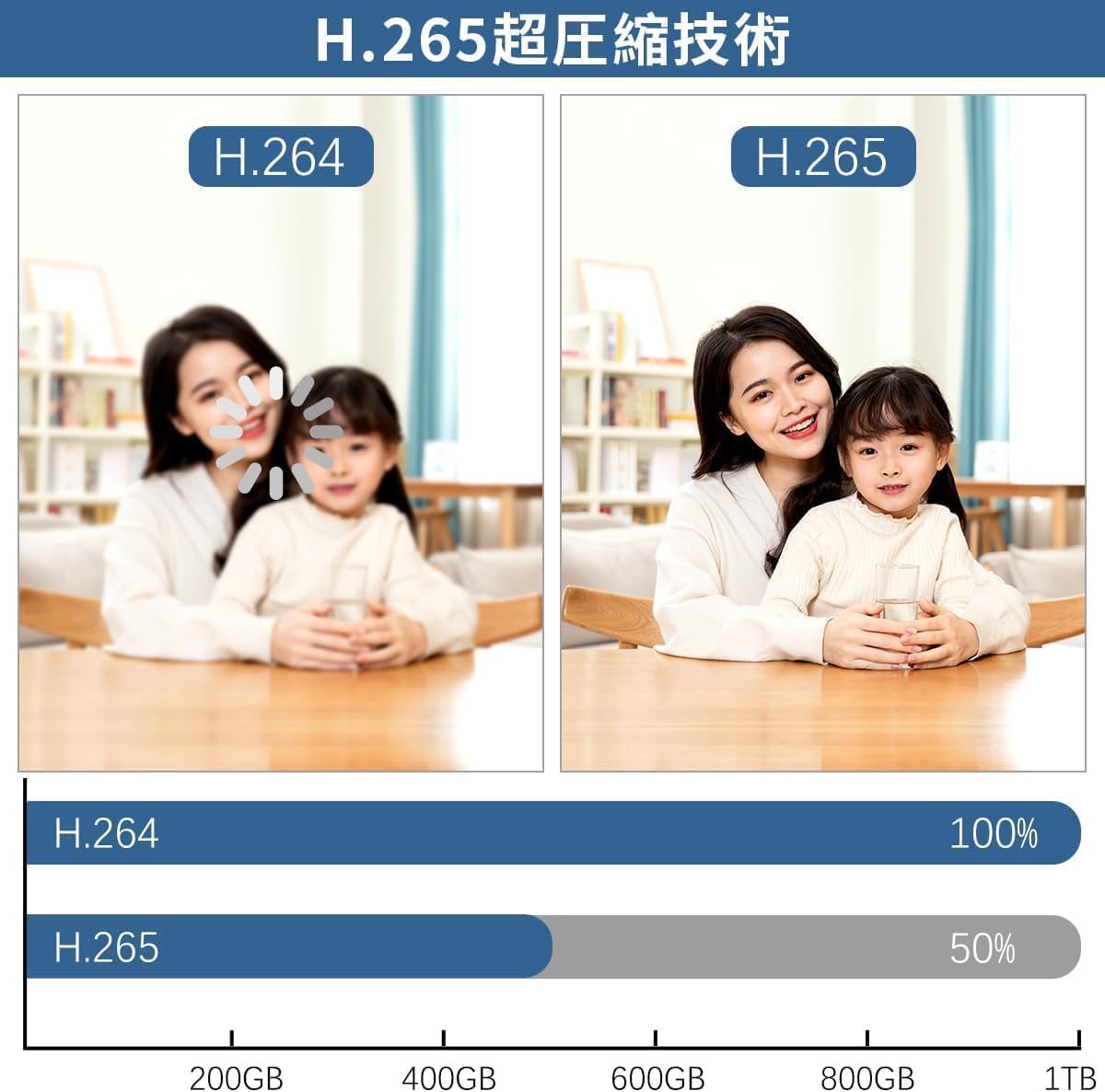
Image: A comparison illustrating the efficiency of H.265 video compression, demonstrating that it requires significantly less storage space (approximately 50% less) than H.264 for equivalent video quality.
4.2 ความต้านทานต่อสภาพอากาศ
The cameras are rated IP67 for dust and water resistance, allowing them to operate reliably in various weather conditions, including rain and snow. Regular cleaning of the camera lenses with a soft, damp cloth is recommended to ensure clear image quality.

Image: The IP67 waterproof and dustproof rating of the camera, depicted functioning effectively under various weather conditions such as rain, snow, and direct sunlight, highlighting its robust design.
5 การแก้ไขปัญหา
If you encounter issues with your WEILAILIFE AHD Recorder, please refer to the following common solutions:
- ไม่มีการแสดงวิดีโอ:
- Ensure the DVR is powered on and the power adapter is securely connected.
- Check HDMI/VGA cable connections between the DVR and the monitor.
- Verify that the monitor input source is correctly selected (e.g., HDMI1, VGA).
- Confirm that cameras are properly connected to the DVR's video input ports.
- ไม่มีการบันทึก:
- Check the hard drive status in the DVR's system settings to ensure it is detected and functioning.
- Verify recording schedules and settings in the DVR menu.
- ปัญหาการเข้าถึงระยะไกล:
- Ensure the DVR is connected to the internet via the LAN cable and your router.
- Check your network connection and router settings.
- Confirm that the "Honestview" or "Eseecloud" app is updated to the latest version.
- Re-add the device in the app if connection issues persist.
- การตรวจจับความเคลื่อนไหวไม่ทำงาน:
- Review motion detection settings in the DVR menu, including sensitivity and detection areas.
- ตรวจสอบให้แน่ใจว่าเลนส์กล้องสะอาดและไม่มีสิ่งกีดขวาง
หากขั้นตอนเหล่านี้ไม่สามารถแก้ไขปัญหาของคุณได้ โปรดติดต่อฝ่ายสนับสนุนลูกค้า
6. ข้อมูลจำเพาะ
| คุณสมบัติ | ข้อมูลจำเพาะ |
|---|---|
| ยี่ห้อ | ไวไลไลฟ์ |
| หมายเลขรุ่น | WEILAI-AHDNVR4TB |
| ความละเอียดวิดีโอ | 5 Megapixels (2592 x 1944) |
| จำนวนช่อง | 8 ช่อง |
| ความจุในการเก็บข้อมูล | 4 TB HDD (Built-in) |
| การบีบอัดวิดีโอ | เอช.265 |
| พอร์ต USB | 2 |
| อุปกรณ์ที่รองรับ | Cameras, Smartphones, Tablets, TVs, Laptops |
| สี | สีดำ |
| ขนาดสินค้า | 26 x 7 x 18 ซม. |
7. การรับประกันและการสนับสนุน
WEILAILIFE is committed to providing high-quality products and excellent customer service. Your WEILAILIFE AHD Recorder comes with a รับประกันคุณภาพ 24 เดือน.
For any inquiries, issues, or support needs during consideration or use, please do not hesitate to contact us. Our dedicated support team is available to assist you.
ข้อมูลติดต่อ:
- การสนับสนุนทางอีเมล์: info-jp@weilailifetech.com (Japanese language support available, 24-hour response time)
- Japan Office Address: Rose Avenue Inage Tendai 1F, Tendai 5-8-9, Inage Ward, Chiba City, Chiba Prefecture, Japan


