1. บทนำ
Thank you for choosing the LOEWE Leo Wireless Headphones. These premium headphones are designed to deliver an exceptional audio experience with advanced features such as Hi-Res Audio, adaptive noise cancellation, and real-time voice translation. This manual provides essential information for setting up, operating, and maintaining your headphones to ensure optimal performance and longevity.
2. เนื้อหาบรรจุภัณฑ์
ก่อนใช้งานโปรดตรวจสอบว่ามีสินค้าครบทั้งหมดในบรรจุภัณฑ์:
- LOEWE Leo Wireless Headphones
- สายชาร์จ USB-C
- AUX to USB-C Audio Cable
- กระเป๋าหนัง
- ซองใส่ยาก
- Cable Pouch
- คู่มือการใช้งาน (เอกสารนี้)
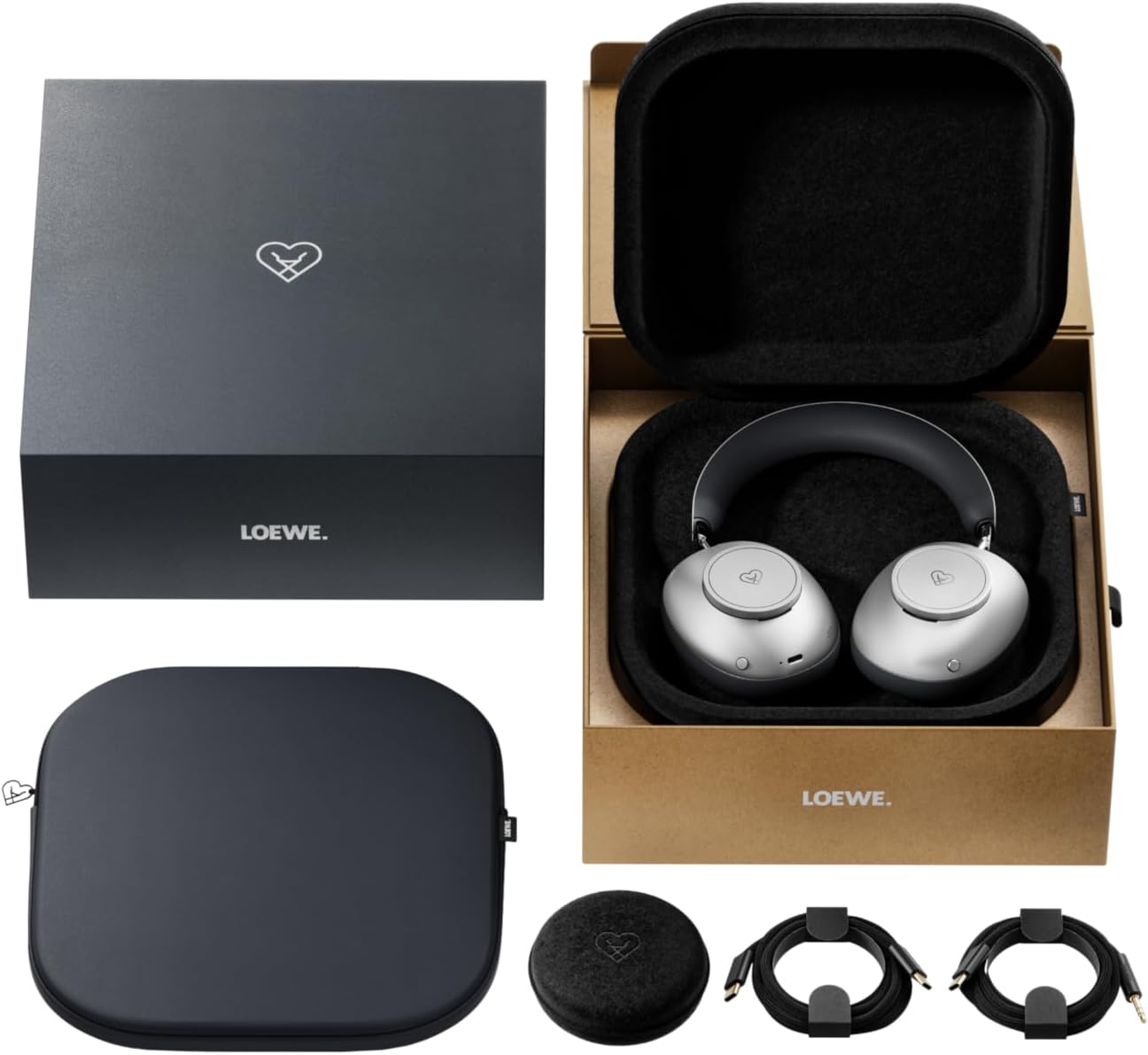
Image: The LOEWE Leo Wireless Headphones package contents, showing the headphones, USB-C cable, AUX cable, leather case, hard case, and cable pouch.
3. สินค้าหมดview
Familiarize yourself with the physical components and controls of your LOEWE Leo headphones.

ภาพ: ด้านหน้า view of the LOEWE Leo Wireless Headphones, showcasing ที่ครอบหูและแถบคาดศีรษะ
3.1. การควบคุมและพอร์ต
The headphones feature intuitive controls for easy operation:
- ปุ่มควบคุม: Two precision-crafted rotary wheels for volume adjustment and navigation.
- ปุ่มการทำงาน: Dedicated buttons for playback control, ANC modes, and voice translation activation.
- พอร์ต USB-C: สำหรับการชาร์จและการเชื่อมต่อเสียงแบบมีสาย
- แจ็คขนาด 3.5 มม.: For traditional wired audio connection.

ภาพ: รายละเอียด view of the earcup, highlighting the control dial, USB-C port, and 3.5mm audio jack.
4. การเริ่มต้น
4.1. การชาร์จหูฟัง
Before first use, fully charge your LOEWE Leo headphones. A full charge provides up to 65 hours of continuous playback.
- เชื่อมต่อสายชาร์จ USB-C ที่ให้มากับพอร์ต USB-C บนหูฟัง
- เชื่อมต่อปลายสายอีกด้านหนึ่งเข้ากับอะแดปเตอร์ไฟ USB ที่ใช้งานร่วมกันได้ (ไม่รวมอยู่ด้วย) หรือพอร์ต USB ของคอมพิวเตอร์
- ไฟ LED บนหูฟังจะแสดงสถานะการชาร์จ โดยปกติจะดับหรือเปลี่ยนสีเมื่อชาร์จเต็มแล้ว
4.2. เปิด/ปิดเครื่อง
- การเปิดเครื่อง: กดปุ่มเปิด/ปิดค้างไว้ประมาณ 3 วินาที จนกว่าไฟแสดงสถานะ LED จะสว่างขึ้น
- วิธีปิดเครื่อง: กดปุ่มเปิด/ปิดค้างไว้ประมาณ 3 วินาที จนกระทั่งไฟแสดงสถานะ LED ดับลง
4.3. การจับคู่บลูทู ธ
The LOEWE Leo headphones utilize Bluetooth Low Energy (BLE) for faster pairing and reduced power consumption.
- ตรวจสอบให้แน่ใจว่าหูฟังปิดอยู่
- Press and hold the Power button for approximately 5 seconds until the LED indicator flashes rapidly, indicating pairing mode.
- บนอุปกรณ์ของคุณ (สมาร์ทโฟน แท็บเล็ต คอมพิวเตอร์) เปิดใช้งาน Bluetooth และค้นหาอุปกรณ์ที่มีอยู่
- Select "LOEWE Leo" from the list of found devices.
- เมื่อเชื่อมต่อแล้ว ไฟ LED จะหยุดกระพริบและยังคงเป็นสีน้ำเงินค้าง
4.4. การเชื่อมต่อแบบมีสาย
For a wired audio experience, use the supplied AUX to USB-C cable.
- Connect the USB-C end of the AUX cable to the headphones.
- Connect the 3.5mm end of the AUX cable to your audio source's 3.5mm jack.
- หูฟังจะเปลี่ยนเป็นโหมดสายโดยอัตโนมัติ
5. การใช้งานหูฟังของคุณ
5.1. การเล่นเสียงและการควบคุมระดับเสียง
Use the control dials and action buttons for managing your audio:
- เพิ่ม/ลดระดับเสียง: Rotate the designated control dial.
- เล่น/หยุดชั่วคราว: Press the central action button once.
- เพลงถัดไป: Double-press the central action button.
- แทร็กก่อนหน้า: Triple-press the central action button.

Image: Close-up of the earcup's control dial, used for volume and navigation.
5.2. Adaptive Noise Cancellation (ANC)
The LOEWE Leo features advanced adaptive noise cancellation that continuously analyzes your environment and adjusts in real-time.
- เปิดใช้งาน/ปิดใช้งาน ANC: Press the dedicated ANC button once.
- โหมดความโปร่งใส: Press the ANC button twice to allow ambient sounds to pass through, enhancing situational awareness.

Image: Illustration of the adaptive noise cancellation feature, depicting sound wave management.
5.3. Real-time Voice Translation
Communicate across language barriers with the integrated real-time voice translation feature.
- Ensure your headphones are connected to a device with internet access and the LOEWE companion app installed.
- Activate the translation feature via the dedicated button or the companion app.
- Speak into the headphone's microphone. The translated audio will be played back in real-time.

Image: Earcup detail showing the microphone for voice input and the 'leo' icon, representing the real-time translation function.
5.4. Dolby Atmos and Spatial Audio
Experience immersive sound with Dolby Atmos and spatial audio support. This feature is automatically enabled when compatible content is played through a connected device that supports these audio technologies.
6. การบำรุงรักษาและการดูแล
6.1. การทำความสะอาด
- เช็ดหูฟังด้วยผ้าแห้งนุ่มและไม่ขุย
- ห้ามใช้สารทำความสะอาดที่มีฤทธิ์กัดกร่อน แอลกอฮอล์ หรือตัวทำละลายเคมี
- Keep moisture away from openings.
6.2. การดูแลแบตเตอรี่
- หลีกเลี่ยงการปล่อยแบตเตอรี่จนหมดบ่อยครั้ง
- Store the headphones in a cool, dry place when not in use for extended periods.
- The battery is user-replaceable, contributing to the product's longevity.
6.3. Modular Design
The LOEWE Leo headphones feature a durable modular design with replaceable components, such as ear cushions and headbands. This design allows for easy replacement of worn parts, extending the product's lifespan.

Image: The modular construction of the LOEWE Leo headphones, showing detachable earcups and headband for maintenance or replacement.
7 การแก้ไขปัญหา
If you encounter issues with your LOEWE Leo headphones, refer to the following common solutions:
- ไม่มีไฟฟ้า: ตรวจสอบให้แน่ใจว่าหูฟังชาร์จเต็มแล้ว เสียบหูฟังเข้ากับแหล่งจ่ายไฟโดยใช้สาย USB-C
- ไม่มีเสียง:
- ตรวจสอบระดับเสียงทั้งบนหูฟังและอุปกรณ์ที่เชื่อมต่อของคุณ
- Ensure the headphones are properly paired via Bluetooth or the AUX cable is securely connected.
- ลองรีสตาร์ททั้งหูฟังและอุปกรณ์ต้นทางเสียงดู
- การตัดการเชื่อมต่อบลูทูธ:
- ตรวจสอบให้แน่ใจว่าหูฟังอยู่ในระยะการเชื่อมต่อบลูทูธของอุปกรณ์ของคุณ (โดยทั่วไปคือ 10 เมตร)
- Disable and re-enable Bluetooth on your device, then attempt to re-pair.
- Clear the LOEWE Leo from your device's Bluetooth history and pair again.
- ANC ไม่ทำงานอย่างมีประสิทธิภาพ:
- ตรวจสอบให้แน่ใจว่าที่ครอบหูแนบสนิทกับหูของคุณ ปรับให้กระชับหากจำเป็น
- Verify that ANC is activated.
- Voice Translation Issues:
- Check your device's internet connection.
- Ensure the LOEWE companion app is up-to-date and configured correctly.
- พูดอย่างชัดเจนและด้วยจังหวะที่พอเหมาะ
If problems persist, please contact LOEWE customer support.
8. ข้อมูลจำเพาะ
| คุณสมบัติ | คำอธิบาย |
|---|---|
| ชื่อรุ่น | สิงห์ |
| หมายเลขรุ่น | 64641J10 |
| เทคโนโลยีการเชื่อมต่อ | Wireless (Bluetooth), Wired |
| การสื่อสารแบบไร้สาย | บลูทู ธ พลังงานต่ำ (BLE) |
| คุณสมบัติเสียง | Hi-Res Audio, Dolby Atmos, Spatial Audio |
| ระบบตัดเสียงรบกวน | Adaptive Noise Reduction (ANC) |
| คุณสมบัติพิเศษ | Real-time Voice Translation, Modular Design with Replaceable Components |
| อายุการใช้งานแบตเตอรี่ | สูงสุด 65 ชั่วโมง (โดยประมาณ) |
| ประเภทการควบคุม | Button Control, Rotary Dials |
| อุปกรณ์ที่รองรับ | Cellular Phone, Tablet, Computer, Laptop |
| น้ำหนัก | 3 Kilograms (product weight as listed, may include packaging) |
9. การรับประกันและการสนับสนุน
9.1. การรับประกันของผู้ผลิต
The LOEWE Leo Wireless Headphones come with a การรับประกันจากผู้ผลิต 2 ปีการรับประกันนี้ครอบคลุมข้อบกพร่องด้านวัสดุและฝีมือการผลิตภายใต้การใช้งานปกติ โปรดเก็บหลักฐานการซื้อไว้เพื่อขอรับสิทธิ์การรับประกัน
For specific terms and conditions of the warranty, please refer to the warranty card included in your product packaging or visit the official LOEWE webเว็บไซต์.
9.2. การสนับสนุนลูกค้า
For technical assistance, troubleshooting, or warranty inquiries, please contact LOEWE customer support through their official webไซต์หรือข้อมูลการติดต่อที่ระบุไว้ในเอกสารผลิตภัณฑ์ของคุณ
แหล่งข้อมูลออนไลน์: Visit the official LOEWE website for FAQs, software updates, and additional support resources.


