1. สินค้าหมดview
The PROSTER Pinless Moisture Meter PST272 is a non-destructive device designed for accurately measuring moisture content in various materials without causing damage. It utilizes advanced high-frequency electromagnetic wave technology to scan up to 20mm deep, providing an average reading across a 40x40mm area. This meter is ideal for inspecting finished drywall, hardwood floors, and other delicate surfaces.

Image 1: PROSTER Pinless Moisture Meter PST272, showing the device, carrying case, and AAA batteries.
คุณสมบัติหลัก:
- Non-Destructive Deep Sensing: Scans up to 20mm deep across a 40x40mm area using high-frequency electromagnetic waves, ensuring no damage to surfaces.
- 4-Material Smart Mode: Provides precise measurements for Drywall, Mortar, Hardwood, and Softwood.
- สัญญาณเตือนคู่: Features a customizable audio alarm that activates when moisture levels exceed a set threshold, complemented by a 3-color bar graph (Green: Dry, Yellow: Risk, Red: Wet) on the display.
- การจัดการข้อมูล: Includes HOLD function to lock readings and MAX/MIN record to track extreme moisture levels.
- Environmental Tracking: Measures ambient temperature and humidity for a comprehensive diagnostic picture.
- การออกแบบที่เป็นมิตรต่อผู้ใช้: Ergonomic grip with soft rubber for secure handling, auto-calibration in 3 seconds, and auto-off after 10 minutes of inactivity.
2. เนื้อหาบรรจุภัณฑ์
The following items are included with your PROSTER Pinless Moisture Meter PST272:
- 1x PROSTER Pinless Moisture Meter PST272
- กระเป๋าเก็บของ 1x
- แบตเตอรี่ AAA 3 ก้อน
- 1x คู่มือผู้ใช้

Image 2: All items included in the PROSTER Pinless Moisture Meter PST272 package.
3. การตั้งค่า
3.1. การติดตั้งแบตเตอรี่
- ค้นหาช่องใส่แบตเตอรี่ที่ด้านหลังของอุปกรณ์
- เปิดฝาครอบแบตเตอรี่
- ใส่แบตเตอรี่ AAA จำนวน 3 ก้อน โดยตรวจสอบให้แน่ใจว่าขั้วถูกต้อง (+/-)
- ปิดฝาครอบแบตเตอรี่ให้แน่น
3.2. Initial Power On & Calibration
After installing the batteries, press the power button (U) to turn on the device. The meter will automatically calibrate within 3 seconds. Ensure the sensor area is not in contact with any material during calibration for accurate results.
Video 1: Demonstration of the LASELION MS04 Pinless Moisture Meter, showing unboxing, power-on, calibration, and measurement on various surfaces like wash basins, wall corners, and wooden flooring. It also highlights the temperature display and alarm value setting.
4. คู่มือการใช้งาน
4.1. เปิด/ปิดเครื่อง
- กดปุ่มเพาเวอร์ (U) briefly to turn the meter on.
- กดปุ่มเปิด/ปิดค้างไว้ (U) for approximately 2 seconds to turn the meter off.
- The meter features an auto-off function after 10 minutes of inactivity to conserve battery life.
4.2. การเลือกโหมด
The PST272 offers four dedicated measurement modes for different materials. Press the 'SEL' button to cycle through the modes:
- โหมด Drywall: For measuring moisture in drywall.
- Mortar Mode: For measuring moisture in mortar and masonry.
- โหมดไม้เนื้อแข็ง: For measuring moisture in hardwood materials.
- Softwood Mode: For measuring moisture in softwood materials.
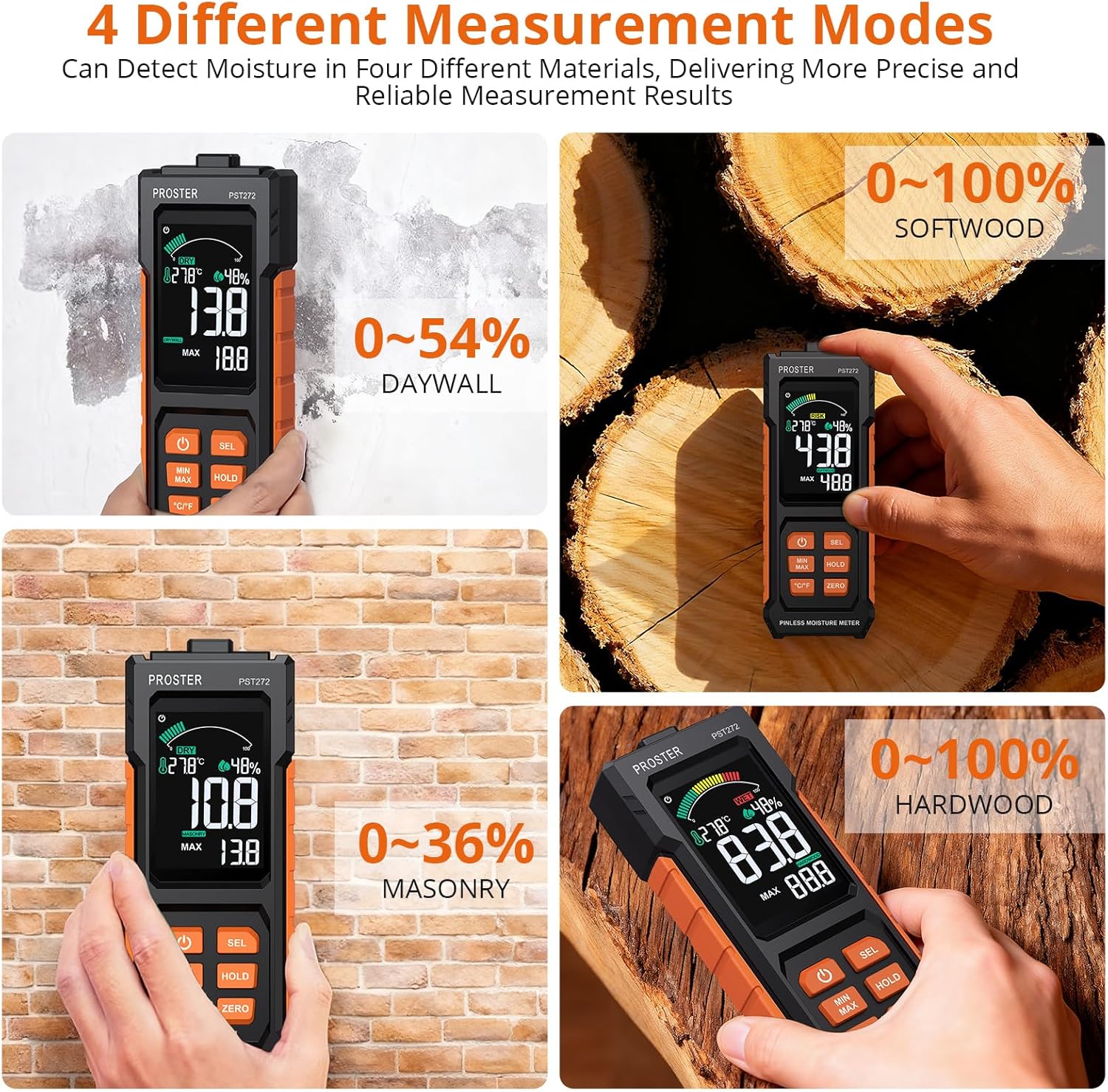
Image 3: The meter's display showing the four distinct measurement modes: Softwood, Drywall, Masonry, and Hardwood.
4.3. Measurement Technique
To obtain accurate readings, hold the instrument by its base and place the sensor area (located on the back of the device) flat against the surface of the material you wish to measure. Ensure the object's thickness is greater than 20mm and the area is greater than 40mm x 40mm for optimal results. Avoid placing fingers on the sensor area during measurement.
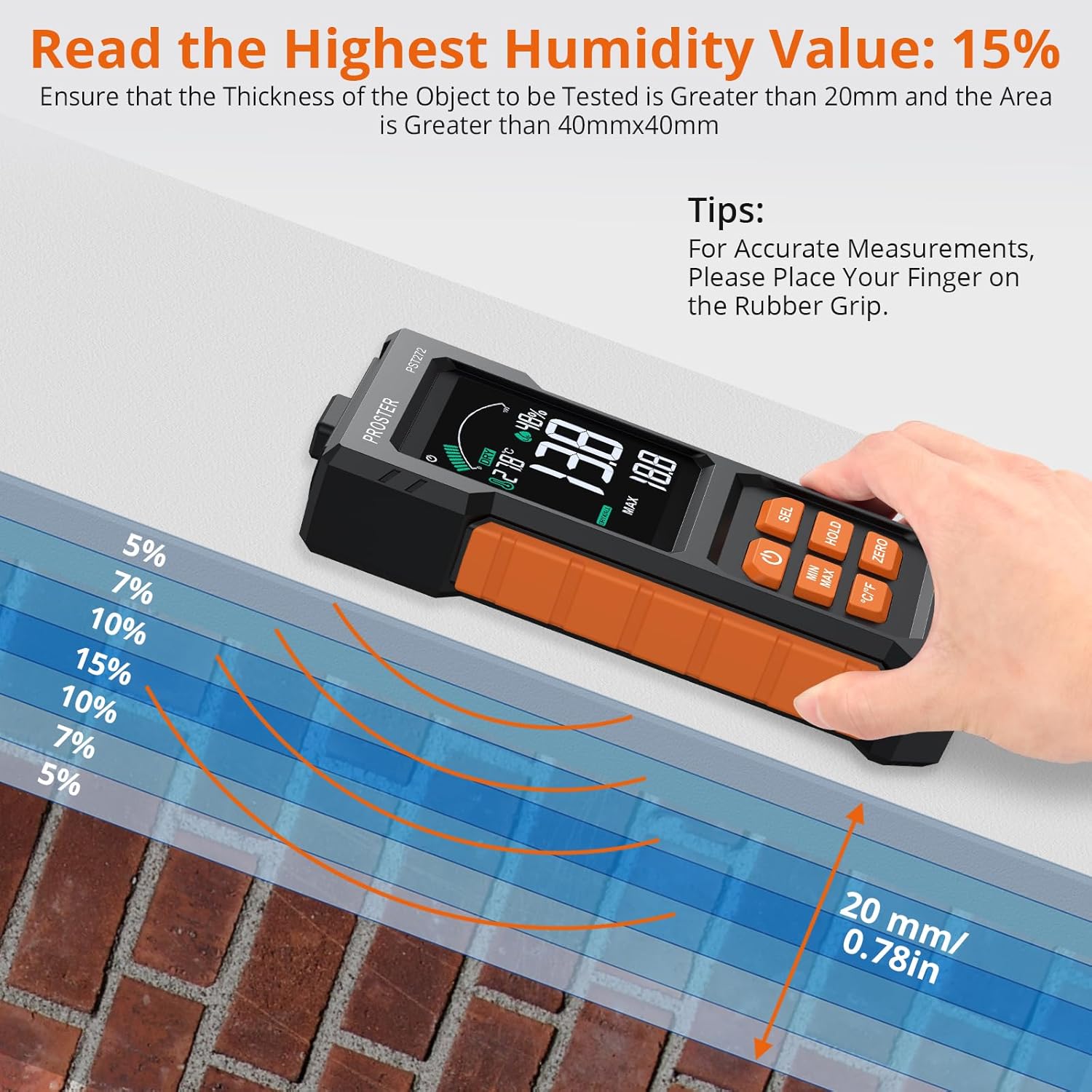
Image 4: The meter demonstrating its 20mm depth sensing capability on a wall, indicating optimal measurement conditions.
4.4. Reading the Display & Alarms
The large 2.7-inch anti-glare color LCD displays the moisture content as a digital readout and a 3-color bar graph:
- สีเขียว: Indicates a dry moisture level.
- เหลือง: Indicates a risk level, suggesting moderate moisture.
- สีแดง: Indicates a wet level, signifying high moisture content.
A customizable audio alarm will sound when the moisture level surpasses your preset threshold for the selected material mode.
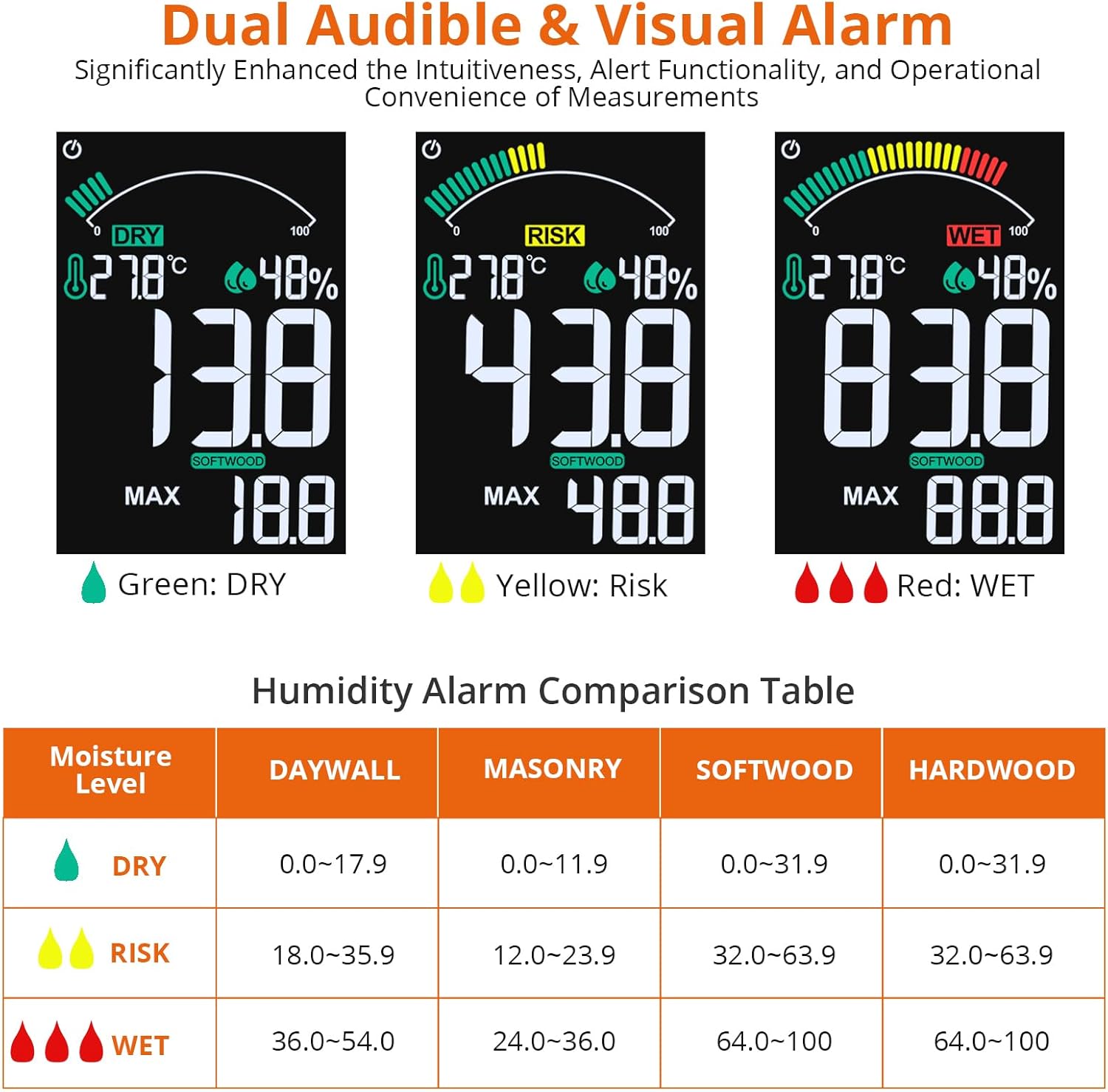
Image 5: The meter's display illustrating the three moisture level indicators (Dry, Risk, Wet) and their corresponding percentage ranges for different materials.
Video 2: A short demonstration of a pinless moisture meter (MT28C) in wall and wood modes, highlighting its non-destructive measurement capabilities and quick response.
4.5. Data Hold & MAX/MIN Functions
- Press the 'HOLD' button to freeze the current reading on the screen. Press it again to release.
- Use the 'MAX/MIN' function to record the highest and lowest moisture levels detected during a measurement session. This is useful for mapping the extent of a leak or monitoring drying progress over time.
4.6. การแสดงอุณหภูมิและความชื้น
The meter also displays ambient temperature (in °C or °F) and relative humidity, providing additional environmental context for your measurements. Press the '°C/°F' button to switch between Celsius and Fahrenheit.
5. การบำรุงรักษา
- รักษาอุปกรณ์ให้สะอาดและแห้ง ใช้ซอฟท์damp ใช้ผ้าเช็ดทำความสะอาดภายนอก ห้ามใช้น้ำยาทำความสะอาดที่มีฤทธิ์กัดกร่อนหรือตัวทำละลาย
- Store the meter in its storage bag in a cool, dry place when not in use.
- ถอดแบตเตอรี่ออกหากจะไม่ได้ใช้งานอุปกรณ์เป็นเวลานานเพื่อป้องกันการรั่วไหล
6 การแก้ไขปัญหา
- ไม่มีจอแสดงผล/เปิดเครื่อง: ตรวจสอบว่าติดตั้งแบตเตอรี่อย่างถูกต้องและมีประจุเพียงพอ เปลี่ยนแบตเตอรี่หากจำเป็น
- การอ่านค่าที่ไม่ถูกต้อง: Ensure the sensor is placed flat against the material and that the correct material mode is selected. Avoid interference from nearby metal objects (steel bars, wires) or thin materials, as these can affect readings. Re-calibrate the device by holding it in the air and pressing the power button.
- สัญญาณเตือนไม่ส่งเสียง: Verify that the alarm threshold is set appropriately for the material being measured.
7. ข้อมูลจำเพาะ
| คุณสมบัติ | ข้อมูลจำเพาะ |
|---|---|
| หมายเลขรุ่น | พีเอสที272 |
| หลักการวัด | High-frequency electromagnetic wave induction |
| Sensing Depth | สูงถึง 20มม. |
| พื้นที่วัด | 40มม. x 40มม. |
| โหมดวัสดุ | Drywall, Mortar, Hardwood, Softwood |
| Drywall Measurement Range | 0% - 54% |
| Mortar Measurement Range | 0% - 36% |
| Hardwood Measurement Range | 0% - 100% |
| Softwood Measurement Range | 0% - 100% |
| แสดง | 2.7-inch VA Color LCD with 3-color bar graph |
| แหล่งพลังงาน | แบตเตอรี่ AAA 3 ก้อน (รวมอยู่ด้วย) |
| Auto-Off | ไม่มีการใช้งาน 10 นาที |
| น้ำหนักสินค้า | 169 กรัม |
| ผู้ผลิต | พรอสเตอร์ เทรดดิ้ง จำกัด |
8. การรับประกันและการสนับสนุน
PROSTER offers a 2-year warranty for this product. For any product problems or concerns, please contact customer support. We are committed to providing the best solution within 24 hours.


