1. บทนำ
Welcome to the JideTech P2 200X Hybrid Zoom 4K 8MP Outdoor PTZ IP PoE Security Camera user manual. This document provides detailed instructions for the installation, operation, and maintenance of your new security camera. Please read this manual thoroughly before using the product to ensure proper setup and optimal performance. Keep this manual for future reference.
2. สินค้าหมดview
2.1. เนื้อหาบรรจุภัณฑ์
ตรวจสอบว่ารายการทั้งหมดที่ระบุไว้ด้านล่างนี้รวมอยู่ในแพ็คเกจของคุณ:
- 1x JideTech P2 8MP PTZ PoE Camera Outdoor
- 1x ชุดสกรู
- 1x คู่มือการใช้งาน
- 1x RJ45 Network Cable
- อะแดปเตอร์ไฟฟ้า 1x 12V 3A

Image: Contents included in the JideTech P2 camera package.
2.2. คุณสมบัติหลัก
The JideTech P2 camera offers a range of advanced features:
- 200X Hybrid Zoom & 20FPS Ultra 4K HD: Combines 20x optical zoom and 10x digital zoom for detailed 3840x2160 (8MP) video at 20 frames per second.
- Auto Tracking & Smart Human/Vehicle Detection: Automatically tracks detected subjects and identifies human/vehicle shapes to reduce false alarms.
- 492ft Infrared Night Vision & Pan 360° Tilt 90°: Provides clear night vision up to 492 feet with full 360-degree horizontal and 90-degree vertical rotation.
- Super Compatibility & Power over Ethernet (PoE): Compatible with most NVRs, supports RTSP, RTMP, Onvif 2.4, Blue Iris, iSpy, and Security Spy. PoE allows single-cable power and data.
- IP66 Waterproof & Two-Way Talk: Durable IP66 weatherproof design with built-in microphone and speaker for two-way audio communication.
2.3. การระบุส่วนประกอบ
ทำความคุ้นเคยกับส่วนประกอบของกล้อง:

Image: Diagram identifying key components of the JideTech P2 camera, including the lens, IR LEDs, speaker, reset button, network cable interface, power interface, and SD card slot.
3. การตั้งค่าและการติดตั้ง
3.1. การติดตั้งกล้อง
The JideTech P2 camera is designed for wall mounting. Select a suitable location that provides the desired field of view and is within reach of power and network connections. Use the provided screw pack for secure installation.
3.2. วิธีการเชื่อมต่อ
Your camera supports three primary connection methods:
- Connect via NVR PoE: Connect the camera's PoE port directly to a PoE-enabled Network Video Recorder (NVR) using an Ethernet cable. This provides both power and data.
- Connect by DC12V Power Supply: Connect the camera to the provided 12V 3A power adapter for power. Then, connect the camera's LAN port to your router using an Ethernet cable for data.
- Connect via PoE Injector or PoE Switch: Connect the camera's PoE port to a PoE injector or a PoE switch using an Ethernet cable. The injector/switch will provide power and data, and then connect to your router.

Image: Diagram illustrating various network IP camera connection methods, including direct connection to a PoE switch, a PoE NVR, or a router with a separate power adapter.
Video: This video demonstrates three different ways to connect your PoE IP camera to your network, including NVR PoE, DC12V power supply, and PoE injector/switch connections.
3.3. Waterproof Kit Installation
For outdoor installations, it is essential to properly install the waterproof kit on the network cable connection to prevent water ingress and ensure long-term reliability.

Image: Step-by-step guide for installing the waterproof kit on the network cable, ensuring a secure and weather-resistant connection.
4. การดำเนินการ
4.1. Initial Access and Software
To access and manage your JideTech P2 camera, you can use the dedicated mobile application or compatible PC software.
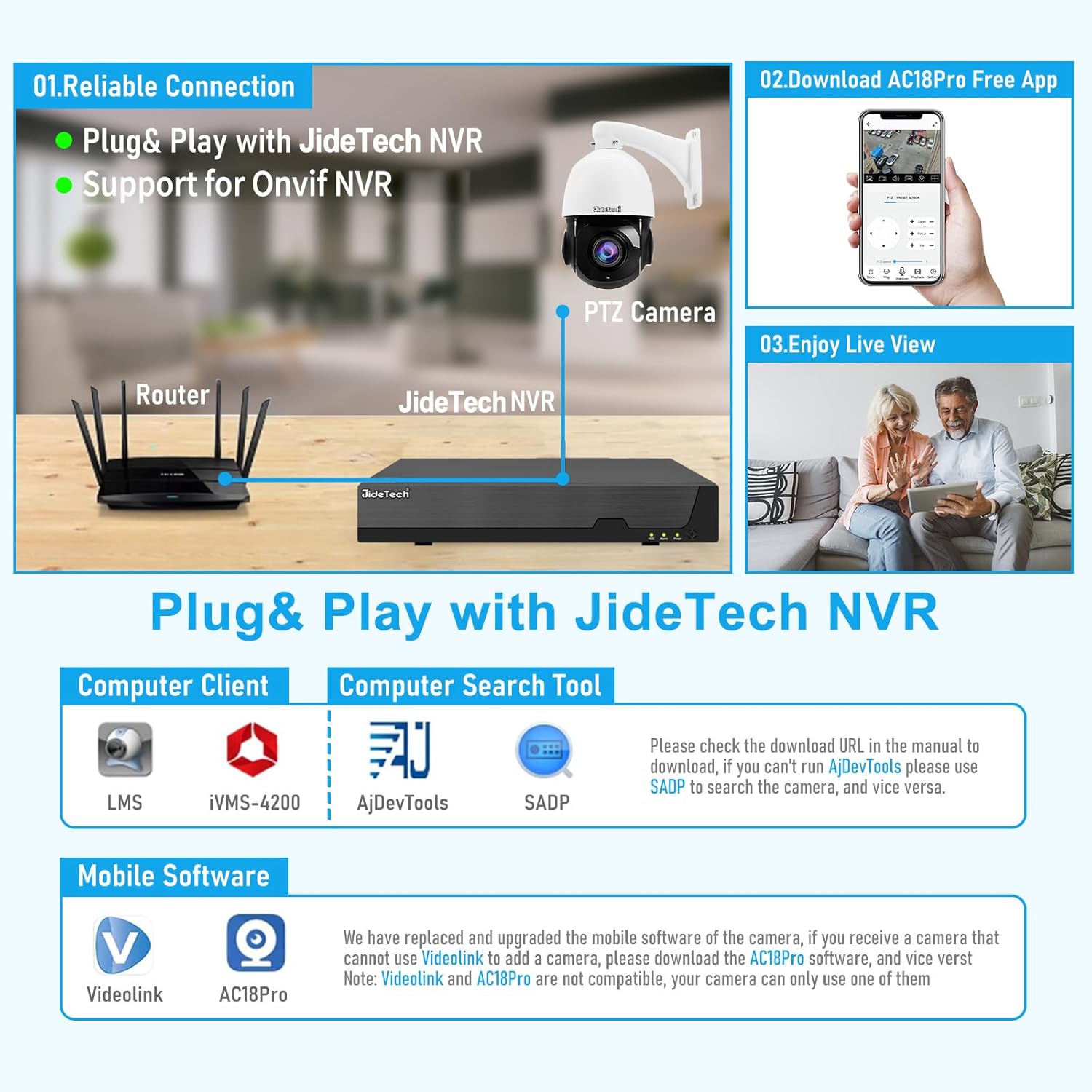
ภาพ: เหนือview of connecting the camera with a JideTech NVR and accessing live view via the AC18Pro mobile app.

Image: Information on multi-user remote access, allowing control and viewing from various devices like smartphones, tablets, and PCs.
4.2. การควบคุมการแพน การเอียง และการซูม (PTZ)
The JideTech P2 camera offers extensive PTZ capabilities for comprehensive coverage:
- แพน: 360-degree horizontal rotation.
- เอียง: 90-degree vertical rotation.
- ซูม: 200X hybrid zoom (20x optical, 10x digital) for detailed viewของวัตถุที่อยู่ห่างไกล
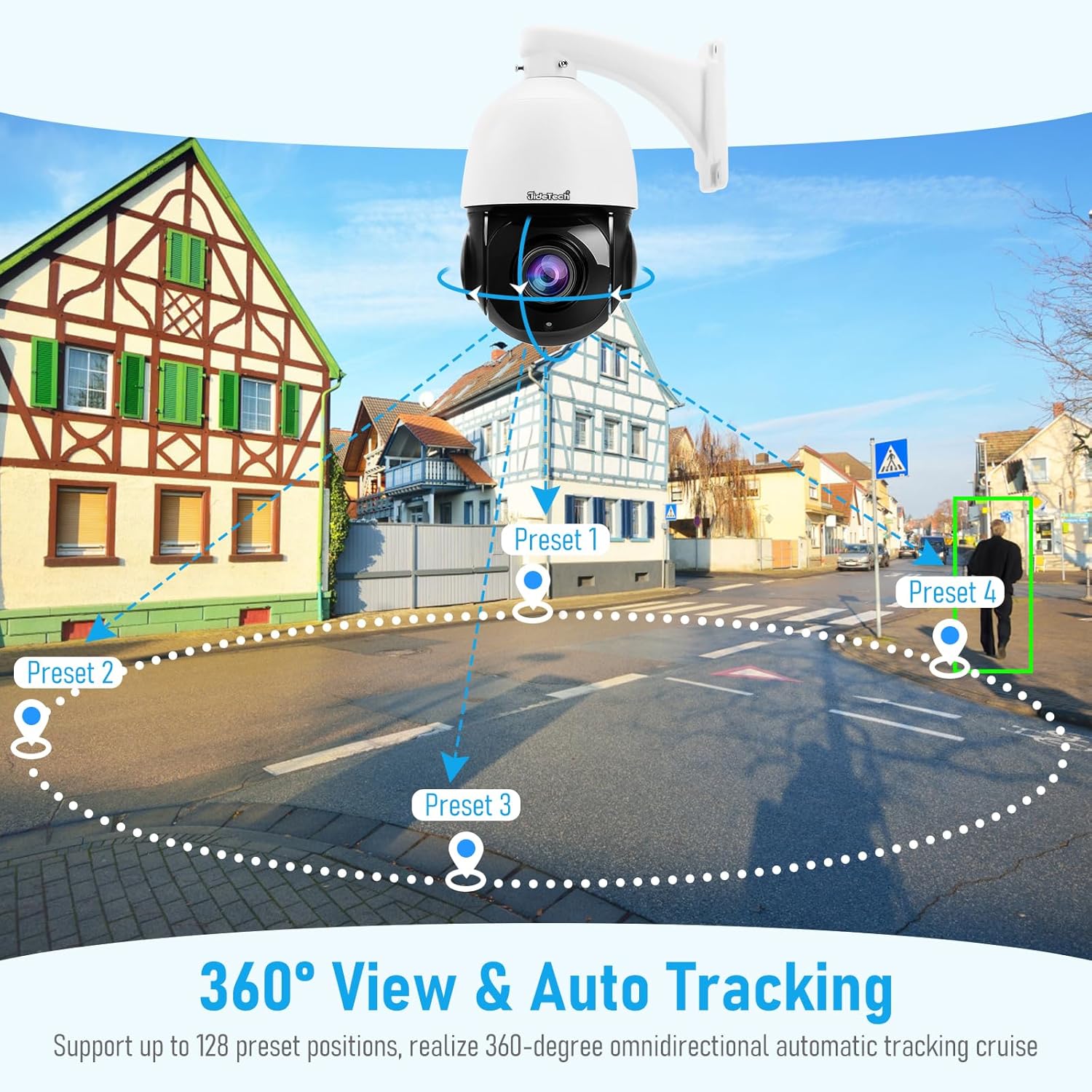
Image: Illustration of the camera's 360-degree view and auto-tracking capabilities, including preset positions for regional cruise detection.

Image: Demonstration of the camera's 200X hybrid zoom capability, showing increasing detail from 4MP to 8MP resolution.
Video: This video showcases the JideTech 4K 8MP 200x hybrid zoom PTZ camera's powerful zoom functionality in an outdoor setting.
4.3. คุณสมบัติการตรวจจับอัจฉริยะ
The camera incorporates intelligent detection to enhance security and minimize false alerts:
- การตรวจจับมนุษย์/ยานพาหนะ: Advanced algorithms differentiate between human and vehicle shapes from other moving objects, triggering more accurate alerts.
- ติดตามอัตโนมัติ: When a human or vehicle is detected entering the monitoring area, the camera will automatically track its movement until it leaves the area.
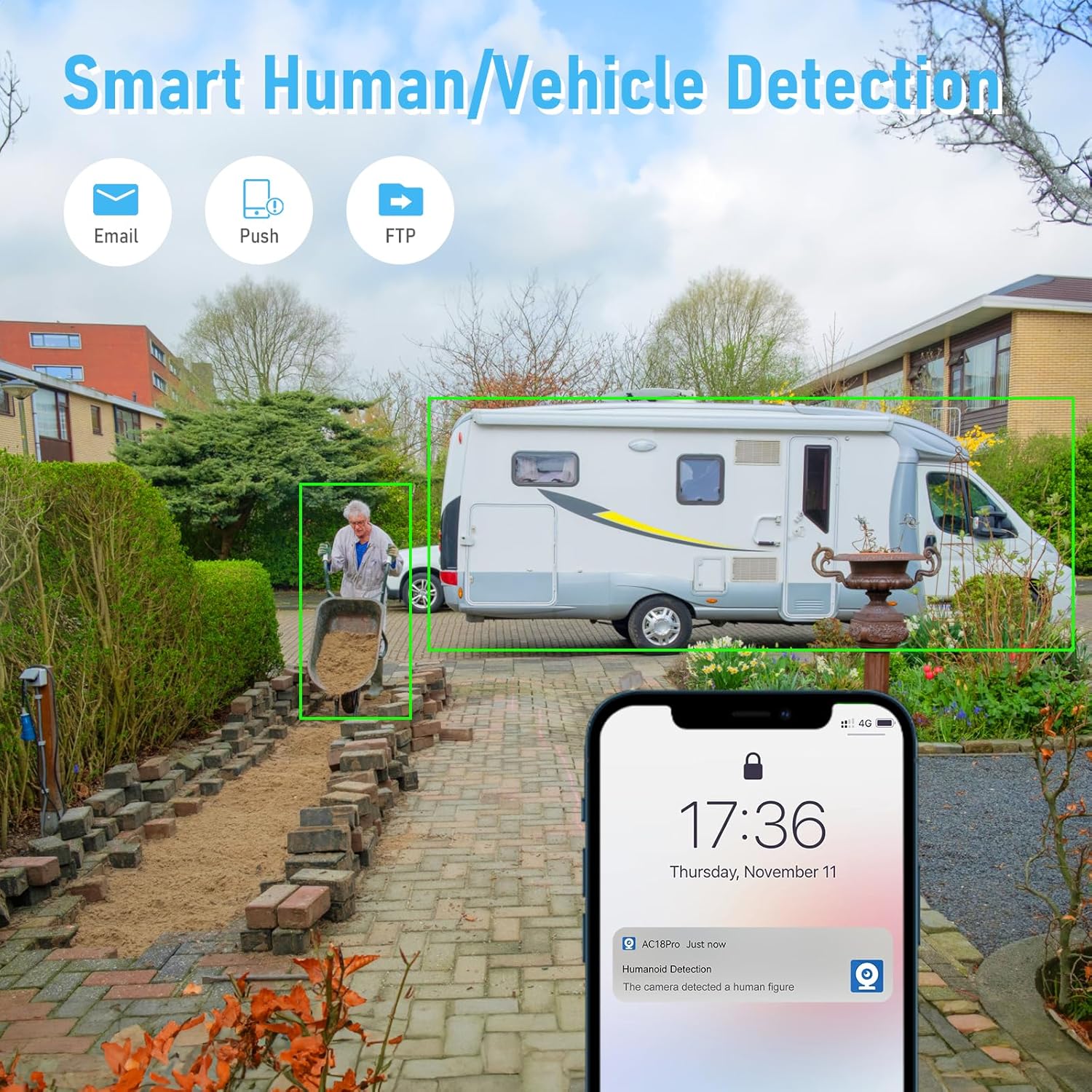
Image: Visual representation of smart human and vehicle detection, showing how the camera identifies and frames targets within the surveillance area.
Video: This video demonstrates the JideTech 200X Hybrid Zoom PoE PTZ Security Camera's human/vehicle detection and auto-tracking features, including night vision zoom.

Image: Diagram illustrating intelligent cruise control with up to 128 preset positions and 4 cruise lines for 360-degree omnidirectional automatic tracking.
4.4. การมองเห็นในเวลากลางคืน
The camera is equipped with 6 infrared lights, providing clear night vision up to 492 feet, ensuring surveillance even in complete darkness.

Image: Comparison demonstrating the superior night vision quality achieved with the 4K 8MP Full HD SO-NY 415 Chip, showing clearer images with less noise.
4.5. การพูดสองทาง
The integrated microphone and speaker enable real-time two-way audio communication, allowing you to listen and speak through the camera.

Image: Depiction of the real-time dialogue feature, showing a user communicating through the camera via a mobile app.
4.6. การบันทึกและจัดเก็บวิดีโอ
The camera supports local storage via a Micro SD card (up to 256GB) and utilizes advanced video compression for efficient storage.

Image: Comparison of H.265+ and H.264+ video encoding, highlighting how H.265+ reduces file size without compromising quality, saving storage space.

Image: Feature demonstrating the ability to quickly review 24 hours of recorded footage in minutes, capturing dynamic processes with 4K resolution and 200X Hybrid Zoom.
5. การบำรุงรักษา
Regular maintenance helps ensure the optimal performance and longevity of your JideTech P2 camera.
- การทำความสะอาด: ค่อยๆ เช็ดเลนส์และตัวกล้องด้วยผ้าเนื้อนุ่มและแห้งamp cloth. Avoid using abrasive cleaners or solvents that could damage the surface or lens coating.
- อัพเดตเฟิร์มแวร์: Periodically check the JideTech official website or the mobile application for available firmware updates. Keeping your camera's firmware up-to-date ensures access to the latest features, security enhancements, and bug fixes.
- การปกป้องสิ่งแวดล้อม: Ensure that all cable connections, especially those exposed to the elements, are properly sealed using the waterproof kit. Regularly inspect the camera's mounting for stability and signs of wear.
6 การแก้ไขปัญหา
If you encounter issues with your JideTech P2 camera, refer to the common problems and solutions below:
6.1. ปัญหาทั่วไปและวิธีแก้ไข
- ไม่มีไฟฟ้า:
- Verify that the power adapter is securely connected to the camera and a functional power outlet.
- If using PoE, ensure your NVR or PoE switch is powered on and the Ethernet cable is correctly connected to a PoE port.
- ไม่มีภาพวิดีโอ:
- Check all Ethernet cable connections between the camera, router, NVR, or PoE switch.
- Ensure the camera has obtained a valid IP address. If configured manually, verify the settings.
- Restart the camera and the connected network device (router/NVR).
- คุณภาพของภาพต่ำ:
- Clean the camera lens with a soft cloth to remove dust or smudges.
- Ensure adequate lighting in the surveillance area, especially for optimal night vision performance.
- Adjust image settings such as brightness, contrast, and Digital Wide Dynamic Range (WDR) in the camera's software.
- สัญญาณเตือนที่ผิดพลาด:
- Adjust the sensitivity levels for human/vehicle detection in the camera's settings.
- Define specific detection zones to exclude areas with frequent non-threatening movements (e.g., swaying trees).
- ระบบติดตามอัตโนมัติทำงานผิดปกติ:
- ตรวจสอบให้แน่ใจว่าเฟิร์มแวร์ของกล้องเป็นเวอร์ชันล่าสุด
- Check for any physical obstructions that might impede the camera's movement or field of view.
- Verify that the auto-tracking feature is enabled in the camera settings.

Image: Explanation of Digital Wide Dynamic Range (WDR) technology, showing how it improves image clarity by retaining details in both dark and bright areas.
7. ข้อมูลจำเพาะ
| คุณสมบัติ | รายละเอียด |
|---|---|
| ชื่อรุ่น | P2 |
| การใช้งานภายใน/ภายนอกอาคาร | ในร่ม, กลางแจ้ง |
| ความละเอียดในการจับภาพวิดีโอ | 3840x2160 (8 ล้านพิกเซล) |
| อัตราเฟรม | 20 เฟรมต่อวินาที |
| ซูมออปติคอล | 20 เท่า |
| ประเภทการซูม | Hybrid Zoom (200X) |
| ช่วงการมองเห็นตอนกลางคืน | 492 ฟุต |
| Viewอิงแองเกิล | 360 องศา (แพน), 90 องศา (เอียง) |
| เทคโนโลยีการเชื่อมต่อ | PoE, Wired |
| โปรโตคอลการเชื่อมต่อ | Ethernet, RTSP, RTMP, Onvif 2.4 |
| คุณสมบัติพิเศษ | 2-Way Audio, HD Resolution, Local Recording, Night Vision, PTZ Technology, Human/Vehicle Detection, Auto Tracking |
| การให้คะแนนการคุ้มครองระหว่างประเทศ | IP66 (กันน้ำ) |
| ขนาดหน่วยความจำแฟลชที่รองรับสูงสุด | ความจุ 256 GB (Micro SD) |
| วัสดุ | อลูมิเนียม |
| น้ำหนักสินค้า | 4.18 ปอนด์ |
| ขนาดสินค้า | 9.25 x 7.48 x 5.7 นิ้ว |
8. การรับประกันและการสนับสนุน
JideTech is committed to providing high-quality products and excellent customer service.
- ข้อมูลการรับประกัน: For detailed information regarding the product warranty, including coverage period and terms, please visit the official JideTech webเว็บไซต์.
- การสนับสนุนด้านเทคนิค: If you encounter any issues during installation, setup, or operation, or have any questions about your JideTech P2 camera, please do not hesitate to contact our dedicated customer service team. Contact details can be found on the JideTech official website. We are here to assist you in a timely and effective manner.


