1. บทนำ
Thank you for choosing the Garvee 61-Key Weighted Electronic Keyboard Piano. This manual provides essential information for setting up, operating, and maintaining your new instrument. Please read it thoroughly to ensure optimal performance and longevity of your keyboard.

Figure 1: Garvee 61-Key Weighted Electronic Keyboard Piano
2. สิ่งที่รวมอยู่
ตรวจสอบว่ามีสินค้าทั้งหมดที่ระบุไว้ด้านล่างอยู่ในแพ็คเกจของคุณ:
- 1x Garvee 61-Key Weighted Electronic Keyboard Piano
- 1x Music Rest/Holder
- 1x X-Stand
- 1x Stool
- ไมโครโฟน 1x
- หูฟัง 1x
- 1x Note Stickers
- 1x อะแดปเตอร์แปลงไฟ/ที่ชาร์จไฟ
- 1x Sustain Pedal

รูปที่ 2: อุปกรณ์เสริมที่รวมอยู่
3. คำแนะนำในการตั้งค่า
- Assemble the X-Stand: Unfold the X-stand and adjust it to your desired height. Ensure it is stable on a flat surface.
- วางแป้นพิมพ์: Carefully place the Garvee keyboard onto the assembled X-stand, ensuring it sits securely on the rubberized supports.
- ติดที่พักโน้ตเพลง: เสียบที่วางโน้ตเพลงลงในช่องที่กำหนดไว้บนแผงด้านบนของแป้นพิมพ์
- เชื่อมต่อพลังงาน: Plug the power adapter into the DC 12V input port on the rear of the keyboard, then plug the adapter into a wall outlet. Alternatively, for portable use, install 6x AA batteries (not included) into the battery compartment on the underside of the keyboard.
- เชื่อมต่อแป้นเหยียบ Sustain: Plug the sustain pedal into the 'PEDAL' jack on the rear of the keyboard.
- เชื่อมต่อหูฟัง: For private practice, plug the headphones into the 'PHONES' jack on the rear of the keyboard.
- เชื่อมต่อไมโครโฟน: Plug the microphone into the 'MIC IN' jack on the rear of the keyboard.
- Apply Note Stickers: If desired, apply the provided note stickers to the keys to aid in learning.
Video 1: Garvee Keyboard Setup and Comparison. This video demonstrates the unfolding and setup of the Garvee keyboard, highlighting its sturdy design and key features.
4. คู่มือการใช้งาน
4.1. เปิด/ปิดเครื่องและปรับระดับเสียง
- พลัง: กดปุ่ม พลัง button to turn the keyboard ON or OFF.
- ปริมาณ: ใช้ ปริมาณ knob or buttons to adjust the master volume.
4.2. Selecting Tones, Rhythms, and Demos
- เสียงเรียกเข้า: The keyboard features 128 tones. Use the โทนเสียง buttons and number pad to select different instrument sounds. The LCD display will show the selected tone.
- จังหวะ: Choose from 128 rhythms using the จังหวะ buttons and number pad. Adjust tempo with the จังหวะ ปุ่ม
- เพลงเดโม่: Play pre-recorded demo songs using the สาธิต ปุ่ม
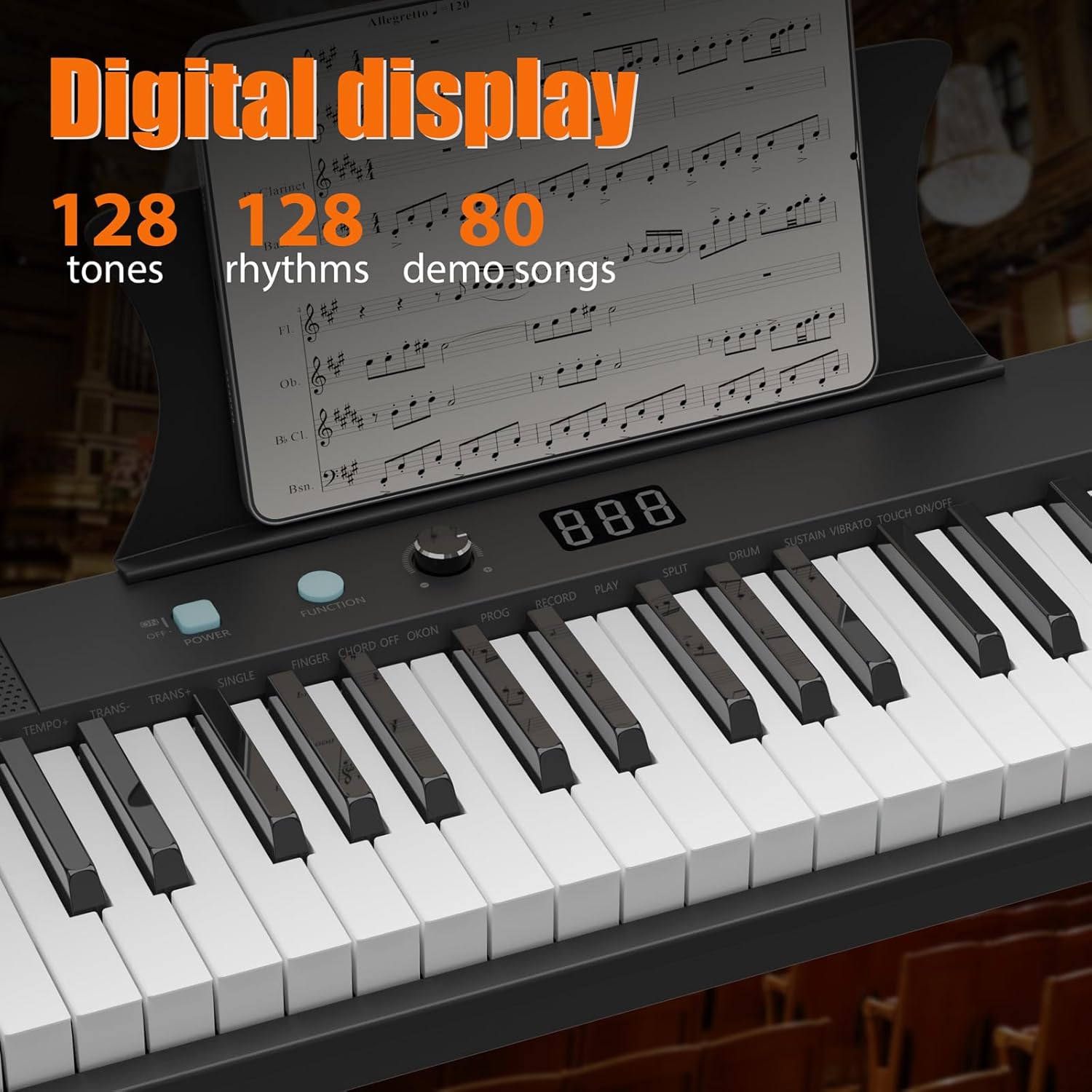
Figure 3: Digital Display and Controls
4.3. Teaching Modes
The keyboard includes teaching modes to assist beginners:
- โหมดติดตาม: The keyboard waits for you to play the correct note before proceeding.
- One Key Mode: Play any key to advance through the melody of a demo song.
4.4. การบันทึกและการเล่น
ใช้ บันทึก button to record your performance and the เล่น button for playback.
4.5. การเชื่อมต่อภายนอก
The keyboard supports various external connections:
- ยูเอสบี: Connect to a computer for MIDI functionality.
- ช่องรับสัญญาณเสียงเข้า: Connect external audio devices to play along with your favorite music.
- AUX ออก: Connect to external speakers or ampลิตเตอร์

รูปที่ 4: พอร์ตเชื่อมต่อ
Video 2: 61-Key Portable Keyboard Features. This video showcases the various functions and controls of a 61-key portable keyboard, including tone selection, rhythm, and demo modes.
5. คุณสมบัติหลัก
- 61 Weighted Keys: Provides a realistic piano playing experience with keys that respond to touch velocity.
- การออกแบบพกพา: Lightweight and compact, making it easy to transport and store.
- จอแสดงผล LCD: Clear display for easy navigation and selection of tones, rhythms, and settings.
- แหล่งจ่ายไฟคู่: Operates via AC adapter or batteries for versatile use at home or on the go.
- ลำโพงในตัว: Delivers clear and rich audio for practice and performance.
- Comprehensive Starter Kit: Includes essential accessories like a stand, stool, headphones, microphone, and sustain pedal.

รูปที่ 5: ขนาดผลิตภัณฑ์
6. การบำรุงรักษา
- การทำความสะอาด: Use a soft, dry cloth to clean the keyboard surface. Avoid using abrasive cleaners or solvents.
- พื้นที่จัดเก็บ: เก็บแป้นพิมพ์ไว้ในที่แห้งและเย็น หลีกเลี่ยงแสงแดดโดยตรงและอุณหภูมิที่สูงหรือต่ำเกินไป หากเก็บรักษาเป็นเวลานาน ควรถอดแบตเตอรี่ออกเพื่อป้องกันการรั่วไหล
- การเปลี่ยนแบตเตอรี่: When using batteries, replace all batteries simultaneously with new ones of the same type (AA). Do not mix old and new batteries or different types of batteries.
7 การแก้ไขปัญหา
| ปัญหา | สาเหตุที่เป็นไปได้ | สารละลาย |
|---|---|---|
| ไม่มีเสียง | Volume too low; Headphones connected; Power issue | Increase volume; Disconnect headphones; Check power adapter/batteries |
| กุญแจไม่ตอบสนอง | Keyboard not powered on; Function mode active | Ensure power is on; Check active function modes (e.g., teaching mode) |
| เสียงเพี้ยน | Volume too high; External device issue | Lower volume; Check connections to external devices |
8. ข้อมูลจำเพาะ
| คุณสมบัติ | รายละเอียด |
|---|---|
| จำนวนคีย์ | 61 |
| ประเภทกุญแจ | Weighted, Velocity-sensitive |
| ขนาด (กว้าง x ยาว x สูง) | 40.35" x 11.22" x 4.72" |
| น้ำหนักสินค้า | 8.82 ปอนด์ |
| โทนสี | 128 |
| จังหวะ | 128 |
| เพลงสาธิต | 60 |
| การเชื่อมต่อ | 3.5mm Jack (Headphones, AUX IN, MIC IN), USB |
| แหล่งจ่ายไฟ | DC 12V Adapter or 6x AA Batteries |
| วัสดุตัวเครื่อง | พลาสติก |
| หมายเลขรุ่น | 0QQTRWT6 |
| ยูพีซี | 199641941961 |
9. การรับประกันและการสนับสนุน
For warranty information and customer support, please refer to the documentation included with your product or visit the official Garvee webไซต์ โปรดเก็บใบเสร็จรับเงินของคุณไว้เป็นหลักฐานการซื้อสำหรับการเรียกร้องการรับประกันใดๆ
การสนับสนุนทางออนไลน์: สำหรับแหล่งข้อมูลเพิ่มเติมและคำถามที่พบบ่อย โปรดไปที่ Garvee Store on Amazon.


