1. บทนำ
This manual provides comprehensive instructions for the setup, operation, maintenance, and troubleshooting of your GMKtec Mini PC G3S. Please read this manual thoroughly before using the device to ensure optimal performance and longevity.

Figure 1: GMKtec Mini PC G3S, showcasinด้วยการออกแบบที่กะทัดรัดและพอร์ตต่างๆ
2. เนื้อหาบรรจุภัณฑ์
ตรวจสอบว่ารายการทั้งหมดที่ระบุไว้ด้านล่างนี้มีอยู่ในบรรจุภัณฑ์ผลิตภัณฑ์ของคุณ:
- GMKtec Nucbox G3 S Mini PC (16GB RAM, 512GB SSD)
- ฐานยึด VESA พร้อมสกรู
- สาย HDMI
- อะแดปเตอร์แปลงไฟ
- คู่มือการใช้งาน
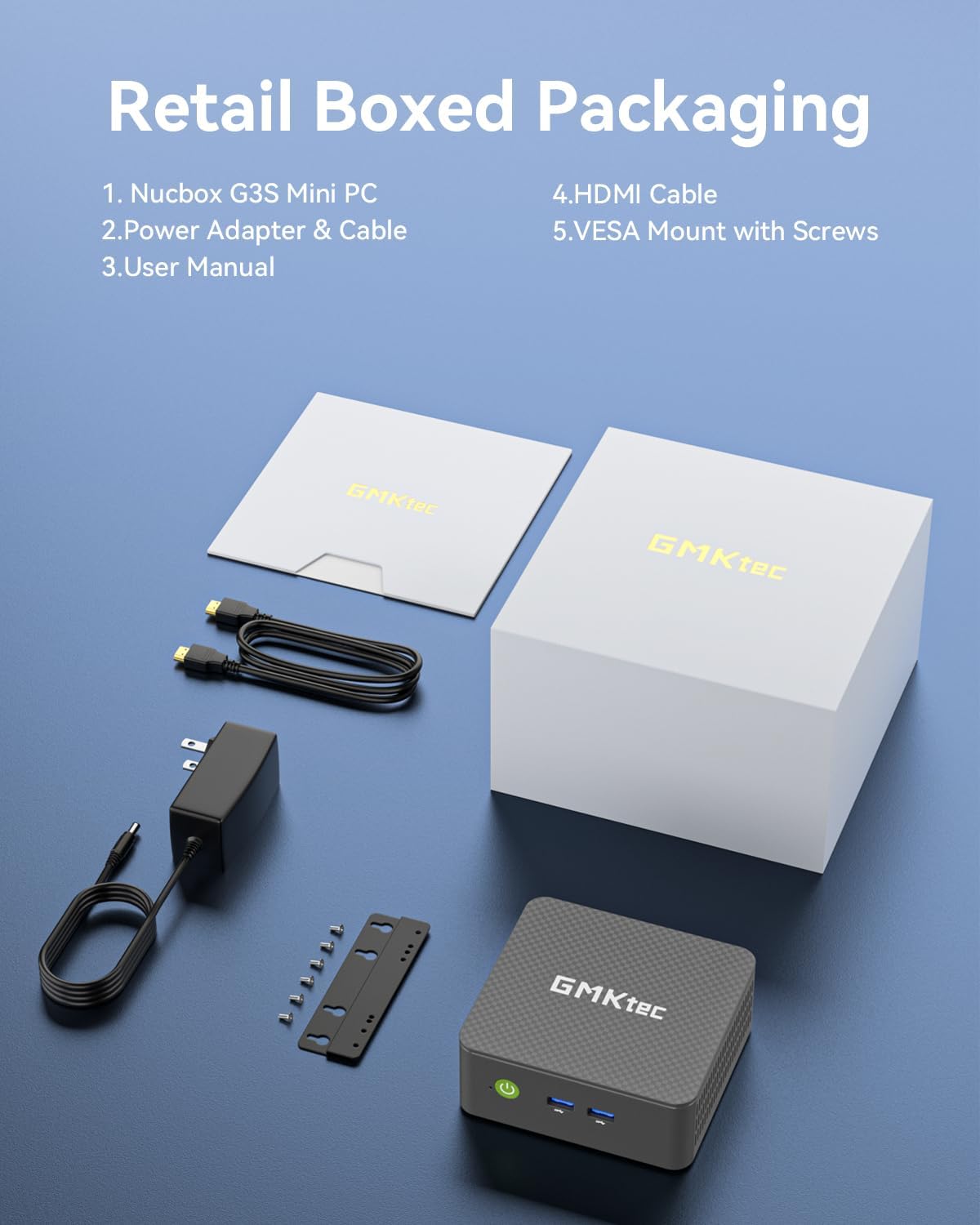
Figure 2: All components included in the GMKtec Mini PC G3S retail packaging.
3. คุณสมบัติทางกายภาพและพอร์ตต่างๆ
The GMKtec Mini PC G3S is designed with a variety of ports for versatile connectivity:
- แผงด้านหน้า: Power Button, 2x USB 3.2 (Gen 2) ports.
- แผงด้านข้าง: Kensington Lock slot, Micro SD Card Reader.
- แผงด้านหลัง: 2x HDMI 2.0 ports (4K@60Hz support), 1x USB 2.0 port, 1x USB 3.2 (Gen 2) port, 1x Gigabit Ethernet (RJ45 1000MbE) port, 1x 3.5mm Audio Jack, DC 12V 3A Power Input.

รูปที่ 3: รายละเอียด view of the front and rear ports on the GMKtec Mini PC G3S.
4. คู่มือการติดตั้ง
โปรดทำตามขั้นตอนเหล่านี้เพื่อตั้งค่า Mini PC ของคุณในเบื้องต้น:
- เชื่อมต่ออุปกรณ์ต่อพ่วง: Connect your monitor(s) to the HDMI ports using the provided HDMI cable. Connect a USB keyboard and mouse to the available USB ports.
- การเชื่อมต่อไฟฟ้า: Connect the power adapter to the DC 12V 3A input port on the rear of the Mini PC, then plug the adapter into a power outlet.
- เปิดเครื่อง: กดปุ่มเปิด/ปิดที่อยู่ด้านหน้าของมินิพีซี ไฟแสดงสถานะการทำงานจะสว่างขึ้น
- การบูตครั้งแรก: The system will boot into Windows 11 Pro. Follow the on-screen instructions to complete the initial Windows setup, including language, region, network connection, and user account creation.
- การติดตั้งฐานยึด VESA (ไม่บังคับ): If desired, attach the VESA mount to the back of a compatible monitor using the provided screws, then secure the Mini PC to the VESA mount. This allows for a clutter-free desktop setup.

Figure 4: The GMKtec Mini PC G3S demonstrating VESA mount compatibility and compact desk placement.
5. การดำเนินการ
5.1. รองรับการแสดงผลแบบ Dual 4K
The Mini PC G3S supports dual 4K@60Hz displays via its two HDMI 2.0 outputs. This allows for extended desktop environments, enhancing productivity for multitasking.
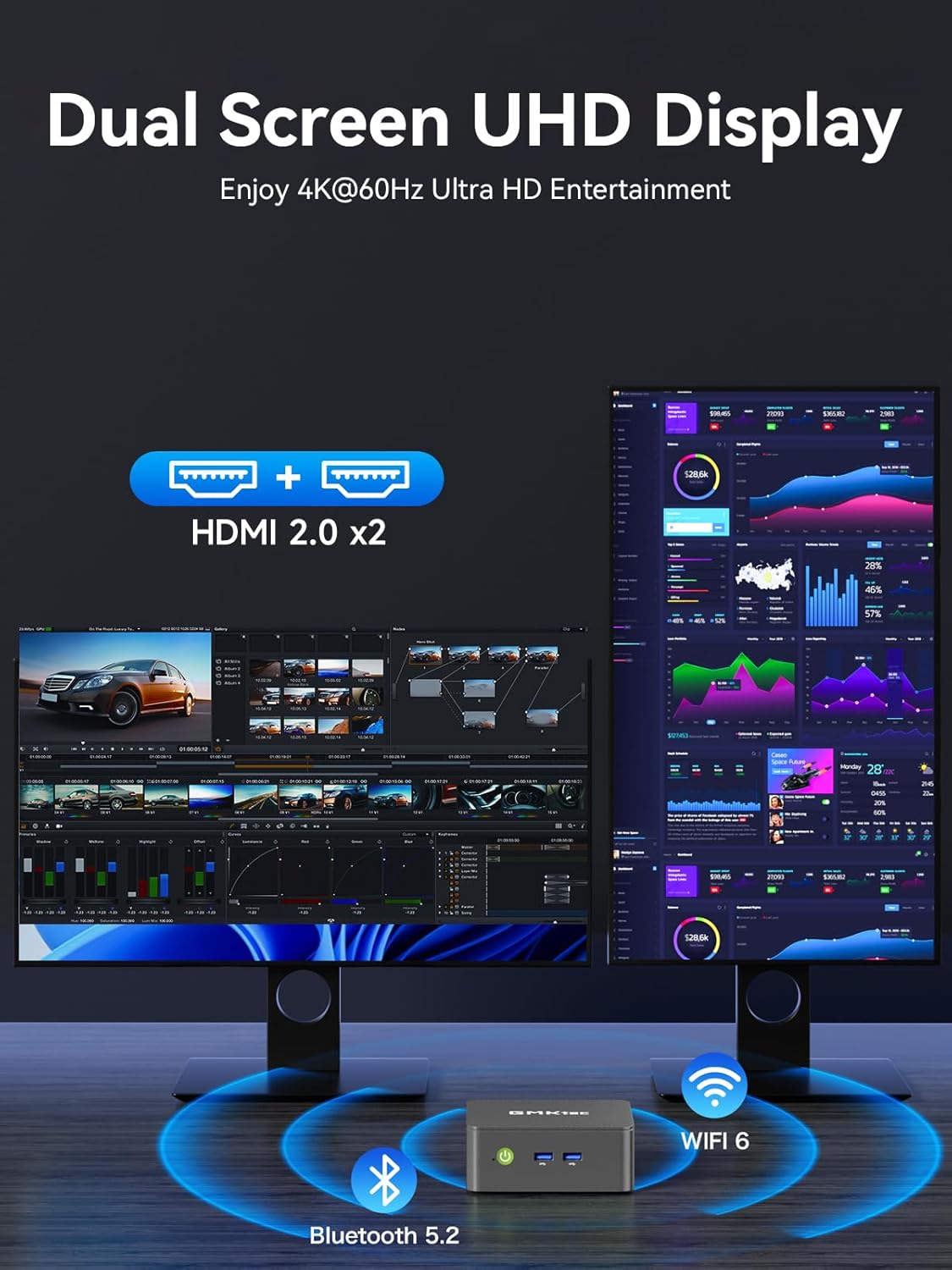
Figure 5: The Mini PC G3S powering a dual 4K display setup for enhanced workspace.
5.2. การเชื่อมต่อเครือข่ายและไร้สาย
อุปกรณ์นี้มีตัวเลือกการเชื่อมต่อที่แข็งแกร่ง:
- มีสาย: Gigabit Ethernet (RJ45 1000MbE) for stable and high-speed internet access.
- ไร้สาย: Integrated WiFi 5 (802.11ac) for wireless internet and Bluetooth 5.0 for connecting wireless peripherals.
5.3. โหมดการทำงาน
The Mini PC G3S features adjustable performance modes to suit different usage scenarios. These modes can be accessed and configured via the BIOS settings:
- โหมดเงียบ: Optimized for minimal fan noise, suitable for light tasks and quiet environments.
- Normal Mode (Default): Balanced performance for everyday computing.
- โหมดการทำงาน: Maximizes CPU and GPU performance for demanding applications.
To adjust modes, press the เอสซี key during boot-up to enter the BIOS page, then navigate to BIOS Setup to select your preferred mode.
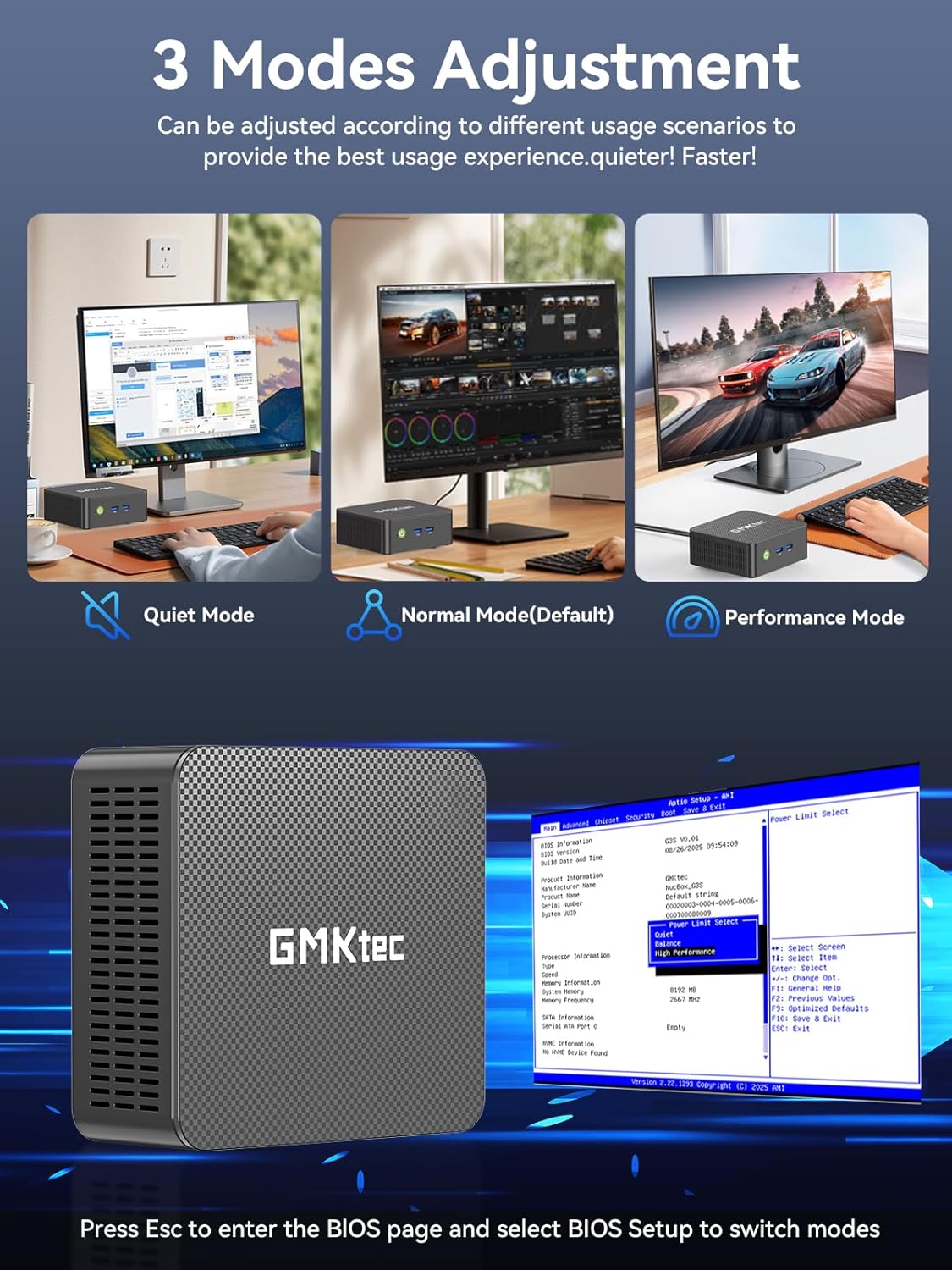
Figure 6: Illustration of the three performance modes and the BIOS entry screen.
6. การขยายพื้นที่เก็บข้อมูล
The GMKtec Mini PC G3S comes with a 512GB M.2 2242 SSD and 16GB DDR4 RAM. For additional storage, the device supports expansion:
- M.2 2280 PCIe: Expandable up to 8TB.
- M.2 2242 SATA: Expandable up to 2TB.
Consult a qualified technician for storage upgrades to ensure proper installation and avoid damage to the device.

รูปที่ 7: ภายใน view illustrating the RAM and dual SSD slots for storage expansion.
7. ข้อมูลจำเพาะทางเทคนิค
| คุณสมบัติ | ข้อมูลจำเพาะ |
|---|---|
| โปรเซสเซอร์ | 12th Gen Intel N95 (up to 3.4GHz, 4 Cores/4 Threads, 6MB Cache) |
| กราฟฟิก | กราฟิก Intel UHD (สูงสุด 1200MHz) |
| แรม | 16GB DDR4 SO-DIMM |
| พื้นที่จัดเก็บ | 512GB M.2 2242 SATA SSD |
| การขยายพื้นที่เก็บข้อมูล | 1x M.2 2280 PCIe Gen3*2 (Max 8TB), 1x M.2 2242 SATA (Max 2TB) |
| เอาท์พุตวิดีโอ | 2x HDMI 2.0 (4K@60Hz) |
| พอร์ต USB | พอร์ต USB 3.2 (รุ่นที่ 3) 2 ช่อง, พอร์ต USB 2.0 1 ช่อง |
| เครือข่าย | Gigabit Ethernet (RJ45 1000MbE), WiFi 5 (802.11ac), Bluetooth 5.0 |
| ระบบปฏิบัติการ | วินโดวส์ 11 โปร |
| ขนาด | ประมาณ 6.46 x 6.3 x 4.21 นิ้ว |
| น้ำหนัก | ประมาณ 2.07 ปอนด์ |
8. การบำรุงรักษา
To ensure the longevity and optimal performance of your GMKtec Mini PC G3S, follow these maintenance guidelines:
- การทำความสะอาด: Regularly clean the exterior of the Mini PC with a soft, dry cloth. Use compressed air to clear dust from ventilation grilles to prevent overheating. Ensure the device is powered off and unplugged before cleaning.
- การอัปเดตซอฟต์แวร์: Keep your operating system and drivers updated to the latest versions. This improves security, stability, and performance.
- การระบายอากาศ : Ensure the Mini PC is placed in a well-ventilated area and that its vents are not obstructed. Proper airflow is crucial for heat dissipation.
- แหล่งจ่ายไฟ: ใช้เฉพาะอะแดปเตอร์ไฟฟ้าดั้งเดิมที่ให้มาพร้อมกับอุปกรณ์เท่านั้น
9 การแก้ไขปัญหา
If you encounter issues with your Mini PC, refer to the following common solutions:
- ไม่มีจอแสดงผล:
- Ensure the monitor is powered on and correctly connected to the Mini PC via HDMI.
- ตรวจสอบให้แน่ใจว่าได้เลือกแหล่งสัญญาณเข้าที่ถูกต้องบนจอภาพของคุณแล้ว
- ลองใช้สาย HDMI หรือจอภาพอื่นหากมี
- ไม่มีไฟฟ้า:
- Check that the power adapter is securely connected to both the Mini PC and a working power outlet.
- ตรวจสอบให้แน่ใจว่าได้กดปุ่มเปิด/ปิดอย่างแน่นหนา
- ปัญหาการเชื่อมต่อเครือข่าย:
- For wired connections, ensure the Ethernet cable is properly connected and the router is functioning.
- For Wi-Fi, check that Wi-Fi is enabled in Windows settings and you are connected to the correct network with the correct password.
- รีสตาร์ทเราเตอร์/โมเด็มและมินิพีซีของคุณ
- ประสิทธิภาพการทำงานช้า:
- ปิดแอปพลิเคชันที่ไม่จำเป็นซึ่งทำงานอยู่เบื้องหลัง
- Ensure the system is updated and free of malware.
- Consider switching to 'Performance Mode' in BIOS settings if sustained high performance is required.
If problems persist, please contact GMKtec customer support.
10. การรับประกันและการสนับสนุน
GMKtec นำเสนอ รับประกันจำกัด 1 ปี for each Mini PC, effective from the date of purchase. This warranty covers defects due to design and workmanship. For any issues or inquiries, please utilize the following support channels:
- ฝ่ายบริการลูกค้าของอเมซอน: Log in to your Amazon account, navigate to 'Your Orders', and select 'Ask Product Question' for assistance.
- GMKtec After-Sales Team: Contact support directly via email at support@gmktec.com.
- 24/7 Client Support: GMKtec provides continuous client support for your convenience.

รูปที่ 8: เกินview of available customer support options for GMKtec products.
วิดีโอผลิตภัณฑ์อย่างเป็นทางการ
วิดีโอ 1: ผลิตภัณฑ์อย่างเป็นทางการview of the GMKtec Mini PC G3S, highlighting its features and capabilities.


