1. สินค้าหมดview
The Baseus BS1 NC Semi-in-Ear Noise Cancelling Earbuds offer a blend of comfort and advanced audio technology. Featuring Adaptive Hybrid Active Noise Cancellation (ANC), Hi-Res Audio with LDAC support, and a lightweight design, these earbuds are engineered for extended listening and clear communication. They are also equipped with a 6-microphone AI system for clear calls and IP55 water and dust resistance.

Image: Baseus BS1 NC Semi-in-Ear Noise Cancelling Earbuds and their charging case in black.
2. เนื้อหาบรรจุภัณฑ์
ตรวจสอบให้แน่ใจว่ามีรายการทั้งหมดอยู่ในบรรจุภัณฑ์:
- Baseus Bass BS1 NC Semi-in-Ear Earbuds (Left and Right)
- เคสชาร์จไฟ
- สายชาร์จ USB-C
- คู่มือเริ่มต้นอย่างรวดเร็ว

Image: The complete retail package for the Baseus BS1 NC Earbuds, showing the earbuds, charging case, USB-C cable, and quick start guide.
3. การชาร์จหูฟังและเคส
For optimal performance, fully charge the earbuds and charging case before first use.
3.1 กำลังชาร์จหูฟังเอียร์บัด
- ใส่หูฟังลงในกล่องชาร์จ ตรวจสอบให้แน่ใจว่าหูฟังอยู่ในช่องที่ถูกต้อง (L สำหรับซ้าย และ R สำหรับขวา)
- ปิดกล่องชาร์จ หูฟังจะเริ่มชาร์จโดยอัตโนมัติ
3.2 การชาร์จเคส
- เชื่อมต่อสายชาร์จ USB-C ที่ให้มากับพอร์ตชาร์จบนเคส
- เชื่อมต่อปลายสายอีกด้านหนึ่งเข้ากับอะแดปเตอร์ไฟ USB (ไม่รวมอยู่ด้วย) หรือพอร์ต USB ของคอมพิวเตอร์
- The LED indicator on the case will show the charging status:
- สีเขียว: ชาร์จ 75% - 100%
- เหลือง: ชาร์จ 25% - 75%
- สีแดง: Below 25% charged
- A full charge for the case provides up to 40 hours of total playtime for the earbuds (with ANC off). A 10-minute charge can provide up to 2 hours of playback.

Image: The Baseus BS1 NC Earbuds resting in their open charging case, highlighting the 40-hour total playtime and rapid charging capabilities.
4. การจับคู่และการเชื่อมต่อ
4.1 การจับคู่เริ่มต้น
- เปิดกล่องชาร์จ หูฟังจะเข้าสู่โหมดจับคู่โดยอัตโนมัติ
- บนอุปกรณ์ของคุณ (สมาร์ทโฟน แท็บเล็ต คอมพิวเตอร์) เปิดใช้งาน Bluetooth
- ค้นหา "Baseus Bass BS1 NC" in the list of available Bluetooth devices.
- Select "Baseus Bass BS1 NC" to connect. A voice prompt will confirm successful pairing.
4.2 การเชื่อมต่อใหม่อัตโนมัติ
Once paired, the earbuds will automatically reconnect to the last connected device when removed from the charging case and within Bluetooth range.
4.3 การเชื่อมต่อหลายจุด
The Baseus BS1 NC supports Baseus Smart-Connect (BSC) technology, allowing simultaneous connection to two devices. This enables seamless switching between audio sources without manual re-pairing.
To use multipoint connection:
- จับคู่เอียร์บัดกับอุปกรณ์เครื่องแรกของคุณ
- ตัดการเชื่อมต่อหูฟังออกจากบลูทูธของอุปกรณ์เครื่องแรก (อย่าทำการยกเลิกการจับคู่)
- จับคู่เอียร์บัดกับอุปกรณ์เครื่องที่สองของคุณ
- เชื่อมต่อหูฟังกับอุปกรณ์เครื่องแรกอีกครั้งผ่านการตั้งค่าบลูทูธ ตอนนี้หูฟังควรเชื่อมต่อกับอุปกรณ์ทั้งสองแล้ว
เสียงจะสลับไปที่อุปกรณ์ที่กำลังเล่นเนื้อหาหรือรับสายโดยอัตโนมัติ
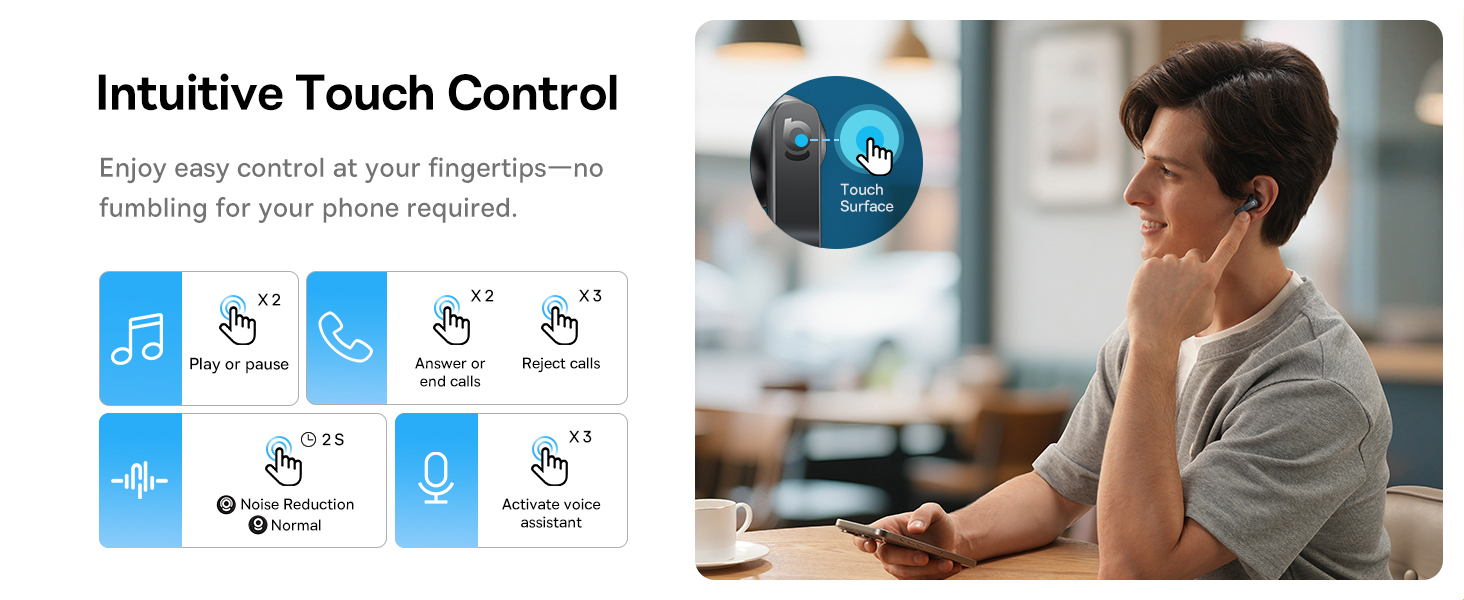
Image: A visual representation of the Baseus BS1 NC Earbuds connected to both a laptop and a smartphone, showcasing the instant multipoint connection feature.
5. การสวมหูฟัง
The Baseus BS1 NC earbuds feature a semi-in-ear design for comfortable, pressure-free wear. For optimal sound quality and noise cancellation, ensure a proper fit.
- ระบุเอียร์บัดด้านซ้าย (L) และด้านขวา (R)
- ค่อยๆ ใส่หูฟังแต่ละข้างเข้าไปในช่องหูของคุณ
- Adjust the earbud until it feels secure and comfortable. The stem should point slightly forward or downward.

Image: A person wearing the Baseus BS1 NC Earbuds, illustrating their ergonomic and lightweight design for all-day comfort.
6. คู่มือการใช้งาน
6.1 ระบบควบคุมแบบสัมผัส
The earbuds feature intuitive touch controls on their stems. The following are default functions, which may be customizable via the Baseus app:
| การกระทำ | การทำงาน |
|---|---|
| Double-tap (Left or Right Earbud) | เล่น/หยุดเพลง, รับสาย/วางสาย |
| Triple-tap (Left or Right Earbud) | Reject call, Activate voice assistant |
| กดค้างไว้ (2 วินาที) | Switch Noise Control Mode (ANC/Normal/Transparency) |

Image: An illustration detailing the intuitive touch controls on the Baseus BS1 NC Earbuds for various functions like play/pause, call management, noise reduction, and voice assistant activation.
6.2 โหมดควบคุมเสียงรบกวน
The Baseus BS1 NC earbuds offer three noise control modes:
- Adaptive Hybrid ANC (Active Noise Cancellation): Reduces ambient noise for an immersive listening experience. Ideal for noisy environments.
- โหมดความโปร่งใส: Allows you to hear your surroundings while still enjoying your audio. Useful for awareness in urban settings or conversations.
- โหมดปกติ: Standard audio playback without active noise cancellation or transparency features.
Switch between modes by pressing and holding the touch area on either earbud for 2 seconds.

Image: A cutaway diagram of a Baseus BS1 NC earbud in an ear, illustrating the semi-in-ear fit and the availability of Adaptive Noise Cancelling and Transparency Mode.
6.3 Hi-Res Audio with LDAC
These earbuds support LDAC technology, enabling high-resolution audio transmission for a detailed and rich sound experience. Ensure your device supports LDAC and activate it in your device's Bluetooth settings for the best audio quality.

Image: The Baseus BS1 NC Earbuds surrounded by sound waves, emphasizing features like Hi-Res Audio, SuperBass 2.0, and 13mm dynamic drivers for powerful sound.
6.4 6-Mic AI Clear Calls
The earbuds are equipped with 6 microphones and AI noise isolation technology to ensure your voice is clear during calls, even in noisy environments. Wind noise reduction further enhances call clarity outdoors.
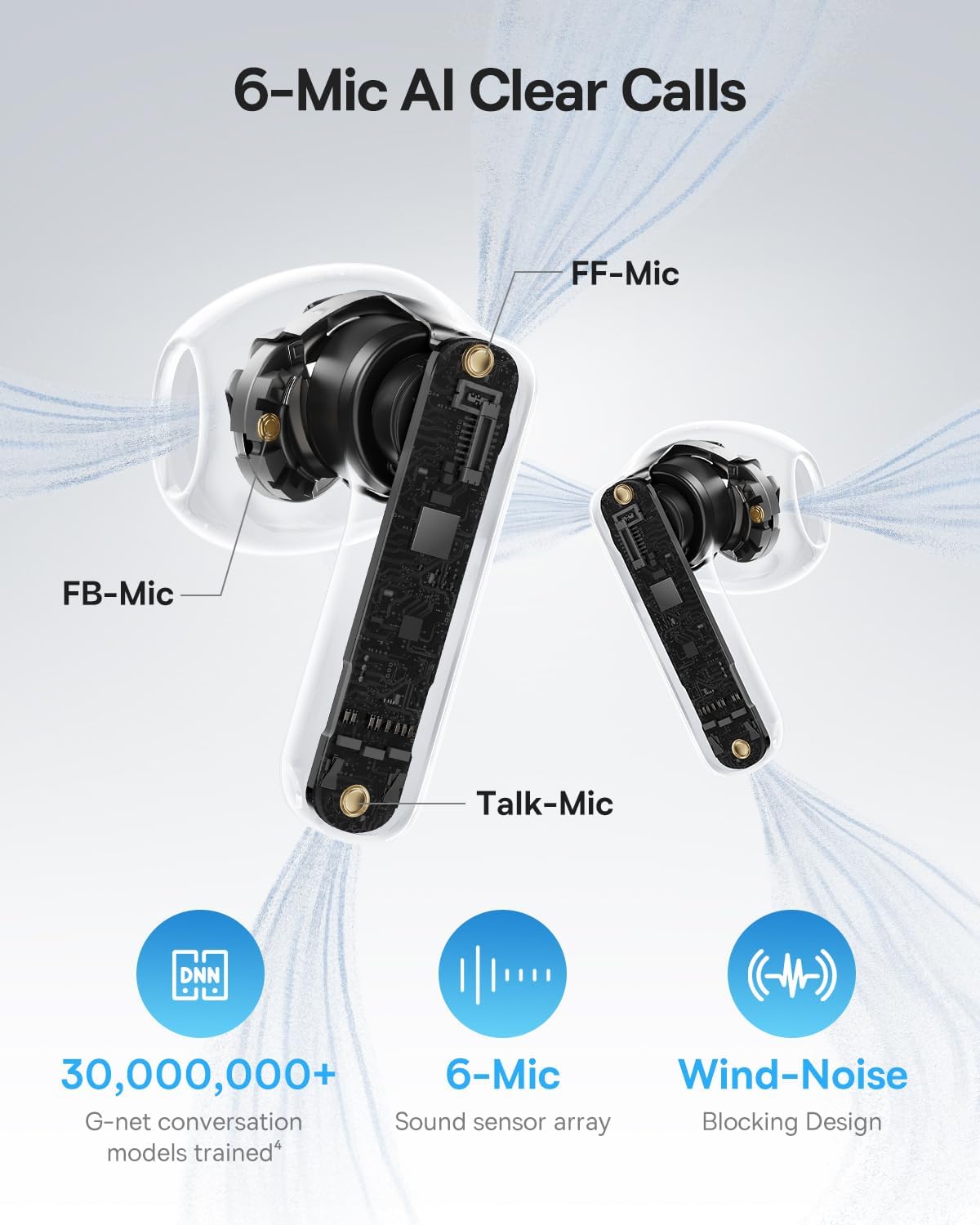
Image: A detailed diagram of the Baseus BS1 NC earbud, highlighting the placement of the FF-Mic, FB-Mic, and Talk-Mic, which contribute to the 6-Mic AI Clear Call technology and wind-noise blocking design.
6.5 การควบคุมแอพอัจฉริยะ
Download the dedicated Baseus app for enhanced control and customization options. The app allows you to:
- ปรับระดับ Bass Boost
- Select from various EQ Modes.
- ควบคุมการตั้งค่าเสียงเชิงพื้นที่
- ใช้ฟังก์ชัน "ค้นหาหูฟังของคุณ"
หมายเหตุ: ในโหมดผู้เยี่ยมชม ไม่จำเป็นต้องสร้างบัญชีหรือขอสิทธิ์ใดๆ เพื่อปรับแต่งคุณสมบัติ แต่จำเป็นต้องเข้าถึง GPS เพื่อค้นหาหูฟังที่หายไป

Image: A smartphone displaying the Baseus app interface, which offers various sound control options including Bass Boost, EQ Modes, Spatial Acoustics, and a "Find Your Earbuds" function.
7. การบำรุงรักษาและการดูแล
7.1 การทำความสะอาด
- ทำความสะอาดหูฟังและกล่องชาร์จเป็นประจำด้วยผ้าแห้งนุ่มที่ไม่เป็นขุย
- ห้ามใช้สารเคมีรุนแรง น้ำยาทำความสะอาด หรือสารซักฟอกชนิดเข้มข้น
- Gently remove any earwax or debris from the earbud mesh and charging contacts using a small, soft brush or cotton swab.
7.2 ความทนทานต่อน้ำและฝุ่น (IP55)
The earbuds are rated IP55, meaning they are protected against limited dust ingress and low-pressure water jets from any direction. This makes them suitable for workouts and light rain exposure.
- ห้ามจุ่มหูฟังลงในน้ำ
- ตรวจสอบให้แน่ใจว่าหูฟังแห้งก่อนใส่กลับเข้าไปในกล่องชาร์จ เพื่อป้องกันไม่ให้หน้าสัมผัสการชาร์จเสียหาย
- กล่องชาร์จไม่กันน้ำ

Image: The Baseus BS1 NC Earbuds shown with water droplets, signifying their IP55 rating for dust and water resistance.
7.3 พื้นที่จัดเก็บ
เก็บหูฟังเอียร์บัดไว้ในกล่องชาร์จเมื่อไม่ได้ใช้งานเพื่อปกป้องและชาร์จอยู่เสมอ
8 การแก้ไขปัญหา
If you encounter issues with your Baseus BS1 NC earbuds, refer to the following common solutions:
- ไม่มีเสียง/ปัญหาการเชื่อมต่อ:
- ตรวจสอบให้แน่ใจว่าหูฟังมีการชาร์จแล้ว
- Verify Bluetooth is enabled on your device and "Baseus Bass BS1 NC" is selected.
- Try placing earbuds back in the case, closing it, and then reopening to reset the connection.
- ลืมอุปกรณ์ในการตั้งค่าบลูทูธของคุณและจับคู่ใหม่อีกครั้ง
- เอียร์บัดข้างหนึ่งไม่ทำงาน:
- ตรวจสอบให้แน่ใจว่าได้ชาร์จหูฟังเอียร์บัดทั้งสองข้างแล้ว
- Place both earbuds back in the case, close, and reopen.
- ทำความสะอาดหน้าสัมผัสการชาร์จบนหูฟังทั้งสองข้างและภายในเคส
- คุณภาพเสียงไม่ดี:
- ตรวจสอบให้แน่ใจว่าใส่เอียร์บัดในหูของคุณอย่างถูกต้อง
- ทำความสะอาดตาข่ายของเอียร์บัดเพื่อขจัดสิ่งกีดขวางต่างๆ
- Check your device's audio settings and ensure LDAC is enabled if supported.
- ANC ไม่มีประสิทธิผล:
- Ensure ANC mode is activated via touch control or the Baseus app.
- Adjust the earbuds for a better seal in your ears.
9. ข้อมูลจำเพาะ
| คุณสมบัติ | รายละเอียด |
|---|---|
| ชื่อรุ่น | เบสอัส เบส BS1 NC |
| การควบคุมเสียงรบกวน | ระบบตัดเสียงรบกวนแบบปรับได้, ระบบตัดเสียงรบกวนจากสิ่งแวดล้อม, ระบบตัดเสียงรบกวนแบบไฮบริด |
| เทคโนโลยีการเชื่อมต่อ | บลูทูธ 6.0 ไร้สาย |
| เทคโนโลยีการสื่อสารไร้สาย | บลูทูธ 6.0 |
| ช่วงบลูทูธ | 10 เมตร |
| ประเภทไดร์เวอร์เสียง | ไดร์เวอร์แบบไดนามิก |
| ขนาดไดร์เวอร์เสียง | 13 มิลลิเมตร |
| การตอบสนองความถี่ | ความถี่ 40 กิโลเฮิรตซ์ |
| เวลาแฝงของเสียง | 60 มิลลิวินาที |
| อายุการใช้งานแบตเตอรี่ (หูฟัง) | 7 ชั่วโมง (ปิด ANC) |
| เวลาเล่นทั้งหมด (รวมเคส) | 40 ชั่วโมง (ปิด ANC) |
| Charging Time (Rapid Charge) | 10 นาที เล่นได้ 2 ชั่วโมง |
| ระดับความต้านทานต่อน้ำ | IP55 (เฉพาะหูฟัง) |
| ประเภทการควบคุม | การควบคุมแบบสัมผัส |
| วัสดุ | อะคริโลไนไตรล์ บิวทาไดอีน สไตรีน (ABS), โพลีคาร์บอเนต (PC) |
| น้ำหนักสินค้า (หูฟัง) | 4 กรัมต่อเอียร์บัด |
| Product Dimensions (Earbuds) | 1.2 x 0.7 x 0.7 นิ้ว |
| อุปกรณ์ที่รองรับ | อุปกรณ์ที่มีความสามารถในการส่งและรับเสียงผ่านบลูทูธ ได้แก่ iOS, Android, Windows, Mac OS และ Switch |
10. วิดีโอผลิตภัณฑ์อย่างเป็นทางการ
Watch the official product video for a visual guide on the Baseus BS1 NC Earbuds:
วิดีโอ: วิดีโอผลิตภัณฑ์อย่างเป็นทางการจาก Baseusasing the features and usage of the Baseus BS1 NC Semi-in-Ear True Wireless Earbuds.
11. การรับประกันและการสนับสนุน
For warranty information, technical support, FAQs, and further assistance, please visit the official Baseus support center.
Refer to the Quick Start Guide included in your package for a direct link or visit the Baseus webเว็บไซต์.
Note: Protection plans may be available for purchase separately.


