การแนะนำ
This manual provides essential information for the safe and efficient use of your Blaupunkt 40FGC5500S 40-inch Full HD Google TV. Please read it thoroughly before operating the device and retain it for future reference. This television combines Full HD LED display technology with the Google TV operating system, offering a wide range of entertainment options and smart features.
การตั้งค่า
1. การแกะกล่องและเนื้อหา
นำโทรทัศน์และอุปกรณ์เสริมทั้งหมดออกจากบรรจุภัณฑ์อย่างระมัดระวัง ตรวจสอบให้แน่ใจว่ามีอุปกรณ์ครบถ้วน:
- Blaupunkt 40FGC5500S TV Unit
- รีโมทคอนโทรล
- สายไฟ
- ขาตั้งทีวี (2 ชิ้น) และสกรู
- คู่มือการใช้งาน (เอกสารนี้)
Inspect the TV for any damage. If any damage is found, do not proceed with installation and contact customer support.

ด้านหน้า view of the Blaupunkt 40FGC5500S 40-inch Full HD Google TV, showcasinด้วยจอแสดงผลและขอบจอที่บางเฉียบ

ด้านหน้าทำมุม view of the Blaupunkt 40FGC5500S 40-inch Full HD Google TV, providing a perspective of its design.
2. การติดตั้งขาตั้ง
If placing the TV on a table, attach the two included stands to the bottom of the TV using the provided screws. Ensure the stands are securely fastened to prevent the TV from tipping.
3. การติดตั้งบนผนัง
The Blaupunkt 40FGC5500S is compatible with VESA 200x200 mm wall mounts. For wall mounting, remove the stands and follow the instructions provided with your wall mount bracket. Professional installation is recommended for safety.

หลัง view of the Blaupunkt 40FGC5500S 40-inch Full HD Google TV, showing the VESA mounting pattern and connection panel.
4. การเชื่อมต่ออุปกรณ์ต่อพ่วง
Connect external devices such as set-top boxes, gaming consoles, or sound systems to the TV's ports. The TV features 3 HDMI ports, 2 USB ports, an Ethernet (LAN) input, and a 3.5mm audio output.

ด้านข้าง view of the Blaupunkt 40FGC5500S 40-inch Full HD Google TV, illustrating the accessible input ports for various devices.
5. เปิดเครื่องและการตั้งค่าเริ่มต้น
Connect the power cable to the TV and a power outlet. Press the power button on the remote control or the TV. Follow the on-screen instructions to complete the initial setup, which includes:
- การเลือกภาษา
- การเชื่อมต่อเครือข่าย (Wi-Fi หรืออีเทอร์เน็ต)
- การลงชื่อเข้าใช้บัญชี Google
- การตั้งค่า Google Assistant
- Channel scanning (if applicable)
การดำเนินงาน
1. อินเทอร์เฟซ Google TV
Your Blaupunkt TV runs on Google TV, providing a personalized home screen with content recommendations from your subscriptions. Navigate using the remote control's directional pad and select button.

The Google TV interface on the Blaupunkt 40FGC5500S, displaying various streaming applications and content suggestions.
2. การควบคุมด้วยเสียงด้วย Google Assistant
Press the Google Assistant button on your remote control and speak into the microphone to search for content, control smart home devices, get answers, and more.

Icon indicating the voice control feature, powered by Google Assistant.
3. การเข้าถึงแอปพลิเคชัน
The Google TV home screen provides quick access to popular streaming services like Netflix, YouTube, and Google Play. You can download additional apps from the Google Play Store.

Icon representing the smart features and application access on the TV.
4. การเชื่อมต่อ
- Wi-Fi 2T2R: เชื่อมต่อกับเครือข่ายไร้สายที่บ้านของคุณเพื่อเข้าถึงอินเทอร์เน็ต
- Bluetooth 5.0: Pair wireless headphones, speakers, or other Bluetooth-enabled devices.
- Chromecast ในตัว: ส่งเนื้อหาจากสมาร์ทโฟน แท็บเล็ต หรือคอมพิวเตอร์ที่รองรับไปยังทีวีได้โดยตรง
5. การตั้งค่าภาพและเสียง
Navigate to the settings menu to adjust picture modes (e.g., Standard, Vivid, Movie), brightness, contrast, and color. The TV supports HDR for enhanced visual detail. Audio settings allow you to customize sound profiles and volume levels from the integrated 16W speakers.

Icon representing the high-quality display and picture settings.
6. คุณสมบัติเพิ่มเติม
- คู่มือโปรแกรมอิเล็กทรอนิกส์ (EPG): View upcoming TV programs and schedule recordings (if external recording device is connected).
- เวลานอน: ตั้งค่าทีวีให้ปิดอัตโนมัติหลังจากช่วงเวลาที่กำหนดไว้
- การล็อคเด็ก: Restrict access to certain channels or content.
การซ่อมบำรุง
1. การทำความสะอาดทีวี
Before cleaning, unplug the TV from the power outlet. Use a soft, dry, lint-free cloth to gently wipe the screen and cabinet. Do not use liquid cleaners, aerosols, or abrasive materials, as they may damage the TV's surface.
2. การอัปเดตซอฟต์แวร์
The TV may receive automatic software updates via the internet to improve performance and add new features. Ensure your TV is connected to the internet to receive these updates. You can also manually check for updates in the settings menu.
การแก้ไขปัญหา
หากคุณประสบปัญหาเกี่ยวกับทีวี โปรดดูปัญหาทั่วไปและวิธีแก้ไขต่อไปนี้:
| ปัญหา | วิธีแก้ปัญหาที่เป็นไปได้ |
|---|---|
| ไม่มีไฟฟ้า | ตรวจสอบว่าสายไฟเชื่อมต่อกับทั้งทีวีและเต้ารับไฟฟ้าอย่างแน่นหนาหรือไม่ ลองใช้เต้ารับอื่น |
| ไม่มีภาพแต่มีเสียง | ตรวจสอบให้แน่ใจว่าได้เลือกแหล่งสัญญาณเข้าที่ถูกต้อง ตรวจสอบการเชื่อมต่อสายเคเบิลกับอุปกรณ์ภายนอก |
| ไม่มีเสียงแต่มีภาพ | Check volume levels and mute settings. Ensure external audio systems are properly connected and selected. |
| รีโมตคอนโทรลไม่ทำงาน | เปลี่ยนแบตเตอรี่ ตรวจสอบให้แน่ใจว่าไม่มีสิ่งกีดขวางระหว่างรีโมทและเซ็นเซอร์อินฟราเรดของทีวี |
| ไม่สามารถเชื่อมต่อ Wi-Fi ได้ | Verify your Wi-Fi password. Restart your router and the TV. Ensure the TV is within range of your Wi-Fi network. |
หากปัญหายังคงมีอยู่หลังจากลองวิธีแก้ไขเหล่านี้แล้ว โปรดติดต่อฝ่ายสนับสนุนลูกค้า
ข้อมูลจำเพาะ
The following table details the technical specifications of the Blaupunkt 40FGC5500S 40-inch Full HD Google TV:
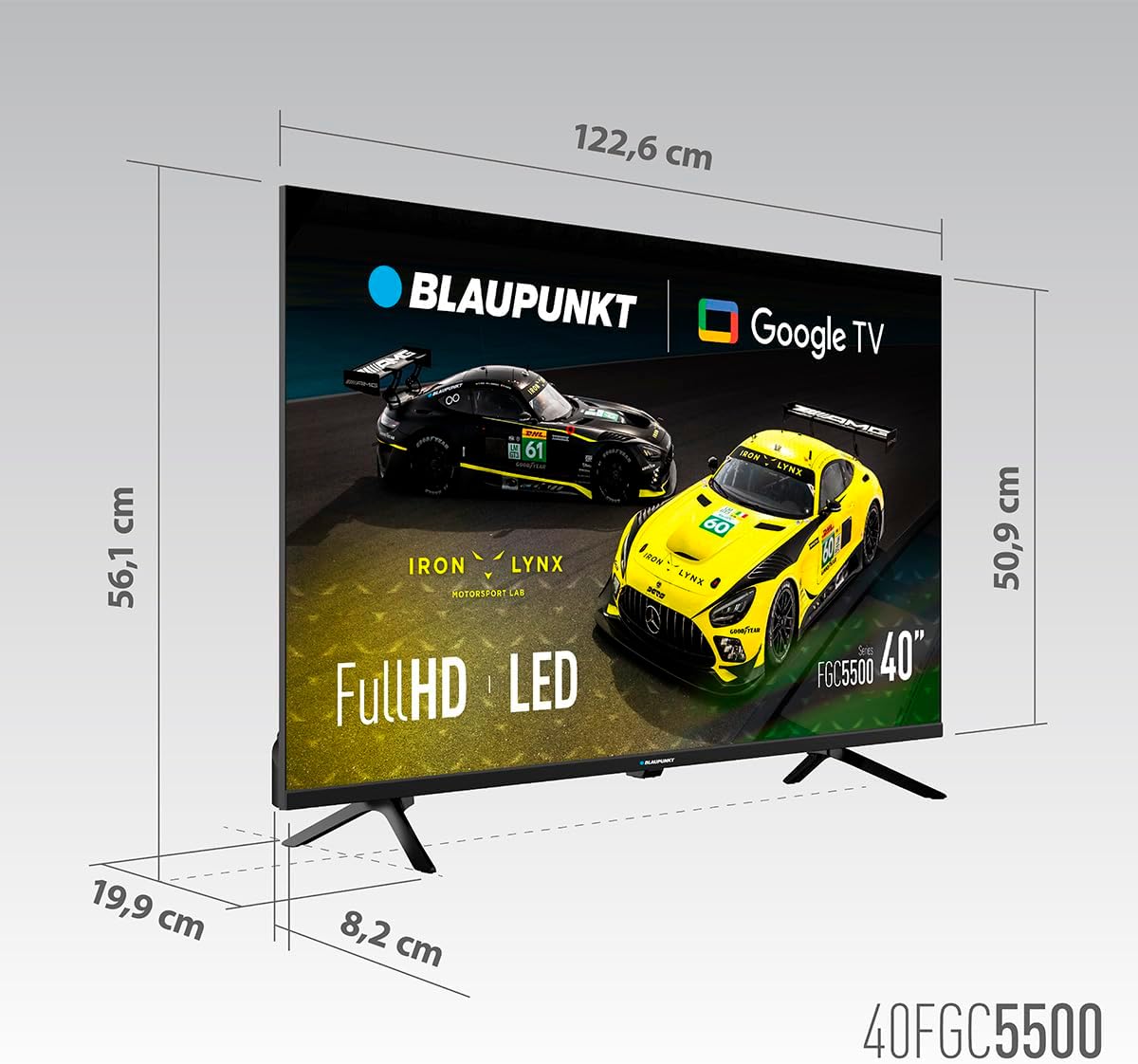
Dimensional diagram of the Blaupunkt 40FGC5500S 40-inch Full HD Google TV, showing its width, height, and depth.
| คุณสมบัติ | รายละเอียด |
|---|---|
| ยี่ห้อ | บลาพุงท์ |
| ชื่อรุ่น | 40FGC5500S |
| ขนาดหน้าจอ | 40 นิ้ว (102 เซนติเมตร) |
| เทคโนโลยีการแสดงผล | นำ |
| ประเภทจอภาพ | VA |
| ปณิธาน | 1920 x 1080 พิกเซล (ฟูลเอชดี) |
| อัตราการรีเฟรช | 60 เฮิรตซ์ |
| ระบบปฏิบัติการ | กูเกิลทีวี |
| การเชื่อมต่อ | Bluetooth 5.0, Ethernet, HDMI (3 ports), USB (2 ports), Wi-Fi 2T2R, 3.5mm Audio |
| กำลังขับเสียง | 16 วัตต์ (รวม) |
| คุณสมบัติพิเศษ | Built-in Speaker, Chromecast, Sleep Timer, Wide Viewing Angle, HDR |
| ความเข้ากันได้ในการติดตั้ง | VESA 200x200 mm (Wall Mount, Table Stand) |
| ขนาดสินค้า (กxยxส) | 89.3 x 19.9 x 56.1 ซม. |
| น้ำหนักผลิตภัณฑ์ | 5.6 กก. |
| การจัดอันดับประสิทธิภาพการใช้พลังงาน | F |
การรับประกันและการสนับสนุน
ข้อมูลการรับประกัน
For detailed warranty information, please refer to the warranty card included with your product or visit the official Blaupunkt webไซต์ โดยทั่วไปการรับประกันจะครอบคลุมข้อบกพร่องในการผลิตเป็นระยะเวลาหนึ่งนับจากวันที่ซื้อ
การสนับสนุนลูกค้า
If you require technical assistance, have questions about your product, or need to report a fault, please contact Blaupunkt customer support. Contact details can usually be found on the official Blaupunkt webไซต์หรือในเอกสารที่มาพร้อมกับทีวีของคุณ


