การแนะนำ
This manual provides detailed instructions for the installation, operation, and maintenance of your J-TREK JX03 Motorcycle Intercom. Please read this manual thoroughly before using the product to ensure safe and optimal performance.

Image: Two J-TREK JX03 intercom units, showcasing their design and compact size.
คุณสมบัติหลัก
- Qualcomm Dual Bluetooth 5.2 Chip: The JX03 motorcycle intercom features Qualcomm Dual Bluetooth 5.2 chips. Two independent chips handle media audio (music/navigation) and communication audio (intercom calls) separately. This allows simultaneous music/navigation listening and intercom communication. The system automatically adjusts audio priority, seamlessly restoring media volume after calls for smooth multitasking.
- Proprietary JMC1.0 Mesh Network Technology: The JX03 intercom utilizes J-TREK's proprietary JMC1.0 Mesh Network Technology. Up to 8 riders can form a network within a 1500m range. Key benefits include: intelligent interference countermeasures, automatically switching channels in complex wireless environments to ensure call clarity and stability; host-free design, the network automatically reconfigures if members leave or join, without affecting team communication; excellent penetration and obstacle avoidance, information automatically selects the optimal route even in mountainous areas or urban building clusters, effectively avoiding communication dead zones and maintaining continuous team communication.
- High-Quality Speakers Optimized for Riding: Specifically designed for motorcycle audio, these 40mm large speakers were developed after over 2000 hours of wind tunnel acoustic testing. Enhanced bass, thanks to specially treated diaphragm material, powerfully reproduces music's rhythm and bass lines even amidst engine noise; superior wind noise suppression, a unique acoustic structure effectively counters wind noise at high speeds, ensuring call clarity even at 80km/h; immersive soundstage, precise tuning delivers an immersive, realistic sound experience, transforming every ride into a moving concert hall.
- Large Knob & Anti-Slip Buttons: Designed for reliable operation even with gloves, optimized for motorcycle glove use. Volume adjustment and function switching can be performed accurately and quickly even while wearing thick gloves, with clear operational feedback significantly improving safety and convenience during riding. Each operation is designed to be precisely transmitted, preventing accidental operations while riding.
- Voice Commands, Japanese Voice Guide, & Third-Party Device Compatibility: The JX03 motorcycle intercom supports voice commands. Activate Siri or Google Assistant to make calls, switch songs, start navigation, and more, all hands-free, significantly enhancing safety. It also features natural Japanese voice guidance (system notifications like battery level, connection status) for user-friendly operation. Furthermore, it offers broad compatibility, allowing connection with other J-TREK units, and also a single connection with other brands' (e.g., Cardo, Sena) intercoms or Bluetooth devices to extend communication range (Note: Limited to compatible models. Connection may not be possible due to protocol differences).

Image: A diagram illustrating the Qualcomm BT 5.2 dual-chip architecture, separating communication and media audio processing.

Image: Several motorcyclists riding on a scenic road, connected by a mesh network, illustrating the JMC1.0 Mesh communication capability.
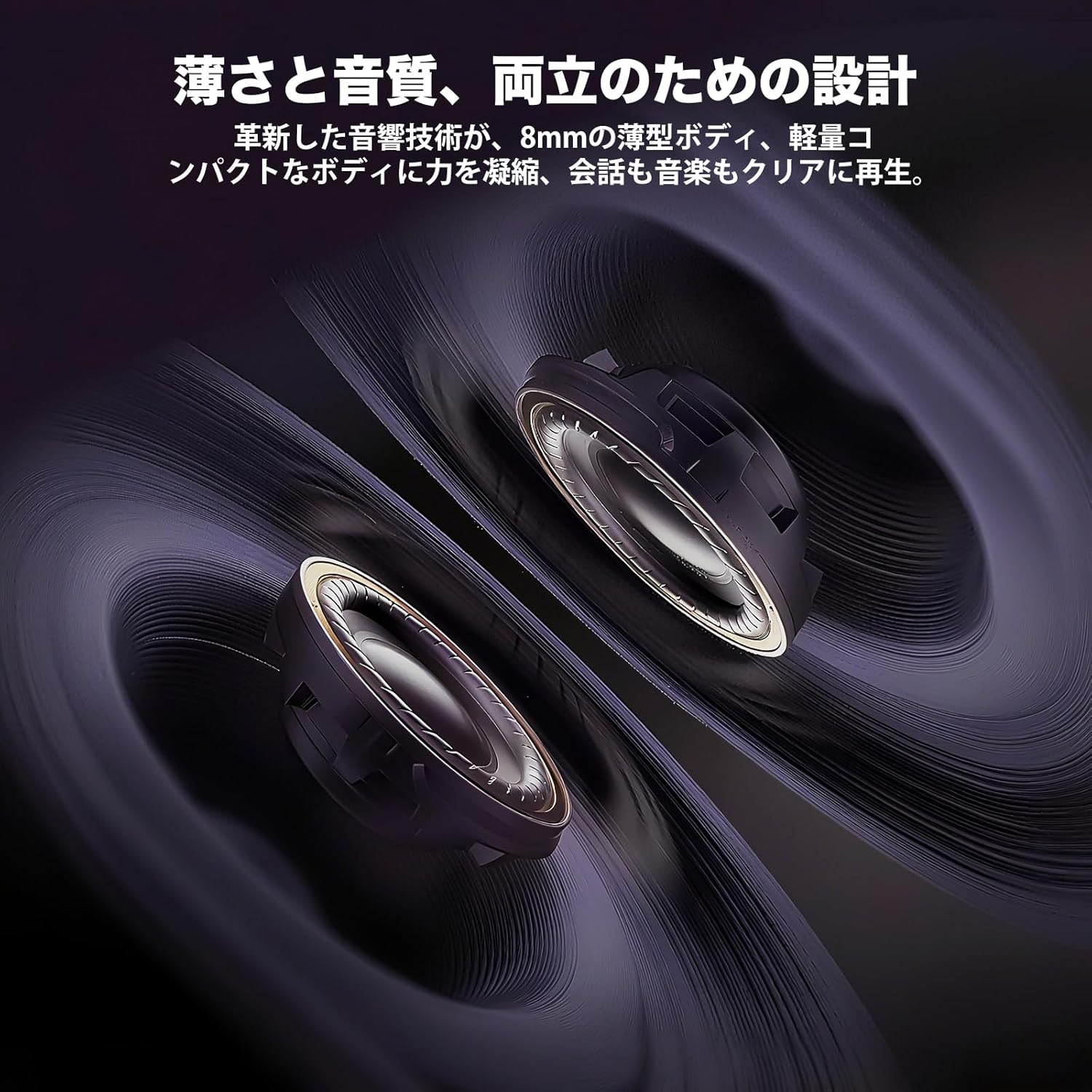
Image: A cutaway diagram of the 40mm speakers, highlighting their design for clear audio reproduction.
เนื้อหาแพ็คเกจ
The J-TREK JX03 Motorcycle Intercom 2-unit set includes the following items:

Image: A visual representation of all components included in the J-TREK JX03 intercom package.
- Intercom Unit x2
- Jet Helmet Microphone x2
- Full-Face Microphone x2
- แท่นยึด x2
- สายชาร์จ USB Type-C x2
- ลำโพงx2
- Audio Adapter Cable x2
- Mounting Bracket Adhesive Tape (Red, for removal) x2
- Jet Helmet Microphone Adhesive Tape x2
- Speaker Positioning Adhesive Tape x4
- Clip-type Adhesive Tape (White, for mount attachment) x6
- Speaker Position Pads
- คู่มือการใช้งาน x2
- คู่มือเริ่มต้นอย่างรวดเร็ว x2
- Mount Clip x2
- Full-Face Microphone Adhesive Tape x2
การตั้งค่า
1. การติดตั้ง
The JX03 intercom can be mounted on most motorcycle helmets using the provided mounting bracket and adhesive tapes. Choose the appropriate microphone (jet helmet or full-face) for your helmet type.
- Attach the mounting bracket to the side of your helmet using the clip or adhesive tape.
- Slide the intercom unit onto the mounted bracket until it clicks into place.
- Install the speakers inside the helmet's ear pockets, securing them with the speaker positioning adhesive tapes.
- Connect the microphone to the intercom unit and position it near your mouth, ensuring it does not obstruct your vision or helmet closure.
2. การชาร์จไฟ
Before first use, fully charge the intercom unit. Use the provided USB Type-C charging cable.
- Connect the USB Type-C cable to the charging port on the intercom unit.
- Connect the other end to a USB power source (e.g., computer, USB wall adapter).
- The indicator light will show charging status (refer to the Quick Start Guide for specific light patterns). A full charge takes approximately 1.5 hours.

Image: The J-TREK JX03 intercom unit displayed with icons indicating 28 hours talk time, 1.5 hours charging time, 30 hours music time, and 350 hours standby time.
3. Pairing (Bluetooth & Mesh)
Refer to the Quick Start Guide for detailed pairing instructions. The JX03 supports both Bluetooth and Mesh communication.
- การจับคู่บลูทู ธ : For connecting to a single device (e.g., smartphone, GPS) or another brand's intercom.
- Mesh Pairing: For group communication with up to 8 JX03 units. The system automatically connects and reconfigures the network.
คำแนะนำการใช้งาน
การควบคุมพื้นฐาน
The large knob and anti-slip buttons are designed for easy operation even with gloves.
- เปิด/ปิดเครื่อง: กดปุ่มเปิด/ปิดค้างไว้
- การปรับระดับเสียง: Rotate the large knob.
- เล่นเพลง/หยุดชั่วคราว: กดปุ่มมัลติฟังก์ชั่นสั้นๆ
- เพลงถัดไป / ก่อนหน้า: Rotate the knob while music is playing (refer to Quick Start Guide for direction).
- รับ/วางสาย: กดปุ่มมัลติฟังก์ชันสั้นๆ ขณะมีสายเรียกเข้าหรือกำลังสนทนาอยู่
การสื่อสารแบบตาข่าย
Once paired in Mesh mode, the units will automatically connect. Up to 8 riders can communicate simultaneously.
- Ensure all units are within the 1500m communication range.
- The system intelligently manages connections, even if a rider leaves and rejoins the group.
บลูทูธอินเตอร์คอม
For one-on-one communication with another Bluetooth intercom unit (J-TREK or compatible third-party).
- Initiate Bluetooth intercom pairing as per the Quick Start Guide.
- Once connected, you can communicate directly with the paired unit.
คำสั่งเสียง
Activate your smartphone's voice assistant (Siri or Google Assistant) directly from the intercom.
- Press the designated voice command button (refer to Quick Start Guide).
- Speak your command (e.g., "Call [Contact Name]", "Play [Song Title]", "Start navigation to [Destination]").
Music Sharing & FM Radio
The JX03 allows music sharing between two devices and features a built-in FM radio.

Image: Two motorcyclists riding, with musical notes and radio waves indicating music sharing and FM radio functionality.
- การแบ่งปันเพลง: Connect two JX03 units via Bluetooth and activate the music sharing function (refer to Quick Start Guide).
- วิทยุ FM: Activate the FM radio function. Use the buttons to scan for stations (76-108MHz).
การซ่อมบำรุง
การทำความสะอาด
- เช็ดทำความสะอาดตัวเครื่องอินเตอร์คอมด้วยผ้าเนื้อนุ่มและแห้งamp ผ้า.
- อย่าใช้สารเคมีรุนแรงหรือน้ำยาทำความสะอาดที่มีฤทธิ์กัดกร่อน
- ตรวจสอบให้แน่ใจว่าพอร์ตทั้งหมดแห้งก่อนชาร์จ
การดูแลแบตเตอรี่
- หลีกเลี่ยงการปล่อยแบตเตอรี่จนหมดบ่อยครั้ง
- Store the unit in a cool, dry place when not in use for extended periods.
- Charge the unit periodically if stored for a long time to maintain battery health.
ความต้านทานต่อน้ำ (IP65)
The JX03 intercom is designed with IP65 water resistance, making it suitable for use in various weather conditions, including heavy rain and dusty environments.

Image: A motorcyclist wearing a helmet with the J-TREK JX03 intercom attached, riding in the rain, demonstrating its IP65 water resistance.
- Ensure all port covers are securely closed to maintain water resistance.
- ห้ามจุ่มตัวเครื่องลงในน้ำ
การแก้ไขปัญหา
- ไม่มีไฟฟ้า: ตรวจสอบให้แน่ใจว่าอุปกรณ์ชาร์จแบตเตอรี่เต็มแล้ว ตรวจสอบสายชาร์จและแหล่งจ่ายไฟด้วย
- ไม่มีเสียง/ระดับเสียงต่ำ: Check volume levels on both the intercom and connected device. Ensure speakers are correctly positioned in the helmet.
- ไม่สามารถจับคู่ได้: Ensure both devices are in pairing mode. Clear previous pairings and try again. Check compatibility for third-party devices.
- อินเตอร์คอมตัดการเชื่อมต่อ: Ensure units are within range. For Mesh, the network should automatically reconfigure. For Bluetooth, try re-pairing.
- คุณภาพเสียงไม่ดี: Check microphone position. Ensure wind noise suppression is active. Move closer to other intercom users if range is an issue.
หากปัญหายังคงมีอยู่ โปรดติดต่อฝ่ายสนับสนุนลูกค้า
ข้อมูลจำเพาะ
| คุณสมบัติ | ข้อมูลจำเพาะ |
|---|---|
| ชื่อรุ่น | เจเอ็กซ์03 |
| ยี่ห้อ | เจ-เทรค |
| เทคโนโลยีการเชื่อมต่อ | Bluetooth 5.2, JMC1.0 Mesh |
| Max Mesh Group | 8 ไรเดอร์ |
| Max Mesh Range | 1500ม. |
| ช่วงบลูทูธสูงสุด | 1000ม. |
| ขนาดลำโพง | 40มม. |
| ความไวต่อความรู้สึก | 108 เดซิเบล |
| การตอบสนองความถี่ | 20เฮิรตซ์-20กิโลเฮิรตซ์ |
| การควบคุมเสียงรบกวน | Multi-Noise Canceling |
| ความต้านทานต่อน้ำ | IP65 |
| ความจุของแบตเตอรี่ | 1000mAh |
| เวลาในการชาร์จ | 1.5 ชั่วโมง |
| เวลาสนทนา | นานถึง 28 ชั่วโมง |
| เวลาเล่นเพลง | นานถึง 30 ชั่วโมง |
| เวลาสแตนด์บาย | นานถึง 350 ชั่วโมง |
| พอร์ตชาร์จ | ยูเอสบี ไทป์ ซี |
| วัสดุ | พลาสติก |
| สี | สีดำ |
การรับประกันและการสนับสนุน
J-TREK provides a 1-year product warranty for the JX03 Motorcycle Intercom.

Image: A graphic indicating a 1-year product warranty.
- During the warranty period, free repair or new product replacement will be provided for manufacturing defects.
- For any questions or support regarding the product, please contact our dedicated support team.
อีเมลสนับสนุน: support@j-trek.com
We are committed to providing excellent support for your J-TREK product experience.


