การแนะนำ
This manual provides comprehensive instructions for the INPHIC Tri-Mode Wireless Mouse, Model B0FQCFSHPQ. It covers setup, operation, maintenance, and troubleshooting to ensure optimal performance and user experience. Please read this manual thoroughly before using the product.
สินค้าเกินview
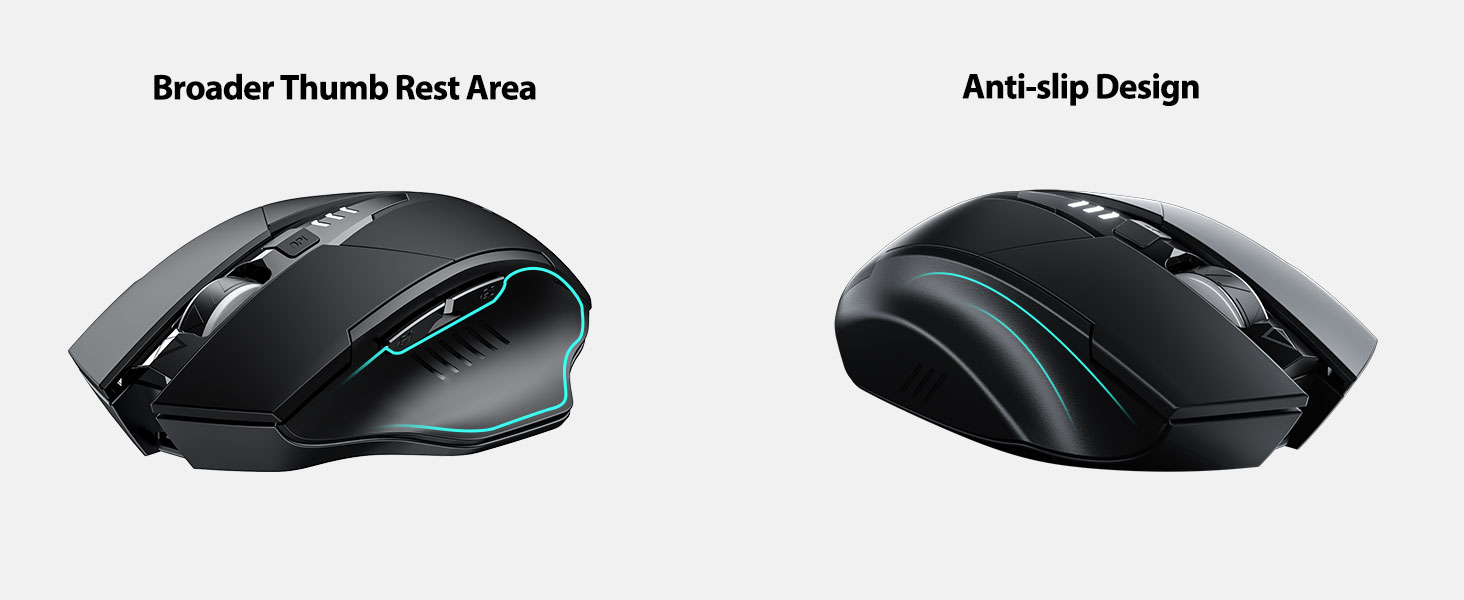
The INPHIC Tri-Mode Wireless Mouse offers versatile connectivity options (Bluetooth 5.0, Bluetooth 4.0, and 2.4G USB) and an ergonomic design for comfortable use. Key features include a visible battery indicator, silent click buttons, and adjustable DPI settings.
เนื้อหาแพ็คเกจ
- INPHIC Tri-Mode Wireless Mouse
- ตัวรับสัญญาณ USB (เก็บไว้ในเมาส์)
- สายชาร์จ USB-C
- คู่มือการใช้งาน (เอกสารนี้)
ส่วนประกอบเมาส์

- ปุ่มคลิกซ้าย/ขวา: การทำงานที่เงียบ
- ล้อเลื่อน: สำหรับการเลื่อนหน้าจอในแนวตั้ง
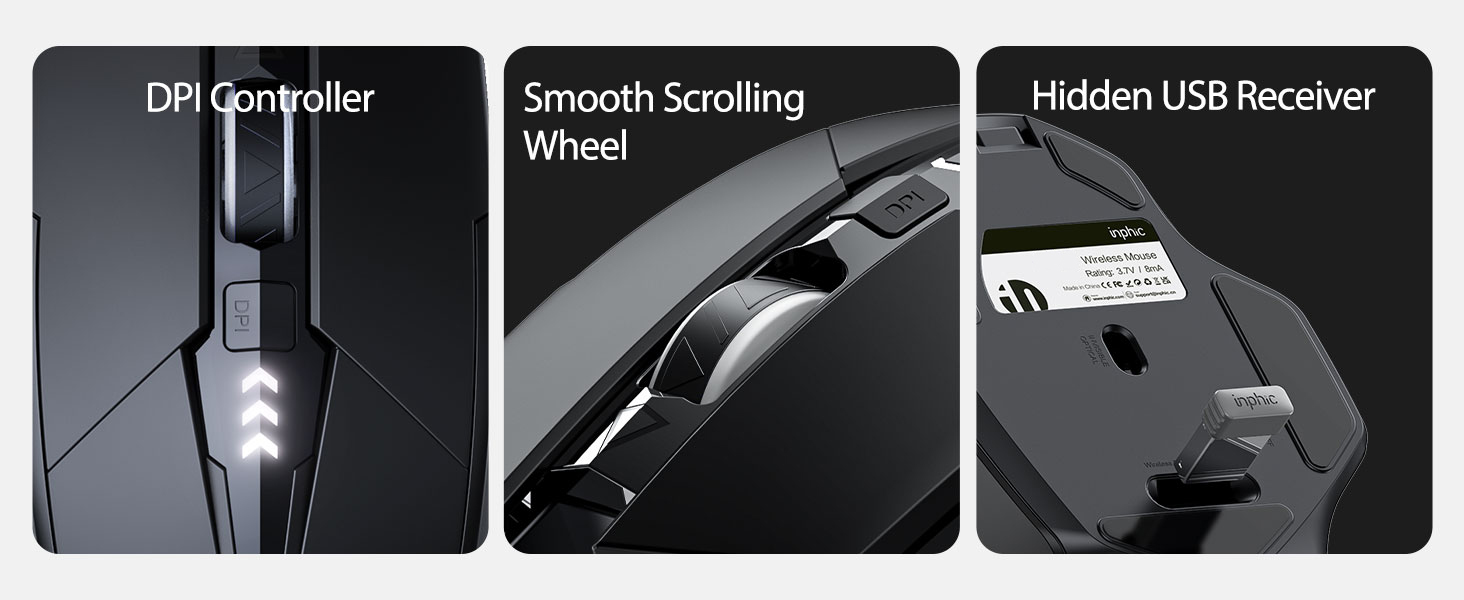
- ปุ่ม DPI: Adjusts cursor speed (800/1200/1600/2000/2400 DPI).
- Forward/Backward Buttons (Side): สำหรับการนำทางใน web เบราว์เซอร์หรือ file นักสำรวจ
- ไฟแสดงสถานะแบตเตอรี่: LED lights on top display remaining battery level.
- Connection Type Switch (Bottom): Toggles between 2.4G USB, Bluetooth 4.0, and Bluetooth 5.0 modes.
- Power Switch (Bottom): สวิตช์เปิด / ปิด
- USB Receiver Slot (Bottom): จัดเก็บตัวรับสัญญาณ USB 2.4G
- Charging Port (Front): USB-C port for recharging the internal battery.
การตั้งค่า
การชาร์จเบื้องต้น
Before first use, fully charge the mouse for approximately 1 hour. Connect the USB-C charging cable to the mouse's charging port and to a USB power source (e.g., computer USB port, USB wall adapter).

การเชื่อมต่อเมาส์
The mouse supports three connection modes: 2.4G USB, Bluetooth 4.0, and Bluetooth 5.0. Use the switch on the bottom of the mouse to select your desired mode.
การเชื่อมต่อ USB 2.4G
- Locate the USB receiver stored in the slot on the bottom of the mouse.
- เสียบตัวรับสัญญาณ USB เข้ากับพอร์ต USB ที่พร้อมใช้งานบนคอมพิวเตอร์ของคุณ
- Switch the connection mode on the bottom of the mouse to "2.4G".
- Turn on the mouse using the power switch. The mouse should connect automatically.
Bluetooth Connection (BT 4.0 / BT 5.0)
- Switch the connection mode on the bottom of the mouse to "BT 4.0" or "BT 5.0".
- เปิดเมาส์โดยใช้สวิตช์เปิดปิด
- On your device (laptop, tablet, etc.), open Bluetooth settings.
- ค้นหา new Bluetooth devices. The mouse should appear as "INPHIC Mouse" or similar.
- เลือกเมาส์ที่จะจับคู่
- เมื่อจับคู่เสร็จแล้ว เมาส์ก็พร้อมใช้งานได้ทันที
บันทึก: Bluetooth 5.0 is compatible with Windows 8/10 (not Windows 7 or XP), Android, and Mac OS systems. iOS systems (iPad and iPhone) require iOS 14 or later for Bluetooth 5.0 compatibility.
คำแนะนำการใช้งาน
เปิด/ปิดเครื่อง
Use the ON/OFF switch located on the bottom of the mouse to power the device. To conserve battery, turn off the mouse when not in use for extended periods.
การสลับโหมดการเชื่อมต่อ
The mode switch button on the bottom of the mouse allows you to cycle between 2.4G USB, Bluetooth 4.0, and Bluetooth 5.0 connections. This enables seamless switching between multiple paired devices.

การปรับ DPI (ความเร็วเคอร์เซอร์)
Press the DPI button located on the top of the mouse, below the scroll wheel, to cycle through 5 adjustable DPI levels: 800, 1200, 1600, 2000, and 2400. This allows you to customize cursor sensitivity to your preference.

ตัวบ่งชี้แบตเตอรี่
The mouse features a visible battery indicator on its top surface. LED lights illuminate to show the remaining battery power, providing a clear visual cue for when recharging is needed.

โหมดสลีปอัตโนมัติ
To conserve power, the mouse will automatically enter sleep mode after 5 minutes of inactivity. To wake the mouse, simply click any button.
การซ่อมบำรุง
การทำความสะอาด
Wipe the mouse with a soft, dry cloth. For stubborn dirt, a slightly damp สามารถใช้ผ้าเช็ดทำความสะอาดได้ เพื่อไม่ให้ความชื้นเข้าไปในชิ้นส่วนภายใน หลีกเลี่ยงสารเคมีรุนแรงหรือน้ำยาทำความสะอาดที่มีฤทธิ์กัดกร่อน
การดูแลแบตเตอรี่
- ควรชาร์จเมาส์เมื่อไฟแสดงสถานะแบตเตอรี่แสดงว่าพลังงานเหลือน้อย
- หลีกเลี่ยงการปล่อยแบตเตอรี่จนหมดบ่อยครั้งเพื่อยืดอายุการใช้งาน
- เก็บเมาส์ไว้ในที่แห้งและเย็นเมื่อไม่ได้ใช้งานเป็นเวลานาน
การแก้ไขปัญหา
| ปัญหา | สาเหตุที่เป็นไปได้ | สารละลาย |
|---|---|---|
| เมาส์ไม่ตอบสนอง |
|
|
| การเคลื่อนที่ของเคอร์เซอร์ผิดปกติหรือช้า |
|
|
| ปัญหาการเชื่อมต่อบลูทูธ |
|
|
ข้อมูลจำเพาะ
| คุณสมบัติ | รายละเอียด |
|---|---|
| แบบอย่าง | B0FQCFSHPQ |
| เทคโนโลยีการเชื่อมต่อ | Bluetooth 5.0 / Bluetooth 4.0 / 2.4G USB Wireless |
| ระดับ DPI | 800 / 1200 / 1600 / 2000 / 2400 (ปรับได้) |
| ปุ่ม | 6 (ซ้าย, ขวา, ล้อเลื่อน, DPI, ไปข้างหน้า, ถอยหลัง) |
| ประเภทแบตเตอรี่ | Rechargeable (400mAh built-in) |
| พอร์ตชาร์จ | ยูเอสบี-ซี |
| ระยะการทำงาน | สูงถึง 10 เมตร (33 ฟุต) |
| ขนาดสินค้า | 4.7 x 3.1 x 0.04 นิ้ว |
| น้ำหนักสินค้า | 3.36 ออนซ์ |
| ความเข้ากันได้ | Windows 7/8/10/XP, Vista, Mac OS. Bluetooth 5.0: Windows 8/10, Android, Mac OS, iOS 14+ (iPad/iPhone). 2.4G USB: Any USB-enabled device. |

การรับประกันและการสนับสนุน
INPHIC products are designed for reliability and performance. For warranty information and technical support, please refer to the official INPHIC webหรือติดต่อฝ่ายบริการลูกค้าโดยตรง
- ผู้ผลิต: อินฟิค
- ผู้ขาย: YingFeiTe (on Amazon)
- นโยบายการคืนสินค้า: Refer to Amazon's current return policy.
- ติดต่อฝ่ายสนับสนุน: For assistance, visit the INPHIC Store on Amazon หรือเจ้าหน้าที่ของผู้ผลิต webเว็บไซต์.
ข้อมูลด้านความปลอดภัยที่สำคัญ
- อย่าให้เมาส์สัมผัสกับอุณหภูมิหรือความชื้นที่สูงเกินไป
- หลีกเลี่ยงการทำตกหรือให้เมาส์ได้รับแรงกระแทกรุนแรง
- Do not attempt to disassemble or repair the mouse yourself. This may void the warranty.
- เก็บให้พ้นจากมือเด็ก
วิดีโอสินค้า
คำอธิบายวิดีโอ: An official product video from INPHIC demonstrating the features and usage of the INPHIC Bluetooth Mouse. It shows the mouse being unboxed, its various components, connection methods, and ergonomic design in action.


