1. บทนำ
This manual provides essential instructions for the setup, operation, maintenance, and troubleshooting of your Marantz Cinema 50 9.4 Channel 8K Home Theater AV Receiver. Please read this manual thoroughly before using the product to ensure correct and safe operation.

ภาพที่ 1.1: ด้านหน้า view of the Marantz Cinema 50 AV Receiver. This image displays the receiver's elegant front panel with the central display, input selector, and volume knob.
The Marantz Cinema 50 is designed to deliver immersive audio and video experiences, featuring 9.4 channel amplification, 8K Ultra HD support, Dolby Atmos, DTS:X, IMAX Enhanced, Auro 3D, and HEOS Built-in streaming capabilities.
2. การตั้งค่า
Proper setup is crucial for optimal performance. Follow these steps to connect your Marantz Cinema 50 AV Receiver.
2.1 การแกะและการจัดวาง
นำเครื่องรับสัญญาณออกจากบรรจุภัณฑ์อย่างระมัดระวัง วางเครื่องรับสัญญาณบนพื้นผิวเรียบและมั่นคงที่มีการระบายอากาศเพียงพอ ตรวจสอบให้แน่ใจว่ามีพื้นที่รอบๆ ตัวเครื่องเพียงพอสำหรับการระบายความร้อน
2.2 การเชื่อมต่อลำโพง
Connect your speakers to the corresponding speaker terminals on the rear panel of the receiver. Ensure correct polarity (+ to + and - to -) for each speaker. The Cinema 50 supports a 9.4 channel configuration, allowing for various surround sound setups including height channels.
2.3 การเชื่อมต่อแหล่งเสียง/วิดีโอ
Connect your audio and video sources (e.g., Blu-ray player, game console, streaming device) to the HDMI input ports. The receiver features multiple 8K-compatible HDMI inputs. For audio-only sources, use the optical, coaxial, or analog audio inputs.
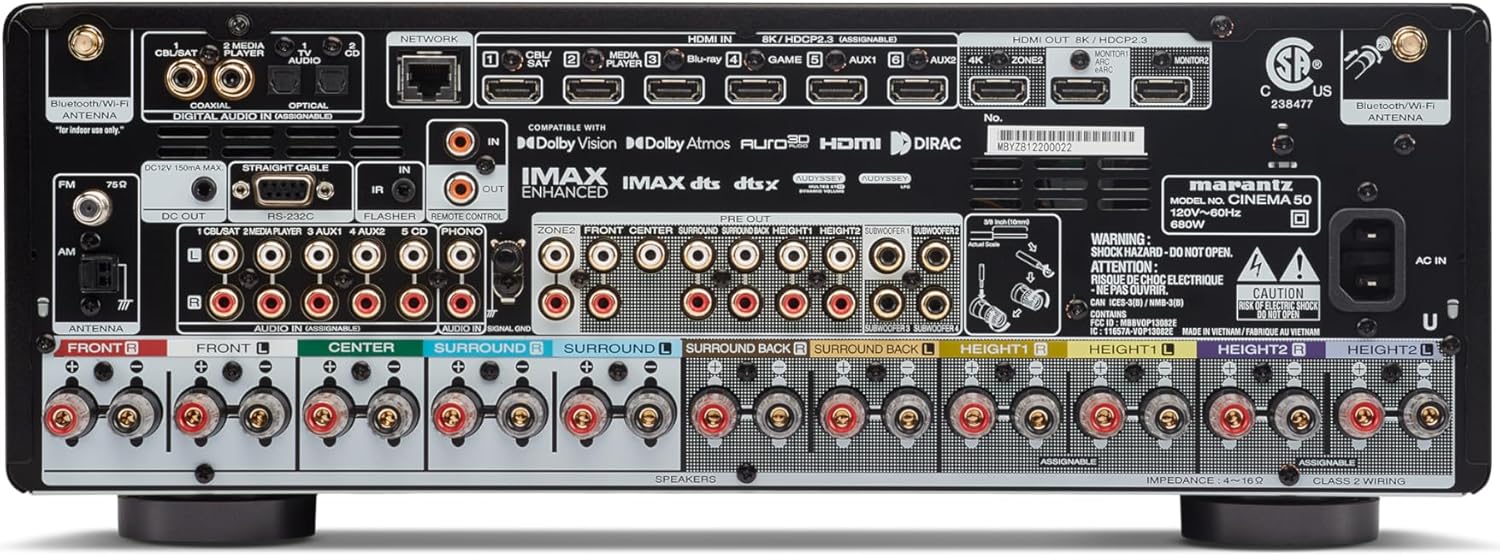
Image 2.1: Rear panel of the Marantz Cinema 50 AV Receiver. This image illustrates the various input and output ports, including HDMI, speaker terminals, and network connections, crucial for system setup.
2.4 Network and Antenna Connections
Connect the receiver to your home network using an Ethernet cable or via Wi-Fi. Attach the supplied Bluetooth/Wi-Fi antennas for wireless connectivity. Connect the FM/AM antennas for radio reception.
2.5 การเชื่อมต่อแหล่งจ่ายไฟและการตั้งค่าเริ่มต้น
Once all connections are made, connect the power cord to the receiver and then to a wall outlet. Power on the receiver and follow the intuitive on-screen setup assistant for initial configuration, including speaker calibration and network settings.
3. คู่มือการใช้งาน
This section covers the basic operation of your Marantz Cinema 50 AV Receiver.
3.1 เปิด/ปิดเครื่อง
กดปุ่มเปิด/ปิดที่แผงด้านหน้าหรือรีโมทคอนโทรลเพื่อเปิดหรือปิดเครื่องรับสัญญาณ
3.2 การเลือกอินพุต
Use the INPUT selector knob on the front panel or the dedicated input buttons on the remote control to switch between connected audio/video sources (e.g., Blu-ray, Game, TV Audio).

Image 3.1: Front panel of the Marantz Cinema 50 AV Receiver, highlighting the central display which shows the current input and volume level during operation.
3.3 การควบคุมระดับเสียง
Adjust the volume using the VOLUME knob on the front panel or the volume up/down buttons on the remote control.
โหมดเสียง 3.4 โหมด
Select various sound modes to optimize your listening experience. The Cinema 50 supports advanced formats like Dolby Atmos, DTS:X, IMAX Enhanced, and Auro 3D, which can be selected via the remote control's sound mode buttons.
3.5 HEOS ในตัว
Utilize the HEOS Built-in feature for multi-room audio and access to various streaming services like Spotify and Tidal. Control HEOS functions via the dedicated HEOS app on your smartphone or tablet.
3.6 การควบคุมระยะไกล
The included remote control provides full functionality for the receiver. Familiarize yourself with its layout for easy navigation and control of all features.
4. การบำรุงรักษา
Regular maintenance helps ensure the longevity and optimal performance of your receiver.
4.1 การทำความสะอาด
Wipe the exterior of the receiver with a soft, dry cloth. Do not use abrasive cleaners, solvents, or chemical sprays, as these can damage the finish. Avoid spraying liquids directly onto the unit.
4.2 การระบายอากาศ
Ensure that the ventilation openings on the receiver are not blocked. Proper airflow is essential to prevent overheating. Do not place the receiver in an enclosed cabinet without adequate ventilation.
4.3 การจัดการสายเคเบิล
Periodically check all cable connections to ensure they are secure and free from damage. Loose connections can lead to signal loss or poor audio/video quality.
5 การแก้ไขปัญหา
If you encounter issues with your Marantz Cinema 50, refer to the following common troubleshooting tips.
5.1 ไม่มีไฟฟ้า
- ตรวจสอบว่าสายไฟเชื่อมต่อกับตัวรับสัญญาณและเต้ารับที่ผนังอย่างแน่นหนาแล้วหรือไม่
- ตรวจสอบว่าเต้ารับไฟฟ้าใช้งานได้โดยเสียบอุปกรณ์อื่น
5.2 ไม่มีเสียง
- ตรวจสอบให้แน่ใจว่าเลือกแหล่งอินพุตที่ถูกต้อง
- Check all speaker wire connections for correct polarity and secure fit.
- Verify that the volume is not muted or set to a very low level.
- Confirm that the audio output settings on your source device are correctly configured.
5.3 No Picture/Video
- ตรวจสอบให้แน่ใจว่าเลือกแหล่งอินพุตที่ถูกต้อง
- Check all HDMI cable connections between the source, receiver, and TV. Try a different HDMI cable if necessary.
- Confirm that your TV is set to the correct HDMI input.
- If experiencing handshake issues or no display on TV, pressing the HEOS button on the remote can sometimes help reset the connection.
5.4 รีโมทคอนโทรลไม่ทำงาน
- เปลี่ยนแบตเตอรี่ในรีโมทคอนโทรล
- Ensure there are no obstructions between the remote control and the receiver's remote sensor.
- Point the remote control directly at the receiver.
6. ข้อมูลจำเพาะ
Key technical specifications for the Marantz Cinema 50 AV Receiver:
| คุณสมบัติ | ข้อมูลจำเพาะ |
|---|---|
| แบบอย่าง | โรงภาพยนตร์ 50 |
| ช่องทางการ | 9.4 |
| เอาท์พุต วัดtage | 110 วัตต์ต่อช่อง |
| เทคโนโลยีการเชื่อมต่อ | สาย HDMI, Wi-Fi, บลูทูธ |
| พอร์ต HDMI ทั้งหมด | 9 |
| รูปแบบเสียงที่รองรับ | ดอลบี แอทมอส, ดีทีเอส:เอ็กซ์, ไอแม็กซ์ เอ็นฮีล, ออโรร่า 3 มิติ |
| บริการสตรีมมิ่ง | Spotify, Tidal (via HEOS Built-in) |
| ขนาดสินค้า | 15.5 x 17.4 x 6.5 นิ้ว |
| น้ำหนักสินค้า | 36.6 ปอนด์ (16.62 กิโลกรัม) |
| สี | เงิน |
7. การรับประกันและการสนับสนุน
As this product is a renewed item, specific warranty details may vary. Please refer to the warranty information provided by your seller at the time of purchase. For technical support, product inquiries, or service, please contact Marantz customer support or visit their official webเว็บไซต์.
แนะนำให้เก็บหลักฐานการซื้อไว้เพื่อใช้ในการเคลมประกันสินค้า