1. บทนำ
The LAUNCH CRP123I V3.0 Elite OBD2 Scanner is an advanced diagnostic tool designed for comprehensive vehicle system analysis. This device offers enhanced diagnostic capabilities for engine, anti-lock braking system (ABS), supplemental restraint system (SRS), and transmission systems, alongside a suite of reset functions and full OBD2 modes. It features a new processor, Android 8.1 operating system, a 5-inch touchscreen, and a 6000mAh rechargeable battery for efficient and reliable performance.

ภาพที่ 1.1: จบแล้วview of the LAUNCH CRP123I V3.0 Elite OBD2 Scanner's key features, including 4 system diagnostics and 7 special functions.
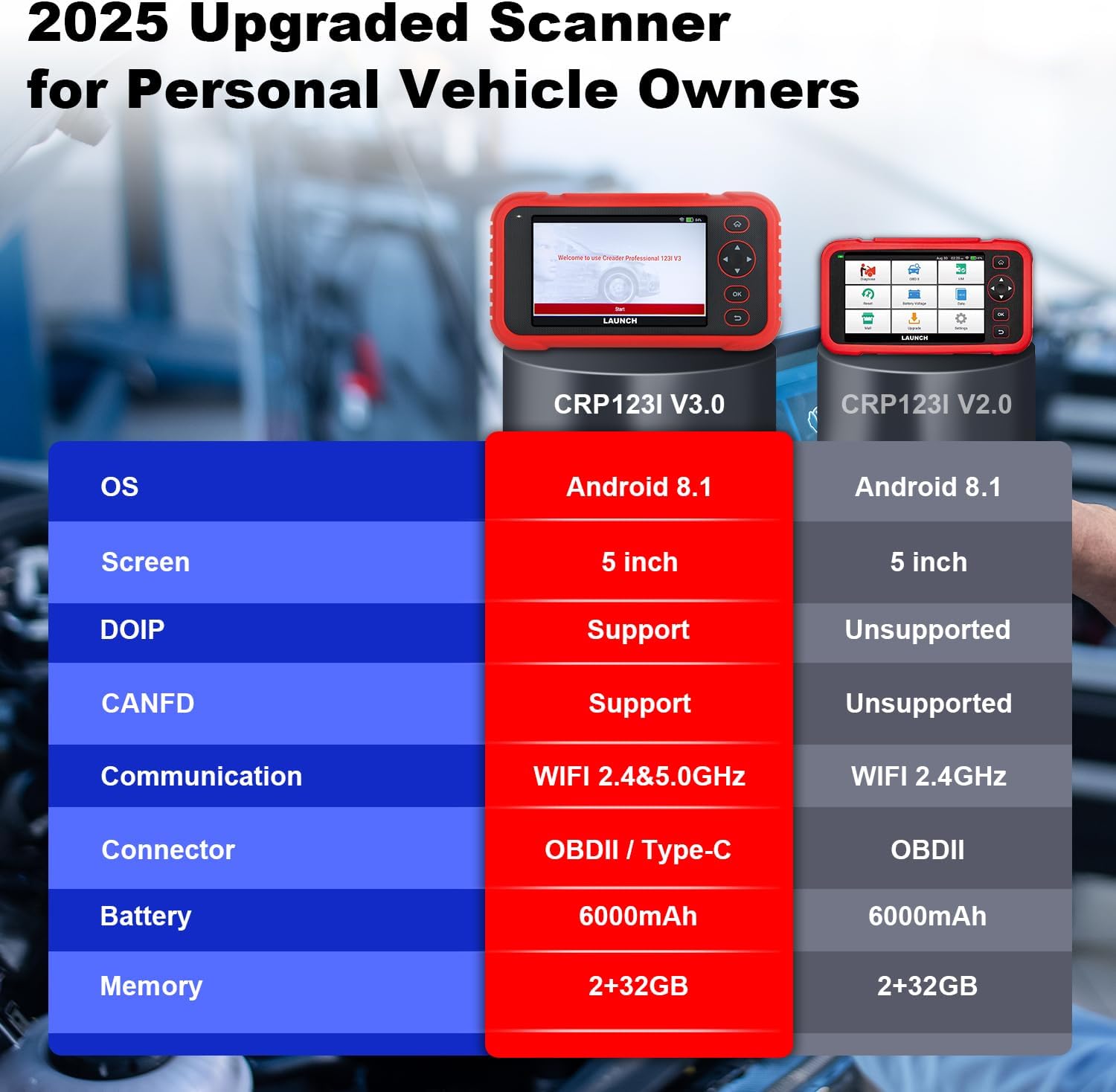
Image 1.2: Feature comparison between the CRP123I V3.0 and its predecessor, highlighting upgrades such as DOIP, CANFD, and dual-band WiFi.
2. เนื้อหาบรรจุภัณฑ์
เมื่อแกะกล่อง ตรวจสอบว่ามีส่วนประกอบทั้งหมดครบถ้วน:
- เครื่องมือสแกน CRP123I V3.0
- OBDII Diagnostic Cable
- สาย USB
- คู่มือการใช้งาน
- กระเป๋าใส่อุปกรณ์

Image 2.1: The complete package contents, including the scan tool, cables, user manual, and carrying case.
3. การตั้งค่า
โปรดทำตามขั้นตอนเหล่านี้สำหรับการตั้งค่าและการเชื่อมต่อเบื้องต้น:
- เปิดเครื่อง: Ensure the device is charged. The CRP123I V3.0 features a 6000mAh rechargeable battery.
- เชื่อมต่อกับยานพาหนะ: Locate your vehicle's OBDII port, typically under the dashboard on the driver's side. Connect the diagnostic cable from the scanner to the vehicle's OBDII port. The device supports OBDII and Type-C connections.
- การบูตครั้งแรก: The scanner will power on automatically or prompt you to press the power button. The 5-inch touchscreen will display the LAUNCH logo and then the main interface.
- การเชื่อมต่อเครือข่าย: For updates and online features, connect the device to a Wi-Fi network. The CRP123I V3.0 supports 2.4GHz and 5GHz dual Wi-Fi. Navigate to 'Settings' > 'Wi-Fi' to connect.
- อัพเดตซอฟต์แวร์: It is recommended to perform a software update upon first use to ensure you have the latest features and vehicle coverage. Access the 'Upgrade' menu for one-touch lifetime free updates.
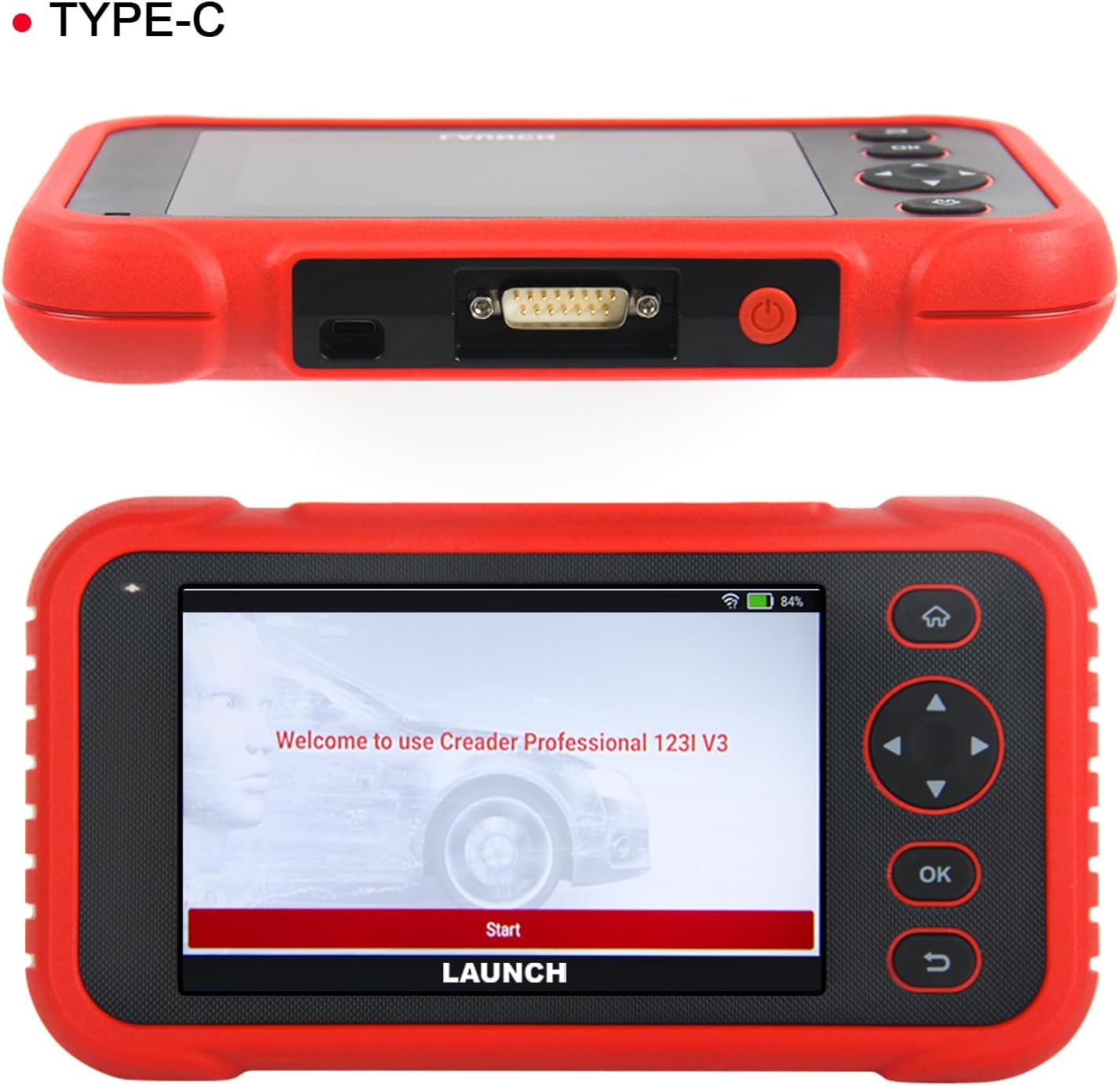
ภาพที่ 3.1: ด้านบน view of the scanner showing the OBDII connector, and front view displaying the initial welcome screen.
4. คู่มือการใช้งาน
4.1. การวินิจฉัยระบบ 4 ระบบ
The CRP123I V3.0 allows for in-depth diagnostics of four major vehicle systems:
- ระบบเครื่องยนต์: Reads and clears engine fault codes, views live data, and turns off the Malfunction Indicator Lamp (มิล).
- ระบบเบรกป้องกันล้อล็อก (ABS): Diagnoses ABS issues, reads/clears codes, and monitors live data related to braking performance.
- Supplemental Restraint System (SRS/Airbag): Detects and clears airbag system fault codes, ensuring proper functionality of safety components.
- ระบบส่งกำลัง : Analyzes transmission performance, reads/clears codes, and displays live data such as transmission temperature.

Image 4.1: Visual representation of the four OE-level systems (Engine, SRS, Transmission, ABS) that the scanner can diagnose.
4.2. 7 ฟังก์ชันรีเซ็ต
The tool provides 7 frequently used reset functions for common maintenance tasks:
- รีเซ็ตน้ำมัน: รีเซ็ตระบบอายุการใช้งานน้ำมันเครื่องหลังจากเปลี่ยนถ่ายน้ำมันเครื่องแล้ว
- Electric Throttle Relearn: เรียนรู้ตำแหน่งของลิ้นปีกผีเสื้อใหม่หลังจากทำความสะอาดหรือเปลี่ยนใหม่
- การรีเซ็ตมุมพวงมาลัย (SAS): รีเซ็ตเซ็นเซอร์มุมพวงมาลัย
- เลือดออกบริเวณ ABS: ทำการไล่ลมระบบเบรก ABS เพื่อคืนความไวในการเบรก
- Battery Matching (BMS Reset): รีเซ็ตระบบจัดการแบตเตอรี่หลังจากเปลี่ยนแบตเตอรี่
- ระบบรีเซ็ตเบรก (EPB): รีเซ็ตผ้าเบรกมือไฟฟ้าหลังจากเปลี่ยนใหม่
- การรีเซ็ต DPF: Performs Diesel Particulate Filter regeneration.
Note: The availability of specific service functions may vary by vehicle make, model, and year.

Image 4.2: An illustration of the seven hot reset services available on the CRP123I V3.0.
4.3. ฟังก์ชัน OBDII ครบถ้วน
The CRP123I V3.0 supports all 10 OBDII test modes for comprehensive emissions-related diagnostics:
- อ่านรหัส: Displays Diagnostic Trouble Codes (DTCs).
- รหัสที่ชัดเจน: Erases DTCs and turns off the MIL.
- ข้อมูลสด: แสดงข้อมูลแบบเรียลไทม์จากเซ็นเซอร์ของรถยนต์
- ความพร้อมของ I/M: Checks the readiness of emission monitors.
- ตรึงกรอบ: Stores a snapshot of vehicle operating conditions when an emission-related fault occurs.
- การทดสอบเซ็นเซอร์ O2: ดึงผลการทดสอบเครื่องตรวจสอบเซนเซอร์ O2
- การทดสอบจอภาพออนบอร์ด: ดึงผลลัพธ์สำหรับส่วนประกอบและระบบส่งกำลังที่เกี่ยวข้องกับการปล่อยมลพิษ
- การทดสอบ EVAP: เริ่มการทดสอบระบบควบคุมการปล่อยไอระเหย
- ข้อมูลยานพาหนะ: Retrieves vehicle identification information (VIN, CID, CVN).
- การค้นหาโค้ด DTC: ให้คำจำกัดความสำหรับรหัสทั่วไปและรหัสเฉพาะของผู้ผลิต

Image 4.3: A comprehensive display of the professional full OBDII functions supported by the scanner.
4.4. Live Data Streams and Smog Test
Monitor up to 4 real-time data streams simultaneously on one screen. This allows for quick diagnosis and verification of repairs without switching views. The I/M Readiness function helps check emission system status, assisting in preparation for smog tests by identifying potential issues like faulty sensors or catalytic converter problems.

Image 4.4: The 4-in-1 live data graphic display feature, enabling visualization and analysis of multiple data streams.

Image 4.5: A real-time voltage monitor display, useful for assessing battery and charging system health.
4.5. Vehicle Identification and Diagnostic Reports
The scanner supports automatic VIN (Vehicle Identification Number) detection for quick vehicle identification. For vehicles that do not support AUTO VIN, you can manually input the VIN. After diagnosis, the tool can generate and allow you to share or print detailed diagnostic reports.

Image 4.6: The AUTO VIN feature, simplifying vehicle identification.

Image 4.7: The VIN scan function and options for sharing and printing diagnostic reports.
4.6. ความคุ้มครองยานพาหนะ
The CRP123I V3.0 is compatible with all U.S. road vehicles manufactured after 1996 that comply with OBD2/EOBD/JOBD standards. This includes over 10,000 models, covering most gasoline cars, many 12V diesel vehicles, light-duty trucks, and a small range of gasoline-electric hybrid vehicles. It also supports AutoAuth for FCA SGW to access 2018+ FCA SGW-equipped models.

Image 4.8: An illustration of the extensive vehicle coverage across different regions and vehicle types.
5. การบำรุงรักษา
To ensure optimal performance and access to the latest features and vehicle compatibility, regularly update the scanner's software. The CRP123I V3.0 offers lifetime free software updates.
- การอัปเดตซอฟต์แวร์: Connect the device to Wi-Fi and navigate to the 'Upgrade' section on the main menu to download and install available updates.
- การทำความสะอาด: ใช้ผ้านุ่มและแห้งเช็ดทำความสะอาดอุปกรณ์ หลีกเลี่ยงน้ำยาทำความสะอาดหรือตัวทำละลายที่มีฤทธิ์กัดกร่อน
- พื้นที่จัดเก็บ: Store the scanner in its carrying case in a cool, dry place when not in use.

Image 5.1: The 'Lifetime Free Updated' feature ensures the scanner remains current with the latest vehicle data and functions.
6 การแก้ไขปัญหา
If you encounter issues with the CRP123I V3.0, consider the following:
- อุปกรณ์ไม่ได้เปิดเครื่อง: Ensure the battery is charged or the device is properly connected to the vehicle's OBDII port.
- ปัญหาการเชื่อมต่อ: Verify the OBDII cable is securely connected to both the scanner and the vehicle. Ensure the vehicle's ignition is on.
- ไม่สามารถติดต่อสื่อสารกับยานพาหนะได้: Check if your vehicle is OBDII compliant (generally 1996 and newer for U.S. vehicles). Ensure the vehicle's battery has sufficient voltage.
- ฟังก์ชันไม่ทำงาน: Some functions are vehicle-specific. Confirm compatibility for your vehicle's make, model, and year.
- ประสิทธิภาพการทำงานช้า: Ensure the device has sufficient memory. Perform regular software updates.
For specific fault code definitions, use the built-in DTC Library or the Fault Codes Google Search feature.

Image 6.1: The DTC Search function, providing quick access to fault code explanations via Google.
7. ข้อมูลจำเพาะ
| ผู้ผลิต | ปล่อย |
| แบบอย่าง | CRP123I |
| ระบบปฏิบัติการ | แอนดรอยด์ 8.1 |
| ขนาดหน้าจอ | 5 Inches (720P) |
| หน่วยความจำ | 32GB |
| แบตเตอรี่ | ลิเธียมไออน 6000mAh (รวมอยู่ด้วย) |
| การเชื่อมต่อ | 2.4 & 5GHz Dual WiFi, OBDII / Type-C |
| โปรโตคอลที่รองรับ | CANFD & DoIP, OBD2/EOBD/JOBD |
| น้ำหนักสินค้า | 2.27 ปอนด์ |
| ขนาดแพ็คเกจ | 9.84 x 7.09 x 2.76 นิ้ว |
| ประเภทความพอดีของยานยนต์ | พอดีทุกประการ |
8. การรับประกันและการสนับสนุน
The LAUNCH CRP123I V3.0 Elite OBD2 Scanner comes with a 5-year warranty. Enjoy lifetime free software updates to keep your diagnostic tool current with the latest features and vehicle compatibility. For any inquiries, technical assistance, or support, please contact our dedicated customer service team.
อีเมลสนับสนุนลูกค้า: nina@hilson.com.cn
Our 24/7 professional service team is committed to providing one-on-one customer service to ensure your satisfaction.


