1. บทนำ
This manual provides essential information for the setup, operation, and maintenance of your NIMO 15.6-inch laptop, model N15A. Please read this guide thoroughly to ensure optimal performance and longevity of your device.
1.1 ผลิตภัณฑ์เกินview
The NIMO 15.6-inch laptop is designed for productivity and light gaming, featuring an AMD Ryzen 7 Pro 6850U processor, 16GB LPDDR5 RAM, and a 1TB PCIe 4.0 SSD. It includes a 15.6" FHD IPS anti-glare display, a backlit keyboard, and an integrated fingerprint sensor for secure login.

Image 1.1: NIMO 15.6-inch Laptop N15A. This image displays the laptop with its screen showing a dynamic graphic, highlighting key features like the 15.6" FHD IPS display, AMD Ryzen 7 Pro 6850U processor, 16GB RAM, 1TB SSD, fingerprint sensor, Type-C PD charger, and backlit keyboard.
1.2 อะไรอยู่ในกล่อง
- แล็ปท็อป NIMO N15A จำนวน 1 เครื่อง
- 1 x ที่ชาร์จเร็ว Type-C 100W PD
- 1 x คู่มือผู้ใช้ (เอกสารนี้)
- ระบบปฏิบัติการ Windows 11 Home (ติดตั้งมาแล้ว)
2. การตั้งค่า
2.1 การชาร์จเริ่มต้น
Before first use, it is recommended to fully charge your NIMO laptop. Connect the included 100W PD fast charger to the Type-C charging port on the laptop and to a power outlet. The charging indicator light will illuminate. A 15-minute charge can provide up to 2 hours of usage, and a full charge typically takes approximately 1 hour for 5 hours of usage, with up to 12 hours of standby time.
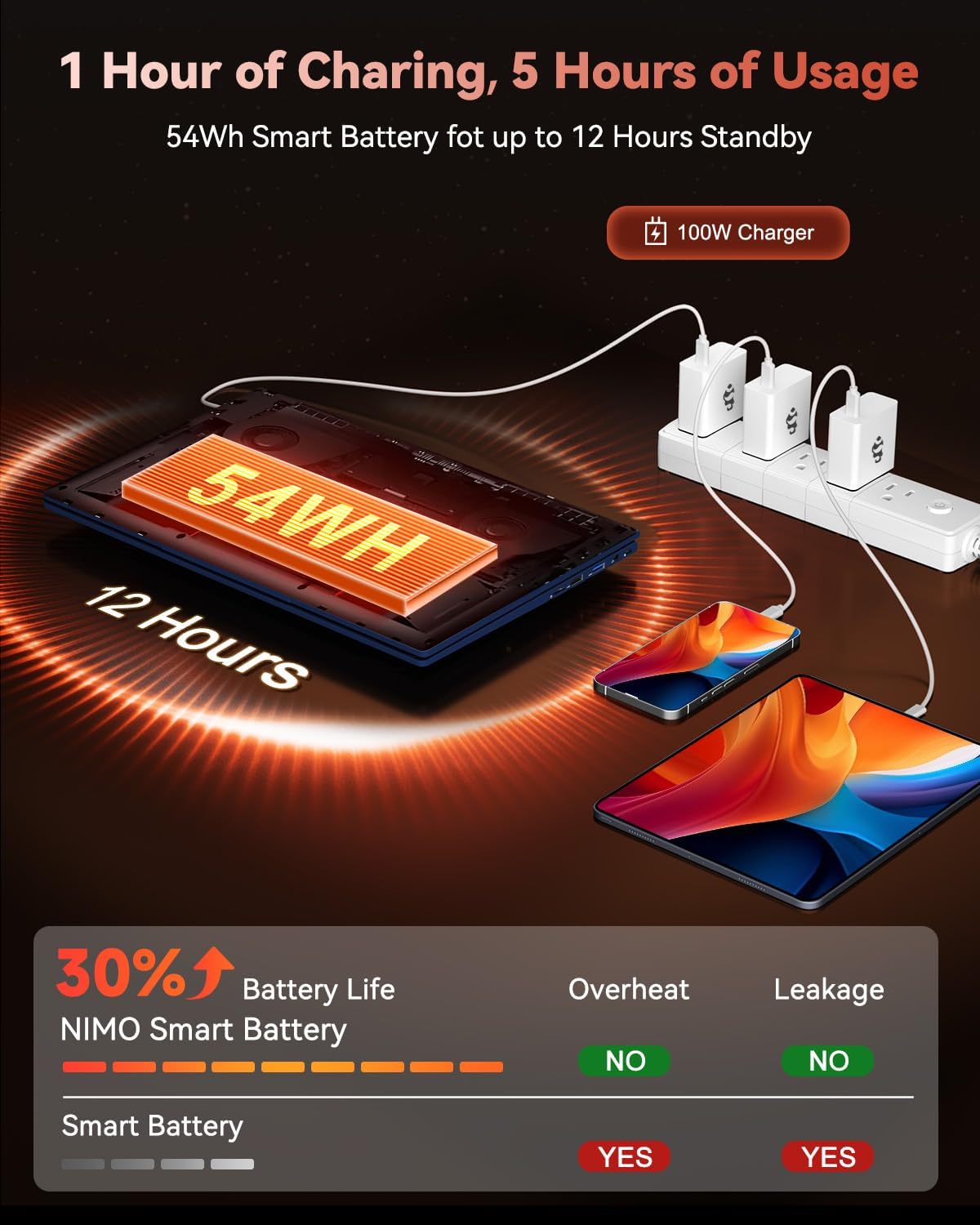
Image 2.1: NIMO Laptop Charging. This image illustrates the laptop being charged with the 100W Type-C PD fast charger, highlighting the 54Wh smart battery and charging efficiency.
2.2 การเปิดเครื่อง
Press the power button located on the keyboard to turn on the laptop. The system will boot into Windows 11 Home. Follow the on-screen instructions for initial Windows setup, including language selection, network connection, and user account creation.
3. การดำเนินการ
3.1 การแสดงผล
Your NIMO laptop features a 15.6-inch Full HD (1920x1080 pixels) IPS anti-glare display. This display offers clear, vibrant visuals with an 85% screen-to-body ratio and eye protection features. Adjust brightness using the function keys (Fn + Fx keys, refer to keyboard layout for specific keys).

Image 3.1: NIMO Laptop Display. This image emphasizes the 15.6-inch Full HD IPS display with its 1920x1080 resolution, bright viewและคุณสมบัติในการปกป้องดวงตา
3.2 คีย์บอร์ดและทัชแพด
The laptop is equipped with a backlit keyboard for comfortable typing in various lighting conditions. The precision gesture touchpad allows for effortless navigation. An integrated fingerprint sensor is located on the touchpad for secure and instant login.

Image 3.2: NIMO Laptop Backlit Keyboard and Fingerprint Sensor. This image shows a user interacting with the laptop, highlighting the backlit keyboard and the fingerprint sensor on the touchpad.
3.3 Webกล้องความเป็นส่วนตัว
The laptop includes a built-in 2.0 MP webcam with a privacy camera switch. This allows you to physically disable the webcam when not in use, enhancing your privacy.
4. การปฏิบัติงาน
4.1 โปรเซสเซอร์และกราฟิก
The NIMO N15A is powered by an AMD Ryzen 7 Pro 6850U processor, featuring 8 cores and 16 threads with turbo speeds up to 4.7GHz. This processor is designed for efficient handling of demanding tasks, professional workloads, and content creation. Integrated graphics are provided by the AMD Radeon 680M GPU, one of the most capable integrated GPUs available, offering balanced performance for productivity and gaming.

Image 4.1: AMD Ryzen 7 Pro 6850U Processor. This image visually represents the AMD Ryzen 7 Pro 6850U processor, highlighting its 8 cores, 16 threads, 680M GPU Radeon, and 4.7GHz turbo boost.

Image 4.2: AMD Radeon 680M Graphics. This image showcases the laptop's capability with AMD Radeon 680M graphics, displaying various applications and games.
4.2 หน่วยความจำและที่เก็บข้อมูล
The laptop comes equipped with 16GB of LPDDR5 RAM, operating at 6400 MHz, providing a 50% speed increase compared to DDR4. For storage, it includes a 1TB PCIe 4.0 SSD, offering rapid multitasking and data access with speeds up to 6000 MB/s. This configuration ensures seamless multitasking and ampที่เก็บของสำหรับคุณ fileและแอปพลิเคชั่น

Image 4.3: NIMO Laptop Memory and Storage. This image illustrates the 1TB PCIe 4.0 SSD and 16GB LPDDR5 RAM, demonstrating the laptop's multitasking capabilities with multiple applications open.
5. การเชื่อมต่อ
The NIMO N15A laptop offers a range of high-speed interfaces for connecting peripherals and external devices:
- พอร์ต USB 3.0: พอร์ต 4 ช่องสำหรับการถ่ายโอนข้อมูลความเร็วสูง
- พอร์ต USB 2.0: 1 port for general peripheral connections.
- พอร์ต Type-C: Multiple Type-C ports, including one for 100W PD charging and others with multifunction capabilities.
- พอร์ต HDMI: สำหรับเชื่อมต่อกับจอแสดงผลภายนอกหรือโปรเจ็กเตอร์
- แจ็คหูฟัง: สำหรับเอาต์พุตเสียง
- เครื่องอ่านการ์ด Micro SD: For expanding storage or transferring data from memory cards.
- สล็อตล็อคเคนซิงตัน: เพื่อความปลอดภัยทางกายภาพ
- การเชื่อมต่อไร้สาย: Supports 802.11a/b/g/n/ac for Wi-Fi.

Image 5.1: NIMO Laptop Connectivity Ports. This image provides a detailed diagram of the laptop's various ports, including Micro SD, USB 2.0, USB 3.2, Headphone Jack, Kensington Lock, Type-C (multifunction), HDMI, and Charger LED.
6. การบำรุงรักษา
6.1 การดูแลทั่วไป
- รักษาแล็ปท็อปให้สะอาดโดยเช็ดพื้นผิวต่างๆ ด้วยผ้าแห้งและนุ่มเป็นประจำ
- หลีกเลี่ยงการวางแล็ปท็อปไว้ในที่ที่มีอุณหภูมิสูง แสงแดดโดยตรง หรือความชื้นสูง
- อย่าวางวัตถุหนักบนแล็ปท็อป
- ตรวจสอบให้แน่ใจว่ามีการระบายอากาศที่เหมาะสมโดยไม่ปิดกั้นช่องระบายอากาศ
6.2 การอัพเกรดส่วนประกอบ
The NIMO N15A laptop is designed with user-friendly upgrade options. You can easily upgrade components such as the SSD to meet evolving needs. Refer to the official NIMO support resources or a qualified technician for detailed upgrade instructions to avoid voiding your warranty.
7 การแก้ไขปัญหา
This section addresses common issues you might encounter with your NIMO laptop. For more complex problems, please contact NIMO customer support.
7.1 ปัญหาพลังงาน
- โน๊ตบุ๊คเปิดไม่ติด: Ensure the charger is properly connected and the battery has sufficient charge. Try holding the power button for 10-15 seconds to perform a hard reset.
- ไม่ชาร์จแบตเตอรี่: Verify the charger is functioning correctly and connected to a working power outlet. Check the Type-C cable for damage.
7.2 ปัญหาการแสดงผล
- หน้าจอว่างเปล่า: Ensure the laptop is powered on. Try adjusting the display brightness using function keys. Connect to an external monitor to check if the issue is with the laptop's internal display.
7.3 ปัญหาการเชื่อมต่อ
- Wi-Fi ไม่เชื่อมต่อ: Check if Wi-Fi is enabled in Windows settings. Restart your router and the laptop. Ensure correct Wi-Fi password is entered.
- อุปกรณ์ USB ไม่ได้รับการตรวจพบ: Try connecting the device to a different USB port. Ensure device drivers are up to date.
8. ข้อมูลจำเพาะ
| คุณสมบัติ | รายละเอียด |
|---|---|
| ยี่ห้อ | นีโม |
| ชื่อรุ่น | NIMO N15AB (N15A) |
| ขนาดหน้าจอ | 15.6 นิ้ว |
| ความละเอียดหน้าจอ | 1920 x 1080 Pixels (Full HD IPS) |
| โปรเซสเซอร์ | AMD Ryzen 7 Pro 6850U (8 Cores, up to 4.7 GHz) |
| แรม | 16GB LPDDR5 (6400 เมกะเฮิรตซ์) |
| ฮาร์ดไดรฟ์ | SSD ขนาด 1024 GB (PCIe 4.0) |
| โคโปรเซสเซอร์กราฟิก | การ์ดจอ AMD Radeon 680M (แบบรวมในตัว) |
| ระบบปฏิบัติการ | วินโดวส์ 11 โฮม |
| ประเภทไร้สาย | 802.11a/b/g/n/ac |
| พอร์ต USB | 1 x USB 2.0, 4 x USB 3.0, Multiple Type-C (Multifunction) |
| พอร์ตอื่น ๆ | HDMI, Headphone Jack, Micro SD Reader, Kensington Lock |
| อายุการใช้งานแบตเตอรี่ (เฉลี่ย) | 9 ชั่วโมง |
| น้ำหนักสินค้า | 3.8 ปอนด์ |
| ขนาดสินค้า | 14.07 x 8.98 x 0.76 นิ้ว |
| คุณสมบัติพิเศษ | คีย์บอร์ดเรืองแสง, เครื่องอ่านลายนิ้วมือ, ระบบเสียง HD, แป้นตัวเลข |
| หลัง Webความละเอียดของกล้อง | 2 MP |
9. การรับประกันและการสนับสนุน
NIMO stands by the quality of its products. Your NIMO laptop comes with the following:
- การรับประกันจากผู้ผลิต 2 ปี: ครอบคลุมถึงข้อบกพร่องในด้านวัสดุและฝีมือการผลิตภายใต้การใช้งานปกติ
- นโยบายการคืนสินค้าแบบไม่ยุ่งยากภายใน 90 วัน: สามารถคืนสินค้าได้ภายใน 90 วันนับจากวันที่ซื้อ
For technical assistance, warranty claims, or product-related inquiries, please contact NIMO customer support. Our dedicated support team is available to provide prompt and effective assistance.
Contact information may be found on the official NIMO website or through the product page where you made your purchase.


