การแนะนำ
This manual provides comprehensive instructions for the installation, operation, and maintenance of your Imou Cell 3C AIO 5MP Solar Surveillance Camera. Please read this manual thoroughly before use and retain it for future reference.
The Imou Cell 3C AIO is a wireless, rechargeable surveillance camera featuring an integrated 2.2W solar panel for continuous power. It offers 5MP (3K) resolution, IP66 weather resistance, smart color night vision, and advanced human detection with smart tracking. Key features include a built-in siren and spotlight for deterrence, flexible storage options via microSD card or Imou Cloud, and a privacy mode for enhanced security.
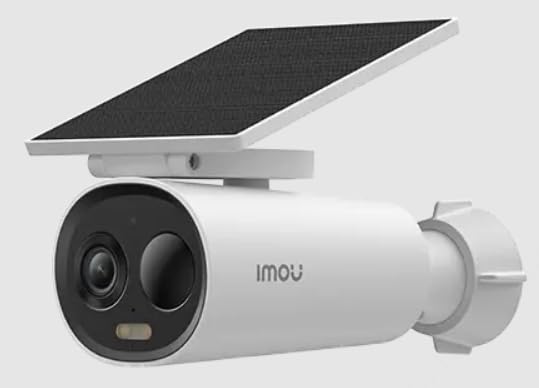
Image of the Imou Cell 3C AIO 5MP Solar Surveillance Camera, showcasing its compact design and integrated solar panel.
การตั้งค่า
Follow these steps for initial setup of your Imou Cell 3C AIO camera:
- แกะกล่องและตรวจสอบ: Carefully remove all components from the packaging and ensure everything is present and undamaged.
- ค่าใช้จ่ายเริ่มต้น: Although solar-powered, it is recommended to fully charge the camera using a 5V USB adapter (not included) before the first use to ensure optimal performance.
- ดาวน์โหลดแอป Imou Life: ดาวน์โหลดและติดตั้งแอป "Imou Life" จากแอปสโตร์ของสมาร์ทโฟนของคุณ (มีให้ใช้งานบน iOS และ Android)
- การสร้างบัญชี: เปิดแอป Imou Life แล้วสร้างบัญชีใหม่หรือเข้าสู่ระบบด้วยบัญชีที่มีอยู่แล้ว
- เพิ่มอุปกรณ์: Follow the in-app instructions to add your camera. This typically involves scanning a QR code on the camera or its packaging.
- ตำแหน่งการติดตั้ง: Select a suitable outdoor location for mounting. Ensure the solar panel receives direct sunlight for several hours daily to maintain battery charge. The camera is IP66 weather-resistant, suitable for various outdoor conditions.
- การติดตั้งที่ปลอดภัย: Use the provided mounting hardware to securely attach the camera to the chosen surface. Adjust the camera angle for optimal surveillance coverage.
คำแนะนำการใช้งาน
Utilize the Imou Life app to access and control your camera's features:
- สด View: เปิดแอป Imou Life แล้วเลือกกล้องของคุณจากรายการอุปกรณ์เพื่อ view การถ่ายทอดสดวิดีโอแบบเรียลไทม์
- การตรวจจับและติดตามการเคลื่อนไหว: The camera features advanced human detection and smart tracking. Configure detection sensitivity, activity zones, and alert preferences within the app settings.
- การมองเห็นตอนกลางคืน: The camera supports smart color night vision, which automatically activates in low-light conditions to provide clear, full-color images.
- เสียงไซเรนและไฟสปอตไลท์: The integrated spotlight and siren can be configured to activate automatically upon detection of an intruder, or they can be manually triggered through the Imou Life app to deter potential threats.
- การจัดเก็บวิดีโอ:
- การ์ด MicroSD: Insert a microSD card (up to 256GB, not included) into the designated slot for local video storage.
- อิมโม คลาวด์: Subscribe to Imou Cloud for secure cloud storage of your video recordings. Refer to the app for subscription details and free trial availability.
- โหมดความเป็นส่วนตัว: Activate the privacy mode within the Imou Life app. This feature physically covers the camera lens, ensuring your privacy when desired.
การซ่อมบำรุง
การบำรุงรักษาอย่างถูกต้องจะช่วยให้กล้องของคุณมีอายุการใช้งานยาวนานและมีประสิทธิภาพสูงสุด:
- การทำความสะอาด: ทำความสะอาดเลนส์กล้องและพื้นผิวแผงโซลาร์เซลล์เป็นประจำด้วยผ้าเนื้อนุ่มและแห้งamp cloth. Avoid using abrasive cleaners or harsh chemicals, as these can damage the components.
- อัพเดตเฟิร์มแวร์: Periodically check for and install firmware updates through the Imou Life app. Updates often include performance improvements, new features, and security enhancements.
- การดูแลสิ่งแวดล้อม: While IP66 rated, extreme environmental conditions (e.g., prolonged exposure to direct salt spray, very high humidity, or temperatures outside the specified operating range) should be minimized to prevent potential damage.
- สุขภาพแบตเตอรี่: Ensure the solar panel receives adequate sunlight daily to maintain the internal battery's charge. If the camera is in a shaded area, occasional manual charging via USB may be required.
การแก้ไขปัญหา
โปรดดูส่วนนี้สำหรับวิธีแก้ปัญหาที่พบบ่อย:
- กล้องไม่เปิดเครื่อง:
- Check if the solar panel is obstructed or receiving insufficient sunlight.
- Ensure the internal battery has sufficient charge. If necessary, manually charge the camera via USB.
- ไม่สามารถเชื่อมต่อกับ Wi-Fi ได้:
- ตรวจสอบให้แน่ใจว่ากล้องอยู่ในระยะสัญญาณของเราเตอร์ Wi-Fi ของคุณ
- Double-check the Wi-Fi password entered in the Imou Life app.
- รีสตาร์ททั้งกล้องและเราเตอร์ Wi-Fi ของคุณ
- คุณภาพของภาพต่ำ:
- ทำความสะอาดเลนส์กล้องเพื่อขจัดสิ่งสกปรกหรือรอยเปื้อนต่างๆ
- Ensure there is adequate lighting in the surveillance area, especially for optimal color night vision.
- Check your network connection stability, as a weak signal can affect video streaming quality.
- การตรวจจับความเคลื่อนไหวไม่ทำงาน:
- Verify that motion detection is enabled and configured correctly in the Imou Life app settings.
- Adjust the detection sensitivity and ensure activity zones are properly defined.
- ตรวจสอบให้แน่ใจว่าไม่มีสิ่งกีดขวางทางกายภาพใดๆ บังกล้อง view ในพื้นที่การตรวจจับ
ข้อมูลจำเพาะ
| คุณสมบัติ | รายละเอียด |
|---|---|
| หมายเลขรุ่น | ไอพีซี-K9DC-5M0WEH-V2 |
| ยี่ห้อ | อิโม |
| ปณิธาน | 5 ล้านพิกเซล (3K) |
| แผงโซลาร์เซลล์แบบรวม | 2.2 วัตต์ |
| ทนทานต่อสภาพอากาศ | ได้รับการรับรอง IP66 |
| ขนาด (กว้าง x ยาว x สูง) | 16.8 x 7.2 x 6 ซม. |
| น้ำหนัก | 650 กรัม |
| การใช้พลังงาน | 3.5 วัตต์ |
| เล่มที่tage | 5 โวลต์ |
| ตัวเลือกการจัดเก็บข้อมูล | MicroSD card (up to 256GB), Imou Cloud |
| คุณสมบัติ | Human Detection, Smart Tracking, Smart Color Night Vision, Siren, Spotlight, Privacy Mode |
การรับประกันและการสนับสนุน
For detailed warranty information, technical assistance, or customer support, please visit the official Imou website or contact their authorized service centers. Retain your proof of purchase for any warranty claims.


