1. บทนำ
The Trevi RDA 70 BR is a compact and versatile portable radio designed to provide a comprehensive listening experience. It combines traditional radio functionality with modern digital features, making it suitable for listening to music or news anywhere. This manual provides instructions for the proper setup, operation, and maintenance of your device.
2. ข้อมูลด้านความปลอดภัย
- อ่านคำแนะนำทั้งหมดอย่างละเอียดก่อนใช้อุปกรณ์
- อย่านำวิทยุไปวางไว้กลางฝน ความชื้น หรืออุณหภูมิที่สูงหรือต่ำเกินไป
- หลีกเลี่ยงการวางอุปกรณ์ใกล้แหล่งความร้อนหรือแสงแดดโดยตรง
- ห้ามถอดประกอบหรือพยายามซ่อมแซมเครื่องด้วยตนเอง แนะนำให้ช่างผู้ชำนาญการเป็นผู้ดำเนินการซ่อมบำรุงทั้งหมด
- เก็บอุปกรณ์ให้ห่างจากสนามแม่เหล็กแรงสูง
- Use only the specified charging cable (USB Type-C) for recharging the battery.
3. เนื้อหาบรรจุภัณฑ์
ตรวจสอบให้แน่ใจว่ามีรายการทั้งหมดอยู่ในบรรจุภัณฑ์:
- Trevi RDA 70 BR Portable Radio
- สายชาร์จแบบ USB Type-C
- คู่มือการใช้งาน (เอกสารนี้)
4. สินค้าหมดview
Familiarize yourself with the various parts and controls of your Trevi RDA 70 BR radio.

รูปที่ 1: ด้านหน้าทำมุม view of the Trevi RDA 70 BR Portable Radio, showing the speaker grille, display, and main controls.
แผงควบคุมด้านหน้า
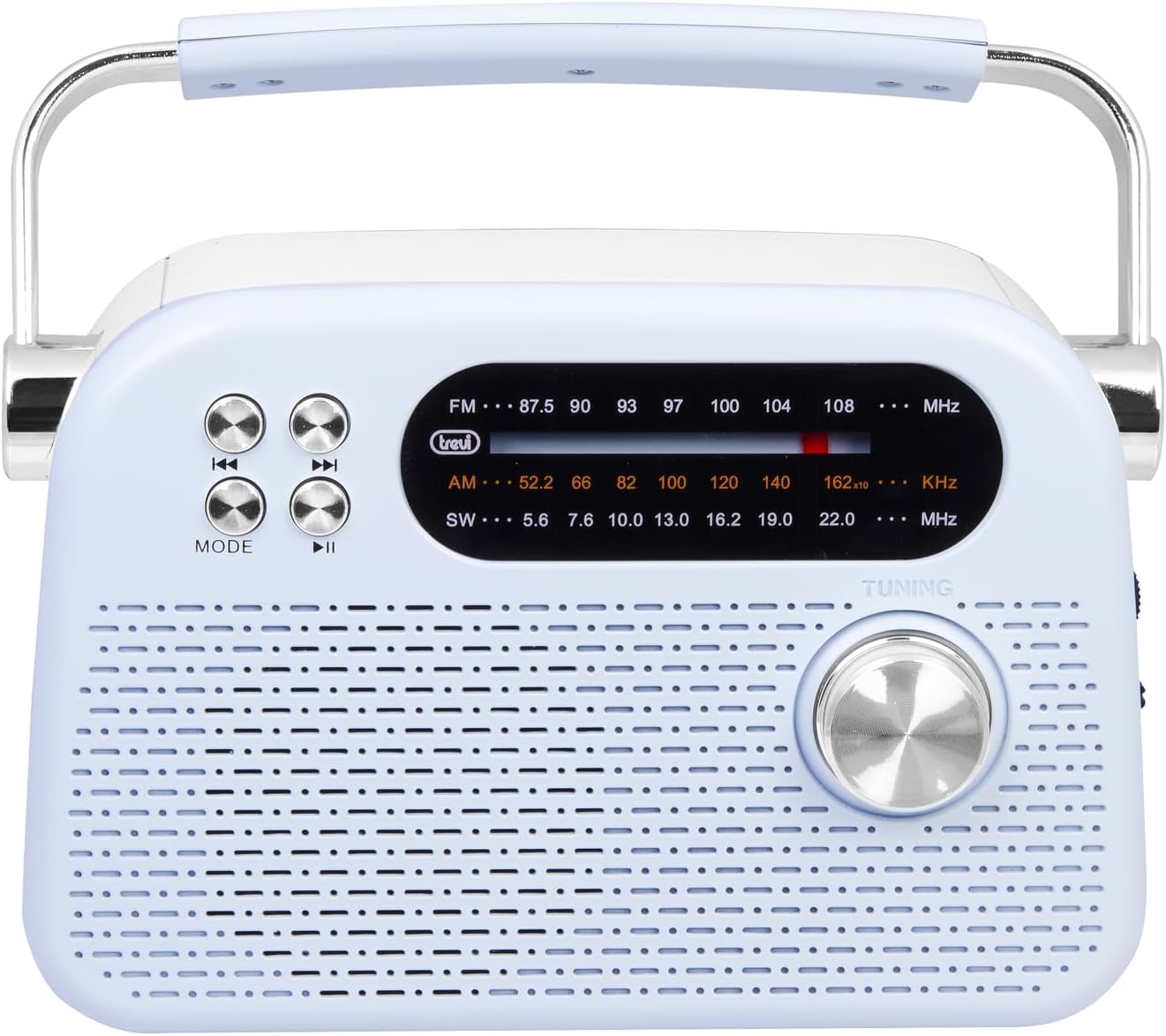
รูปที่ 2: รายละเอียดด้านหน้า view highlighting the display, mode button, playback controls, and tuning knob.
- แสดง: Shows frequency, mode, and other information.
- ปุ่มโหมด: Switches between radio bands (FM/AM/SW) and media playback modes (USB/Micro SD/Wireless).
- Playback Controls (◀◀ / ▶▶ / ▶▶): Used for skipping tracks in media mode or fine-tuning in radio mode.
- ปุ่มปรับ: For manual station tuning.
Side Panel Controls and Ports

รูปที่ 3: ด้านข้าง view showing the power switch, volume control, USB port, Micro SD slot, and USB Type-C charging port.
- OFF/ON/Volume Knob: Turns the radio on/off and adjusts the volume level.
- DC 5V IN (USB Type-C): ช่องชาร์จสำหรับแบตเตอรี่ภายใน
- พอร์ต USB: สำหรับเชื่อมต่อแฟลชไดรฟ์ USB เพื่อเล่น MP3
- Micro SD Slot (TF): For inserting Micro SD cards for MP3 playback.
- สวิตช์เลือกคลื่นความถี่: Selects between FM, AM, and SW radio bands, and MEDIA mode for USB/Micro SD/Wireless.
แผงด้านหลัง

รูปที่ 4: ด้านหลัง view showing the telescopic antenna and battery compartment.
- เสาอากาศยืดไสลด์: Extend for improved radio reception, especially for FM and SW bands.
- ช่องใส่แบตเตอรี่: Houses the rechargeable lithium battery.
5. การตั้งค่า
5.1 การชาร์จแบตเตอรี่
- Locate the USB Type-C charging port on the side of the radio.
- Connect the provided USB Type-C cable to the radio's charging port.
- ต่อปลายอีกด้านของสาย USB เข้ากับอะแดปเตอร์แปลงไฟ USB มาตรฐาน (ไม่ได้รวมอยู่ในชุด) หรือพอร์ต USB ของคอมพิวเตอร์
- The charging indicator light will illuminate (if present) to show charging status.
- Once fully charged, disconnect the cable. A full charge ensures maximum portability and uninterrupted use.
5.2 การปรับเสาอากาศ
For optimal radio reception, extend the telescopic antenna fully. Adjust its direction and angle to achieve the clearest signal, especially for FM and Shortwave (SW) broadcasts.
6. คู่มือการใช้งาน
6.1 การเปิด/ปิดเครื่องและการควบคุมระดับเสียง
- เพื่อเปิดวิทยุ ON, rotate the OFF/ON/Volume knob clockwise.
- Continue rotating the knob clockwise to เพิ่มระดับเสียง.
- Rotate the knob counter-clockwise to ลดระดับเสียง.
- เพื่อเปิดวิทยุ ปิด, rotate the knob counter-clockwise until it clicks into the OFF position.
การเลือกโหมด 6.2
ใช้ สวิตช์เลือกวงดนตรี on the side panel to choose your desired mode:
- เอฟเอ็ม: For Frequency Modulation radio stations.
- AM: สำหรับ Amplitude Modulation radio stations.
- สว.: For Shortwave radio stations.
- สื่อ: For playing audio from USB, Micro SD, or Wireless (Bluetooth) sources.
6.3 การปรับจูนวิทยุ
- Select the desired radio band (FM, AM, or SW) using the Band Selector Switch.
- ขยายเสาอากาศแบบยืดหดเพื่อการรับสัญญาณที่ดีขึ้น
- ค่อยๆหมุน ลูกบิดปรับแต่ง on the front panel to scan for stations.
- The frequency will be displayed on the screen. Stop tuning when you find a clear station.
6.4 USB/Micro SD Playback (MP3)
- Insert a USB flash drive or a Micro SD card (with MP3 files) into the corresponding port/slot on the side panel.
- Switch the Band Selector Switch to สื่อมวลชน mode. The radio should automatically detect and begin playing MP3 files.
- ใช้ การควบคุมการเล่น (◀◀ / ▶▶) to skip to the previous or next track.
- ใช้ เล่น/หยุดชั่วคราว (▶▶) ปุ่มเพื่อหยุดชั่วคราวหรือเล่นต่อ
6.5 การเชื่อมต่อแบบไร้สาย (บลูทูธ)
The radio supports wireless audio streaming from compatible devices.
- Switch the Band Selector Switch to สื่อมวลชน mode. The radio will enter Bluetooth pairing mode (indicated by an audible prompt or flashing indicator).
- บนสมาร์ทโฟน แท็บเล็ต หรืออุปกรณ์อื่นๆ ที่เปิดใช้งาน Bluetooth ของคุณ ให้เปิดใช้งาน Bluetooth และค้นหาอุปกรณ์ที่มีอยู่
- เลือก "Trevi RDA 70 BR" (or similar name) from the list of devices to pair.
- เมื่อจับคู่เสร็จแล้ว คุณสามารถสตรีมเสียงจากอุปกรณ์ของคุณไปยังวิทยุได้
- Use the playback controls on your connected device or the radio's playback controls to manage audio.
7. การบำรุงรักษา
- การทำความสะอาด: ใช้ผ้านุ่มและแห้งเช็ดทำความสะอาดภายนอกวิทยุ ห้ามใช้น้ำยาทำความสะอาดที่มีฤทธิ์กัดกร่อนหรือตัวทำละลาย
- พื้นที่จัดเก็บ: เมื่อไม่ได้ใช้งานเป็นเวลานาน ควรเก็บวิทยุไว้ในที่แห้งและเย็น หลีกเลี่ยงแสงแดดโดยตรงและอุณหภูมิที่สูงหรือต่ำเกินไป
- การดูแลแบตเตอรี่ เพื่อยืดอายุการใช้งานแบตเตอรี่ ควรหลีกเลี่ยงการปล่อยให้แบตเตอรี่หมดจนเกลี้ยงบ่อยๆ ควรชาร์จแบตเตอรี่เป็นประจำ แม้ว่าจะไม่ได้ใช้งานอย่างต่อเนื่องก็ตาม
8 การแก้ไขปัญหา
| ปัญหา | สาเหตุที่เป็นไปได้ | สารละลาย |
|---|---|---|
| ไม่มีไฟฟ้า | Battery is discharged; Power knob is OFF. | Charge the battery; Rotate the power knob to ON. |
| การรับสัญญาณวิทยุไม่ดี | เสาอากาศไม่ยืดออก สัญญาณอ่อน มีสัญญาณรบกวน | Extend and adjust the telescopic antenna; Move the radio to a different location; Tune carefully. |
| USB/Micro SD เล่นไม่ได้ | Incorrect mode; Unsupported file รูปแบบ; เสียหาย files. | Ensure Band Selector Switch is on MEDIA; Check if files are MP3 format; Try a different USB/Micro SD card. |
| Cannot connect via Wireless (Bluetooth) | Radio not in pairing mode; Bluetooth off on device; Device already connected to another unit. | Ensure radio is in MEDIA mode; Enable Bluetooth on your device; Disconnect from other devices and try again. |
9. ข้อมูลจำเพาะ
| คุณสมบัติ | รายละเอียด |
|---|---|
| ยี่ห้อ | เทรวี |
| แบบอย่าง | อาร์ดีเอ 70 บีอาร์ |
| ขนาด (กว้าง x ยาว x สูง) | 18.5 x 7 x 12.5 ซม. |
| น้ำหนัก | 600 กรัม |
| แหล่งพลังงาน | แบตเตอรี่ลิเธียมแบบชาร์จไฟได้ |
| พอร์ตชาร์จ | พอร์ต USB Type-C (DC 5V) |
| แถบความถี่วิทยุที่รองรับ | เอฟเอ็ม, เอเอ็ม, เอสดับบลิว |
| การเล่นสื่อ | USB, Micro SD (MP3 format) |
| การเชื่อมต่อแบบไร้สาย | Yes (Bluetooth compatible) |
| คุณสมบัติพิเศษ | พกพาได้, ชาร์จไฟได้ |
10. การรับประกันและการสนับสนุน
For warranty information and customer support, please refer to the documentation provided at the time of purchase or visit the official Trevi website. Standard return policies apply for products purchased through retailers. For specific details regarding returns or defective products, consult your purchase platform's help pages.


