การแนะนำ
This manual provides essential information for the safe and efficient use of your Getac B300 G7 Fully Rugged Notebook. Please read this manual thoroughly before operating the device and retain it for future reference.
The Getac B300 G7 is designed for demanding environments, featuring MIL-STD-810G and IP65 certifications for resistance against shock, vibration, dust, and water.
การตั้งค่า
1. การแกะกล่องและการตรวจสอบเบื้องต้น
Carefully remove the notebook and all accessories from the packaging. Inspect the device for any signs of damage. If any damage is found, contact your vendor immediately.
2. การเชื่อมต่อพลังงาน
Before initial use, ensure the battery is fully charged. Connect the AC adapter to the notebook's DC-in jack and then to a power outlet.
- อะแดปเตอร์ AC: 90วัตต์
- แบตเตอรี่: Li-on 10.8V

Figure 1: Left side of the Getac B300 G7, showing various ports including the power input.
3. การบูตเครื่องครั้งแรก
Press the power button to turn on the notebook. The device will boot into Windows 11 Pro. Follow the on-screen instructions to complete the initial setup of the operating system.
4. การเชื่อมต่ออุปกรณ์ต่อพ่วง
The Getac B300 G7 offers multiple ports for connecting external devices:
- ยูเอสบี 3.0: 3 ports for connecting USB devices like external drives, keyboards, or mice.
- แลน (RJ45): สำหรับการเชื่อมต่อเครือข่ายแบบใช้สาย
- ช่องต่อ HDMI: สำหรับเชื่อมต่อกับจอแสดงผลภายนอก
- External VGA: For connecting to older external displays.
- พอร์ตอนุกรม: 2 ports for legacy device connectivity.
- Microphone (Mini-jack): สำหรับอินพุตไมโครโฟนภายนอก
- Audio Output (Mini-jack): สำหรับหูฟังหรือลำโพงภายนอก
- Docking Connector: For connecting to a compatible docking station.
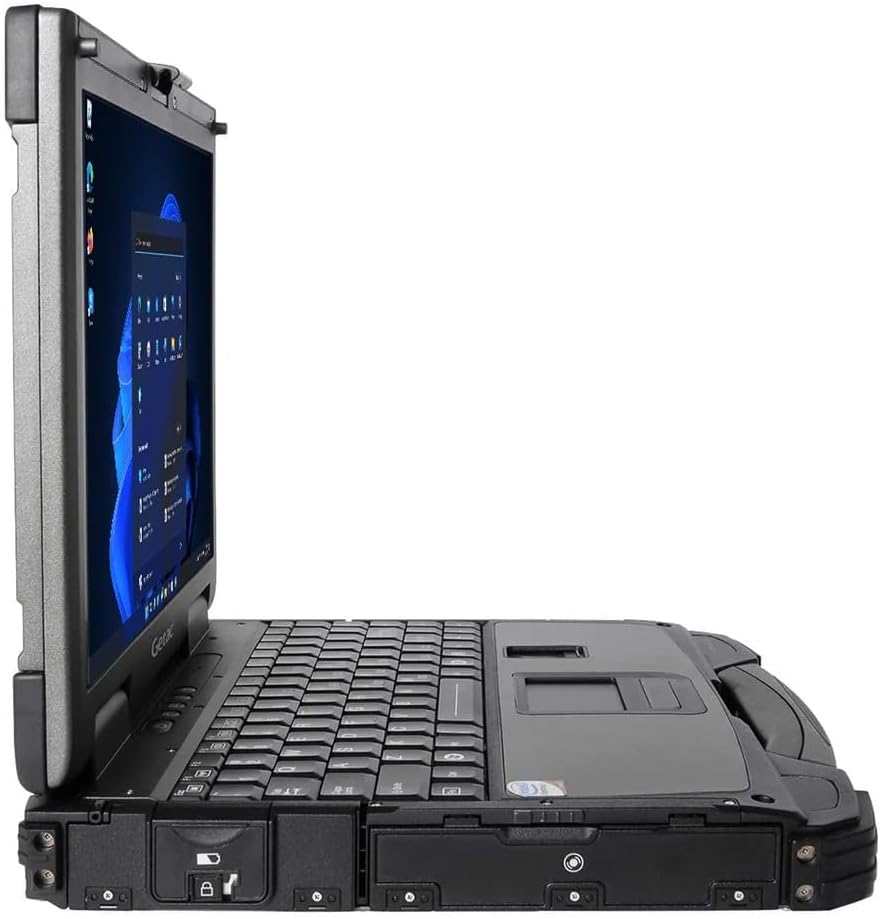
Figure 2: Right side of the Getac B300 G7, showing additional ports.
Operating the Notebook
1. เปิด/ปิดเครื่อง
- การเปิดเครื่อง: กดปุ่มเปิดปิดที่อยู่บนอุปกรณ์
- วิธีปิดเครื่อง: Use the Windows Start menu to select 'Shut down'. Avoid forced shutdowns unless necessary to prevent data loss.
2. Display and Touchscreen
The notebook features a 13.3-inch TFT LCD XGA (1024 x 768) touchscreen display with 700 nits brightness. You can interact with the display using your finger or a compatible stylus (not included).
- ท่าทางสัมผัส: Standard Windows 11 touch gestures are supported.
- การปรับความสว่าง: Adjust display brightness through Windows settings or dedicated function keys (if available).
3. แป้นพิมพ์และอุปกรณ์ป้อนข้อมูล
The Getac B300 G7 includes a backlit keyboard for use in low-light conditions. The integrated touchpad can be used for cursor control. An Insertable Smartcard Reader is also available for secure access applications.
- การควบคุมแบ็คไลท์: Use the appropriate function key combination to toggle or adjust keyboard backlight.
- Smartcard Reader: Insert your smartcard into the designated slot for authentication or data access.
4. Optical Drive
The notebook is equipped with a DVD Super Multi Drive. This allows you to read and write various CD and DVD formats.
- การใส่แผ่นดิสก์: Gently push the disc into the drive until it clicks into place.
- การดีดแผ่นดิสก์ออก: Use the eject button on the drive or the eject option in Windows File นักสำรวจ
5. ระบบปฏิบัติการ
Your Getac B300 G7 comes with Windows 11 Pro pre-installed. Refer to Microsoft's documentation for detailed information on using Windows 11 Pro features and functionalities.
การซ่อมบำรุง
1. Cleaning the Notebook
- ภายนอก: ใช้แบบนุ่มๆamp cloth with a mild cleaning solution. Avoid harsh chemicals or abrasive materials.
- แสดง: Use a microfiber cloth specifically designed for screens. Do not spray cleaners directly onto the screen.
- พอร์ต: Ensure ports are free of dust and debris. Use compressed air if necessary, holding the can upright.
2. การดูแลแบตเตอรี่
เพื่อยืดอายุการใช้งานและประสิทธิภาพของแบตเตอรี่ให้สูงสุด:
- หลีกเลี่ยงอุณหภูมิที่สูงหรือต่ำเกินไป
- อย่าปล่อยแบตเตอรี่จนหมดบ่อยๆ
- If storing the notebook for an extended period, charge the battery to approximately 50-60% before storage.
3. คุณสมบัติที่ทนทาน
While the B300 G7 is designed to be rugged, proper care is still essential:
- Ensure all port covers are securely closed to maintain IP65 dust and water resistance.
- Avoid unnecessary drops or impacts, even though the device is MIL-STD-810G certified.
- Clean any mud or dirt from the casing promptly.

รูปที่ 3: ด้านบน view of the Getac B300 G7, showcasing การออกแบบที่แข็งแกร่ง
การแก้ไขปัญหา
This section addresses common issues you might encounter with your Getac B300 G7 notebook.
1. Notebook Does Not Power On
- Ensure the AC adapter is securely connected to both the notebook and a working power outlet.
- Verify the battery is charged. If the battery is completely drained, it may take a few minutes of charging before the notebook can power on.
- Try removing and reinserting the battery (if user-removable) to reset it.
2. ปัญหาการแสดงผล
- ไม่มีจอแสดงผล: Connect an external monitor to the HDMI or VGA port to check if the issue is with the internal display.
- จอแสดงผลสลัว: Adjust the brightness settings in Windows or using the keyboard function keys.
- หน้าจอสัมผัสไม่ตอบสนอง: Restart the notebook. If the issue persists, check for driver updates in Windows Device Manager.
3. Peripheral Devices Not Working
- ตรวจสอบให้แน่ใจว่าได้เสียบอุปกรณ์เข้ากับพอร์ตที่ถูกต้องแล้ว
- Try connecting the device to a different port or another computer to rule out device malfunction.
- Check Windows Device Manager for any driver issues related to the peripheral.
4. ปัญหาด้านประสิทธิภาพของระบบ
- ปิดแอปพลิเคชันที่ไม่จำเป็นซึ่งทำงานอยู่เบื้องหลัง
- ตรวจสอบให้แน่ใจว่า Windows และไดรเวอร์ได้รับการอัปเดตแล้ว
- เรียกใช้โปรแกรมล้างข้อมูลและจัดเรียงข้อมูลในดิสก์ (สำหรับ HDD ไม่จำเป็นสำหรับ SSD)
- ตรวจสอบมัลแวร์หรือไวรัส
ข้อมูลจำเพาะ
| คุณสมบัติ | คำอธิบาย |
|---|---|
| ชื่อรุ่น | B300 G7 |
| โปรเซสเซอร์ | Intel Core i5-8350U (1.7 GHz, up to 3.6 GHz with Turbo Boost, 6MB Cache) |
| แรม | 16GB DDR4 (2400 MHz), Max 32GB |
| พื้นที่จัดเก็บ | 512GB SSD |
| แสดง | 13.3-inch TFT LCD XGA (1024 x 768), 700 nits, Touchscreen |
| กราฟฟิก | กราฟิก Intel UHD 620 แบบบูรณาการ |
| ระบบปฏิบัติการ | วินโดวส์ 11 โปร |
| ไดรฟ์ออปติคอล | ไดร์ฟ DVD ซูเปอร์มัลติไดรฟ์ |
| พอร์ต | USB 3.0 x 3, LAN (RJ45), HDMI, External VGA, Serial Port x 2, Microphone (Mini-jack), Audio Output (Mini-jack), DC-in Jack, Docking Connector |
| คุณสมบัติพิเศษ | Backlit Keyboard, Insertable Smartcard Reader |
| Rugged Certification | มาตรฐาน MIL-STD-810G, IP65 |
| ขนาด (กว้าง x ยาว x สูง) | 11.9" x 10.35" x 2.36" |
| น้ำหนัก | 7.7 ปอนด์ |
| การเชื่อมต่อ | Ethernet (No Wi-Fi, No Bluetooth) |
| รายการที่รวมอยู่ | Li-on battery 10.8V, AC Adapter 90W |

รูปที่ 4: ด้านบน view of the Getac B300 G7, highlighting its robust casing and integrated handle for portability.
ข้อมูลการรับประกัน
This Getac B300 G7 notebook comes with a รับประกันจำกัด 90 วันการรับประกันนี้ครอบคลุมถึงข้อบกพร่องในวัสดุและฝีมือการผลิตภายใต้การใช้งานปกติในระหว่างระยะเวลาการรับประกัน
การรับประกันไม่ครอบคลุมถึง:
- ความเสียหายที่เกิดจากอุบัติเหตุ การใช้งานในทางที่ผิด น้ำท่วม ไฟไหม้ แผ่นดินไหว หรือสาเหตุภายนอกอื่นๆ
- Damage caused by operating the product outside the permitted or intended uses described by Getac.
- Damage caused by service performed by anyone who is not an authorized service provider.
- Products or parts that have been modified to alter functionality or capability without the written permission of Getac.
For specific terms and conditions, please refer to the warranty documentation provided with your purchase or contact your vendor.
สนับสนุน
If you encounter issues that cannot be resolved using the troubleshooting guide in this manual, please contact your vendor or an authorized service center for assistance. When contacting support, please have your model number (B300 G7) and serial number ready.
For the latest drivers, software updates, and additional support resources, please visit the official Getac support webเว็บไซต์.


