การแนะนำ
The JBL GRIP is a compact, portable Bluetooth speaker designed to deliver powerful JBL Pro Sound. It features AI Sound Boost technology for optimized audio output with minimal distortion. With its durable, dustproof, and waterproof design, the JBL GRIP is suitable for various environments and activities. This manual provides essential information for the proper use and maintenance of your speaker.

Image: The JBL GRIP speaker lineup in different colors, highlighting its portability.
มีอะไรอยู่ในกล่อง
Upon unboxing your JBL GRIP speaker, please ensure all components are present:
- JBL GRIP Portable Bluetooth Speaker
- คู่มือเริ่มต้นอย่างรวดเร็ว
- USB-C Charging Cable (Note: USB charging cable is not included in some regions, please check packaging)

Image: A purple JBL GRIP speaker, representing the main product.
สินค้าเกินview
Familiarize yourself with the key features and components of your JBL GRIP speaker.
การควบคุมและพอร์ต
- ปุ่มเปิด/ปิด: อยู่บนแผงด้านบน
- ปุ่มจับคู่บลูทูธ: Located on the top panel, for connecting to devices.
- ปุ่มเล่น/หยุดชั่วคราว: อยู่บนแผงด้านบน
- ปุ่มปรับระดับเสียงขึ้น / ลง: อยู่บนแผงด้านบน
- พอร์ตชาร์จ USB-C: Located on the side panel, protected by a cover.
- แสงโดยรอบ: Integrated on the side panel, offering customizable lighting effects.

ภาพ: ด้านบน view of the JBL GRIP speaker, highlighting the control buttons.
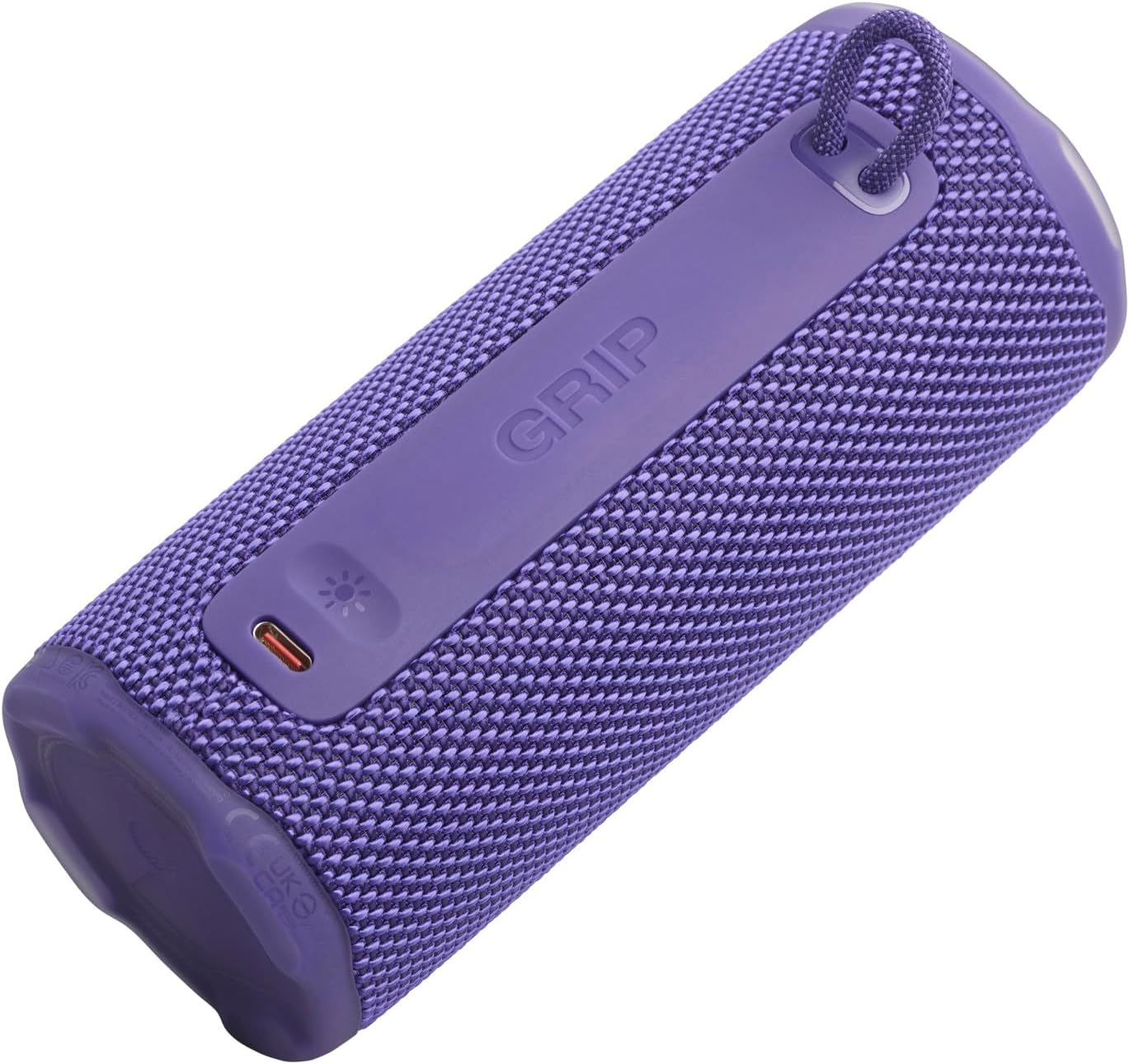
ภาพ: ด้านข้าง view of the JBL GRIP speaker, showing the USB-C charging port and the ambient light strip.
คุณสมบัติหลัก
- AI Sound Boost: Real-time music analysis algorithm optimizes output and suppresses distortion for enhanced sound quality.
- IP68 กันฝุ่นและกันน้ำ: Designed to withstand immersion in water and protect against dust ingress.
- แสงโดยรอบ: Customizable LED light on the speaker's rear panel to set the mood.
- เวลาเล่นยาวนาน: Up to 12 hours of continuous playback, extendable by an additional 2 hours with Playtime Boost.
- Aura Cast Multi-Speaker Connection: Connect multiple JBL GRIP speakers for a wider sound experience.
- JBL Portable App Compatibility: Control settings, customize ambient light, and manage features via the dedicated app.

Image: An internal diagram of the JBL GRIP speaker, illustrating the AI Sound Boost chip and dual passive radiators for enhanced bass.
การตั้งค่า
การชาร์จลำโพง
- Locate the USB-C charging port on the side of the speaker.
- เปิดฝาครอบป้องกันของพอร์ต USB-C
- Connect one end of the USB-C charging cable to the speaker and the other end to a compatible USB power adapter (not included).
- ไฟ LED แสดงสถานะการชาร์จ การชาร์จเต็มใช้เวลาประมาณ 3 ชั่วโมง
- Once fully charged, disconnect the cable and securely close the protective cover to maintain IP68 rating.
จับคู่บลูทู ธ
- Power on the JBL GRIP speaker by pressing the Power button.
- Press the Bluetooth button on the top panel. The LED indicator will flash, indicating pairing mode.
- On your device (smartphone, tablet, etc.), go to Bluetooth settings and select "JBL GRIP" from the list of available devices.
- Once connected, the LED indicator on the speaker will turn solid.
คำแนะนำการใช้งาน
การเล่นขั้นพื้นฐาน
- เล่น/หยุดชั่วคราว: กดปุ่มเล่น/หยุดชั่วคราวหนึ่งครั้ง
- การควบคุมระดับเสียง: ใช้ปุ่มเพิ่มระดับเสียง (+) และลดระดับเสียง (-)
- ข้ามแทร็ก: กดปุ่มเล่น/หยุดชั่วคราวสองครั้งเพื่อเล่นเพลงถัดไป กดสามครั้งเพื่อเล่นเพลงก่อนหน้า
การควบคุมแสงโดยรอบ
The JBL GRIP features an ambient light that can be customized to match your mood.
- Default Modes: Cycle through pre-set light themes by pressing the dedicated light button (if available, otherwise use app).
- การปรับแต่ง: For advanced customization of brightness and color, download and use the JBL Portable app.

Image: A JBL GRIP speaker displaying its customizable ambient light feature.
Aura Cast Multi-Speaker Connection
Aura Cast allows you to connect multiple JBL GRIP speakers for a synchronized audio experience.
- Ensure all JBL GRIP speakers are powered on and in pairing mode.
- Follow the instructions in the JBL Portable app to initiate Aura Cast pairing.
- Once connected, audio will play simultaneously across all linked speakers.

Image: A visual representation of multiple JBL speakers connected using Aura Cast for multi-room audio.
แอปพลิเคชั่นพกพา JBL
Download the JBL Portable app from your device's app store to unlock additional features and control options for your JBL GRIP speaker. The app allows you to:
- ปรับการตั้งค่าอีควอไลเซอร์
- Customize ambient light themes and brightness.
- Manage Aura Cast connections.
- Update speaker firmware.

Image: A screenshot of the JBL Portable app interface, showing customization options for sound and lighting.
การซ่อมบำรุง
กันน้ำและกันฝุ่น (IP68)
The JBL GRIP speaker is rated IP68, meaning it is dust-tight and protected against continuous immersion in water up to 1.5 meters for up to 30 minutes. To maintain this rating:
- ตรวจสอบให้แน่ใจว่าฝาปิดพอร์ต USB-C ปิดสนิทก่อนนำลำโพงไปสัมผัสกับน้ำหรือฝุ่น
- Do not expose the speaker to salt water or other chemicals. If exposed, rinse with fresh water and dry thoroughly.
- Avoid using the speaker in extreme temperatures.

Image: A JBL GRIP speaker in water, demonstrating its IP68 waterproof capability.
การทำความสะอาด
ในการทำความสะอาดลำโพง ให้ใช้ผ้าเนื้อนุ่มและแห้งamp ผ้า ห้ามใช้สารทำความสะอาดที่มีฤทธิ์กัดกร่อนหรือตัวทำละลาย
การแก้ไขปัญหา
| ปัญหา | วิธีแก้ปัญหาที่เป็นไปได้ |
|---|---|
| ลำโพงไม่เปิดเครื่อง | ตรวจสอบให้แน่ใจว่าแบตเตอรี่ชาร์จเต็มแล้ว เชื่อมต่อลำโพงเข้ากับแหล่งจ่ายไฟโดยใช้สาย USB-C |
| ไม่สามารถจับคู่ผ่านบลูทูธได้ |
|
| ไม่มีเสียงหรือเสียงเบา |
|
| ไฟส่องสว่างโดยรอบไม่ทำงาน | Check settings in the JBL Portable app. Ensure the speaker is powered on. |
ข้อมูลจำเพาะ
| คุณสมบัติ | รายละเอียด |
|---|---|
| ชื่อรุ่น | JBL GRIP |
| หมายเลขรุ่นผลิตภัณฑ์ | JBLGRIPPUR |
| ประเภทลำโพง | ลำโพงแบบพกพา |
| เทคโนโลยีไร้สาย | บลูทูธ |
| ย่านความถี่ | 2400MHz - 2483.5MHz |
| การตอบสนองความถี่ | ความถี่ 20 กิโลเฮิรตซ์ |
| กำลังขับสูงสุด | 16 วัตต์ |
| แหล่งพลังงาน | แบตเตอรี่ (ลิเธียมไอออน) |
| อายุการใช้งานแบตเตอรี่ | Up to 12 hours (extendable by 2 hours with Playtime Boost) |
| เวลาในการชาร์จ | ประมาณ 3 ชั่วโมง |
| คะแนนกันน้ำ/กันฝุ่น | IP68 |
| ขนาดสินค้า (ลึก x กว้าง x สูง) | 6.5 x 6.4 x 15.3 ซม. |
| น้ำหนักผลิตภัณฑ์ | 385 กรัม |
| วิธีการควบคุม | แอป |
| ส่วนประกอบที่รวมอยู่ | คู่มือเริ่มต้นอย่างรวดเร็ว |

Image: A diagram illustrating the dimensions and weight of the JBL GRIP speaker.
การรับประกันและการสนับสนุน
The JBL GRIP speaker comes with a limited warranty. Please refer to the included Quick Start Guide or visit the official JBL webเว็บไซต์นี้มีข้อมูลการรับประกันโดยละเอียดและข้อมูลติดต่อฝ่ายสนับสนุน
For technical assistance, troubleshooting, or to register your product, please visit www.jbl.com/support.